1. Sarrera
This manual provides detailed instructions for the installation, operation, and maintenance of your TMEZON WLAN IP Video Door Intercom System. This system is designed for two-family homes, offering enhanced security and communication features. Please read this manual thoroughly before using the product to ensure proper function and safety.

1.1. irudia: Amaituview of the TMEZON WLAN IP Video Door Intercom System, showing two indoor monitors, an outdoor doorbell unit, access cards, and a smartphone displaying the app interface.
2. Segurtasun informazioa
- Ensure all wiring is performed by a qualified electrician to prevent electrical hazards.
- Do not expose the outdoor doorbell unit to extreme temperatures or direct water immersion.
- Use only the power adapters and cables supplied with the system.
- Keep the indoor monitor away from moisture and direct sunlight.
- Ez saiatu gailua zuk zeuk desmuntatzen edo konpontzen. Jarri harremanetan bezeroarentzako laguntza eskatzeko.
3. Paketearen edukia
Egiaztatu elementu guztiak paketean daudela:
- 7-inch IP Touchscreen Monitors (x2)
- 1080P Outdoor Doorbell Unit (x1)
- Muntatzeko euskarriak eta torlojuak
- Elikatze-moldagailuak
- 2-Wire Connection Cables
- IC Access Cards (x8)
- Erabiltzailearen eskuliburua (dokumentu hau)
4. Produktua amaitu daview
4.1 Barruko monitore
The 7-inch TFT touchscreen monitor serves as the central control unit for your intercom system. It allows you to view visitors, communicate, unlock doors, and access system settings.
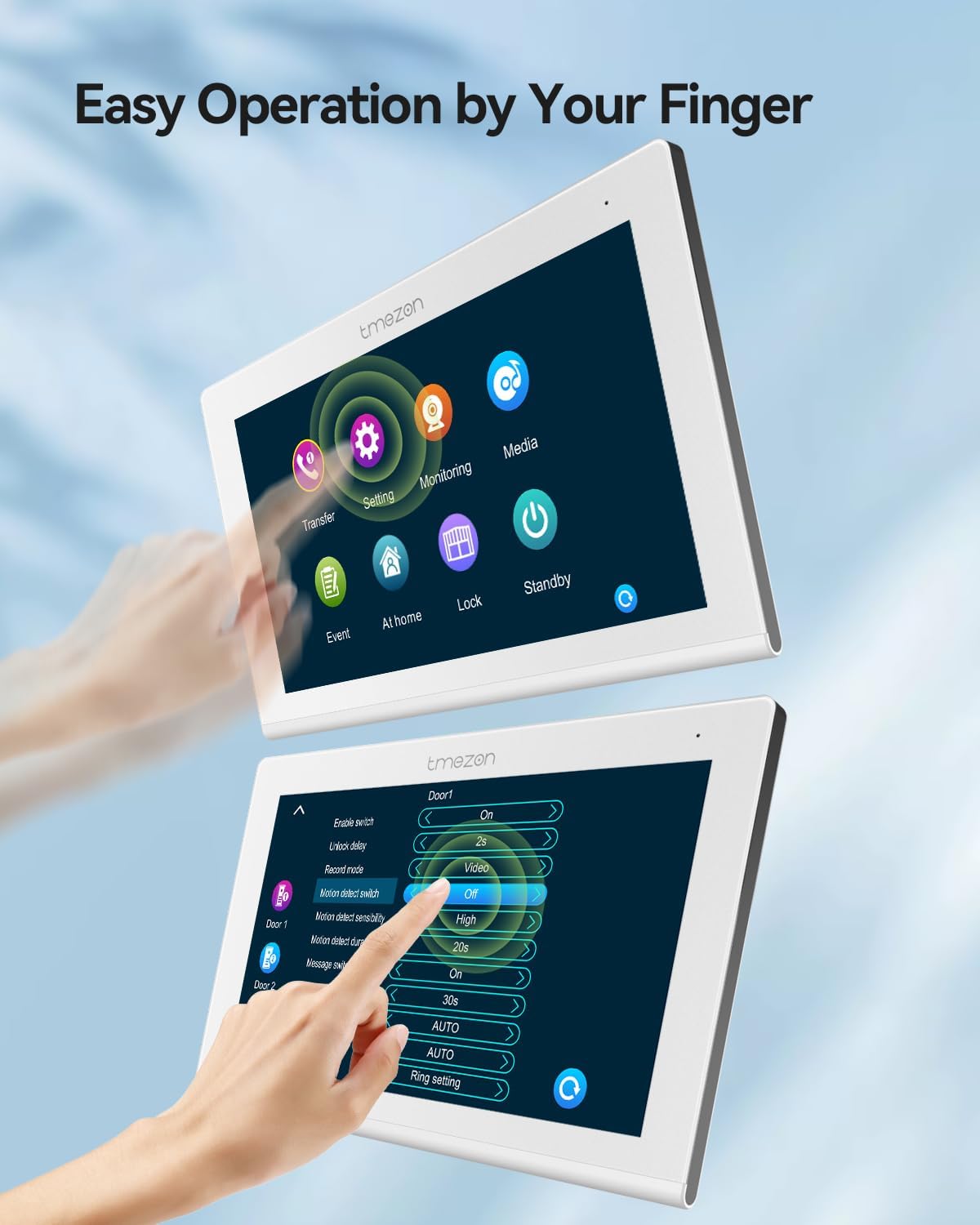
4.1. irudia: The indoor monitor displaying its touch-sensitive interface and various settings options.
4.2 Kanpoko Txirrina Unitatea
The outdoor doorbell unit features a 1080P camera with a 110° wide-angle lens, infrared night vision, and a waterproof, dustproof, and vandal-proof housing. It includes two call buttons for two separate families and an IC card reader for access control.

4.2. irudia: The outdoor doorbell unit demonstrating the IC card unlock feature.
5. Konfigurazioa
5.1 Wiring and Installation
The system utilizes 2-wire technology for simplified installation. Ensure power is disconnected before beginning any wiring.
- Kanpoko unitatea muntatzea: Choose a suitable location near your entrance, ensuring it is within reach of the 2-wire cable and at an appropriate height for visitors. Secure the mounting bracket and attach the doorbell unit.
- Mounting the Indoor Monitors: Install the indoor monitors at desired locations within each family's residence.
- Connecting the 2-Wire Cable: Connect the 2-wire cable from the outdoor unit to each indoor monitor. Ensure correct polarity if specified.
- Potentzia-konexioa: Connect the power adapters to the indoor monitors and plug them into a power outlet.
- Electric Lock Connection (Optional): If using an electric lock, connect it to the designated terminals on the outdoor unit or indoor monitor as per the wiring diagram (refer to the full wiring diagram in the separate installation guide).
5.2 Network Configuration (WLAN)
To enable app functionality, the indoor monitor must be connected to your home's Wi-Fi network.
- On the indoor monitor, navigate to the "Settings" menu.
- Select "Network" or "WLAN Settings".
- Choose your Wi-Fi network from the list and enter the password.
- Berretsi konexioa.
5.3 Aplikazioaren instalazioa eta parekatzea
Download the "TuyaSmart" application from your smartphone's app store (iOS or Android).
- Install and open the TuyaSmart app.
- Erregistratu edo sartu zure kontuan.
- Follow the in-app instructions to add a new device. This typically involves scanning a QR code displayed on the indoor monitor or selecting the device type manually.
- Once paired, you will be able to control and monitor your intercom system remotely.

5.1. irudia: The TuyaSmart app interface on a smartphone, showing options for screenshot, unlock, playback, record, and advanced settings.
6. Funtzionamendu-argibideak
6.1 Answering a Call and Two-Way Audio
When a visitor presses the doorbell button:
- Barruko monitoreak jo egingo du eta bisitariaren irudia bistaratuko du.
- On the monitor, tap the "Answer" icon to establish two-way audio communication.
- If using the app, you will receive a notification. Tap the notification to view the visitor and communicate.

6.1. irudia: An indoor monitor displaying a visitor's image, allowing the resident to confirm identity before granting access.
6.2 Atea desblokeatzea
The system supports three methods for unlocking an electric lock (if connected):
- Via Indoor Monitor: During a call or while monitoring the outdoor unit, tap the "Unlock" icon on the monitor screen.
- Mugikorretarako aplikazioaren bidez: From the TuyaSmart app, tap the "Unlock" button.
- Via IC Access Card: Present a registered IC card to the card reader on the outdoor doorbell unit.
6.3 Argazkia eta grabaketa
The system can automatically capture images or record video:
- Harrapaketa automatikoa: When a visitor presses the doorbell or motion detection is triggered, the system can automatically take a snapshot or record a short video. These files are stored on a micro SD card (not included, supports up to 128GB) inserted into the indoor monitor.
- Eskuzko harrapaketa: You can manually take a snapshot or start recording from the indoor monitor or the TuyaSmart app during live view.
- Erreprodukzioa: Recorded videos and snapshots can be reviewZuzenean barneko monitorearen edo TuyaSmart aplikazioaren bidez editatzen da.

6.2. irudia: The mobile application interface displaying a recorded video for playback.
6.4 Mugimendu-detekzioa
The outdoor doorbell unit features motion detection capabilities.
- Aktibazioa: Enable motion detection in the indoor monitor's settings or via the TuyaSmart app.
- Jakinarazpenak: When motion is detected, you will receive a notification on your smartphone via the TuyaSmart app.
- Grabaketa: Motion events can trigger automatic snapshots or video recordings, stored on the micro SD card.

6.3. irudia: A smartphone displaying a motion detection alert from the TMEZON intercom system.
6.5 Gaueko ikusmena
The 1080P camera on the outdoor unit is equipped with infrared sensors for clear visibility in low-light conditions.
- Night vision activates automatically when ambient light levels are low.
- Images and recordings will be in black and white during night vision mode.

6.4. irudia: A visual comparison demonstrating the clarity of 1080P images during both day and night conditions.
7. Mantentzea
- Garbiketa: Use a soft, dry cloth to clean the indoor monitor screen and the outdoor doorbell lens. Do not use abrasive cleaners or solvents.
- Firmware eguneraketak: Periodically check for firmware updates via the indoor monitor settings or the TuyaSmart app to ensure optimal performance and security.
- SD Txartela Kudeatzeko: Regularly back up important recordings and format the micro SD card to maintain recording capacity and performance.
8. Arazoak
| Arazoa | Kausa posiblea | Irtenbidea |
|---|---|---|
| Ez dago irudirik barneko monitoreetan. | Power issue, loose cable, faulty unit. | Check power connection. Ensure 2-wire cable is securely connected. Contact support if problem persists. |
| Ezin da wifira konektatu. | Pasahitz okerra, seinale ahula, bideratzailearen arazoa. | Egiaztatu Wi-Fi pasahitza. Hurbildu monitoreari bideratzaileari. Berrabiarazi bideratzailea. |
| Aplikazioaren jakinarazpenak ez dira jaso. | App permissions, network issue, app settings. | Check app notification permissions on your phone. Ensure monitor is connected to Wi-Fi. Verify app settings for notifications. |
| Atea desblokeatzeko sistema ez dabil. | Electric lock wiring, power to lock, system settings. | Check wiring to the electric lock. Ensure the lock has power. Verify unlock settings on the monitor/app. |
| Bideo kalitate eskasa gauez. | Infrared sensor obstruction, dirty lens. | Clean the doorbell camera lens. Ensure no obstructions are blocking the infrared sensors. |
9. Zehaztapenak
| Ezaugarri | Xehetasuna |
|---|---|
| Modelo zenbakia | MZ-IP-V718TW*2+MZ-VDP-NF404/EU |
| Monitorearen tamaina | 7-inch TFT Touchscreen |
| Txirrinaren kameraren bereizmena | 1080p |
| Kameraren Angelua | 110°-ko angelu zabala |
| Konektibitatea | WLAN (Wi-Fi), 2-Wire Technology |
| Aplikazioen laguntza | TuyaSmart |
| Desblokeatzeko metodoak | App, Swipe Card, Monitor |
| Biltegiratzea | Mikro SD txartela (128 GB arte, ez dago barne) |
| Ezaugarriak | Snapshot, Auto Recording, 2-Way Audio, Motion Detection, Night Vision |
| Sistemaren Edukiera | Up to 6 IP monitors + 2 doorbells + 2 1080P CCTV cameras + 3 electric locks |
| Elementuaren pisua | 1.83 Kilograms (total package) |
| Paketearen neurriak | 24.1 x 22.9 x 8.4 cm |
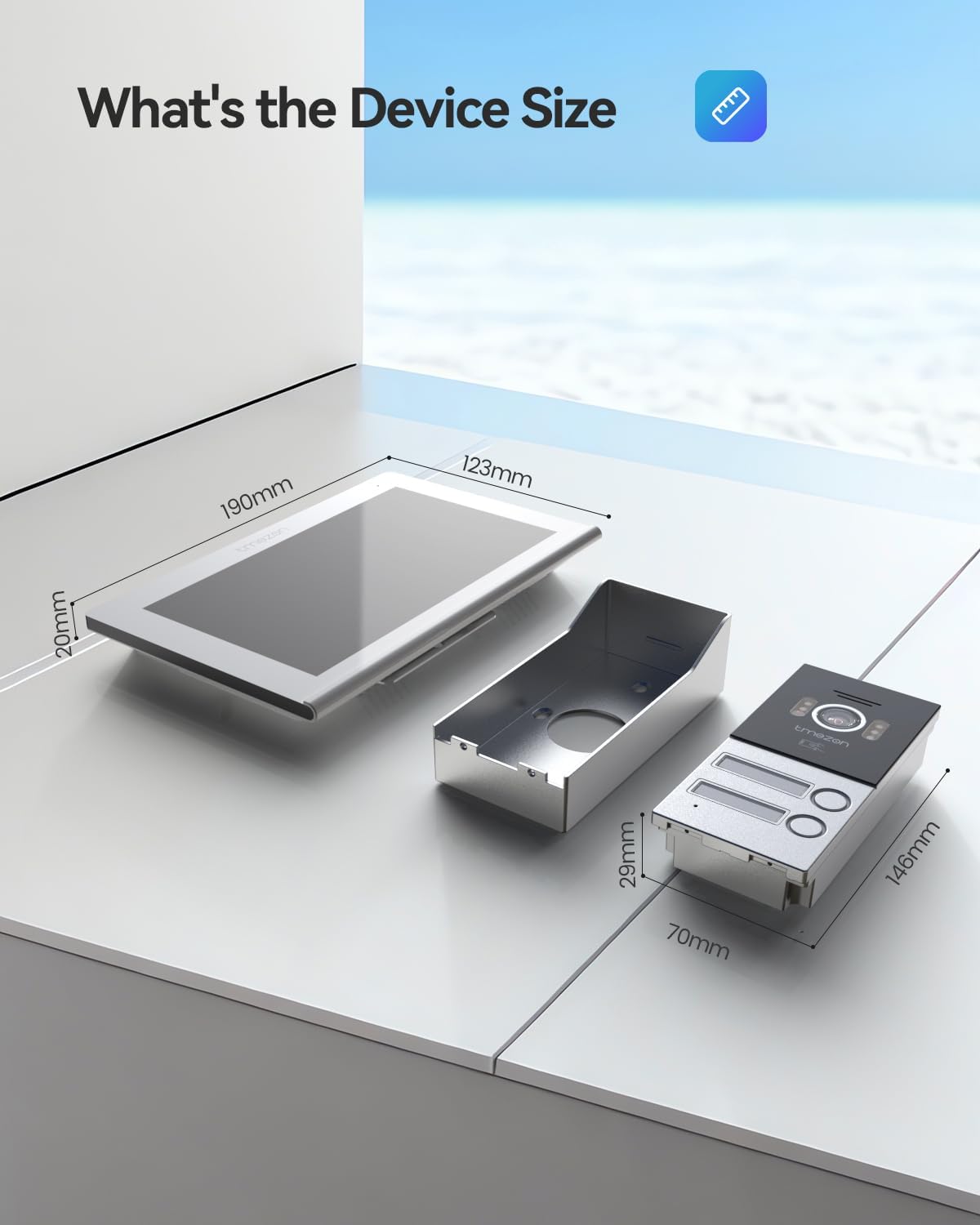
9.1. irudia: TMEZON barneko monitorearen eta kanpoko txirrinaren neurriak.
10. Bermea eta Laguntza
TMEZON products are designed for reliability and performance. For warranty information, please refer to the warranty card included in your package or visit the official TMEZON webgunea.
If you encounter any issues or require technical assistance, please contact TMEZON customer support. Provide your model number and a detailed description of the problem for efficient service.
- Bezeroarentzako laguntza: Refer to your product packaging or the official TMEZON webharremanetarako datuak lortzeko gunea.
- Sareko baliabideak: Egiaztatu TMEZON webMaiz egiten diren galderen, eskuliburu eguneratuen eta softwarearen deskargen gunea.


