1. Sarrera
The BUSICOM PC-SeaV15c is a 15-inch Windows IoT touch panel PC designed for commercial and industrial applications. This manual provides essential information for the safe and efficient setup, operation, and maintenance of your device. Please read this manual thoroughly before using the product and retain it for future reference.
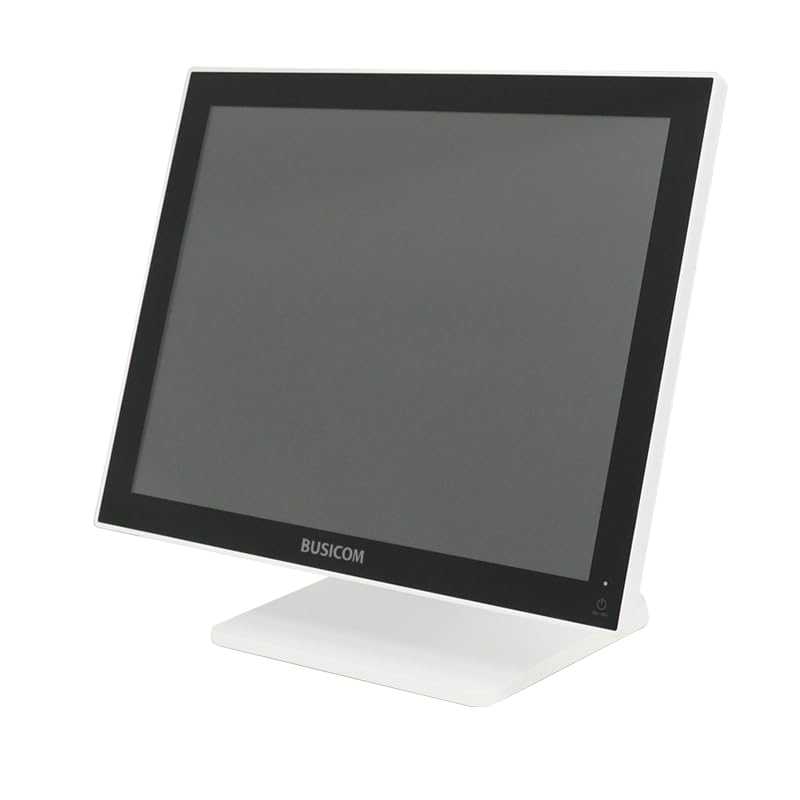
1. irudia: Aurrealdea view of the BUSICOM PC-SeaV15c Touch Panel PC.
2. Produktua amaitu daview
2.1 Ezaugarri nagusiak
- Diseinu aurreratua: Features an ultra-thin bezel and a highly durable 7H reinforced display for enhanced aesthetics and protection.
- Goi-mailako errendimendua: Equipped with Microsoft Windows 10 IoT Enterprise, ensuring long-term support and reliable operation.
- Intuitive Touch Panel: Utilizes a capacitive touch method, offering a familiar and responsive touch experience similar to smartphones and tablets.
- Mantentze erraza: Designed for simple RAM and SSD replacement, facilitating upgrades and servicing.
- Versatile Interfaces: Provides a wide range of connectivity options to integrate with various peripherals.
- Biltegiratze eraginkorra: SSD storage ensures fast processing speeds, quiet operation, and excellent shock resistance.
2.2 Osagaiak
The package typically includes the BUSICOM PC-SeaV15c unit and a power adapter. Additional accessories may vary.

Figure 2: Front and side profile of the PC-SeaV15c unit.

3. Irudia: Atzealdea view showing access panels for RAM and SSD components.
3. Konfiguratzeko argibideak
3.1 Paketatzea
- Carefully remove the PC-SeaV15c from its packaging.
- Check for any visible damage. If damaged, contact your vendor immediately.
- Ziurtatu zerrendatutako osagai guztiak daudela.
3.2 Periferikoak konektatzea
Refer to the interface diagram below for port locations and types.

Figure 4: Detailed diagram of the PC-SeaV15c's rear and bottom interfaces.
- Potentzia-konexioa: Connect the provided power adapter to the DC In port and then to a power outlet.
- USB gailuak: Use the USB 2.0 (4 ports) and USB 3.0 (2 ports) for connecting keyboards, mice, printers, and other USB peripherals.
- Sare-konexioa: Connect an Ethernet cable to the LAN port for wired network access.
- Audio irteera: Connect external speakers or headphones to the Audio Out port.
- Serial Ports (RJ45): Utilize COM1, COM2, COM3, and COM6 for connecting specialized POS peripherals such as barcode scanners or receipt printers.
- Cash Drawer (RJ11): Connect a compatible cash drawer to the RJ11 port.
- Kanpoko pantaila: If an external monitor is required, connect it to the Mini DisplayPort.
- USB C mota: Gailu bateragarrietarako.
3.3 Piztu/Itzaltzea
- Piztu: Press the power button located on the upper right side of the display bezel or the power mark on the rear panel.
- Itzali: To safely shut down the system, use the standard Windows shutdown procedure. Avoid direct power disconnection during operation to prevent data loss.
4. Funtzionamendu-argibideak
4.1 Windows 10 IoT Enterprise
The PC-SeaV15c operates on Windows 10 IoT Enterprise 2021. Familiarize yourself with the Windows operating system for basic navigation, application management, and system settings.
4.2 Touch Panel Usage
The capacitive touch screen supports multi-touch gestures.
- Sakatu: Saguaren klik baten baliokidea.
- Sakatu birritan: Equivalent to a double-click.
- Luze sakatu: Eskuineko botoiarekin klik egitearen baliokidea.
- Pasatu hatza: For scrolling or navigating.
- Zoom egiteko apur bat egin: Erabili bi hatz zooma handitzeko edo txikitzeko.
5. Mantentzea
5.1 Gailua garbitzea
- Garbitu aurretik, itzali eta deskonektatu gailua beti.
- Erabili lipurrik gabeko zapi leun bat dampUrarekin edo pantaila-garbitzaile ez-urratzaile batekin garbitu.
- Do not spray liquids directly onto the screen or device.
- Saihestu produktu kimiko gogorrak, disolbatzaileak edo material urratzaileak erabiltzea.
5.2 RAM and SSD Replacement
The PC-SeaV15c is designed for easy replacement of RAM and SSD components. Refer to Figure 3 for the access panel location. For detailed instructions on component replacement, consult a qualified technician or the BUSICOM support webgunea.
6. Arazoak
Atal honek aurki ditzakezun arazo ohikoenei irtenbideak eskaintzen ditu.
- Gailua ez da pizten:
- Ziurtatu korronte-egokitzailea ondo konektatuta dagoela bai gailura bai funtzionatzen duen entxufe batera.
- Egiaztatu entxufea funtzionatzen duela beste gailu bat konektatuz.
- Touch screen is unresponsive:
- Berrabiarazi gailua.
- Ziurtatu pantaila garbi dagoela eta oztoporik gabe.
- Ez dago pantailarik:
- Egiaztatu gailua piztuta dagoen ala ez.
- If an external display is connected, ensure the correct input source is selected on the external display.
- Peripheral not detected:
- Ensure the peripheral is correctly connected to the appropriate port (USB, LAN, COM).
- Saiatu periferikoa beste portu batera konektatzen.
- Check the peripheral's own power supply, if applicable.
For further assistance, please contact BUSICOM customer support.
7. Zehaztapenak
| Ezaugarri | Xehetasuna |
|---|---|
| Marka | BUSICOM |
| Ereduaren izena | PC-SeaV15c |
| Kolorea | Zuria |
| Pantailaren tamaina | 15 hazbetekoa |
| Ebazpena | 1024x768 |
| Sistema eragilea | Windows 10 IoT Enterprise 2021 |
| PUZaren marka | Intel |
| Prozesadorearen socketa | Intel® N97 |
| CPU Abiadura | 3.6 GHz |
| Memoria Mota | DDR4 |
| RAM instalatua | 4 GB |
| Disko gogor mota | SSD |
| SSD Edukiera | 128 GB (produktuaren izenburuaren arabera) |
| Txartel grafiko mota | Integratua |
| VRAM mota | DDR4 SDRAM |
| VRAM Capacity | 4 GB |
| USB 2.0 Portuak | 4 |
| USB 3.0 Portuak | 2 |
| Unitate optikoa | Bat ere ez |
| Produktuaren pisua | 6 kilogramo |
| Altuera (gutxi gorabehera) | 307.5 mm (as per dimension diagram) |

5. Irudia: Atzealdea view of the PC-SeaV15c with approximate height dimension.
8. Bermea eta Laguntza
For warranty information and technical support, please refer to the warranty card included with your product or visit the official BUSICOM webgunea. Gorde erosketa-agiria erosketaren frogagiri gisa berme-erreklamazioetarako.
BUSICOM Official Webgunea: BUSICOM Store on Amazon.co.jp


