Sarrera
The HiDock H1 is a versatile 11-in-1 USB-C docking station integrated with an AI-powered voice recorder. This device is designed to expand your laptop's connectivity and enhance productivity through intelligent audio capture, transcription, and summarization capabilities. It supports high-resolution dual displays, fast data transfer, and efficient power delivery for various devices.
Produktua amaituview
The HiDock H1 combines essential docking station functionalities with advanced AI audio features, making it a comprehensive tool for professionals and students.
Ezaugarri nagusiak:
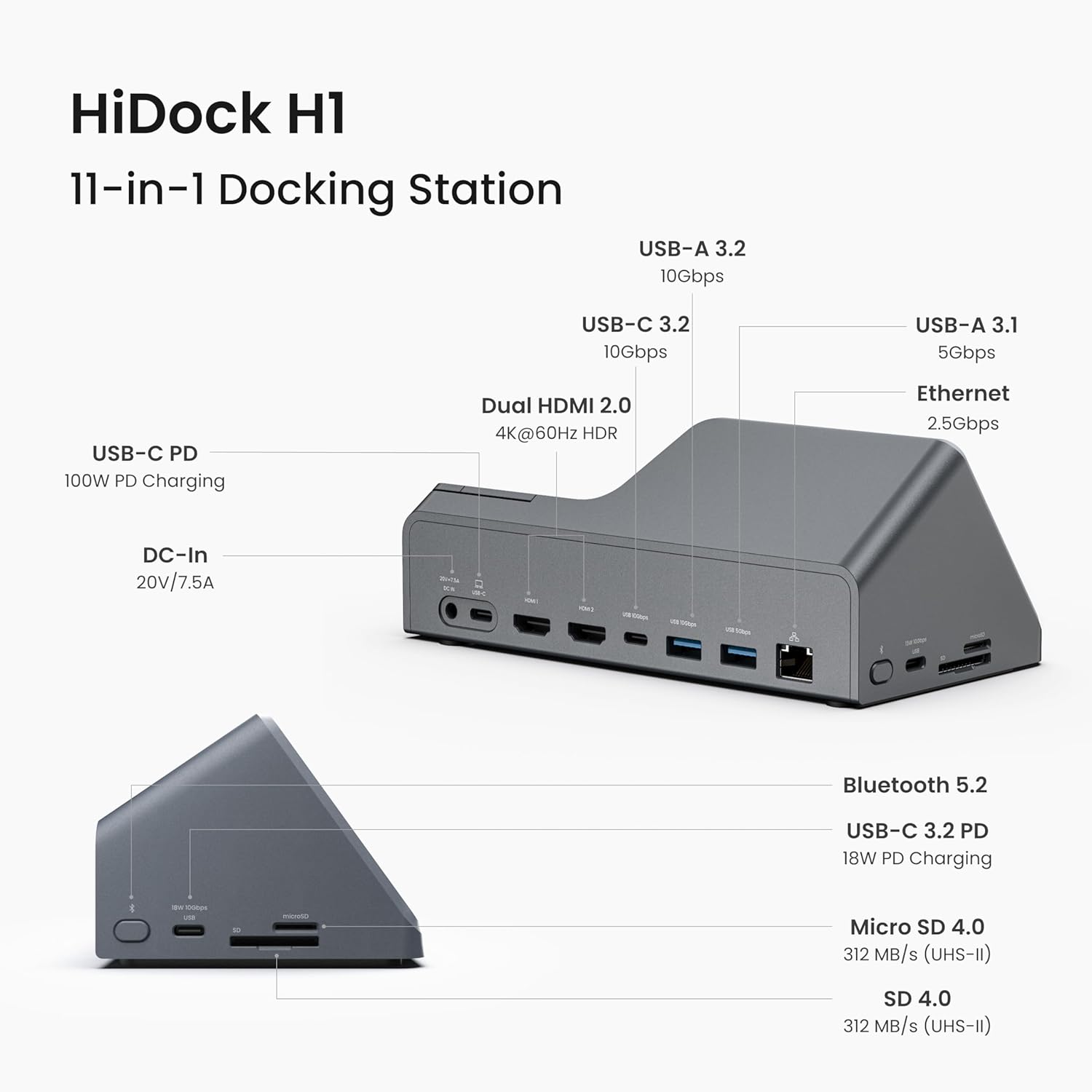
- 11-in-1 Konexioa: Features 2 HDMI ports (4K@60Hz), 1 DC-In port (20V/7.5A), 1 Ethernet port (2.5Gbps), 3 USB-C 3.2 ports, 2 USB-A ports, and SD/MicroSD 4.0 card slots.
- AI Voice Recorder: One-click recording, automatic transcription, and smart summaries in 75 languages with over 20 built-in templates. Supports up to 1,000 hours of continuous recording.
- Fast 118W Charging: Includes a 100W USB-C PD port for laptops and an 18W USB-C 3.2 port for smartphones.
- HDMI pantaila bikoitza: Supports 4K@60Hz display output. Note: macOS supports only Single-Stream Transport (SST) mode, mirroring content across displays.
- Abiadura handiko datuen transferentzia: Up to 10Gbps via USB-C 3.2 ports and 312MB/s for SD/MicroSD 4.0 card readers.
- Kontrol panel intuitiboa: Dedicated buttons for answering/ending calls, muting, recording, and a slider for bidirectional noise cancellation.
- Included Open-Ear Earphone: A lightweight earphone for private, hands-free communication during calls.

Konfigurazioa
1. Potentziara konektatzen
- Connect one end of the AC power cord to the power supply.
- Connect the other end of the AC power cord to an electrical outlet.
- Connect the power supply to the DC-In port (20V/7.5A) on the HiDock H1.
2. Zure ordenagailura konektatzea
- Connect one end of the USB-C cable to the USB-C upstream port on the HiDock H1.
- Connect the other end of the USB-C cable to a compatible USB-C port on your laptop.
- In your laptop's audio settings, select "HiDock H1" as the sound input and output device.
- For video conference software (Zoom, Microsoft Teams, etc.), configure HiDock H1 as both the microphone and speaker.
3. Periferikoak konektatzea
Utilize the available ports on the HiDock H1 to connect your external devices:
- HDMI atakak: Connect up to two external monitors for dual display.
- USB atakak: Connect USB-A and USB-C devices for data transfer or charging.
- Ethernet ataka: Connect an Ethernet cable for a stable wired network connection.
- SD/MicroSD Card Slots: Insert memory cards for data access.
Funtzionamendua
1. Using the AI Voice Recorder
The HiDock H1 features an integrated AI voice recorder for capturing and processing audio from meetings, calls, and other sources.
- Klik bakarreko grabaketa: Press and hold the dedicated function button on the device to start recording.
- Automatic Transcription & Summarization: Recorded audio is automatically transcribed and summarized using the HiNotes App, powered by ChatGPT-4.1 and Claude 3.5 Sonnet.
- Hizkuntza laguntza: Supports transcription and summarization in 75 languages.
- Txantiloiak: Utilize over 20 built-in templates for structured summaries (e.g., General Meeting, Weekly Team Meeting, Business Call).
- Speaker Identification: The HiNotes App can identify multiple speakers in a transcription.
- Recording Notification: The HiNotes App features an optional "recording notification" that alerts all parties with a "start recording" tone.

2. Using the Open-Ear Earphone
The included open-ear earphone provides private audio for calls and meetings.
- Lotzea/Deskonektatzea: The earphone is magnetically attached to the docking station. Simply pull to detach and place back to re-attach.
- Ukipen-kontrolak: Double-tap the touch sensor on the earphone to answer/end calls.
- Funtzio botoia: Hold the function button on the earphone to start recording.
- Audio-aldaketa: If audio is playing from both the speaker and earphone, double-press the earphone's touch sensor to force audio to the earphone only.
3. Adjusting Volume and Mute
- Bolumen kontrola: Rotate the volume knob on the control panel to adjust audio output.
- Mikrofonoa isiltzea: Press the mute button on the control panel to mute or unmute the microphone. An LED ring around the volume knob indicates recording status.
4. Bidirectional Noise Cancellation
The HiDock H1 features a bidirectional noise cancellation slider to reduce background noise for both your outgoing and incoming audio.
- Adjusting Noise Cancellation: Move the BNC slider on the control panel to adjust the level of noise reduction. This helps to focus on voices by eliminating ambient sounds.

Mantentzea
To ensure optimal performance and longevity of your HiDock H1, follow these maintenance guidelines:
- Garbiketa: Erabili zapi leun eta lehor bat gailuaren kanpoaldea garbitzeko. Saihestu garbitzaile likidoak edo material urratzaileak.
- Biltegiratzea: Gorde gailua leku fresko eta lehor batean, eguzki-argitik eta muturreko tenperaturetatik babestuta.
- Kableen kudeaketa: Ziurtatu kableak ez daudela gehiegi tolestuta edo korapilatuta kalteak ekiditeko.
- Software eguneraketak: Regularly check for and install firmware updates for the HiDock H1 and the HiNotes App to ensure compatibility and access to new features.
Arazoak konpontzea
Ohiko arazoak eta irtenbideak:
- Ez dago pantaila-irteerarik: Ensure your laptop supports DP Alt Mode and Power Delivery. Check all HDMI cable connections. For macOS, external monitors will mirror content.
- No Audio/Microphone Detected: Verify that "HiDock H1" is selected as the input/output device in your computer's sound settings and video conference application settings.
- Earphone Audio Issues: If audio plays from both the main speaker and the earphone, double-press the earphone's touch sensor to switch audio exclusively to the earphone.
- Recording Not Starting: Ensure the device is properly connected and powered. Press and hold the function button on the device or earphone to initiate recording.
- Bateragarritasun arazoak: The HiDock H1 is compatible with MacBook (macOS 11+), Windows 10/11, and ChromeOS. It is not compatible with Linux. USB-C to USB-A connection for desktops does not support display output.
- Background Noise Persists: Adjust the BNC slider on the control panel to increase noise cancellation.
Zehaztapenak
| Ezaugarri | Zehaztapena |
|---|---|
| Produktuaren neurriak | 7 x 3 x 4 hazbete (17.78 x 7.62 x 10.16 cm) |
| Elementuaren pisua | 1.15 libra (520 gramo) |
| Modelo zenbakia | HiDock H1 |
| Konektibitatea | USB-C, USB4, TB4, Bluetooth 5.2, Ethernet, HDMI, MicroSD |
| Portuak | 2x HDMI (4K@60Hz), 1x DC-In (20V/7.5A), 1x Ethernet (2.5Gbps), 3x USB-C 3.2, 2x USB-A, SD/MicroSD 4.0 |
| Potentzia Entrega | 100W (USB-C PD), 18W (USB-C 3.2) |
| Datuak transferitzeko abiadura | 10Gbps (USB-C 3.2), 312MB/s (SD/MicroSD 4.0) |
| AI ahots grabagailua | Up to 1,000 hours continuous recording, 75 languages, 20+ templates, ChatGPT-4.1 & Claude 3.5 Sonnet integration |
| Bateragarritasuna | MacBook (macOS 11+), Windows 10/11, ChromeOS (with DP Alt Mode & Power Delivery). Not compatible with Linux. |
| Included Earphone | Lightweight, open-ear, suited for voice communication. |
Bermea eta Laguntza
The HiDock H1 comes with standard manufacturer support. For specific warranty details, please refer to the product packaging or contact HiDock customer service.
- Aurikularra barne: The complimentary open-ear earphone is not covered under warranty.
- Pribatutasun-politika: HiDock adheres to GDPR compliance. No customer data is used to train AI models. Partnerships with OpenAI and Anthropic include robust data security measures.
- HiNotes App: Enjoy lifetime free transcription services with the HiNotes App upon purchase of the HiDock hardware device.


