1. Sarrera
This manual provides detailed instructions for the installation, operation, and maintenance of your PNI House WiFi800 NVR and PNI IP840 Outdoor Camera Wireless Surveillance Kit. Please read this manual thoroughly before using the product to ensure proper setup and functionality. Keep this manual for future reference.
2. Segurtasun informazioa
- Ziurtatu konexio elektriko guztiak ondo daudela eta zehaztutako bolumen-maila betetzen dutela.tage (12V DC).
- Do not expose the NVR to moisture or extreme temperatures.
- The PNI IP840 cameras are IP65 rated for outdoor use; however, avoid submerging them in water.
- Installation should be performed by qualified personnel if you are unsure about electrical connections or mounting procedures.
- Mantendu produktua eremu magnetiko indartsuetatik urrun.
- Use only original or certified replacement parts and accessories.
3. Paketearen edukia
Egiaztatu behean zerrendatutako elementu guztiak zure paketean daudela:
- PNI House WiFi800 NVR (1 unit)
- PNI IP840 Outdoor Cameras (2 units)
- Power Adapters (for NVR and cameras)
- USB Mouse (for NVR)
- Fixing Screws and Wall Plugs (for cameras)
- User Manuals (for NVR and cameras)

Image: PNI House WiFi800 NVR with included USB mouse and power adapter.

Image: PNI IP840 Outdoor Camera with its power adapter and mounting hardware.
4. Produktua amaitu daview
4.1 PNI IP840 Outdoor Camera
The PNI IP840 camera is a high-resolution wireless outdoor surveillance camera featuring 8MP 4K video, pan/tilt functionality, and advanced night vision. It is designed for robust performance in various weather conditions.
- Sentsore: 1/2.7" CMOS, 8MP
- Ebazpena: 3840x2160 (4K)
- Lentea: 3.6mm, 90° viewangelua
- Panorama/Tilt: Horizontala 355°, bertikala 90°
- Gaueko ikuspegia: 4 IR LEDs and 4 White LEDs, up to 15m
- Biltegiratzea: MicroSD txartelaren zirrikitua (gehienez 256 GB, txartela ez dago barne)
- Konektibitatea: WiFi 2.4GHz, ONVIF support
- Ezaugarriak: Motion Detection, Human Shape Detection, Rotation after movement, ICSee app support
- Eguraldiarekiko erresistentzia: IP65 baloratua

Irudia: Aurrealdea view of the PNI IP840 outdoor camera, showing the lens, LEDs, and antennas.

Image: Close-up of the PNI IP840 camera's connection cables for power and wired network.
4.2 PNI House WiFi800 NVR
The PNI House WiFi800 NVR (Network Video Recorder) is the central unit for managing and recording video from your surveillance cameras. It supports up to 8 channels at 5MP or 4 channels at 4K (8MP) resolution.
- Bideo Kanalak: 8 channels (5MP) / 4 channels (4K/8MP)
- Bideo-konpresioa: H.265AI/H.265+
- Erreprodukzio-bereizmena: 1080P (HDMI output)
- Biltegiratzea: Supports 1x 2.5" HDD (up to 14TB) or 1x MicroSD card (up to 128GB)
- Sare Interfazea: RJ45 10/100/1000 Mbit/s
- Haririk gabeko maiztasuna: 2.4 GHz (for NVR-camera communication)
- Irteerak: 1x HDMI, 1x USB 2.0
- Ezaugarriak: Mobile/PC viewing (Android, iOS, Windows), ICSee/XMEye app support, Integrated voice prompt speaker

Image: Rear panel of the PNI House WiFi800 NVR, displaying its various ports including power, HDMI, Ethernet, USB, and reset button.

Irudia: Albokoa view of the PNI House WiFi800 NVR, showing its antennas and port layout.
5. Konfigurazioa
5.1 NVRren hasierako konfigurazioa
- Konektatu energia: Connect the NVR to its power adapter and plug it into an electrical outlet.
- Konektatu pantaila: Connect the NVR to a monitor or TV using an HDMI cable.
- Sagua konektatu: Nabigatzeko, konektatu USB sagua NVR-aren USB atakan.
- Sare konexioa (aukerakoa): For remote access and firmware updates, connect the NVR to your router using an Ethernet cable.
- Storage Installation (Optional): If using an HDD, open the NVR casing and install a 2.5" SATA HDD. Alternatively, insert a MicroSD card into the designated slot.
5.2 Kameraren instalazioa
- Aukeratu kokapena: Select a suitable outdoor location for each camera, ensuring good Wi-Fi signal strength and an unobstructed view. The IP65 rating allows for outdoor exposure.
- Muntatu kamera: Use the provided screws and wall plugs to securely mount the camera to a wall or ceiling.
- Konektatu energia: Connect the camera to its power adapter and plug it into an electrical outlet. Ensure the power cable is protected from the elements.
5.3 Pairing Cameras with NVR
The cameras are typically pre-paired with the NVR in the kit. If not, or if adding new cameras:
- Ensure both the NVR and cameras are powered on.
- On the NVR interface (connected to a monitor), navigate to the camera management or channel settings.
- Select the option to add or search for wireless cameras. The NVR will scan for available PNI IP840 cameras.
- Jarraitu pantailako argibideei parekatze-prozesua amaitzeko.
5.4 Mobile App Configuration (ICSee / XMEye)
- Deskargatu aplikazioa: Download the ICSee or XMEye app from your smartphone's app store (Android or iOS).
- Erregistratu kontua: Create a new user account or log in if you already have one.
- Gehitu gailua: In the app, select "Add Device" or scan the QR code displayed on the NVR's monitor (if available) or the NVR itself.
- Jarraitu gomendioak: Follow the in-app instructions to connect your NVR and cameras to your mobile device for remote viewtzea eta kontrolatzea.
6. Funtzionamendu-argibideak
6.1 Bizi View
Access live video feeds from your cameras via the NVR's connected monitor or through the ICSee/XMEye mobile application. The NVR interface allows for multi-channel display.
6.2 Grabaketa
- Grabaketa jarraitua: Configure the NVR to record continuously to the installed HDD or MicroSD card.
- Mugimenduak aktibatutako grabaketa: Set up recording to trigger only when motion is detected by the cameras.
- Programatutako grabazioa: Define specific time periods for recording.
6.3 Erreprodukzioa
Berrizview foo grabatuatage:
- On the NVR interface, select the "Playback" option.
- Choose the desired camera, date, and time range.
- Use the controls to play, pause, fast forward, or rewind footage.
- Mobile app playback functions similarly, allowing remote access to recorded video.
6.4 Motion Detection and AI Functions
The PNI IP840 cameras feature advanced detection capabilities:
- Mugimendu-detekzioa: Configurable sensitivity to detect movement within the camera's field of view.
- Human Shape Detection: Intelligent analysis to differentiate human figures from other moving objects, reducing false alarms.
- Rotation After Movement: The camera can be set to automatically track detected movement within its pan/tilt range.
- Alarma jakinarazpenak: Enable push notifications to your mobile phone when an alarm event (e.g., motion detection) occurs.
Access these settings through the NVR menu or the mobile application to customize detection zones, sensitivity, and notification preferences.
6.5 Pan/Tilt/Zoom (PTZ) Control
For PNI IP840 cameras, you can remotely control the camera's orientation:
- Use the PTZ controls available in the NVR interface or the ICSee/XMEye mobile app.
- Drag your finger on the live view screen in the app to pan (horizontal 355°) and tilt (vertical 90°) the camera.
- Digital zoom functionality may be available through the app.
7. Mantentzea
- Garbiketa: Regularly clean the camera lenses with a soft, dry cloth to ensure clear image quality. Do not use harsh chemicals.
- Firmware eguneraketak: Periodically check for firmware updates for both the NVR and cameras through the mobile app or NVR interface. Updates can improve performance and add new features.
- Egiaztatu konexioak: Ziurtatu sareko eta energia-kable guztiak ondo konektatuta daudela eta kalterik gabe daudela.
- Biltegiratze kudeaketa: Regularly back up important recordings and manage storage space on your HDD or MicroSD card.
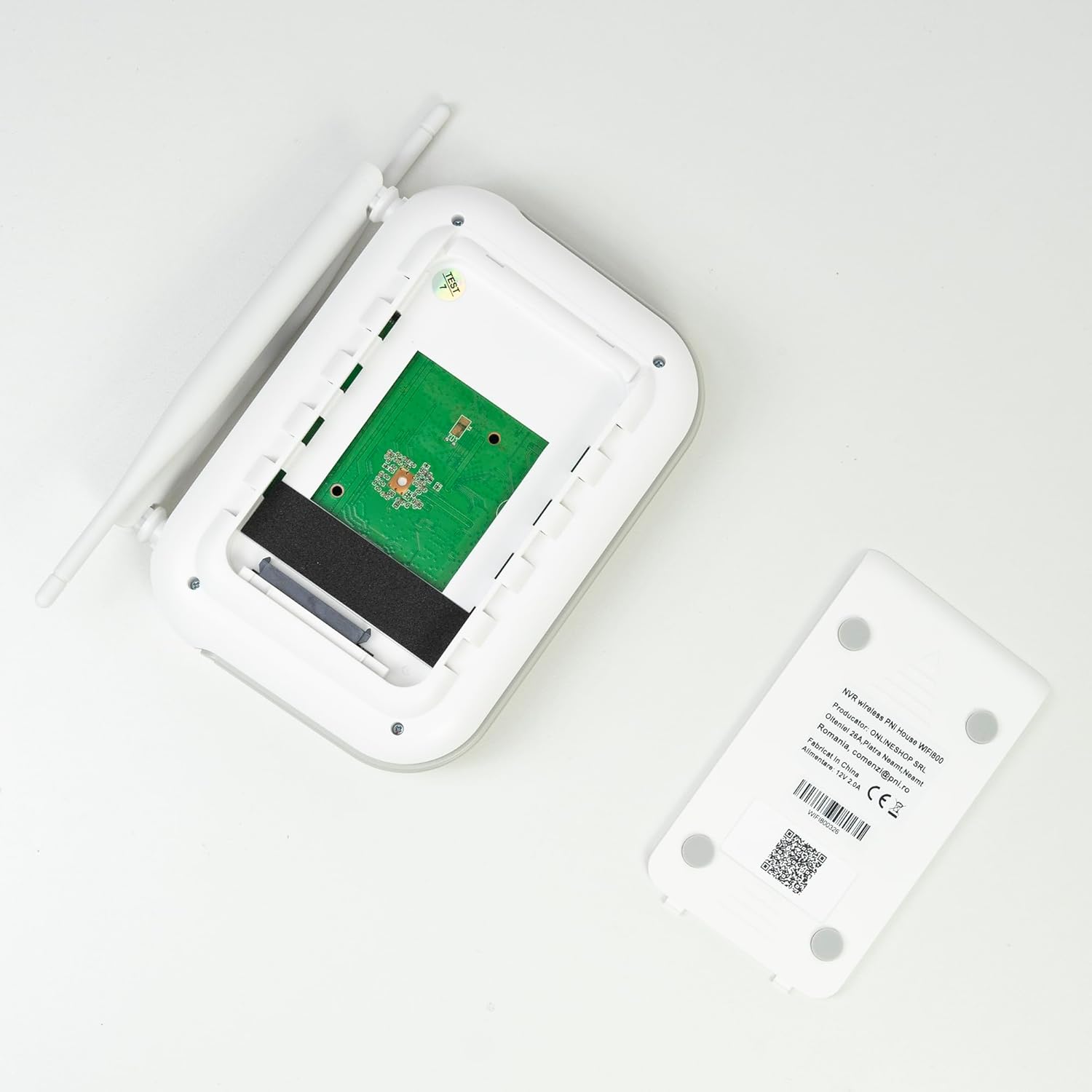
Irudia: Barnekoa view of the PNI House WiFi800 NVR, illustrating the circuit board and the bay for HDD installation.
8. Arazoak
- Ez dago irudirik monitorearen gainean:
- Check NVR power supply and HDMI cable connection to the monitor.
- Ziurtatu monitorearen sarrera-iturri zuzena konfiguratuta dagoela.
- Kamerak konektatzen ez direnak:
- Verify cameras are powered on.
- Check Wi-Fi signal strength at camera locations.
- Re-pair cameras with the NVR if necessary (refer to Section 5.3).
- Ez dago aplikazioaren bidezko urruneko sarbiderik:
- Ensure the NVR is connected to the internet via Ethernet.
- Egiaztatu zure telefonoaren Interneteko konexioa.
- Verify NVR is correctly added to the ICSee/XMEye app.
- Irudiaren kalitate eskasa:
- Kamera-lenteak garbitu.
- Egiaztatu kameraren eremuan oztopoak dauden view.
- Ziurtatu gaueko ikusmenerako argiztapen egokia dagoela.
- Grabaketa arazoak:
- Check if an HDD or MicroSD card is properly installed and formatted.
- Egiaztatu grabazio ordutegiak eta mugimendu detektatzeko ezarpenak.
- Ziurtatu biltegiratze leku nahikoa dagoela eskuragarri.
9. Zehaztapenak
9.1 PNI IP840 Outdoor Camera Specifications
| Ezaugarri | Xehetasuna |
|---|---|
| Irudi-sentsorea | 1/2.7" CMOS |
| Sentsore ebazpena | 8MP |
| Bideo Ebazpena | 3840x2160 (4K) |
| Lente mota | 3.6 mm |
| Viewangelua | 90° |
| Panorama/Tilt | Horizontala: 355°, Bertikala: 90° |
| Argi infragorria | 4x IR LEDs, 4x White LEDs |
| IR Distantzia | 15m arte |
| Bideo-konpresioa | H.265X (compatible with H.264+/H.264) |
| Audioa | Integrated Microphone and Speaker |
| Haririk gabeko maiztasuna | 2.4 GHz |
| Onartutako protokoloak | ONVIF |
| Biltegiratzea | MicroSD txartelaren zirrikitua (gehienez 256 GB) |
| Elikatze Hornidura | 12V/1A |
| Babes Klasea | IP65 |
| Funtzionamendu-tenperatura | -26 °C ~ +80 °C |
| Neurriak | 86x135x146mm |
| Pisua | 371 gramo |
9.2 PNI House WiFi800 NVR Specifications
| Ezaugarri | Xehetasuna |
|---|---|
| Bideo-kanalak | 8 kanal 5MP / 4 kanal 4K (8MP) |
| Bideo-konpresioa | H.265AI/H.265+ |
| Erreprodukzio Ebazpena | 1080P (HDMI) |
| Biltegiratze Ahalmena | 1x 2.5" HDD (max 14TB) / 1x MicroSD card (max 128GB) |
| Sareko interfazea | RJ45 - 10/100/1000 Mbit/s |
| Bideo Irteera | 1x HDMI |
| USB Interfazea | 1x USB 2.0 |
| Prozesadorea | MSR621Q |
| Elikatze Hornidura | 12V/2A |
| Neurriak | 170x120x35mm |
| Pisua | 245 gramo |
| Wi-Fi Frequency (NVR-Camera) | 2.4 GHz |
| Ahots-abisua | Yes, integrated speaker |
10. Bermea eta Laguntza
For warranty information, please refer to the documentation provided at the time of purchase or contact your retailer. For technical support, product inquiries, or assistance with troubleshooting, please visit the official PNI website or contact PNI customer service directly. Keep your purchase receipt as proof of purchase.
Fabrikatzailea: ONLINESHOP SRL
Modelo zenbakia: PNI-WF8-840-2


