1. Sarrera eta Overview
The KOTLIE EM-308B is a versatile 5-in-1 coffee machine designed to cater to various coffee preferences. It supports multiple capsule types, including Nespresso Original, Dolce Gusto, Lavazza A Modo Mio, ESE 44mm pads, and ground coffee. Featuring touch operation, rapid heating, and adjustable settings for water volume and temperature, this machine offers a convenient and customizable brewing experience.
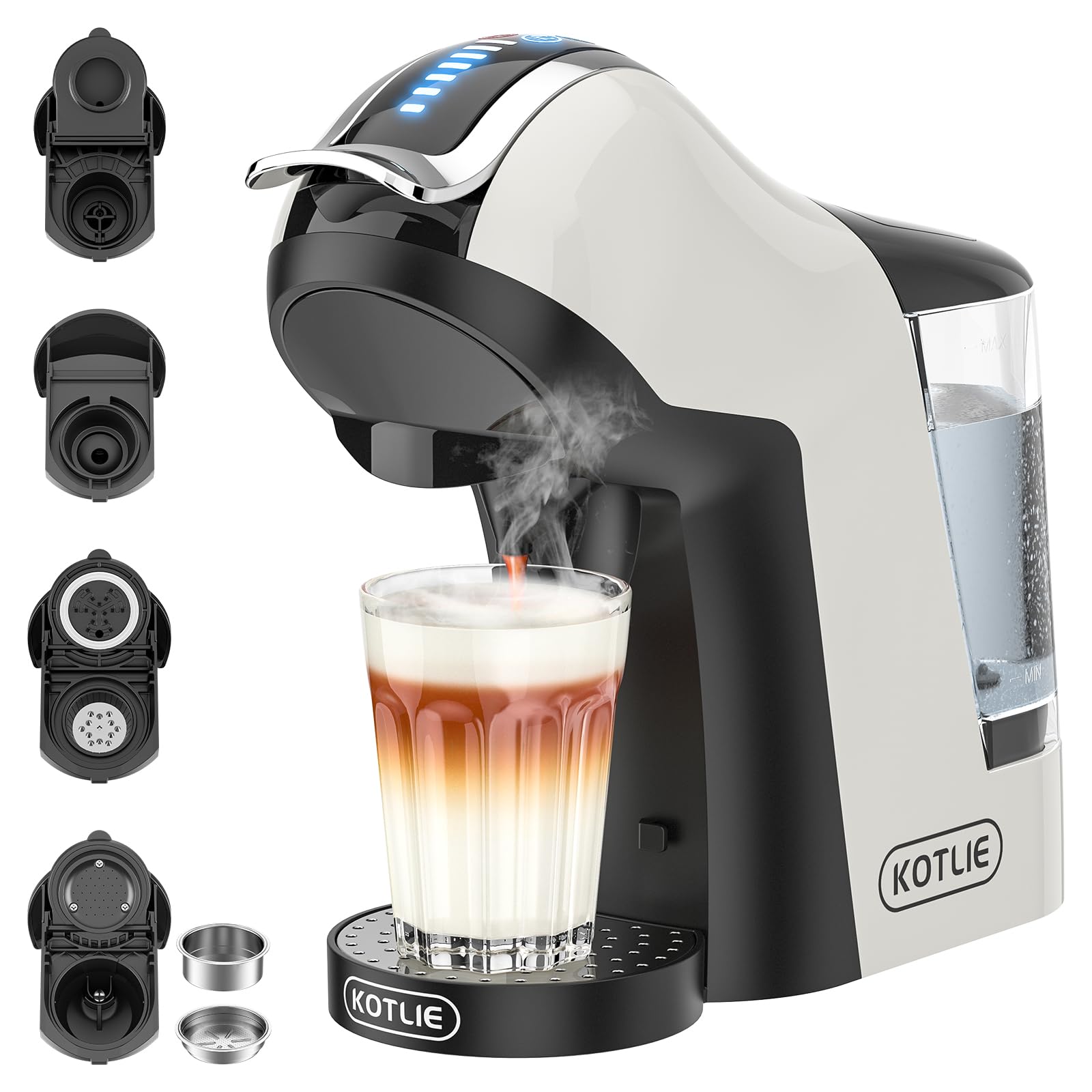
Image: The KOTLIE EM-308B coffee machine in operation, showcasing its compatibility with different coffee formats.

Image: Visual representation of the machine's 5-in-1 compatibility, highlighting the different coffee types it can brew.
2. Produktuaren ezaugarriak
- 5-in-1 bateragarritasuna: Brews coffee using Nespresso Original capsules, Dolce Gusto capsules, Lavazza A Modo Mio capsules, ESE 44mm pads, and ground coffee.
- Ezarpen doigarriak: Offers seven selectable water flow levels and three selectable temperatures for personalized coffee strength and heat.
- Beroketa azkarra: Achieves brewing temperature in approximately 35 seconds.
- High Pressure System: Operates at 19 BAR pressure for optimal extraction.
- Pre-infusion Function: Enhances coffee flavor and aroma.
- Ur-biltegi desmuntagarria: Large 1000 ml capacity water tank for fewer refills.
- Tanta-erretilu desmuntagarria: Accommodates various cup sizes and simplifies cleaning.
- Energia aurreztea: Features a 9-minute standby mode (touch any button to wake) and automatically powers off after 1 hour of inactivity.
- Material seguruak: All food-contact materials are BPA-free and food-safe. Non-food contact materials are recyclable.
- Diseinu trinkoa: Dimensions of 317 mm (L) x 124 mm (W) x 290 mm (H) and a weight of 3 kg, ideal for small spaces.

Image: Key features of the KOTLIE coffee machine, including its multi-capsule compatibility and advanced brewing options.
3. Konfigurazioa
- Deskargatu eta ikuskatu: Carefully remove the coffee machine and all accessories from the packaging. Check for any signs of damage or missing parts.
- Hasierako garbiketa: Before first use, clean the water tank, drip tray, and all adapters with warm, soapy water. Rinse thoroughly and dry.
- Kokalekua: Place the machine on a stable, flat surface away from heat sources and direct sunlight.
- Ur depositua bete: Fill the removable water tank with clean, room-temperature bottled or purified water up to the MAX level. Do not use milk, chocolate, hot water, or any other liquids.
- Konektatu energia: Entxufatu kablea entxufe egoki batera (220-240V).
- First Use Flush: To prepare the machine for use and remove any manufacturing residues, perform a flushing cycle. Insert an empty adapter (or no adapter if the machine allows), place a cup under the dispenser, and run a full cycle of hot water without coffee. Repeat this process 2-3 times.

Image: The coffee machine with its complete set of adapters for various coffee formats.
4. Funtzionamendu-argibideak
Kafea prestatzea
- Piztu: Ensure the machine is plugged in and the water tank is filled. Press the power button to turn on the machine. The machine will heat up, indicated by flashing lights, and will be ready when the lights become steady (approx. 35 seconds).
- Txertatu kafea: Lift the handle and select the appropriate adapter for your chosen coffee type (Nespresso, Dolce Gusto, Lavazza A Modo Mio, ESE pad, or ground coffee). Place the coffee into the adapter.
- Place Adapter: Insert the loaded adapter into the machine and firmly lower the handle until it clicks into place.
- Hautatu Ezarpenak: Use the touch panel to select your desired water temperature (three levels) and water volume (seven levels).
- Garagardoa: Place your cup on the drip tray and press the brew button. The machine will start brewing.
- Gozatu: Once brewing is complete, remove your cup. Lift the handle to eject the used capsule/pad or remove the ground coffee adapter for cleaning.

Image: Step-by-step guide on how to easily operate the coffee machine for brewing.
Kontrol-panela amaitu daview

Irudia: Xehetasun handikoa view of the machine's touch control panel and its various functions.
- Pizteko botoia: Makina piztu/itzali egiten du.
- Pre-infusion Button: Activates the pre-infusion function.
- Tenperatura botoia: Cycles through three temperature settings (indicated by green, yellow, red lights).
- Water Level Indicators: Displays the selected water volume (seven levels).
- Brew Button: Starts the coffee brewing process.
5. Mantentzea
Garbiketa
- Eguneko garbiketa: After each use, empty and rinse the drip tray and water tank. Wipe the exterior of the machine with a damp oihal.
- Adapter Cleaning: Regularly clean all coffee adapters. For ground coffee adapters, remove spent grounds and rinse thoroughly. Ensure all adapters are completely dry before reuse to prevent water residue from affecting coffee taste.
descaling
The coffee machine features an automatic descaling reminder. When all lights on the control panel start flashing continuously, descaling is required. The machine will not brew coffee until the descaling process is completed. This reminder cannot be canceled.
Deskalifikatzeko prozedura:
- Prestatu disoluzioa: Purchase a sodium citrate descaling solution separately. Dilute it according to the product instructions. Pour the prepared solution into the water tank up to the "MAX" level. Ensure the amount of solution is correct.
- Garbiketa zikloa hasi: Insert an empty adapter into the machine. Place a large container under the coffee dispenser. Press the brew button to run all the descaling solution from the tank. Do not interrupt the power supply during this cycle.
- Garbitu: Once the descaling cycle is complete, empty the water tank and rinse it thoroughly. Fill the water tank with clean, fresh water up to the "MAX" level. Repeat the cleaning cycle (Step 2) with clean water to completely flush out any remaining descaling solution.
- Erabilera arrunta: After the rinsing cycle, the coffee machine is ready for normal use.
Oharra: It is recommended to perform this descaling procedure even for machines that have been unused for a long time or are newly purchased to ensure optimal performance.

Image: Detailed instructions for the descaling process, including solution preparation and cleaning cycles.
6. Arazoak
This section addresses common issues you might encounter with your KOTLIE coffee machine.
- Machine Not Brewing / All Lights Flashing: This indicates the descaling mode is active. Follow the descaling procedure outlined in Section 5.
- Eragiketa zaratatsua: The coffee machine typically operates at approximately 60 dB during brewing. If the noise level is significantly higher or unusual, ensure all components are correctly assembled and the water tank is properly seated.
- Coffee Tastes Off: Ensure you are using bottled or purified water. Avoid adding any other liquids to the water tank. Regularly clean all adapters and ensure they are dry before use.
- Ur-ihesak: Check that the water tank is correctly inserted and not damaged. Ensure the drip tray is properly positioned. If leaking persists, contact customer support.
- Makina ez da pizten: Verify the power cord is securely plugged into both the machine and a working electrical outlet. If the machine was in standby for over an hour, it might have powered off and needs to be restarted.

Image: Frequently Asked Questions providing solutions to common user queries.
7. Zehaztapenak
| Ezaugarri | Zehaztapena |
|---|---|
| Eredua | EM-308B |
| liburukiatage | 220-240V |
| Ur deposituaren edukiera | 1000 ml (1 Liter) |
| Funtzionamendu-presioa | 19 TABERNA |
| Produktuaren pisua | 3 kg |
| Produktuaren neurriak (L x W x H) | 31.7 cm x 12.4 cm x 29 cm |
| Boterea | 1400 W |
| Maiztasuna | 50-60Hz |
| Ezaugarri bereziak | Single cup brew, Removable tank, Automatic shut-off |

Image: Key technical specifications and dimensions of the KOTLIE EM-308B coffee machine.
8. Bermea eta Laguntza
For warranty information, please refer to the documentation provided with your purchase or contact the retailer. If you encounter any issues not covered in this manual or require further assistance, please contact KOTLIE customer support through their official website or the platform where the product was purchased. Please have your model number (EM-308B) and purchase details ready when contacting support.


