1. Sarrera
The BLUETTI AC50B is a portable power station designed to provide reliable power for various applications, including camping, road trips, and as a backup during power outages. It features a durable LiFePO4 battery, multiple output ports, and versatile charging options to keep your devices powered.
2. Produktuaren ezaugarriak
2.1. Bukatu daview of Ports and Display

Image: Front panel of the BLUETTI AC50B showing the digital display, DC/PV input, DC output, USB-C and USB-A ports, and AC outlets.
The AC50B features a clear digital display that shows input/output wattage, bateria ehunekotage, and estimated run/charge time. It includes dedicated sections for DC and AC outputs, each with its own activation button.
2.2. Irteerako atakak
- CA irteera: 2x 120V/700W AC outlets (Pure Sine Wave). Supports Power Lifting up to 1000W for resistive loads.
- DC irteera: 1x 12V/10A Car Port.
- USB irteera: 2x 65W USB-C ports, 1x 15W USB-A port.
2.3. Battery Technology and Safety
Image: Illustration of the BLUETTI AC50B's internal LiFePO4 battery cells and safety mechanisms.
The AC50B utilizes LiFePO4 batteries, known for their longevity with over 3500 charge cycles before capacity degrades to 80%, offering an approximate 10-year lifespan. The integrated BLUETTI AI-BMS (Battery Management System) prevents overcharging, over-discharging, short circuits, and overheating, ensuring safe and optimal performance. The unit features a double-layered construction for enhanced durability against impacts.
2.4. Eramangarritasuna
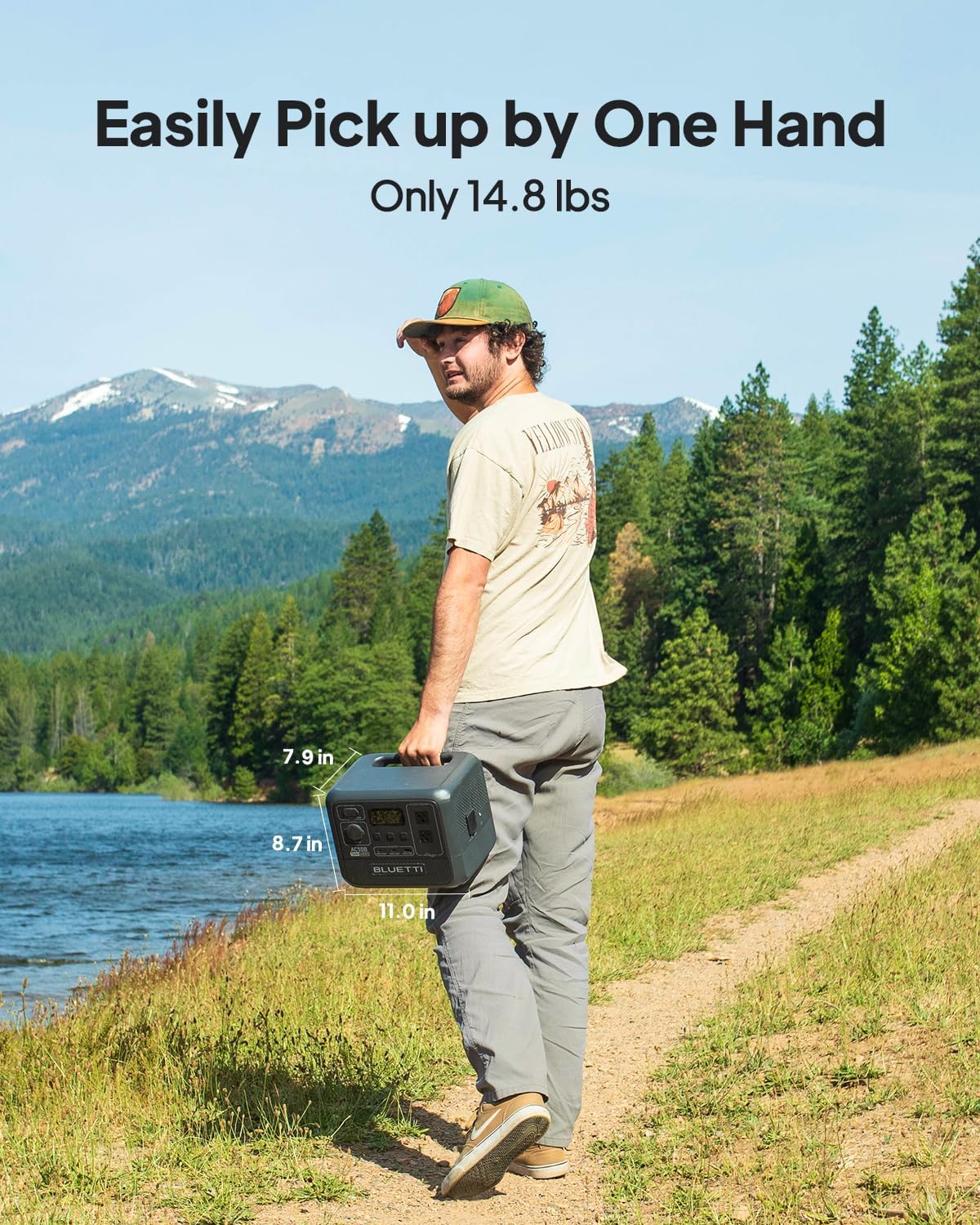
Image: A person easily carrying the BLUETTI AC50B power station by its integrated handle, highlighting its portability.
Weighing only 14.8 lbs, the AC50B is designed for easy transport with a sturdy, integrated handle. Its compact dimensions (11"L x 7.9"W x 8.7"H) make it convenient for various outdoor and indoor uses.
2.5. Uninterruptible Power Supply (UPS) Functionality
The AC50B supports UPS mode, allowing it to act as a backup power source. When connected to a wall outlet and powering devices, if the grid power fails, the unit will instantly switch to battery power, ensuring continuous operation for connected devices like computers or medical equipment.
3. Konfigurazioa
3.1. Included Charging Cables
- AC kargatzeko kablea
- Autoak kargatzeko kablea
- Solar Charging Cable (XT60 to MC4)
3.2. AC50B kargatzea

Image: The BLUETTI AC50B being charged via a standard wall outlet using the included AC charging cable.
The AC50B can be charged using multiple methods:
- AC hormako entxufea: Connect the included AC charging cable to the AC input port on the side of the unit and then to a wall outlet. The unit supports Turbo Charging Mode (up to 580W input), achieving 0-80% charge in 45 minutes and a full charge in approximately 70 minutes.
- Eguzki-panela: Connect a compatible solar panel (up to 200W) using the included XT60 to MC4 solar charging cable to the DC/PV input port. A full charge can be achieved in approximately 3 hours under optimal sunlight conditions.
- Autoaren kargagailua: Use the included car charging cable to charge the unit from your vehicle's 12V cigarette lighter port.
- Sorgailua: The unit can also be charged via a generator using the AC charging cable.
4. Funtzionamendu-argibideak
4.1. Powering On/Off Outputs
To activate the DC outputs (USB ports, 12V car port), press the 'DC' button on the front panel. To activate the AC outlets, press the 'AC' button. The digital display will indicate when outputs are active. Press the respective buttons again to turn them off.
4.2. BLUETTI aplikazioaren kontrola
Video: Demonstration of connecting the BLUETTI AC50B to the BLUETTI mobile application via Bluetooth, showing real-time monitoring of battery status, input/output power, and control over DC/AC outputs. The app also allows selection of charging modes (Standard, Silent, Turbo) and ECO mode settings.
The BLUETTI app allows remote control and monitoring of your AC50B via Bluetooth. Features include:
- Real-time power consumption and battery status.
- Activating/deactivating DC and AC outputs.
- Selecting charging modes: Estandarra, Isilik (slowest, quietest), and Turbo (fastest charging).
- Konfiguratzen ECO modua: This feature allows the unit to automatically shut off outputs after a period of low power draw, conserving battery life. You can set the power threshold and shutdown time.
5. Usage Examples

Image: The BLUETTI AC50B providing power for common camping and travel items, illustrating its capacity to run phones, lamps, mini-fridges, and kettles.
The AC50B is versatile for powering a range of devices:
- Camping & Outdoor: Power phones (approx. 17 times), 12W lamps (approx. 15 hours), 60W mini-fridges (approx. 5.7 hours), or a 500W kettle (approx. 40 minutes).
- Errepideko bidaiak: Charge laptops, tablets, or power small appliances like juicers.
- Larrialdiko babeskopia: Keep essential devices running during power outages, such as Wi-Fi routers, TVs, desktop PCs, or electric blankets.
- Erabilera profesionala: Fast charge camera batteries, drone batteries, or power small tools.
Video: A demonstration of the BLUETTI AC50B powering a small portable washing machine/spinner, showcasing its ability to handle loads up to 700W (1000W Power Lifting) for practical tasks.
6. Mantentzea
To ensure the longevity and optimal performance of your BLUETTI AC50B, follow these maintenance guidelines:
- Biltegiratzea: Gorde unitatea leku fresko eta lehor batean, eguzki-argitik eta muturreko tenperaturetatik babestuta.
- Kargatzen: For long-term storage, it is recommended to charge the unit to 50-80% every 3-6 months to maintain battery health.
- Garbiketa: Erabili zapi lehor eta leun bat unitatearen kanpoaldea garbitzeko. Saihestu produktu kimiko gogorrak edo material urratzaileak erabiltzea.
- Aireztapena: Ensure the ventilation vents are clear of obstructions to prevent overheating.
7. Arazoak
If you encounter issues with your AC50B, consider the following:
- Irteerarik ez: Ensure the DC or AC output buttons are pressed and their indicators are lit. Check if the device you are trying to power is within the unit's wattage mugak.
- Kargatzeko arazoak: Verify that all charging cables are securely connected. Check the power source (wall outlet, solar panel, car) for functionality. If using solar, ensure panels are in direct sunlight.
- Gainkarga babesa: If the unit shuts down unexpectedly, it may be due to an overload. Disconnect the device causing the overload and restart the AC50B.
- Aplikazioen konexioa: Ensure Bluetooth is enabled on your mobile device and the AC50B is within range. Restarting both the app and the power station can resolve connectivity issues.
- Ezohiko portaera: Refer to the full user manual for detailed troubleshooting steps or contact BLUETTI customer support.
8. Zehaztapenak
| Zehaztapena | Balioa |
|---|---|
| Marka | BLUETTI |
| Ereduaren izena | AC50B |
| Bateria mota | LiFePO4 |
| Edukiera | 448Wh |
| AC Irteera | 2x 120V/700W (1000W Power Lifting) |
| DC irteera | 1x 12V/10A Car Port |
| USB irteera | 2x 65W USB-C, 1x 15W USB-A |
| Gehienezko AC sarrera | 580W (Turbo Charging) |
| Eguzki sarrera max | 200W |
| Pisua | 14.8 kilo |
| Neurriak (L x W x H) | 11" x 7.9" x 8.7" |
9. Bermea eta Laguntza
The BLUETTI AC50B Portable Power Station comes with a 5-year warranty, ensuring peace of mind regarding product quality and performance.
Galderarik, laguntza teknikorik edo berme-erreklamaziorik izanez gero, jarri harremanetan BLUETTI bezeroarentzako arreta-zerbitzuarekin, haien zerbitzu ofizialaren bidez. webgunea edo zure produktuaren ontzian emandako harremanetarako informazioa.


