Ongi etorri
Thank you for choosing the BYTECH BICONIC True Wireless Earbuds. This manual provides essential information on how to set up, operate, maintain, and troubleshoot your new earbuds. Please read this manual thoroughly before use to ensure optimal performance and longevity of your device.
Segurtasun-argibide garrantzitsuak
- Ez jarri entzungailuak edo kargatzeko zorroa muturreko tenperaturen, hezetasunaren edo likidoen eraginpean.
- Saihestu gailua erortzea, kolpeak ematea edo desmuntatzea.
- Do not use abrasive cleaners or harsh chemicals to clean the earbuds or case.
- Entzun bolumen moderatuan entzumen-kalteak saihesteko. Soinu ozenen eraginpean denbora luzez egoteak entzumen-galera itzulezina eragin dezake.
- Mantendu haurren eta maskoten eskura.
- Dispose of the device responsibly according to local regulations. Do not dispose of with household waste.
Zer sartzen da
Mesedez, egiaztatu paketearen edukia elementu guztiak daudela ziurtatzeko:
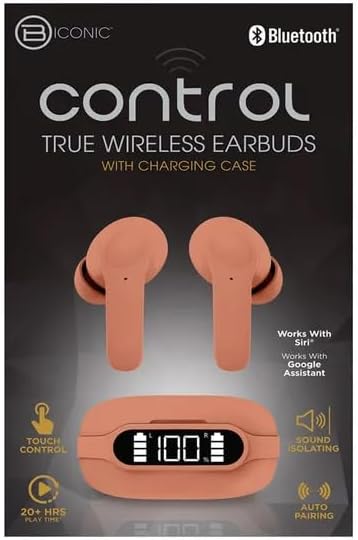
- BYTECH BICONIC True Wireless Earbuds (Left and Right)
- Kargatzeko kaxa
- Kargatzeko kablea
- Erabiltzailearen eskuliburua
Produktua amaituview
Familiarize yourself with the components of your BYTECH BICONIC True Wireless Earbuds.

Hasteko
Entzungailuak eta kasua kargatzen
The BYTECH BICONIC earbuds come with a rechargeable battery in both the earbuds and the charging case. Ensure both are fully charged before first use.
- Jarri entzungailuak kargatzeko zorroan, dagokien zirrikituetan behar bezala sartuta daudela ziurtatuz (E ezkerrerako, R eskuinerako).
- Connect the provided charging cable to the charging port on the case and the other end to a USB power source (e.g., computer USB port, wall adapter).
- The digital display on the charging case will show the battery level. Allow sufficient time for a full charge.
- Guztiz kargatuta dagoenean, deskonektatu kargatzeko kablea.
Bluetooth parekatzea
Jarraitu urrats hauek entzungailuak Bluetooth gaitutako gailuarekin parekatzeko:
- Ziurtatu entzungailuak kargatuta daudela eta kargatzeko zorroaren barruan daudela.
- Open the charging case. The earbuds will automatically enter pairing mode, and an indicator light on the earbuds will flash.
- On your device (smartphone, tablet, etc.), go to the Bluetooth settings and turn Bluetooth on.
- Bilatu available devices. You should see "BYTECH BICONIC" or a similar name appear in the list.
- Select "BYTECH BICONIC" to connect. Once connected, a voice prompt will confirm the successful pairing, and the indicator lights on the earbuds will stop flashing.
- Aurikularrak automatikoki konektatuko dira azken parekatutako gailura zorrotik ateratzean, baldin eta Bluetooth-a gaituta badago gailuak.
Funtzionamendu-argibideak
Ukitu Kontrolak
The BYTECH BICONIC earbuds feature intuitive touch controls for easy management of your audio and calls.
| Ekintza | Funtzioa |
|---|---|
| Ukitu bakarra (ezkerreko/eskuineko entzungailuak) | Erreproduzitu/Pausatu musika, Erantzun/Amaitu deia |
| Sakatu birritan (eskuineko aurikularra) | Hurrengo Pista |
| Sakatu birritan (ezkerreko aurikularra) | Aurreko Pista |
| Hirukoitz Ukitu (Ezkerreko/Eskuineko Aurikularrak) | Aktibatu ahots-laguntzailea (Siri/Google laguntzailea) |
| Sakatu luzea (ezkerreko/eskuineko entzungailua) | Deia baztertu |
Piztu eta itzaltzea
- Piztu: Entzungailuak automatikoki piztuko dira kargatzeko zorrotik ateratzen direnean.
- Itzali: Jarri entzungailuak berriro kargatzeko zorroan eta itxi tapa. Automatikoki itzali eta kargatzen hasiko dira.
Mantentzea eta zaintzea
Proper care will extend the life of your BYTECH BICONIC True Wireless Earbuds.
- Garbiketa: Use a soft, dry, lint-free cloth to clean the earbuds and charging case. Do not use liquids or aerosol cleaners.
- Biltegiratzea: Erabiltzen ez dituzunean, gorde beti entzungailuak kargatzeko zorroan, babesteko eta kargatuta mantentzeko.
- Saihestu muturreko baldintzak: Do not expose the device to extreme heat, cold, or direct sunlight.
- Uraren erresistentzia: These earbuds are not waterproof. Avoid contact with water or excessive moisture.
Arazoak konpontzea
Entzungailuekin arazorik baduzu, jo ezazu honako ohiko irtenbide hauetara:
| Arazoa | Irtenbidea |
|---|---|
| Entzungailuak ez dira parekatzen | Ziurtatu entzungailuak kargatuta daudela. Itzali eta piztu Bluetooth-a gailuan. Ahaztu gailua Bluetooth ezarpenetan eta parekatu berriro. |
| Aurikular bakarra funtzionatzen du | Jarri bi entzungailuak berriro kargatzeko zorroan, itxi tapa, itxaron segundo batzuk eta atera berriro. Ziurtatu biak kargatuta daudela. |
| Soinurik ez | Check volume levels on both your device and the earbuds. Ensure earbuds are properly connected. Try playing different audio. |
| Kargatzeko kaxa ez da kargatzen | Ensure the charging cable is securely connected to both the case and the power source. Try a different USB port or power adapter. |
Zehaztapen Teknikoak
Detailed specifications for your BYTECH BICONIC True Wireless Earbuds:
| Ezaugarri | Xehetasuna |
|---|---|
| Modelo zenbakia | BC-AU-BE-144-TN |
| Konektibitate Teknologia | Haririk gabeko (Bluetooth) |
| Forma-faktorea | Belarri barnekoak (Intraurales) |
| Kolorea | Kafetegia |
| Ezaugarri bereziak | Rechargeable Battery, Touch Control, Sound Isolating, Auto Pairing |
| Dakarten osagaiak | Kablea |
| Jolasteko denbora estimatua | 20+ Hours (with charging case) |
Bermearen informazioa eta bezeroarentzako laguntza
BYTECH products are designed and manufactured to the highest quality standards. For information regarding warranty coverage, please refer to the warranty card included with your purchase or visit the official BYTECH webgunea.
If you require further assistance or have questions not covered in this manual, please contact BYTECH customer support through their official channels. Please have your model number (BC-AU-BE-144-TN) and purchase details ready when contacting support.


