1. Sarrera
The APC Smart-UPS SMT750C is an Uninterruptible Power Supply (UPS) designed to provide reliable power and surge protection for critical electronic equipment. This unit offers 750VA/500W of line-interactive pure sine wave power, making it suitable for servers, storage systems, network closets, business VoIP setups, desktop computers, and retail POS systems. It features Automatic Voltagbolumena zuzentzeko e Erregulazioa (AVR)tage fluctuations and a SmartConnect Ethernet Port for cloud-based remote monitoring. This manual provides essential information for the safe and efficient installation, operation, and maintenance of your SMT750C UPS.
2. Segurtasun informazioa
WARNING: Risk of electric shock. Refer to bottom of unit for warnings.
- Irakurri arretaz argibide guztiak instalatu eta martxan jarri aurretik.
- UPS honek barneko bateriak ditu eta deskarga elektrikoaren arriskua sor dezake korronte alternoko elikatze iturritik deskonektatuta egon arren.
- Do not open or disassemble the UPS. There are no user-serviceable parts inside except for the battery.
- Konektatu UPSa lurreko hartune batera soilik.
- Do not use the UPS in direct sunlight, near heat sources, or in areas with excessive humidity.
- Ensure proper ventilation around the UPS. Do not block any ventilation openings.
3. Paketearen edukia
Egiaztatu elementu guztiak bertan daudela paketea desegiten duzunean:
- APC Smart-UPS SMT750C Unit
- 16GB USB 3.0 Drive
- Erabiltzailearen eskuliburua (dokumentu hau)
- USB komunikazio kablea
- Elikatze kablea

Image: Included 16GB USB 3.0 Drive. This USB drive provides additional storage or file transferentzia gaitasunak.
4. Produktua amaitu daview
Aurrealdeko panela
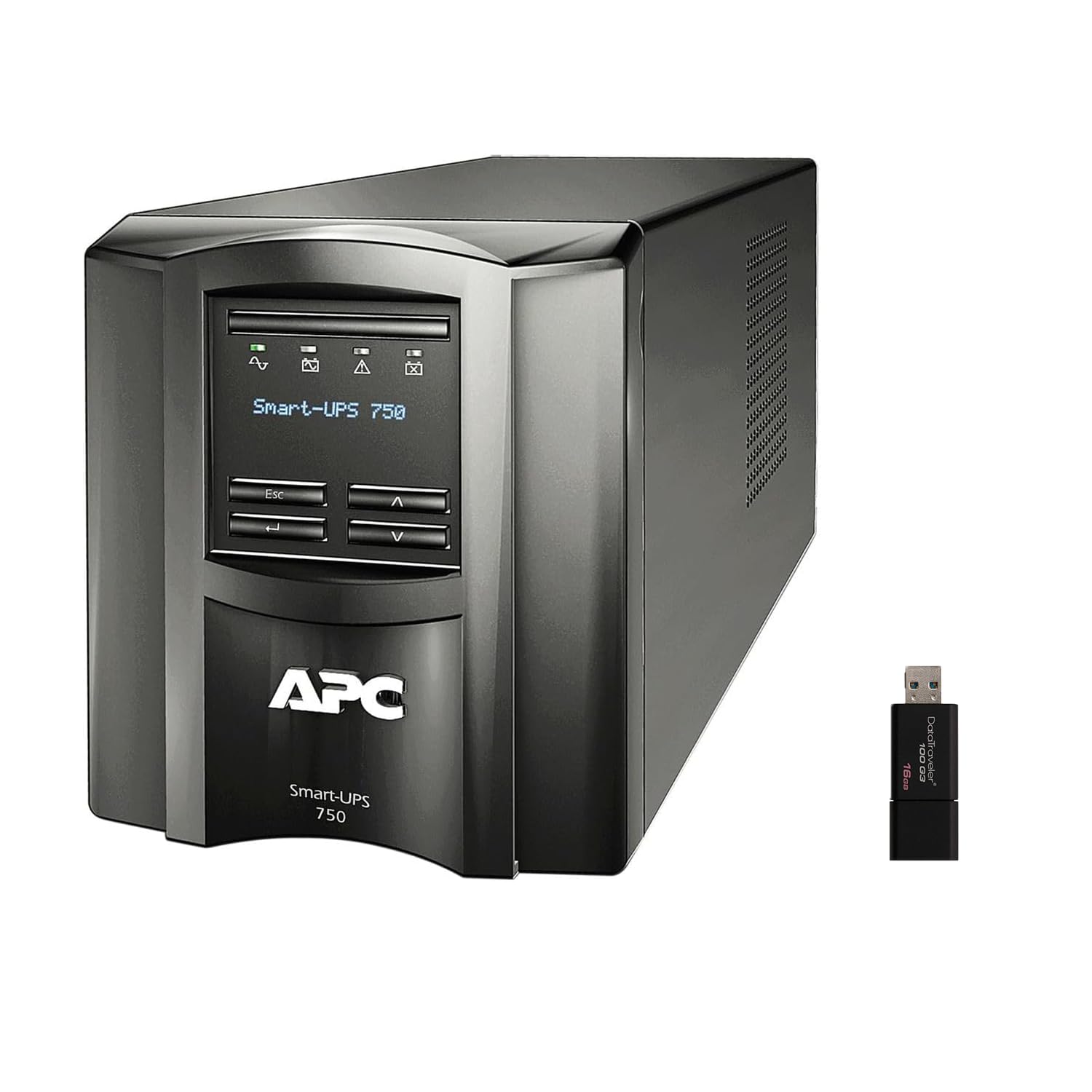
Irudia: Aurrealdea eta albokoa view of the APC Smart-UPS SMT750C. This image displays the compact tower design of the UPS unit.
- Pizteko botoia: Controls the main power to the UPS.
- LCD pantaila: Provides real-time status information, load levels, battery charge, and estimated runtime.
- Nabigazio botoiak: Used to scroll through display menus and adjust settings.
Atzeko panela
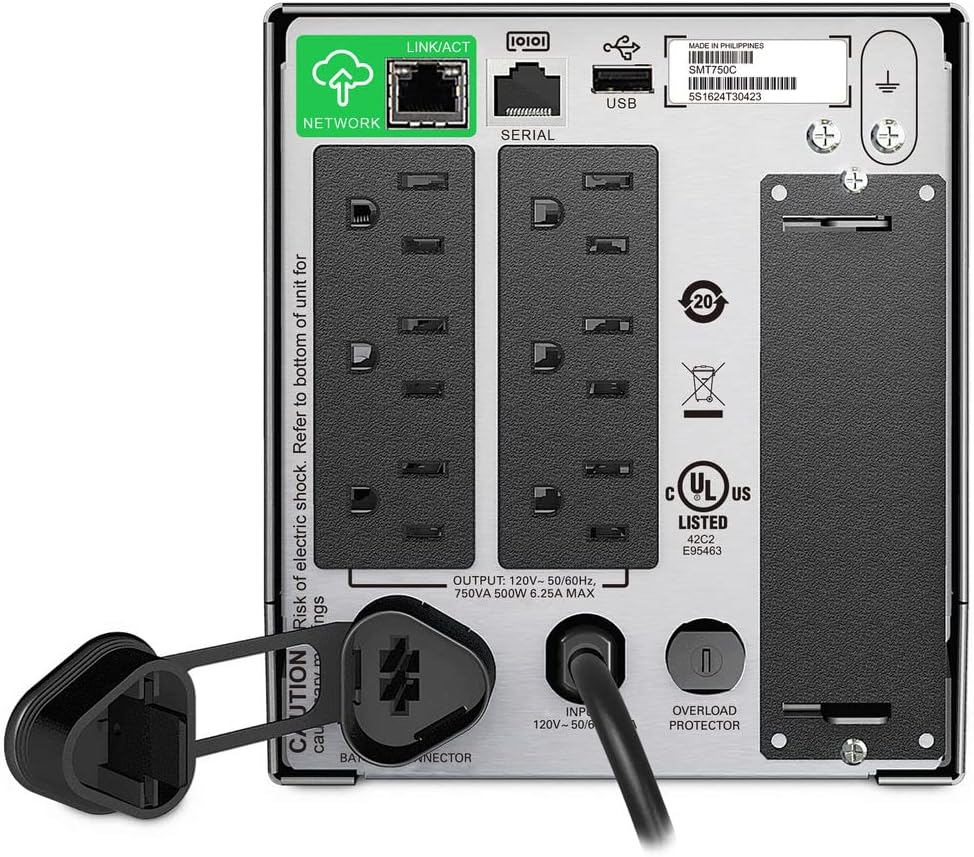
Image: Rear panel of the APC Smart-UPS SMT750C. This view highlights the various input/output ports, including NEMA 5-15R outlets, SmartConnect port, USB, and serial ports.
- NEMA 5-15R Outlets: Six outlets for connecting protected equipment.
- SmartConnect Ethernet Port: For cloud-based remote monitoring and management.
- USB ataka: For communication with a computer for graceful shutdown via PowerChute Serial Shutdown software.
- Serieko portua: Alternative communication port for graceful shutdown.
- Zirrikitu Adimenduna: For optional Network Management Card (sold separately).
- Sarrerako korrontea: Connects the UPS to the utility power.
- Gainkarga babeslea: Resettable circuit breaker.
5. Konfigurazioa
5.1 Bateriaren hasierako konexioa
Before initial use, the internal battery must be connected. The unit is shipped with the battery disconnected for safety during transit.
- Jarri UPSa gainazal egonkor batean.
- Locate the battery compartment cover, typically on the bottom or rear of the unit.
- Remove the cover to access the battery.
- Connect the red battery cable to the positive (+) terminal and the black battery cable to the negative (-) terminal. Ensure a secure connection.
- Jarri bateriaren konpartimentuaren estalkia.
5.2 Energia elektrikora konektatzea
- Plug the UPS power cord into a grounded 3-prong AC outlet.
- Utzi UPSa gutxienez 24 orduz kargatzen ekipamendu kritikoa konektatu aurretik, bateriaren edukiera osoa ziurtatzeko.
5.3 Lotura ekipoak
- Connect your critical equipment (e.g., computer, monitor, network devices) to the NEMA 5-15R outlets on the rear panel.
- For graceful shutdown capabilities, connect the provided USB cable from the UPS to your computer and install the PowerChute Serial Shutdown software (available for download from APC's webgunea).
- For remote monitoring, connect an Ethernet cable to the SmartConnect port and follow the instructions for cloud-based setup.
6. Funtzionamendua
6.1 Piztu/Itzaltzea
- To power on the UPS, press and hold the power button on the front panel until the unit beeps and the display illuminates.
- To power off the UPS, press and hold the power button until the unit beeps and the display turns off.
6.2 Vol. automatikoatagAraudia (AVR)
The SMT750C features AVR, which automatically corrects minor voltage fluctuations (sags and surges) without switching to battery power. This protects connected equipment from voltage irregularities and extends battery life.
6.3 Bateriaren babeskopiako funtzionamendua
Potentzia batean zehartage, the UPS will automatically switch to battery power, providing continuous power to connected equipment. The LCD display will show the estimated remaining runtime. When utility power returns, the UPS will automatically switch back to utility power and recharge its battery.
6.4 Remote Monitoring (SmartConnect)
The SmartConnect port allows for cloud-based remote monitoring of your UPS. This feature enables IT professionals and network administrators to:
- Monitor UPS status and performance.
- Perform firmware upgrades.
- Conduct remote diagnostics.
- Receive proactive email notifications with recommended actions.
7. Mantentzea
7.1 Bateria ordezkatzea
The internal battery is a user-replaceable component. When the battery reaches the end of its service life, the UPS will indicate a battery fault. To replace the battery:
- Ensure the UPS is powered off and disconnected from utility power.
- Kendu bateriaren konpartimentuaren estalkia.
- Disconnect the battery cables (red and black).
- Carefully slide out the old battery.
- Insert a genuine APC replacement battery (model RBC154, sold separately).
- Connect the battery cables, ensuring correct polarity (red to positive, black to negative).
- Jarri bateriaren konpartimentuaren estalkia.
- Recycle the old battery responsibly.
7.2 Garbiketa
Aldian-aldian garbitu UPSaren kanpoaldea oihal leun eta lehor batekin. Ez erabili garbitzaile likido edo aerosolik. Ziurtatu aireztapen-irekiduretan hautsik eta hondakinik gabe daudela.
8. Arazoak
| Arazoa | Kausa posiblea | Irtenbidea |
|---|---|---|
| UPS-a ez da pizten | Battery not connected or low charge | Ensure battery cables are connected. Plug UPS into AC outlet and allow to charge. |
| UPSak etengabe bip egiten du | Overload or on battery power | Reduce connected load. Check utility power. |
| Battery symbol blinking | Battery needs to be flipped (initial setup) or is failing | For new units, ensure battery is correctly oriented and connected. For older units, consider battery replacement. |
| Saltokietan ez dago botererik | UPS is off, circuit breaker tripped, or utility power lost | Turn on UPS. Reset circuit breaker. Check utility power. |
9. Zehaztapenak
- Eredua: SMT750C
- Irteerako potentzia-ahalmena: 500 Watt / 750 VA
- Irteerako konexioak: 6 x NEMA 5-15R
- Sarrerako konexioak: NEMA 5-15P
- Sarrera nominala boltage: 120V
- Irteera nominala boltage: 120V
- Bateria mota: Berun Azidoa
- Forma-faktorea: Dorrea
- Neurriak (H x W x D): 6.34 hazbete (16.1 cm) x 5.43 hazbete (13.8 cm) x 14.53 hazbete (36.9 cm)
- Pisu garbia: 27.56 libra (12.5 kg)
- Kolorea: Beltza
- Materiala: Metala
- Osagarriak barne: 16GB USB 3.0 Drive
10. Bermea eta Laguntza
APC provides a standard warranty for this product. For specific warranty terms and conditions, please refer to the warranty card included with your product or visit the official APC website. For technical support, product registration, or to purchase replacement parts, please visit www.apc.com or contact APC customer service.
Protection plans are available for extended coverage. For example, a 3-Year Protection Plan is available.


