1. Sarrera
The Auronic Electric Air Dehumidifier AU3270 is designed to effectively remove excess moisture from indoor environments, helping to prevent mold growth and maintain a healthy humidity level. This appliance is suitable for spaces up to 15 square meters and can extract up to 10 liters of moisture per day. This manual provides essential information for the safe and efficient use of your dehumidifier.

Image: The Auronic Electric Air Dehumidifier AU3270 positioned in a living room, illustrating its compact design and 10-liter daily capacity for optimal dehumidification.
2. Segurtasun-argibideak
Mesedez, irakurri arretaz segurtasun-argibide guztiak tresna erabili aurretik, lesioak edo kalteak saihesteko.
- Ziurtatu elikadura hornidura boltage hezegailuaren balorazio-etiketarekin bat dator.
- Ez erabili hezetasun-kentzailea kablea edo entxufea hondatuta badago.
- Mantendu tresna bero-iturrietatik, eguzki-argitik eta material sukoietatik urrun.
- Ez blokeatu airearen sarrera edo irteera. Mantendu gutxienez 20 cm-ko distantzia unitatearen inguruan.
- Always place the dehumidifier on a stable, level surface to prevent water spillage.
- Unplug the appliance before cleaning, maintenance, or when not in use for extended periods.
- Ez murgildu unitatea, elikatze-kablea edo entxufea uretan edo beste likido batzuetan.
- Tresna hau ez da gaitasun fisiko, sentsorial edo mental murriztua duten edo esperientzia eta ezagutza falta duten pertsonek (haurrak barne) erabiltzeko, baldin eta haien segurtasunaz arduratzen den pertsona batek gailuaren erabilerari buruz gainbegiratu edo jarraibiderik eman ez badu.
- Haurrak gainbegiratu behar dira aparatuarekin jolasten ez dutela ziurtatzeko.
3. Konfigurazioa
3.1 Desontziratzea eta paketearen edukia
Carefully remove the dehumidifier from its packaging. Check that all components are present and undamaged. The package typically includes the dehumidifier unit, a drainage hose, and this user manual.

Image: Contents of the Auronic Dehumidifier package, displaying the main unit, continuous drainage hose, and user manual, along with key product dimensions.
3.2 Jartzea
Place the dehumidifier on a firm, level surface in the desired location. Ensure there is at least 20 cm of free space around the air inlet and outlet for optimal airflow. The unit is effective for rooms up to 15 square meters. Avoid placing it in direct sunlight or near heat-emitting appliances.
3.3 Energia-konexioa
Plug the power cord into a grounded electrical outlet. Ensure the outlet meets the power requirements specified on the appliance's rating label.
3.4 Drainatze Aukerak
Hezegailu-sistemak bi drainatze-metodo eskaintzen ditu:
- Ur depositua: The unit collects condensed water in its internal 2-liter water tank. The appliance will automatically stop operating when the tank is full, and an indicator will illuminate.
- Etengabeko drainatze: For uninterrupted operation, attach the included drainage hose to the continuous drainage port on the back of the unit. Route the hose to a suitable drain or larger container, ensuring it is sloped downwards to allow water to flow freely by gravity.
4. Funtzionamendu-argibideak
4.1 Kontrol-panela amaituview
The dehumidifier features an intuitive digital LED display and control buttons for easy operation.
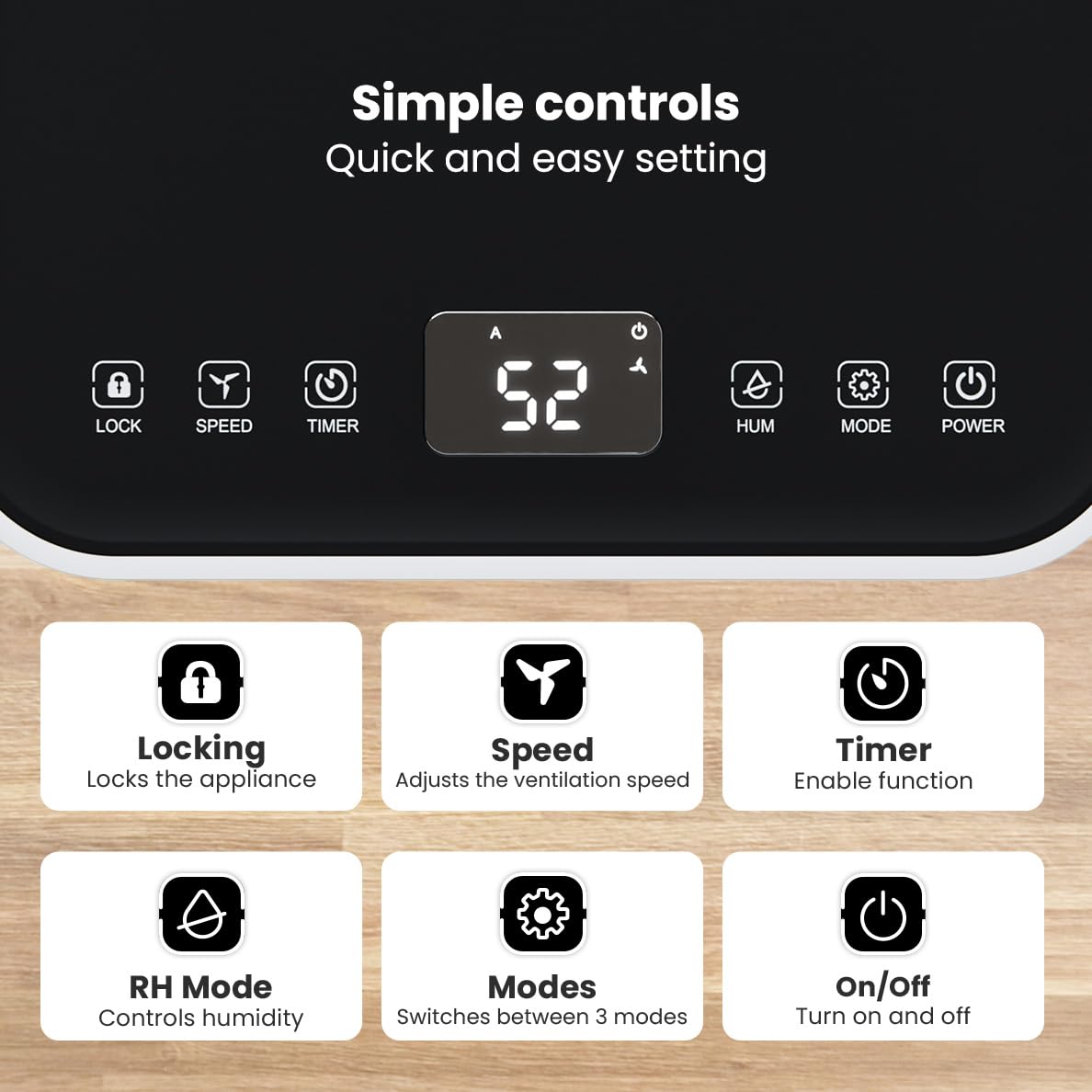
Irudia: Xehetasun handikoa view of the dehumidifier's control panel, highlighting each button's function for easy setting adjustments.
- Pizteko botoia (⏻): Tresna piztu edo itzali egiten du.
- Modu botoia (⚙): Switches between the three operating modes: Automatic, Continuous, and Quiet.
- RH Mode Button (💧): Controls the desired relative humidity level. Press to set the target humidity.
- Tenporizadorearen botoia (⏱): Enables the timer function for scheduled operation.
- Abiadura botoia (⇋): Adjusts the ventilation speed (fan speed).
- Blokeatzeko botoia (🔒): Kontrol-panela blokeatzen du ustekabeko aldaketak saihesteko.
4.2 Funtzionamendu moduak
Press the Mode button to cycle through the available operating modes:
- Modu automatikoa: The device automatically adjusts its operation based on the current room humidity to maintain a comfortable level.
- Etengabeko modua: Oso aproposa d-rentzatamp environments like wet basements. The dehumidifier operates continuously regardless of the humidity level until the water tank is full or continuous drainage is active.
- Modu lasaia: Designed for night-time use or in areas where low noise is preferred. The dehumidifier operates at a reduced fan speed, ensuring a peaceful environment with a noise level below 36dB.

Image: A chart comparing the noise level of the Auronic Dehumidifier (42dB) to common sounds like breathing, whispering, and loud conversation, highlighting its quiet operation.
4.3 Humidity Sensor and Display
The integrated humidity sensor monitors the room's humidity level, which is displayed on the digital screen. The color of the display indicates the current humidity status:
- Urdina: Humidity level is below 45%.
- Berdea: Humidity level is between 45% and 64%.
- Gorria: Humidity level is above 65%.
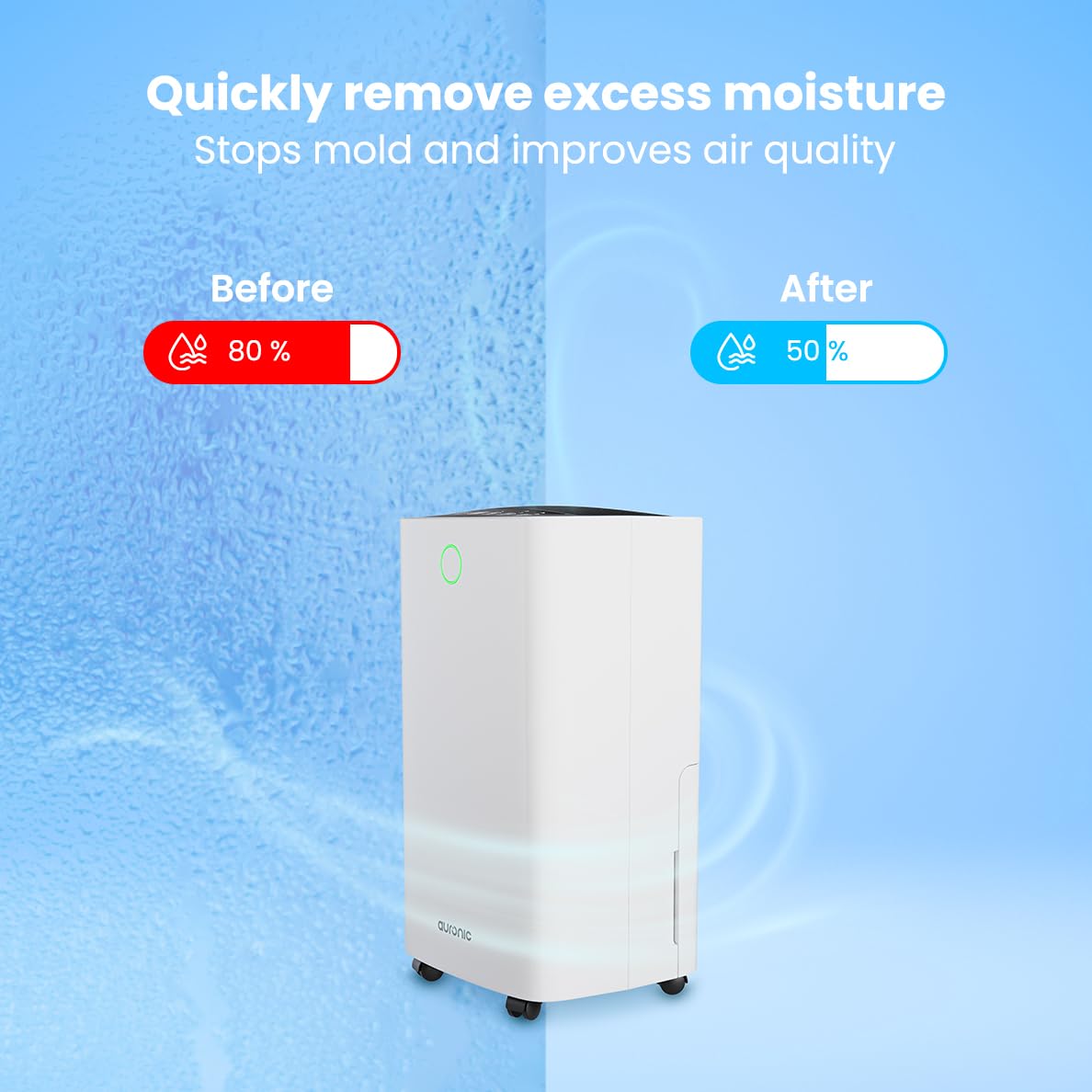
Image: A visual representation demonstrating the dehumidifier's effectiveness, showing a reduction in humidity from 80% to 50% in a room.
4.4 Arropa lehortzeko funtzioa
The Auronic dehumidifier includes a laundry drying function to assist in reducing the drying time of clothes, sheets, and towels. Place the appliance in your laundry room or near drying clothes to utilize this feature, which helps to remove moisture from the air and accelerate the drying process.

Image: The dehumidifier in a bathroom setting, demonstrating its ability to extract up to 10 liters of moisture and its suitability for rooms up to 15 square meters, alongside its intelligent humidity meter, wash-dry function, and silent operation.
5. Mantentzea
Mantentze-lan erregularrak zure deshezegailuaren iraupena eta funtzionamendu eraginkorra bermatzen ditu.
5.1 Ur depositua hustea
When the water tank is full, the dehumidifier will stop operating, and an indicator light will turn on. Carefully pull out the water tank from the unit, empty the collected water, and then reinsert the tank firmly until it clicks into place. Ensure the tank is properly seated to resume operation.
5.2 Aire-iragazkia garbitzea
The air filter should be cleaned regularly (e.g., every two weeks or as needed) to maintain optimal performance. A dirty filter can reduce efficiency and increase energy consumption.
- Deskonektatu hezegailuaren entxufea korronte-hartunetik.
- Aurkitu eta kendu aire-iragazkia (normalean unitatearen atzealdean edo alboan).
- Clean the filter using a vacuum cleaner to remove dust and debris. For heavily soiled filters, wash gently with lukewarm water and a mild detergent.
- Allow the filter to air dry completely before reinserting it into the dehumidifier.
5.3 Garbiketa eta biltegiratze orokorra
Garbitu dehezegailuaren kanpoaldea leun batekin, damp cloth. Do not use abrasive cleaners or solvents. For long-term storage, ensure the water tank is empty and clean, the filter is clean and dry, and the unit is unplugged. Store the dehumidifier in a cool, dry place, preferably in its original packaging.
6. Arazoak
Zure deshezegailuarekin arazoak badituzu, jo ezazu honako arazo eta irtenbide ohikoenei:
| Arazoa | Kausa posiblea | Irtenbidea |
|---|---|---|
| Hezetasun-kengailuak ez du pizten. | Ez dago energia-iturririk; Elikatze-kablea ez dago konektatuta; Pizteko botoia ez dago sakatuta. | Check power connection; Ensure outlet is functional; Press the Power button. |
| Ez da urik biltzen edo hezetasun-gabetzea baxua da. | Room temperature too low; Humidity level already low; Air filter clogged; Air inlet/outlet blocked; Water tank not properly inserted. | Ensure room temperature is above 5°C; Check current humidity; Clean the air filter; Clear any obstructions; Reinsert water tank correctly. |
| Unitatea zaratatsua da. | Unitatea ez dago gainazal mailakatu batean; Aire-iragazkia buxatuta; Barne-osagaiak bibratzen. | Place on a stable, level surface; Clean the air filter; If noise persists, contact customer support. |
| Ur-depositua beteta dagoela adierazten du piztuta dago, baina depositua ez dago beteta. | Float switch malfunction; Water tank not properly seated. | Remove and reinsert the water tank; Check float switch for obstructions. |
| Pantailak errore kode bat erakusten du. | Internal sensor error or malfunction. | Deskonektatu unitatea 5 minutuz, eta gero konektatu berriro. Errorea jarraitzen badu, jarri harremanetan bezeroarentzako arreta-zerbitzuarekin. |
7. Zehaztapenak
Technical specifications for the Auronic Electric Air Dehumidifier AU3270:
| Ezaugarri | Xehetasuna |
|---|---|
| Marka | Auronic |
| Ereduaren izena | AU3270 |
| Edukiera | 10 litro/eguneko |
| Ur deposituaren edukiera | 2 litro |
| Solairuaren Estaldura | Up to 15 m² (150000 Square Centimeters) |
| Wattage | 185 Watt |
| Produktuaren neurriak (L x W x H) | 50D x 30.5Z x 26.5A zentimetro |
| Elementuaren pisua | 10 kilogramo |
| Kolorea | Zuria |
| Zarata Maila | Below 36dB (in Quiet Mode) |
8. Bermea eta laguntza
8.1 Bermearen informazioa
Your Auronic Electric Air Dehumidifier AU3270 comes with a standard manufacturer's warranty. Please refer to the warranty card included in your package for specific terms, conditions, and duration. Keep your proof of purchase for warranty claims.
8.2 Bezeroarentzako laguntza
For any questions, technical assistance, or warranty claims, please contact Auronic customer support. Contact details can typically be found on the product packaging, the official Auronic webgunea edo berme-txartela.


