1. Produktua amaitu daview
The CAPOXO Wired 1080p Full HD Video Recording Camera is designed for discreet surveillance and recording. This device captures high-definition video with audio, features motion detection, and includes a night lamp for low-light conditions. It operates without Wi-Fi, storing recordings directly onto a memory card for easy access.
This manual provides detailed instructions for setting up, operating, and maintaining your CAPOXO camera to ensure optimal performance.
2. Paketearen edukia
Egiaztatu elementu guztiak zure paketean daudela:
- CAPOXO Wired 1080p Full HD Video Recording Camera
- USB kablea
- Erabiltzailearen eskuliburua
Oharra: A Micro SD card (16GB, 32GB, or 64GB Class 10 recommended) and a 5V/1A charger are not included and must be purchased separately.
3. Produktuaren ezaugarriak
- Full HD 1080p Video Recording: Captures clear, high-definition video footage.
- Audio grabaketa: Audioa grabatzen du bideoarekin batera.
- Mugimendu-detekzioa: Automatically triggers video recording when motion is detected.
- Gaua Lamp Gaitasuna: Equipped with white LED lights for recording in low-light or dark conditions.
- Grabaketa jarraitua: Records directly to a Micro SD card (not included).
- Konfigurazio erraza: Wired operation, no complex Wi-Fi configuration required.
- Diseinu eramangarria: Compact and easy to carry or clip.
- Lente birakaria: 90° rotatable lens for wider viewangeluak.

Image: The CAPOXO camera featuring its 90-degree rotatable lens, allowing for flexible recording angles.

Irudia: Gertuko planoa view of the CAPOXO camera's rotatable lens mechanism, highlighting its design for wider field of view.
4. Konfigurazio gida
4.1 Kamera kargatzea
- Before first use, charge the camera for at least 1 hour.
- Connect the camera to a 5V/1A charger (not included) using the provided USB cable.
- Kargatzeko adierazlearen argia piztuko da kargatzen ari den bitartean eta itzali egingo da guztiz kargatzen denean.
- A full charge provides up to 3 hours of continuous operation. The camera can also be used while charging for extended recording.
4.2 Mikro SD txartela sartzea
- Ziurtatu kamera itzalita dagoela.
- Bilatu kameraren alboan dagoen Mikro SD txartelaren zirrikitua.
- Gently insert a Class 10 Micro SD card (16GB, 32GB, or 64GB) into the slot until it clicks into place.
- Txartela kentzeko, astiro-astiro bultzatu berriro barrura, atera arte.

Image: Diagram showing the CAPOXO camera's various components, including the Micro SD card slot, ON/OFF switch, and recording buttons.
5. Funtzionamendu-argibideak
5.1 Piztu/Itzaltzea
- Pizteko, irristatu ON/OFF switch to the "ON" position.
- Itzaltzeko, irristatu ON/OFF switch to the "OFF" position.

Image: A hand demonstrating how to operate the CAPOXO camera, highlighting the easy-to-use ON/OFF switch for one-button recording.
5.2 Bideo-grabaketa
- Ensure the camera is powered on and a Micro SD card is inserted.
- Slide the "SAVE -> VIDEO" switch to the "VIDEO" position to start recording.
- The indicator light will flash to confirm recording is in progress.
- To stop recording, slide the "SAVE -> VIDEO" switch back to the "SAVE" position. The video file Mikro SD txartelean gordeko da.
5.3 Mugimenduak hautemateko grabaketa
The camera automatically records 1080p HD videos when motion is detected. This feature is active when the camera is powered on and in recording mode.
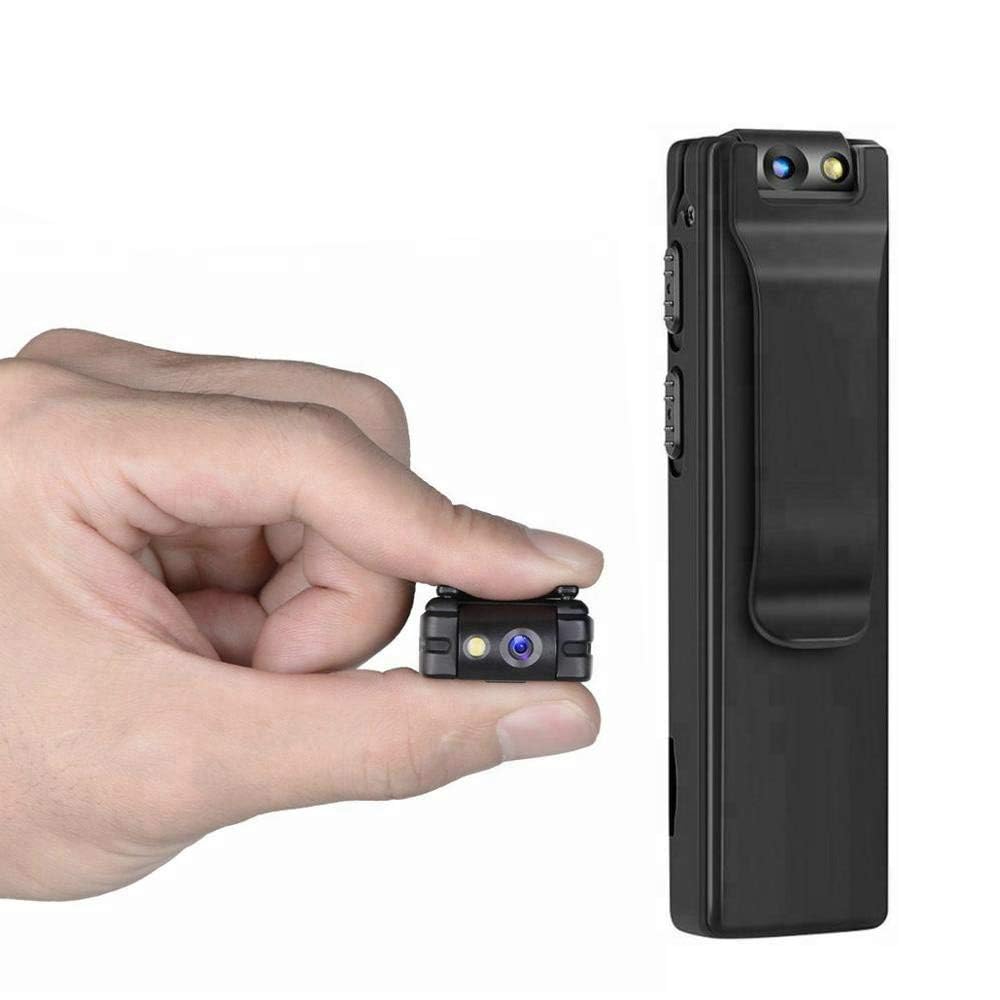
Image: Illustration of the CAPOXO camera's motion detection feature, showing it capturing activity in a room.
5.4 Night Lamp Modua
The camera is equipped with white LED lights to enhance visibility and recording quality in low-light or dark environments.
- To activate the night lamp, slide the "ON -> LAMP" switch to the "LAMP" position.
- To deactivate, slide the switch back to the "ON" position.
5.5 Argazkiak ateratzea
- Ziurtatu kamera piztuta dagoela.
- Press the "PHOTO" button once to take a still image. The indicator light may flash briefly.
- Photos are saved to the Micro SD card.
5.6 ViewGrabazioak
- Itzali kamera.
- Remove the Micro SD card from the camera.
- Insert the Micro SD card into a computer's card reader or a compatible device.
- Sartu files on the Micro SD card to view your recorded videos and photos.

Image: The CAPOXO camera shown in different usage environments, including an office, car, laboratory, and home, demonstrating its versatility.

Image: The CAPOXO camera depicted in diverse settings such as business meetings, family gatherings, children playing, and outdoor adventures, illustrating its broad application.
6. Mantentzea
- Garbiketa: Use a soft, dry cloth to clean the camera body. Do not use liquid cleaners or solvents.
- Lenteen zainketa: Gently wipe the lens with a microfiber cloth designed for optics. Avoid touching the lens with bare fingers.
- Biltegiratzea: Gorde kamera leku fresko eta lehor batean, eguzki-argitik eta muturreko tenperaturetatik babestuta.
- Bateriaren iraupena: Bateriaren iraupena luzatzeko, saihestu bateria maiz erabat deskargatzea. Kargatu aldizka, denbora luzez erabiltzen ez baduzu ere.
- SD Txartela Kudeatzeko: Regularly back up important recordings and format the Micro SD card periodically to maintain optimal performance and prevent data corruption.
7. Arazoak
Kamera Ez Pizten
- Ensure the battery is charged. Connect the camera to a charger for at least 1 hour.
- Egiaztatu ON/OFF etengailua "ON" posizioan dagoela.
Ezin da bideoa grabatu
- Check if a Micro SD card is properly inserted.
- Ensure the Micro SD card has sufficient free space.
- Verify the Micro SD card is Class 10 and within the supported capacity (16GB, 32GB, 64GB).
- Format the Micro SD card if it's a new card or if you encounter issues.
Bideoaren kalitate eskasa
- Ziurtatu kameraren lentea garbi eta orbanik edo hautsik gabe dagoela.
- Check lighting conditions. Use the night lamp argi gutxiko inguruneetan.
Mugimendu-detekzioa ez dabil
- Ensure the camera is powered on and in recording mode.
- Verify there are no obstructions blocking the camera's view.
Camera Unresponsive (Reset)
- If the camera becomes unresponsive, locate the "RESET" button (often a small pinhole).
- Use a thin object (like a paperclip) to gently press and hold the reset button for a few seconds.
- The camera should restart.
8. Zehaztapenak
| Marka | CAPOXO |
| Modelo zenbakia | Capoxo-A-Cctv-Camera |
| Bideo Harrapaketa Ebazpena | 1080p full HD |
| Konektibitate Teknologia | Wired (USB for charging/data transfer) |
| Flash memoria mota | Micro SD (supports 16GB, 32GB, 64GB Class 10) |
| Bideo Harrapaketa formatua | AVI |
| Onartutako audio formatua | AAC |
| Ezaugarri bereziak | Motion Detection, Night Lamp, HD Resolution, 90° Rotatable Lens |
| Bateriaren iraupena | 3 ordu arte (karga osoa egin ondoren) |
| Kargatzeko sarrera | 5V/1A (charger not included) |
| Neurriak (LxWxH) | 9 x 2.5 x 1 zentimetro |
| Elementuaren pisua | 250 g |
| Dakarten osagaiak | Camera, USB Cable, Manual |
9. Bermea eta Laguntza
For warranty information or technical support, please refer to the contact details provided with your purchase documentation or visit the official CAPOXO webgunea.
Gorde erosketaren egiaztagiria bermearen erreklamazioetarako.


