1. Sarrera
This manual provides essential information for the safe and efficient operation of your THOMSON 43FG2S14 43-inch Full HD Google Smart TV. Please read it thoroughly before using the television and retain it for future reference.

1.1. irudia: Aurrealdea view of the THOMSON 43FG2S14 TV.
Ezaugarri nagusiak:
- Full HD bereizmena: Experience clear and detailed images.
- Google TV: Personalized Smart TV experience with recommendations and multiple user profiles. Access content from various streaming services.
- Google Cast: Wirelessly stream movies, music, and videos from compatible devices.
- Backlit Premium Remote Control: Easy navigation even in low light, with a customizable favorite button.
- Triple Tuner (DVB-T, DVB-S, DVB-C): Receive TV signals via terrestrial antenna, satellite, or cable without additional equipment.
- Dolby Audio: Enjoy a dynamic sound experience with clear dialogue and immersive surround sound.
- Konektibitatea: Multiple HDMI and USB ports, Bluetooth 5.1, Wi-Fi.
2. Konfigurazioa
2.1 Desontziratzea eta kokatzea
Carefully remove the TV from its packaging. It is recommended to have two people for this process. Place the TV on a stable, flat surface or mount it on a wall using a compatible VESA mount (not included). Ensure adequate ventilation around the TV.

Figure 2.1: TV dimensions for placement planning.
2.2 Gailuak konektatzea
Connect your external devices such as set-top boxes, gaming consoles, or Blu-ray players to the TV's input ports. Refer to the diagram below for port locations.

2.2. Irudia: Atzealdea view with connection ports.
- HDMI atakak (x3): For high-definition audio and video devices. One port supports ARC (Audio Return Channel).
- USB atakak (x2): USB biltegiratze gailuak konektatzeko, multimedia erreproduzitzeko edo softwarea eguneratzeko.
- LAN ataka: Kable bidezko internet konexiorako.
- Antena sarrera: Connect your terrestrial antenna for DVB-T reception.
- Satelitearen sarrera: Connect your satellite dish for DVB-S reception.
- CI+ zirrikitua: For inserting a Conditional Access Module (CAM) and smart card for encrypted channels.
- Audio irteera (optikoa): Kanpoko audio sistemetara konektatzeko.
- AV IN: Bideo konposatu eta audio estereo kableak erabiliz gailu zaharragoak konektatzeko.
2.3 Hasierako piztea eta lehen konfigurazioa
After connecting all necessary cables, plug the power cord into an electrical outlet. Press the power button on the remote control or the TV. The TV will guide you through the initial setup process, including language selection, network connection (Wi-Fi or LAN), Google account login, and channel scanning.
3. Funtzionamendu-argibideak
3.1 Google TV interfazea
Your THOMSON TV features the Google TV operating system, which organizes content from your various streaming services and apps into a personalized interface. You can create multiple user profiles gomendio pertsonalizatuetarako.
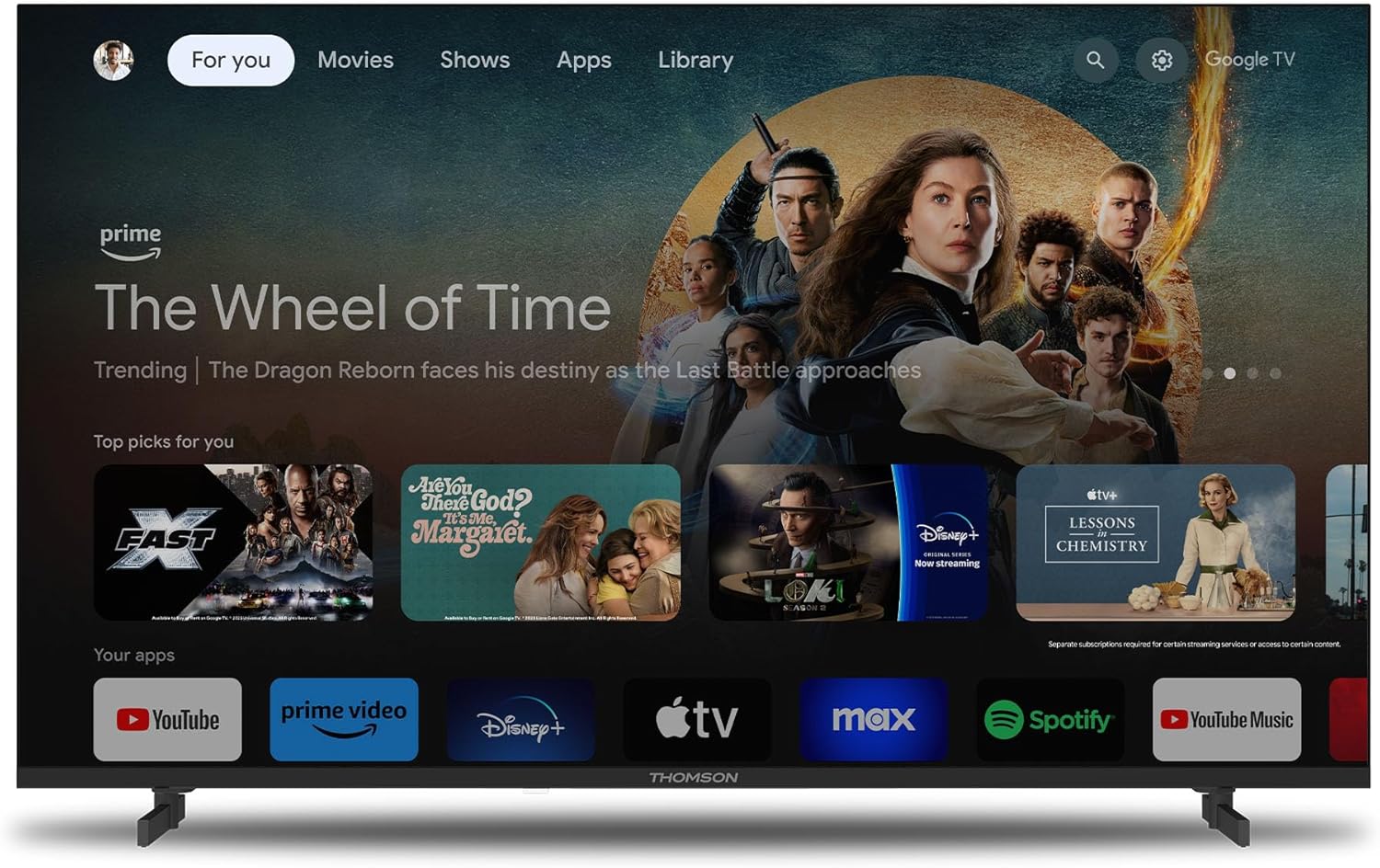
Figure 3.1: Google TV home screen.
3.2 Urruneko kontrolaren erabilera
The included remote control is backlit for easy use in dim lighting. It features dedicated buttons for popular streaming services and a customizable 'Favorite' button (star icon) to quickly access your preferred application.
3.3 Google Cast Functionality
Utilize Google Cast to wirelessly stream content from your compatible smartphone, tablet, or computer directly to your TV screen. Ensure both devices are connected to the same Wi-Fi network.

Figure 3.2: Google Cast in action.
3.4 Dolby Audio Experience
The TV integrates Dolby Audio technology to provide a rich and dynamic sound experience. This enhances dialogue clarity and creates an immersive audio environment for movies, music, and games.

Figure 3.3: Enhanced audio with Dolby Audio.
4. Mantentzea
4.1 Telebista garbitzea
Garbitu aurretik, deskonektatu telebista entxufetik. Erabili zapi leun eta lehor bat pantaila eta kabinetea garbitzeko. Orban egoskorrak izanez gero, garbitu astiro-astiro.ampen the cloth with water or a mild, non-abrasive screen cleaner. Never spray liquid directly onto the screen or cabinet.
4.2 Software eguneraketak
Your TV may receive software updates periodically to improve performance and add new features. Ensure your TV is connected to the internet to receive these updates automatically or check for them manually through the TV's settings menu.
5. Arazoak
Telebistarekin arazoak badituzu, mesedez, kontsultatu honako arazo eta irtenbide ohikoenak laguntza-zerbitzura jo aurretik.
| Arazoa | Kausa posiblea | Irtenbidea |
|---|---|---|
| Telebista ez da pizten. | No power, remote control batteries low. | Check power cord connection. Ensure outlet has power. Replace remote control batteries. |
| Ez dago irudirik, baina soinua badago. | Incorrect input source, loose HDMI cable. | Press the 'Source' button on the remote to select the correct input. Check HDMI cable connections. |
| Soinurik ez, baina irudia badago. | Volume muted, external audio system issue. | Unmute the TV or increase volume. Check connections to external audio systems. |
| Ezin da wifira konektatu. | Incorrect password, router issue, TV too far from router. | Egiaztatu Wi-Fi pasahitza. Berrabiarazi bideratzailea. Gerturatu telebista bideratzailera edo erabili kable bidezko konexioa. |
| Urrutiko agintea ez da erantzuten. | Batteries low, obstruction, pairing issue. | Replace batteries. Remove any obstructions between remote and TV. Re-pair the remote if it's a Bluetooth remote. |
6. Zehaztapenak
Detailed technical specifications for the THOMSON 43FG2S14 TV:
- Marka: Thomson
- Modelo zenbakia: 43FG2S14
- Pantailaren tamaina: 43 hazbete (109 cm)
- Bistaratzeko teknologia: LED
- Ebazpena: 1080p Full HD (1920 x 1080)
- Freskatze-tasa: 60 Hz
- Kontraste-erlazioa: 1000:1
- Sistema eragilea: Google TV
- Audio Teknologia: Dolby Audio, 5.1 Surround Configuration
- Sintonizatzaileak: DVB-T (Terrestrial), DVB-S (Satellite), DVB-C (Cable)
- Konektibitatea:
- 3 x HDMI ports (HDMI 1.4, one with ARC)
- 2 x USB ataka
- Bluetooth 5.1
- Wi-Fi
- LAN (Ethernet) ataka
- Audio Irteera Optikoa
- AV Sartu
- CI+ zirrikitua
- Aspektu-erlazioa: 16:9
- Muntatze mota: Horman muntatzeko modukoa (VESA bateragarria)
- Produktuaren neurriak (L x W x H): 95.5 x 8.5 x 55.5 cm
- Pisua: 6 kg
- Dakarten osagaiak: Urruneko kontrola
7. Bermea eta Laguntza
7.1 Produktuaren bermea
Your THOMSON 43FG2S14 TV comes with a 3 urteko bermea, ensuring the quality and reliability of the product. Please retain your proof of purchase for warranty claims.
7.2 Bezeroarentzako laguntza
For further assistance, technical support, or warranty inquiries, please refer to the contact information provided with your product packaging or visit the official Thomson support website. When contacting support, please have your model number (43FG2S14) and purchase details ready.