1. Sarrera
Thank you for choosing the EvoFox Ronin Wired Mechanical Gaming Keyboard. This manual provides detailed instructions for setting up, operating, and maintaining your keyboard to ensure optimal performance and longevity. The EvoFox Ronin is designed for a superior typing and gaming experience, featuring advanced sound dampening, customizable switches, and dynamic RGB lighting.

Image 1.1: EvoFox Ronin Wired Mechanical Gaming Keyboard (Black)
Ezaugarri nagusiak:
- 9-Layer Gasket Structure: Advanced design for reduced noise, improved stability, and enhanced tactile feedback.
- Hot-Swappable Outemu Red Silent Switches: Customizable, durable, and smooth typing experience with included switch puller.
- Tekla bakoitzeko RGB atzeko argiztapena: 21 effects and Audio Sync Mode for personalized and immersive lighting.
- Dedicated Volume Knob: Convenient control over audio levels.
- Powerful Windows Software: Program keys, create macros, control backlighting, and manage profiles with onboard memory.
- Plataforma arteko bateragarritasuna: Easily switch between Windows and Mac modes.
- Detachable Braided USB-C Cable: Robust 1.5m cable with EMI ring for reliable connection and portability.
2. Paketearen edukia
Mesedez, egiaztatu elementu guztiak zure paketean daudela:
- 1 x EvoFox Ronin Mechanical Gaming Keyboard
- 1 x Keycap-erauigailu
- 4 x Outemu Red Switches (Spare)
- 1 x Erabiltzailearen eskuliburua
3. Produktua amaitu daview
3.1 Gasket Structure
The EvoFox Ronin features an advanced 9-layer gasket structure. This design incorporates silicone gaskets, a mounting plate, and multiple layers of vibration and sound dampening materials to provide a stable, quiet, and comfortable typing experience by minimizing unwanted noise and resonance.
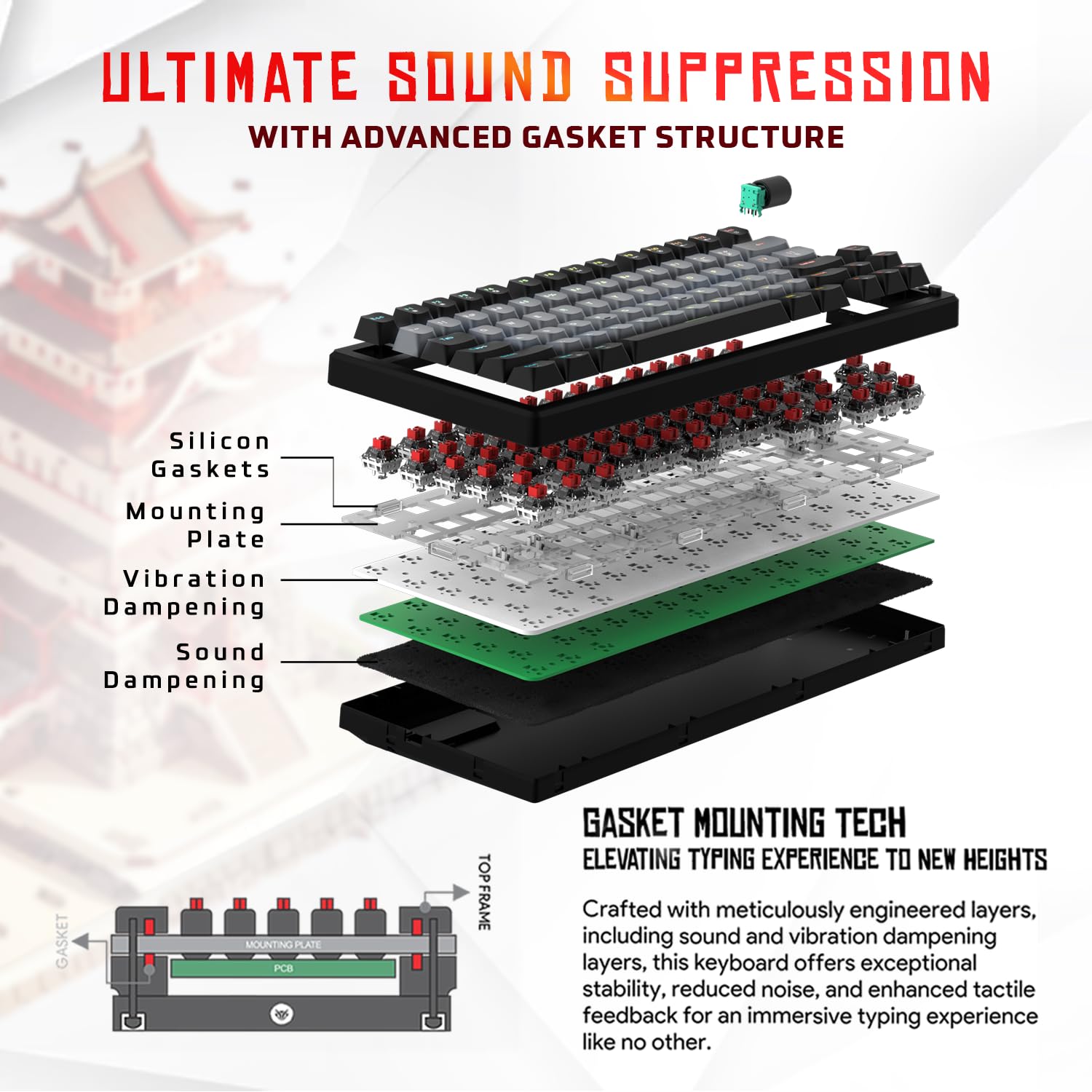
3.1. irudia: Lehertua view of the 9-layer gasket structure, showing silicone gaskets, mounting plate, and dampgeruzak lotzen.
3.2 Outemu Red Silent Switches
The keyboard is equipped with Outemu Red Dust Proof Switches, known for their linear and silent operation. These switches are hot-swappable, allowing users to easily replace them with other compatible 3-pin mechanical switches without soldering, enabling full customization of the typing feel.
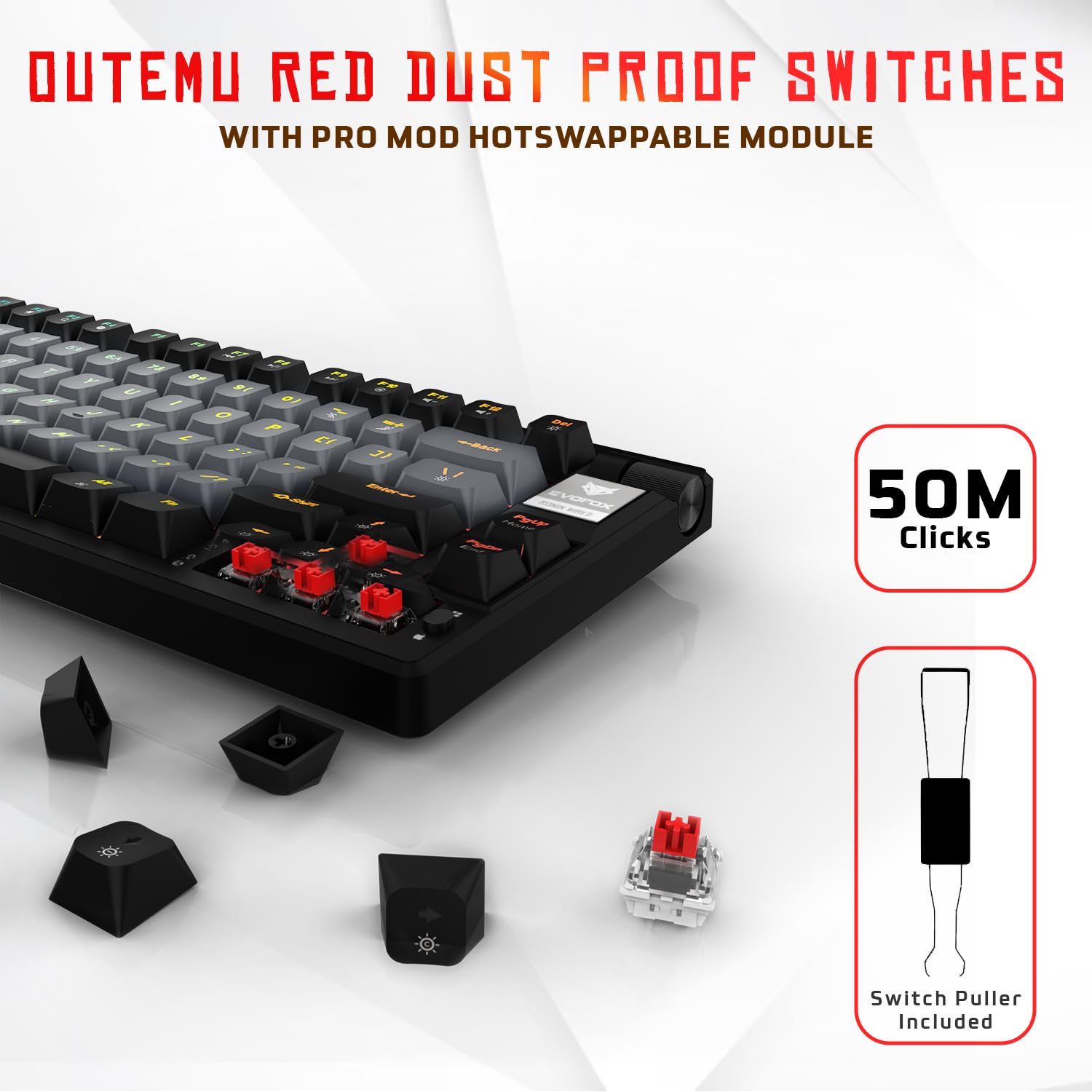
Image 3.2: Close-up of Outemu Red switches and the included switch puller, demonstrating hot-swappable functionality.
3.3 Per-Key RGB Backlighting
Each key on the EvoFox Ronin features individual RGB backlighting, offering 16 million colors and 21 pre-set lighting effects. The lighting can be customized directly on the keyboard or through the dedicated software, including an Audio Sync Mode that reacts to sound.

Image 3.3: The EvoFox Ronin keyboard showcasing its customizable per-key RGB backlighting.
3.4 Dedicated Volume Knob
A metal volume knob is integrated into the keyboard for quick and precise audio adjustments. Rotate to change volume, and press to mute/unmute.
3.5 USB-C kable desmuntagarria
The keyboard connects via a robust 1.5-meter braided USB-C cable, which is detachable for easy portability and storage. The cable includes an EMI ring to minimize signal interference.

Image 3.4: Features of the EvoFox Ronin, including the volume knob, detachable USB-C cable, and double-height adjustable legs.
4. Konfiguratzeko argibideak
Follow these steps to set up your EvoFox Ronin keyboard:
- Deskonprimitu teklatua: Kontu handiz atera teklatua eta osagarri guztiak paketetik.
- Konektatu USB-C kablea: Sartu emandako kablearen USB-C muturra teklatuaren atzealdeko atakan.
- Konektatu ordenagailura: Plug the USB-A end of the cable into an available USB port on your computer (PC or Mac).
- Gidariaren instalazioa: The keyboard is plug-and-play. Your operating system should automatically detect and install the necessary drivers.
- Optional Software Installation: For advanced customization, download the dedicated Windows software from the official EvoFox webgunea.
5. Funtzionamendu-argibideak
5.1 Oinarrizko tekla funtzioak
The EvoFox Ronin functions as a standard TKL (Tenkeyless) keyboard. All keys perform their labeled functions. The keyboard supports N-Key Rollover, ensuring every key press is registered accurately, even during rapid input.
5.2 Multimedia eta funtzio teklak
Access multimedia and additional functions by pressing the Fn key in combination with the designated F-keys or other keys. Refer to the keycap legends for specific functions (e.g., Fn + F1 for media player, Fn + F2 for volume down).
5.3 RGB argiztapenaren kontrola
You can control the RGB lighting directly from the keyboard:
- Aldatu ondorioak: Erabili Fn + \| 21 argiztapen-efektu desberdinen artean ziklatzeko.
- Doitu distira: Erabili Fn + Gora gezia distira handitzeko eta Fn + Behera gezia distira gutxitzeko.
- Abiadura doitzea: Erabili Fn + Ezkerreko Gezia to decrease effect speed and Fn + Eskuineko gezia to increase effect speed.
- Audio sinkronizazio modua: Activate specific modes that react to audio input.
5.4 Softwarearen pertsonalizazioa
The dedicated Windows software allows for comprehensive customization:
- Gakoen programazioa: Edozein tekla funtzio desberdin batera birmapeatu.
- Makroen sorrera: Record and assign complex key sequences to a single key.
- Backlighting Effects: Fine-tune RGB colors, effects, brightness, and speed.
- Profile Kudeaketa: Sortu eta gorde hainbat profesionalfileaplikazio edo joko desberdinetarako.
- Bozketa-tasa: Adjust the polling rate up to 1000Hz.

Image 5.1: Screenshot of the EvoFox Ronin's dedicated software, showing options for light settings, button settings, and macro management.
5.5 Cross-Platform Compatibility
The keyboard supports both Windows and Mac operating systems. Use the designated key combination (typically Fn + Irabazi or similar, refer to keycap legends) to switch between modes, ensuring correct key mapping for your OS.
6. Mantentzea
6.1 Teklatua garbitzea
Teklatuaren itxura eta funtzionaltasuna mantentzeko:
- Deskonektatu teklatua ordenagailutik garbitu aurretik.
- Erabili aire konprimituzko lata bat tekla-tapoien arteko hautsa eta hondakinak kentzeko.
- Garbitu teklak eta teklatuaren gainazala oihal leun eta apur batekinamp oihal. Saihestu gehiegizko hezetasuna.
- Ez erabili produktu kimiko gogorrik edo garbigailu urratzailea.
6.2 Etengailuak ordezkatzea
The EvoFox Ronin features hot-swappable switches, allowing for easy replacement without soldering:
- Deskonektatu teklatua ordenagailutik.
- Erabili barneko tekla-ateragailua nahi duzun tekla-ateragailua astiro-astiro kentzeko.
- Erabili barneko etengailu-ateragailua etengailuaren goiko eta beheko klipak arretaz heltzeko eta zuzen gora tiratzeko.
- Align the pins of the new switch with the holes on the PCB and gently press it down until it clicks into place. Ensure the pins are not bent.
- Ordeztu giltza-tapoia.

Image 6.1: A keycap being removed from the keyboard using a keycap puller.
7. Arazoak
If you encounter issues with your EvoFox Ronin keyboard, refer to the following common solutions:
- Teklatuak ez du erantzuten:
- Ziurtatu USB-C kablea ondo konektatuta dagoela teklatura eta ordenagailura.
- Saiatu teklatua ordenagailuko beste USB ataka batera konektatzen.
- Probatu teklatua beste ordenagailu batean ordenagailuaren arazo espezifiko bat baztertzeko.
- Berrabiarazi ordenagailua.
- RGB argiztapena ez dabil/okerra:
- Check the on-board lighting controls (Fn key combinations) to ensure brightness is not set to zero or an effect is not disabled.
- Softwarea erabiltzen ari bazara, ziurtatu martxan dagoela eta pro zuzena duzula.file aktibo dago.
- Reinstall the keyboard software if issues persist.
- Giltzak ez dira erregistratzen:
- Ziurtatu ez dagoela hondakinik teklaren edo etengailuaren azpian.
- If a specific key is not working, try replacing its switch (refer to Section 6.2).
- Check for bent pins on the switch if you recently replaced one.
- Software Issues (e.g., Antivirus Flagging):
- Ensure you download the software from the official EvoFox website to avoid unofficial versions.
- If your antivirus flags the software, you may need to add an exception for the software's executable file. Proceed with caution and only if you trust the source.
- Contact EvoFox support for the latest software version or assistance.
8. Zehaztapenak
| Ezaugarri | Xehetasuna |
|---|---|
| Marka | EvoFox |
| Ereduaren izena | EvoFox Ronin TKL kableatua |
| Teklatuaren deskribapena | Mekanikoa |
| Konektibitate Teknologia | USB-C (kable bidezkoa) |
| Etengailuak | Outemu Red Silent Dust Proof Switches (Hot-Swappable) |
| Atzeko argiztapena | Per-Key RGB (16 Million Colors, 21 Effects, Audio Sync Mode) |
| Bozketa-tasa | 1000Hz arte |
| Key Rollover | N-Key Rollover (All Anti-Ghosting Keys) |
| Ezaugarri bereziak | Advanced Gasket Structure, Compact TKL Design, Multimedia Keys, Pro Mod Hotswap Module, Powerful Windows Software, Dedicated Volume Controller |
| Gailu bateragarriak | Ordenagailu eramangarria, ordenagailua |
| Hardware Plataforma | PC/Mac/Linux/Unix |
| Kablearen luzera | 1.5m Detachable Braided Type-C with EMI Ring |
| Materiala | Plastikoa |
| Produktuaren neurriak | 32 x 13.5 x 2.6 cm |
| Elementuaren pisua | 640 g |
| Jatorrizko Herrialdea | Txina |
9. Bermea eta Laguntza
The EvoFox Ronin Mechanical Gaming Keyboard comes with a standard manufacturer's warranty. Please refer to the warranty card included in your package for specific terms and conditions, including warranty period and coverage details.
For technical support, troubleshooting assistance, or warranty claims, please contact EvoFox customer support. You can find contact information on the official EvoFox website or through the manufacturer, Allied Electronics & Magnetics Private Limited.
Fabrikatzailea: Allied Electronics & Magnetics Private Limited
Helbidea: C-64/4, Okhla Phase - 2, New Delhi - 110020


