
1. Sarrera
The ASUS VY249HGR Eye Care Gaming monitor is engineered for optimal visual comfort and performance. Featuring an IPS Full HD panel, it delivers exceptional visuals with wide viewing angles. This monitor is suitable for various applications including e-learning, professional work, and entertainment. Its combination of a 120 Hz (OC) refresh rate and Adaptive Sync support ensures consistently smooth visuals, free from tearing and stuttering. Integrated ASUS Eye Care Plus technology prioritizes user well-being, providing comfortable viewing experiences during extended use.

The IPS panel offers ultra-wide 178-degree viewing angles, ensuring consistent color and brightness from any perspective.
2. Zer dago kutxan
Upon unboxing your ASUS VY249HGR monitor, please verify that all the following components are included:
- VY249HGR Monitor
- Hasierako gida azkarra
- Berme Txartela
- Elikatze kablea
- L formako bihurkina
- HDMI kablea
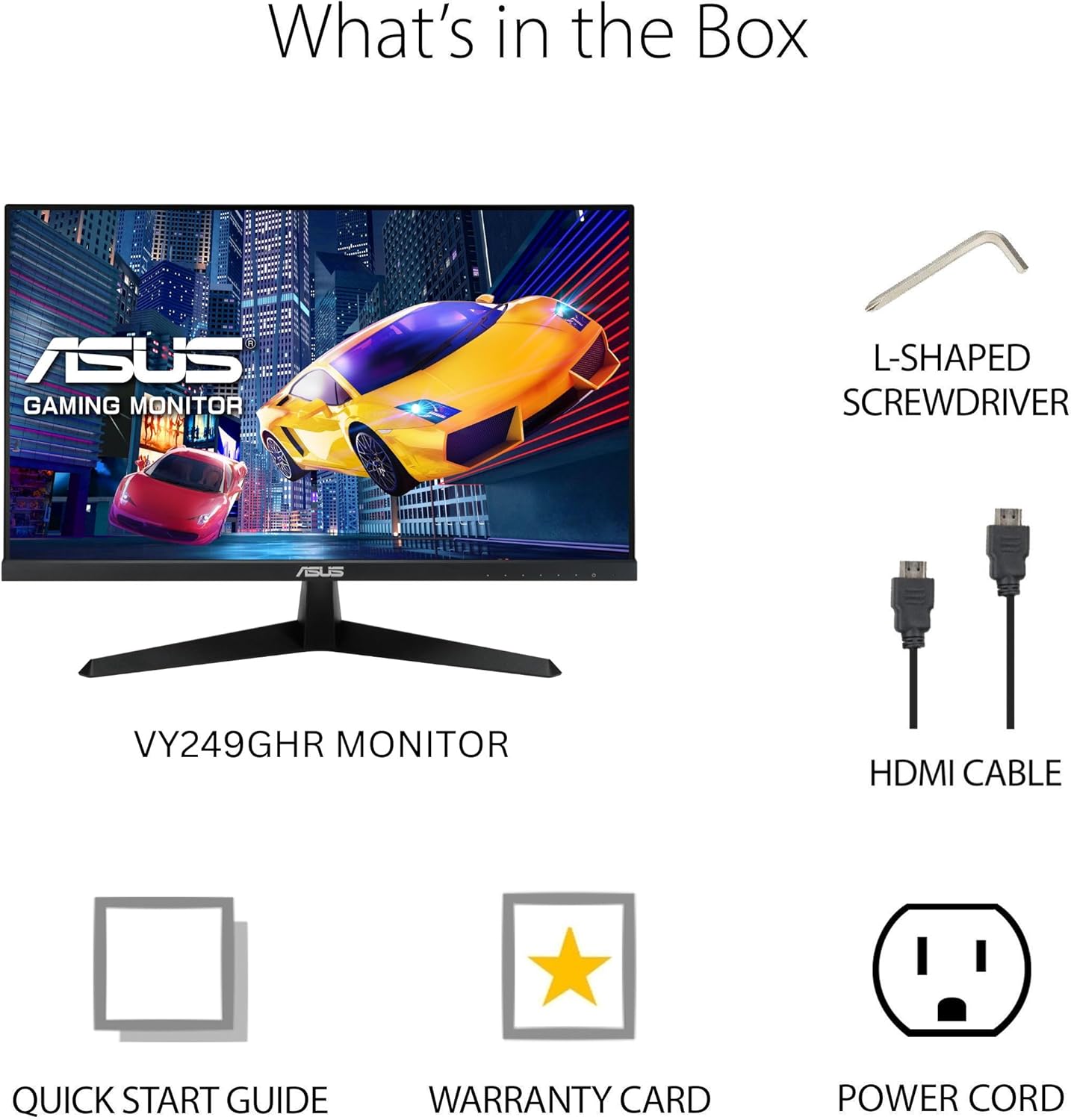
Visual representation of the items included in the monitor packaging.
3. Konfigurazioa
3.1 Monitorearen euskarria muntatzea
- Carefully remove the monitor from its packaging, keeping it protected.
- Attach the base to the monitor stand. The base is designed for easy, tool-free attachment. Align the stand with the slot on the back of the monitor and push until it clicks into place.
- Secure the base to the stand using the integrated screw at the bottom of the base. This screw often has a foldable handle for hand-tightening.
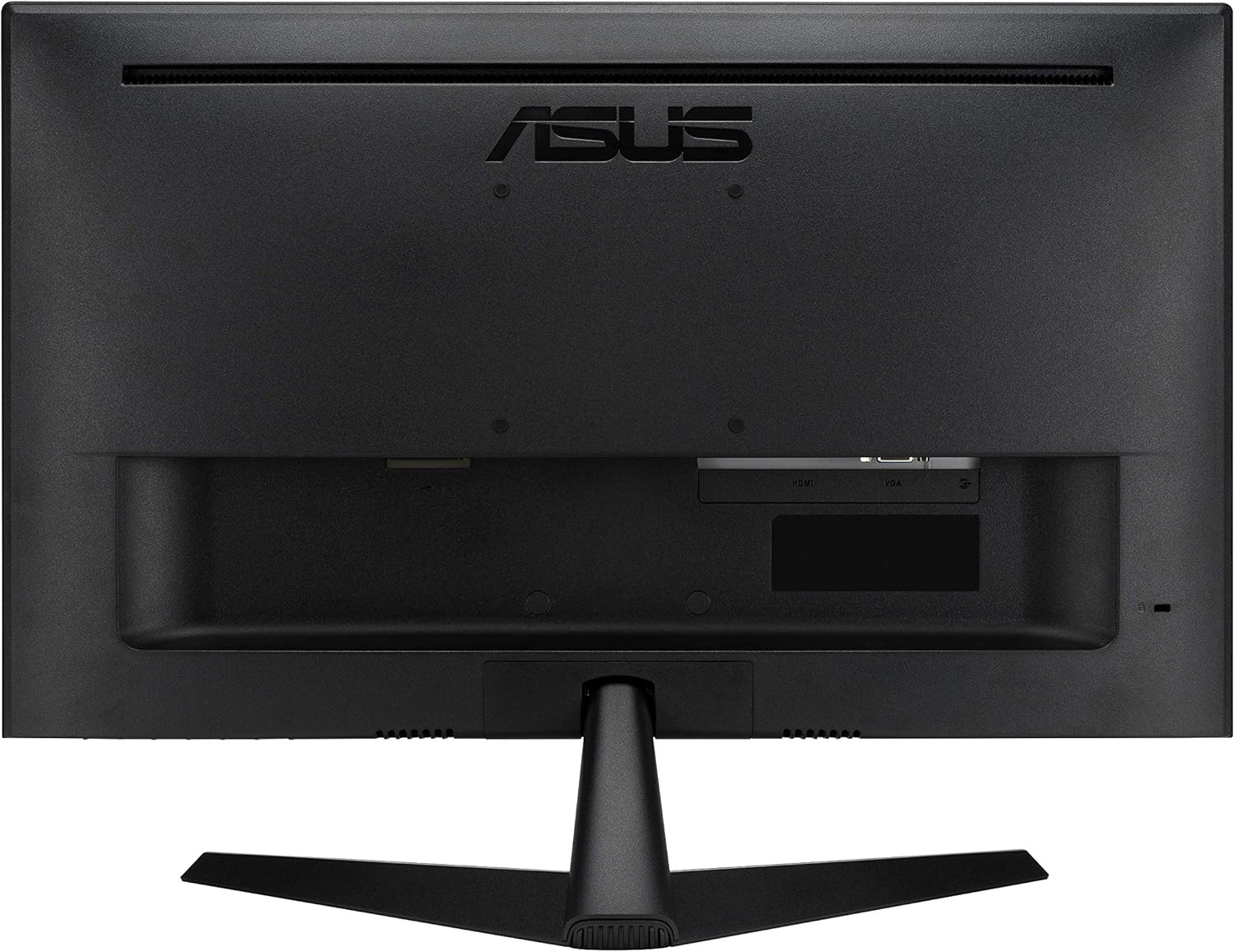
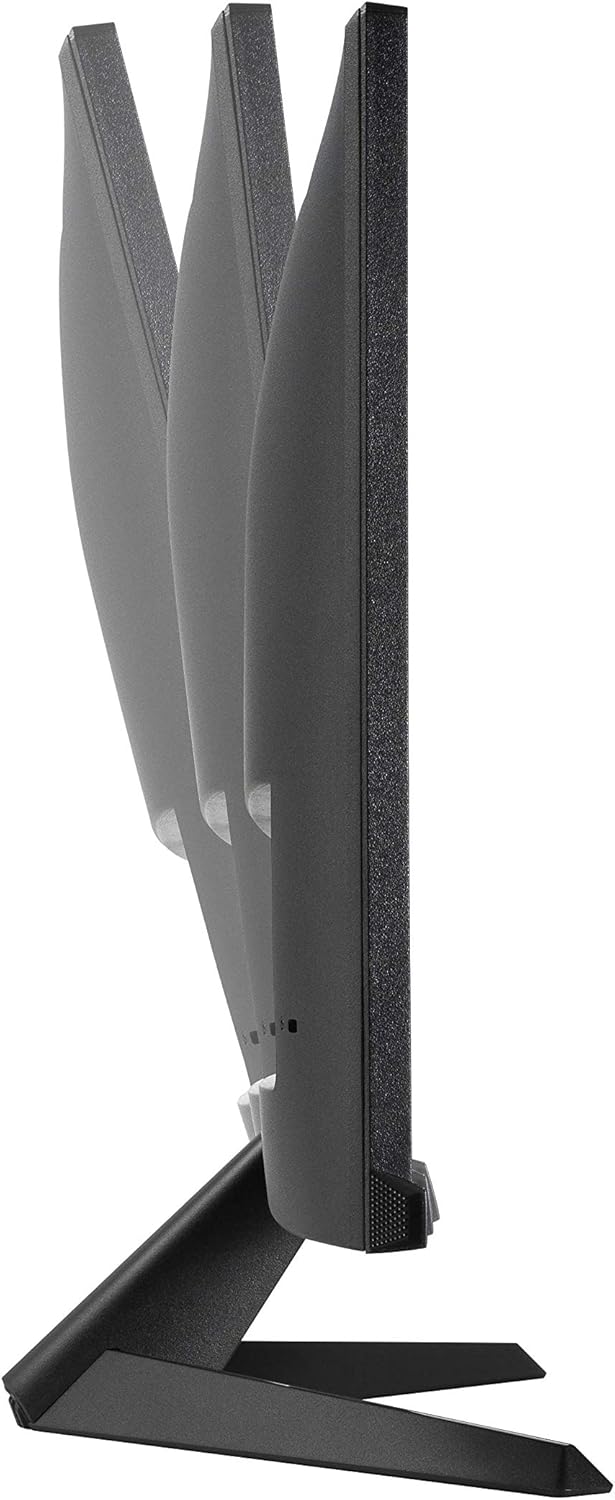
Monitorearen euskarriak inklinazioa doitzeko aukera ematen du zure optimizazioa lortzeko. viewangelua.
3.2 Konektatzeko kableak
The ASUS VY249HGR monitor offers multiple connectivity options. Identify the appropriate ports on the back of your monitor:
- HDMI ataka: For digital video and audio input. Use the included HDMI cable to connect to your computer or other HDMI-enabled devices.
- VGA ataka: For analog video input. A VGA cable may be included for compatibility with older systems.
- Audio jack-a (3.5 mm): For audio input from your device if not using HDMI audio, or for connecting external speakers/headphones.
- Potentzia sarrera: Connect the power cord to this port and then to a power outlet.
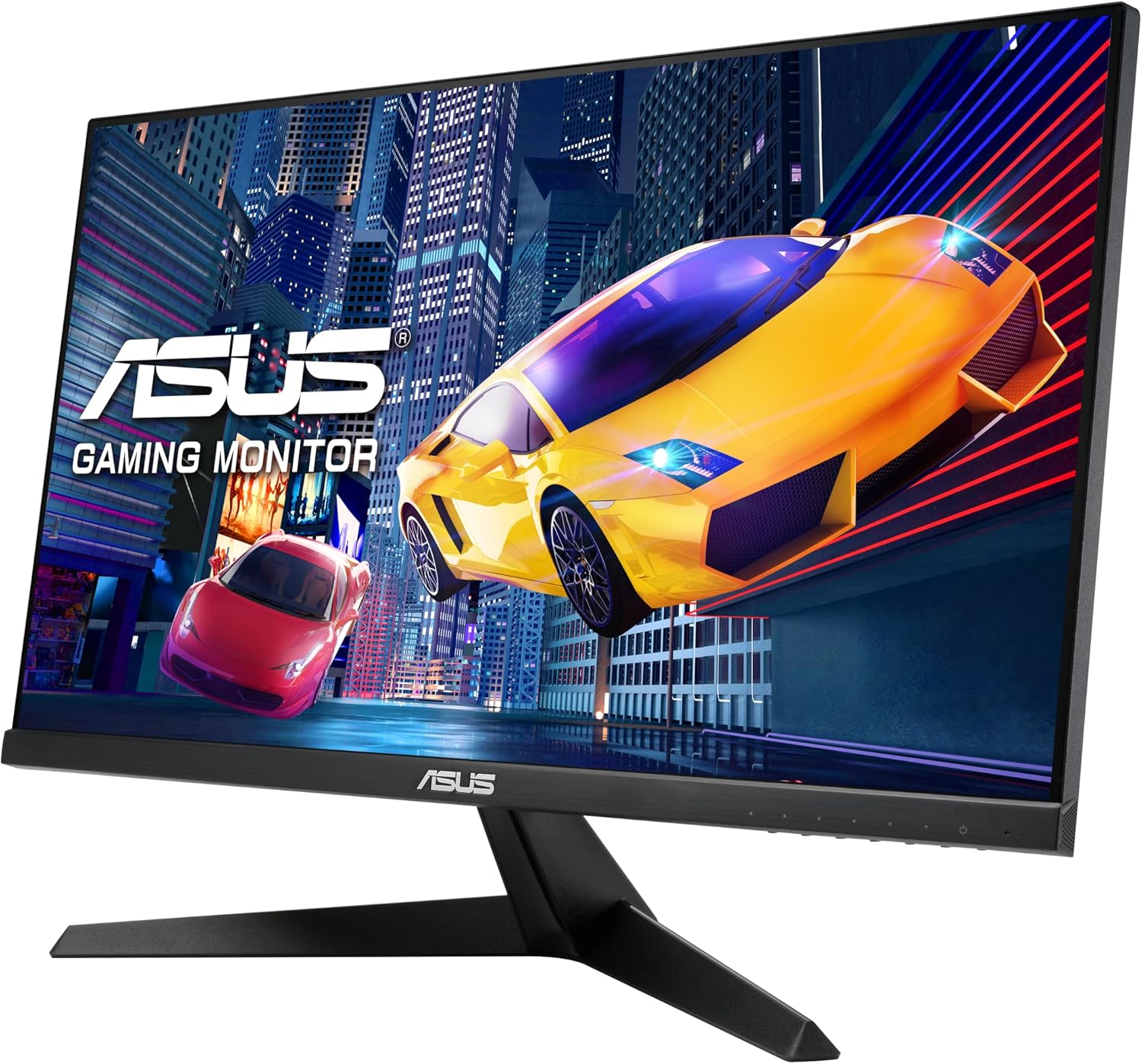
Atzekoa view of the monitor, highlighting the various input ports for connectivity.
Xehetasun bat view of the HDMI, VGA, and audio input ports, along with the power input.
4. Funtzionamendu-argibideak
The monitor's On-Screen Display (OSD) menu allows you to adjust various settings for optimal performance and viewing comfort. The control buttons are located on the bottom right side of the monitor.
4.1 OSD menuan nabigatzea
- Press any OSD button to activate the menu.
- Use the navigation buttons (usually arrows) to move through the menu options.
- Press the 'OK' or 'Enter' button to select an option or confirm a setting.
- Use the 'Exit' or 'Back' button to return to the previous menu or exit the OSD.
4.2 Key OSD Settings
- Splendid Modes: Access various preset display modes optimized for different content types (e.g., Scenery, Standard, Theater, Game, Night View, sRGB, Reading, Darkroom). Select the mode that best suits your current activity.
- Argi urdinaren iragazkia: Reduce harmful blue light emissions to prevent eye strain. Multiple levels are available. It is recommended to adjust this setting based on ambient light and personal comfort.

Illustration of the Blue Light Filter feature, showing its effect on screen color temperature.
For more information on TÜV Rheinland certification, visit certipedia.com.
- Kolore ezarpenak: Adjust Brightness, Contrast, Saturation, Color Temperature, and Skin Tone. Experiment with these settings to achieve your preferred visual output.

Demonstration of the Color Augmentation mode, which assists users with color-vision deficiency.
- Doako arrastoa: This setting helps eliminate ghosting in fast-moving images. It is generally recommended to keep it at a level of 60 for optimal performance.
- Adaptive-Sync / FreeSync: This technology synchronizes the monitor's refresh rate with the GPU's frame rate, eliminating screen tearing and stuttering for a smoother gaming experience. Ensure this is enabled for compatible graphics cards.
- GamePlus: Access gaming-specific enhancements such as Crosshair overlays, Timers, FPS Counters, and Display Alignment tools.

Amaituview of GamePlus features including Crosshair, Timer, FPS Counter, and Display Alignment.
5. Ezaugarriak
The ASUS VY249HGR monitor is equipped with several advanced features to enhance your visual experience:
- 23.8" Full HD IPS Panel with 120Hz (OC) Refresh Rate: Experience vibrant colors and wide viewing angles with the IPS panel, combined with a high refresh rate for fluid motion and responsive gameplay.

Visual comparison demonstrating the smoothness of 120Hz refresh rate versus 60Hz.
- SmoothMotion Technology and 1ms MPRT: These technologies work together to eliminate motion blur and ghosting, ensuring crisp and clear video playback and a responsive experience for daily usage and gaming.
- Sinkronizazio egokitzeko euskarria: Provides a tear-free and stutter-free visual experience by synchronizing the monitor's refresh rate with your graphics card's frame rate.
- Eye Care Plus Technology: Includes features like a TÜV Rheinland-certified Adjustable Blue Light Filter and Flicker-Free technology to minimize eye strain during prolonged viewing. It also offers a Color Augmentation mode for users with color-vision deficiency and a Rest Reminder to manage screen time.
- ASUS DisplayWidget Center: An intuitive software interface that allows users to easily change monitor settings directly from their desktop.
6. Mantentzea
Proper maintenance ensures the longevity and optimal performance of your ASUS VY249HGR monitor:
- Pantaila garbitzea: Gently wipe the screen with a soft, lint-free cloth. For stubborn smudges, use a monitor-specific cleaning solution applied to the cloth, not directly to the screen.
- C garbiketaasing: Erabili zapi leun eta lehor bat monitorearen aldea garbitzeko.asing. Saihestu garbitzaile edo disolbatzaile urratzaileak erabiltzea.
- Aireztapena: Ziurtatu monitorearen aireztapen-irekidurak ez daudela blokeatuta gehiegi berotzea saihesteko.
- Manipulazioa: Always handle the monitor by its edges or stand. Avoid pressing on the screen.
- Itzali: When not in use for extended periods, power off the monitor and unplug it from the power outlet.
7. Arazoak
If you encounter issues with your ASUS VY249HGR monitor, refer to the following common troubleshooting steps:
| Arazoa | Kausa posiblea | Irtenbidea |
|---|---|---|
| Ez dago irudirik pantailan | Kable elektrikoa deskonektatuta; bideo-kablea deskonektatuta; sarrera-iturri okerra hautatuta. | Ensure power cable is securely connected. Check video cable (HDMI/VGA) connections. Select the correct input source via the OSD menu. |
| Irudia lausoa edo distortsionatua dago | Incorrect resolution; Loose video cable; Monitor settings (e.g., Trace Free). | Set display resolution to 1920x1080. Reconnect video cable. Adjust "Trace Free" setting in OSD (recommended 60). |
| Pantailaren urratzea edo tartekatzea | Adaptive Sync/FreeSync not enabled or incompatible GPU. | Ensure Adaptive Sync/FreeSync is enabled in the OSD menu and your graphics card settings. Verify GPU compatibility. |
| Eye discomfort | Blue light exposure; Flicker. | Adjust Blue Light Filter level in OSD. Ensure Flicker-Free technology is active (it is by default). Take regular breaks. |
If the issue persists after trying these steps, please contact ASUS customer support for further assistance.
8. Zehaztapenak
Detailed technical specifications for the ASUS VY249HGR monitor:
- Pantailaren tamaina: 23.8 hazbete
- Panel mota: IPS
- Ebazpena: 1920x1080 (HD osoa)
- Pantailaren gehienezko bereizmena: 1920 x 1080 pixel
- Freskatze-tasa: 120Hz (Overclockable)
- Erantzun denbora: 1 ms MPRT
- Aspektu-erlazioa: 16:9
- Pantailaren gainazalaren deskribapena: Matea
- Kolorea: BELTZA
- Elementuaren pisua: 7.5 kilo
- Produktuaren neurriak (LxWxH): 7.3 x 21.3 x 15.6 hazbete
- Fabrikatzailea: ASUS
- Seriea: VY249HGR
- Modelo zenbakia: VY249HGR

Diagram illustrating the physical dimensions of the ASUS VY249HGR monitor.
9. Bermea eta laguntza
Your ASUS VY249HGR monitor comes with a Warranty Card included in the box. Please refer to this card for detailed information regarding your product's warranty coverage and terms.
For technical support, service, or additional product information, please visit the official ASUS support website or contact their customer service. Keep your purchase receipt and serial number handy for faster service.