1. Sarrera
This manual provides instructions for the installation, operation, and maintenance of your TOPBULL 60A MPPT Solar Charge Controller. This intelligent regulator is designed to efficiently manage power flow from solar panels to various battery types, ensuring optimal charging and system protection. Please read this manual thoroughly before installation and use.
2. Ezaugarri nagusiak
- Advanced MPPT Technology: Achieves up to 99% tracking efficiency and 98% peak conversion efficiency for maximum power harvest from solar panels.
- Bolumen automatikoatage Aitortza: Automatikoki 12V edo 24V DC sistema bolumena hautematen dutage.
- Bateriaren bateragarritasun zabala: Supports various deep cycle battery types including Sealed, Gel, Flooded (FLD), Lithium Iron Phosphate (LiFePO4), and AGM batteries. Includes 0V Li-ion battery charging (activation) support.
- Comprehensive Electronic Protections: Built-in safeguards against reverse polarity, battery overcharge, battery overdischarge, overload, short-circuit, TVS lightning, overpower, over-temperature, and reverse current.
- LCD pantaila intuitiboa: Provides real-time solar charging and battery operation information, customizable parameters, and error codes.
- USB portu bikoitzak: Conveniently charge electronic devices (5V, 2.4A total).
- Bero xahutze eraginkorra: Features a durable metal casing and dual high-speed intelligent fans for optimal thermal management, enhancing longevity and performance.
- Tenperatura-konpentsazioa: Automatically adjusts charging and discharging parameters based on ambient temperature to prolong battery life.
3. Produktua amaitu daview
Familiarize yourself with the components and display of the solar charge controller.

3.1. irudia: Aurrealdea view of the TOPBULL 60A MPPT Solar Charge Controller, showing the LCD display and control buttons.
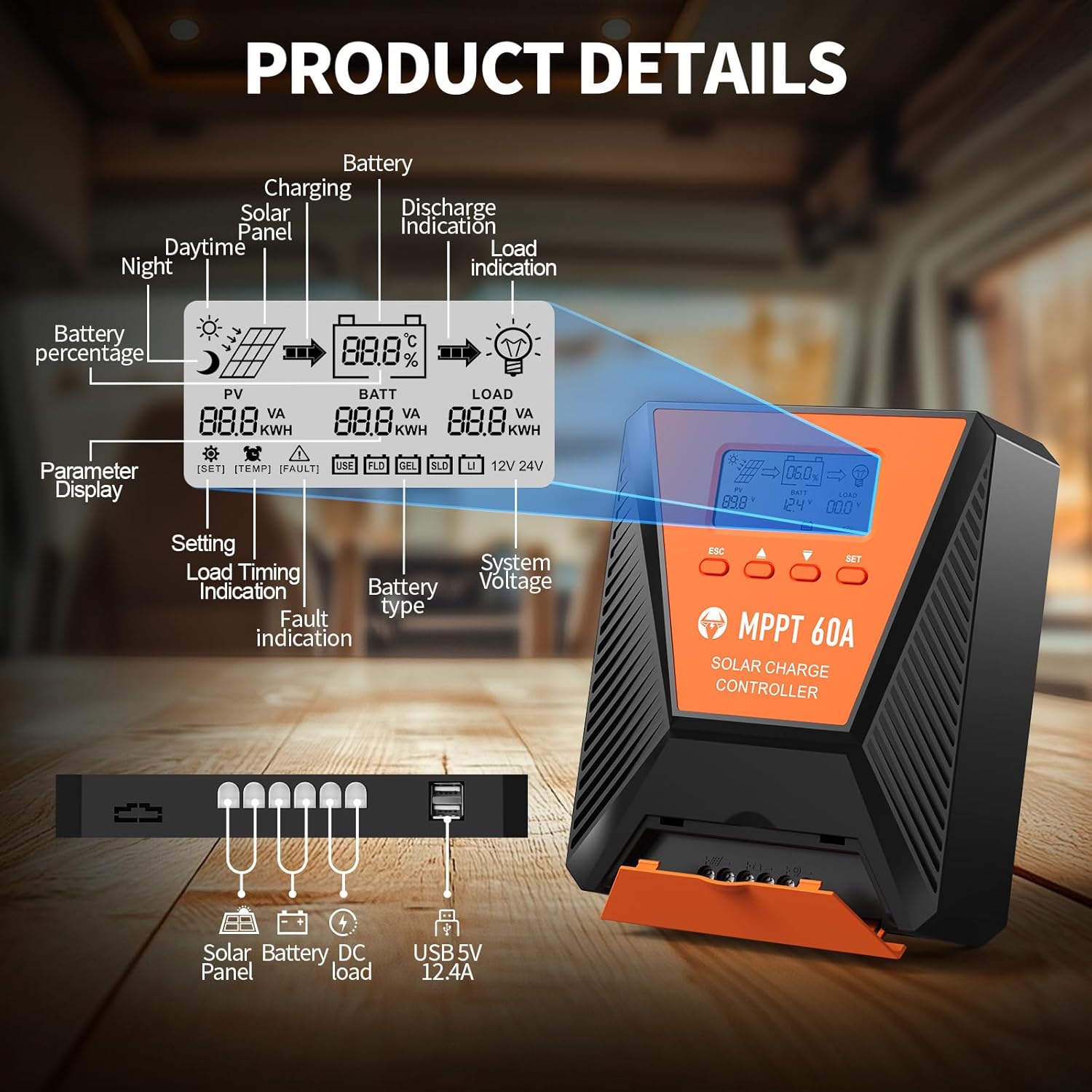
3.2. irudia: Detailed diagram illustrating the LCD display elements and the connection ports at the bottom of the controller. The display shows PV voltage, bateria boltage, load status, battery percentage, and various indicators. The ports include connections for solar panel, battery, DC load, and dual USB 5V 2.4A outputs.
3.1. LCD pantailaren adierazleak
- PV (Photovoltaic): Displays solar panel voltage eta boterea.
- BATT (Battery): Bateria bolumena erakusten dutage, charge status, and type.
- KARGA: Indicates load status and power consumption.
- Bateria Percentage: Visual representation of battery charge level.
- Sistema Boltage: Displays 12V or 24V system recognition.
- Parametroen bistaratzea: Shows current settings and values.
- Akatsen adierazlea: Alerts for system errors.
3.2. Kontrol-botoiak
- ESC: Used to switch load (manual switch) and exit setup menus.
- Gora gezia (▲): Navigates up through main interface pages to view parameters; increases values in setup mode.
- Beheko gezia (▼): Navigates down through main interface pages to view parameters; decreases values in setup mode.
- SET: Enters setting mode, confirms selections, and saves changes. If no key operation for 10 seconds, it exits setting mode automatically.
4. Instalazioa eta konfigurazioa
4.1. Segurtasun-neurriak
- Ensure all connections are correct and secure before applying power.
- Always connect the battery first, then the solar panel, and finally the load. Disconnect in reverse order.
- Instalatu kontrolatzailea ondo aireztatutako leku batean, material sukoietatik eta eguzki-argitik urrun.
- Gehiegi berotzea saihesteko, erabili kable-lodiera egokiak konexio guztietarako.
4.2. Kontrolatzailea muntatzea
Mount the controller vertically on a flat, non-flammable surface using the provided mounting screws. Ensure adequate clearance around the unit for proper airflow and heat dissipation, especially for the cooling fans located on the top.

4.1. irudia: Image showing the dimensions of the controller (approximately 9.0 inches long, 7.3 inches wide, 2.8 inches high) and the included mounting screws and user manual.
4.3. Kableatu konexioak
Follow the connection order carefully to avoid damage to the controller or other components.
- Konektatu bateria: Connect the positive and negative terminals of your battery bank to the corresponding battery terminals on the controller. The controller will automatically detect the system voltage (12V edo 24V).
- Konektatu eguzki-panela: Connect the positive and negative leads from your solar panel array to the solar panel terminals on the controller. Ensure the maximum PV input voltage does not exceed 100VDC. For a 12V system, maximum solar input power is 720W; for a 24V system, it is 1440W.
- Konektatu korronte zuzeneko karga (aukerakoa): Connect your DC loads to the load terminals on the controller. This allows the controller to manage load discharge and provide protection.

4.2. irudia: Wiring diagram illustrating the correct connection sequence: Battery first, then Solar Panel, then DC Load. An optional inverter for AC loads is also shown connected to the battery bank.
4.4. Battery Type Selection
The controller is compatible with various battery types. It is crucial to select the correct battery type for optimal charging and battery longevity. Refer to the display and settings section to adjust this parameter if needed. The controller supports FLD (Flooded), LiFePO4 (Lithium Iron Phosphate), SLD (Sealed Lead-Acid), GEL, and AGM batteries.

4.3. irudia: Illustration showing the controller connected to a battery, with icons representing compatible battery types: LI (Lithium), FLD (Flooded), GEL, SLD (Sealed), and AGM. The controller automatically identifies battery voltage and supports custom parameters, including lithium battery 0V charging.
5. Funtzionamendua
5.1. Monitoring the Display
The LCD display provides real-time information about your solar system. Use the Up (▲) and Down (▼) buttons to cycle through different display screens, showing parameters such as PV voltage, bateria boltage, charging current, load current, and battery state of charge.
5.2. Parametroen ezarpenak
To enter the parameter setting stage:
- Press the "SET" button to enter the setting mode. The value to be adjusted will flash.
- Use the Up (▲) or Down (▼) buttons to adjust the value.
- Press the "SET" button again to confirm and save the new value.
If no button is pressed for 10 seconds in setting mode, the controller will automatically exit without saving changes.
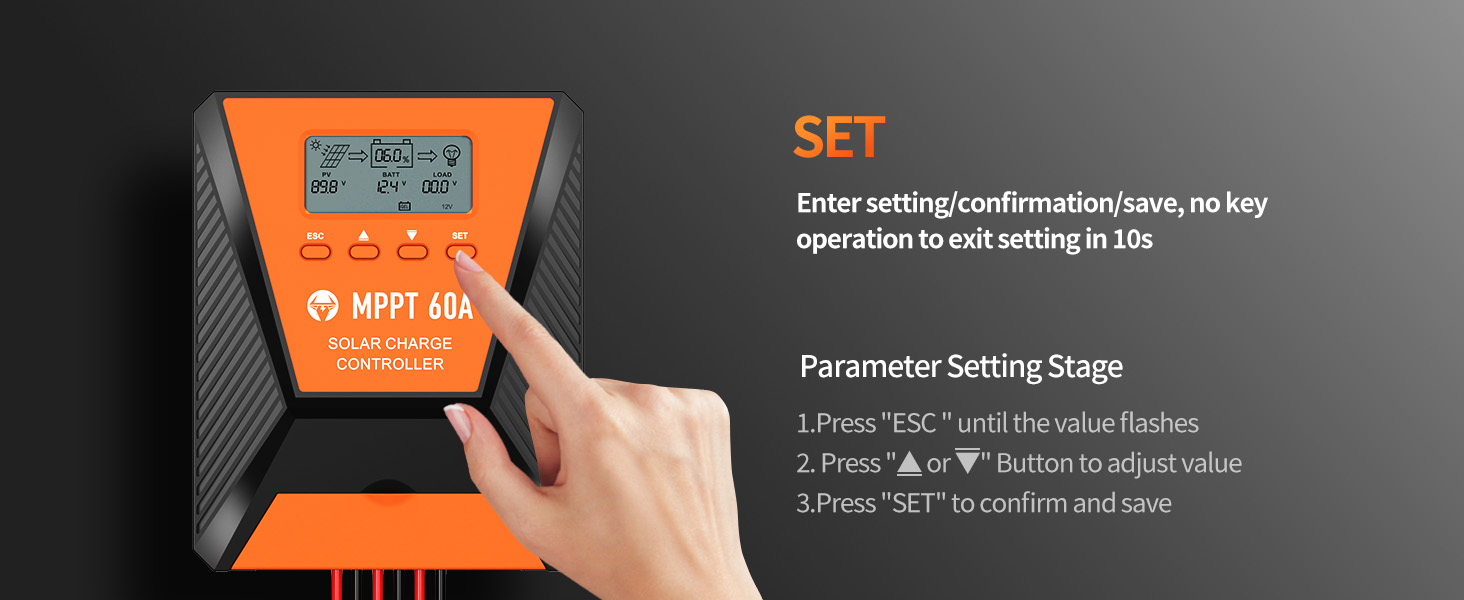
5.1. irudia: Visual guide for using the SET button to enter, adjust, and confirm parameter settings on the controller's LCD display.
5.3. Load Working Modes
The controller supports three distinct load working modes:
- Lighting Time Control Mode (1H-23H): The load automatically turns on or off based on the intensity of sunlight and a set timer.
- Normal OFF Mode (0H): The load remains off. This mode is useful for specific loads or during debugging.
- Normal ON Mode (24H): The load remains continuously on. This mode is suitable for loads requiring a 24-hour power supply.

5.2. irudia: Diagram explaining the three load working modes: Lighting time control (1H-23H), Normal OFF (0H), and Normal ON (24H).
6. Mantentzea
Mantentze-lan erregularrak zure eguzki-karga-kontrolagailuaren iraupena eta errendimendu optimoa bermatzen ditu.
- Ikuskatu konexioak: Periodically check all wiring connections for tightness and corrosion. Loose connections can cause resistance and heat buildup.
- Garbitu kontrolatzailea: Keep the controller clean and free from dust and debris. Ensure the cooling fan vents are unobstructed. Use a dry cloth for cleaning.
- Monitorearen errendimendua: Regularly check the LCD display for normal operation and any error codes. Compare actual performance with expected values.
- Bateriaren ikuskapena: Inspect battery terminals for corrosion and ensure proper ventilation around the batteries.
7. Arazoak
Atal honek zure eguzki-karga-kontrolagailuarekin izan ditzakezun arazo ohikoenak jorratzen ditu.
| Arazoa | Kausa posiblea | Irtenbidea |
|---|---|---|
| No display/Controller not powering on | Bateria ez dago konektatuta edo bolumen baxuatage; reverse polarity; loose wiring. | Egiaztatu bateriaren konexioak eta boltage. Ensure correct polarity. Tighten all wiring. |
| Bateria ez da kargatzen | Solar panel not connected; insufficient sunlight; solar panel fault; incorrect battery type setting. | Verify solar panel connections. Ensure adequate sunlight. Check solar panel output. Confirm correct battery type setting. |
| Karga ez dabil | Load disconnected; overload protection activated; incorrect load working mode. | Check load connections. Reduce load to within controller limits. Adjust load working mode settings. |
| Errore kodea bistaratzen da | Specific system fault (e.g., over-temperature, short-circuit). | Refer to the controller's display for the specific error code and consult the full user manual for detailed explanations and solutions. Address the underlying issue (e.g., reduce temperature, clear short-circuit). |
8. Zehaztapenak
| Parametroa | Balioa |
|---|---|
| Eredua | 60A |
| Sistema Boltage | 12V / 24V aitorpen automatikoa |
| Gehienez PV sarrera boltage | 100VDC |
| Eguzki-energiaren sarrera-potentzia maximoa (12V sistema) | 720W |
| Eguzki-energiaren sarrera-potentzia maximoa (24V sistema) | 1440W |
| Jarraipenaren eraginkortasuna | ≥%99 |
| Bihurketa-eraginkortasun maximoa | Gehienez %98 |
| Onartutako bateria motak | FLD, LiFePO4, SLD, GEL, AGM |
| USB irteera | Dual 5V, 2.4A (Total) |
| Neurriak (gutxi gorabehera) | 10.71 x 8.62 x 4.33 hazbete (Paketea) |
| Elementuaren pisua | 3.36 kilo |
| Materiala | Metala |
| Bistaratzeko mota | LCDa |
9. Bermea eta Laguntza
TOPBULL products are designed for reliability and performance. For warranty information or technical assistance, please contact TOPBULL customer support through the retailer where the product was purchased or visit the official TOPBULL webgunea. Mesedez, eduki zure produktuaren modelo zenbakia eta erosketa data eskuragarri laguntzarekin harremanetan jartzean.
Informazio gehiago lortzeko, bisita dezakezu TOPBULL Store on Amazon.


