1. Sarrera
This user manual provides detailed instructions for the setup, operation, and maintenance of your Thomson 50-inch 4K Ultra HD Smart Android TV (Model: 50UA5S13W). Please read this manual thoroughly before using the television to ensure proper and safe operation. Keep this manual for future reference.

Irudia: Aurrealdea view of the Thomson 50-inch 4K Ultra HD Smart Android TV, showcasing its slim bezels and white finish.
2. Segurtasun informazio garrantzitsua
Bete beti segurtasun neurri hauek deskarga elektrikoak, suteak, gailuari kalteak edo lesio pertsonalak saihesteko.
- Ez jarri telebista euri edo hezetasunera.
- Ez ireki telebistaren c.asing; bidali mantentze-lan guztiak langile kualifikatuen esku.
- Ziurtatu aireztapen egokia; ez blokeatu aireztapen-irekidurak.
- Babestu korronte-kablea ibiltzeko edo atximur ez dadin.
- Deskonektatu telebista tximista-ekaitzetan edo denbora luzez erabili gabe dagoenean.
- Mantendu telebista bero-iturrietatik eta eguzki-argitik zuzenean urrun.
- Erabili fabrikatzaileak zehaztutako eranskinak/osagarriak soilik.
3. Paketearen edukia
Konfigurazioarekin jarraitu aurretik, egiaztatu behean zerrendatutako elementu guztiak zure paketean sartuta daudela:
- Thomson 50-inch 4K Ultra HD Smart Android TV
- Remote Control (with backlit buttons)
- Urruneko Kontrolerako bateriak
- Telebistarako euskarriak (2 pieza)
- Telebistako euskarrietarako torlojuak
- Elikatze kablea
- Hasierako gida azkarra
- Erabiltzailearen eskuliburua (dokumentu hau)
4. Konfigurazioa
4.1 Instalazio fisikoa
You can either place the TV on a flat surface using the provided stands or mount it on a wall (wall mount not included).
Euskarriak lotzea:
- Kontu handiz jarri telebista aurpegia behera gainazal leun eta garbi batean, pantaila kaltetu ez dadin.
- Lerrokatu euskarri bakoitza telebistaren behealdean dauden torloju-zuloekin.
- Lotu euskarriak emandako torlojuak erabiliz.
Horman muntatzea:
This TV supports VESA 200x200 wall mounts. Please refer to the wall mount's instructions for proper installation. Ensure the wall can support the weight of the TV (approximately 12.22 kg).

Irudia: Aurrealdea view of the Thomson TV, illustrating its dimensions: 112 cm width, 69 cm height, and 8 cm depth.

Irudia: Albokoa view of the Thomson TV, showing its slim profile.
4.2 Periferikoak konektatzea
Connect your external devices to the appropriate ports on the TV's rear panel.
- HDMI (4x HDMI 2.0): Blu-ray erreproduzitzaileak, joko kontsolak, set-top boxeak eta abar konektatzeko.
- USB (2x USB 2.0): USB biltegiratze gailuak konektatzeko, multimedia erreproduzitzeko edo softwarea eguneratzeko.
- LAN: Kable bidezko internet konexiorako.
- Audio Out (Digital Optical): Soinu-barretara edo etxeko zinema-sistemetara konektatzeko.
- Satellite (DVB-S2): Satelite antena konektatzeko.
- Antenna (DVB-T2/C): Lurreko edo kable bidezko antena konektatzeko.
- AV sarrera: For connecting older devices with composite video/audio outputs.
- Common Interface (CI+): For inserting a CAM module and smart card for encrypted channels.

Irudia: Atzealdea view of the Thomson TV, detailing the various input and output ports including HDMI, USB, LAN, Audio Out, Satellite, Antenna, AV In, and Common Interface.
4.3 Hasierako konfigurazioa eta sareko konexioa
After connecting the power cord and turning on the TV, you will be guided through the initial setup process.
- Piztu: Plug in the power cord and press the power button on the remote control or TV.
- Hizkuntza hautaketa: Aukeratu zure hizkuntza hobetsia.
- Sare-konexioa: Connect to your Wi-Fi network or use a wired LAN connection. This is essential for Smart TV features.
- Google kontuaren konfigurazioa: Hasi saioa zure Google kontuarekin Google Play Store, Google Assistant eta Android TV-ren beste funtzio batzuetara sartzeko.
- Kanalen miaketa: The TV will guide you through scanning for available channels via the Triple-Tuner (DVB-S2, DVB-T2, or DVB-C).
5. Operating Your Thomson Smart Android TV
5.1 Android TV Interface and Streaming
Your Thomson TV runs on Android TV, providing access to a vast library of content and applications. The home screen offers personalized recommendations and quick access to your favorite streaming services like Netflix, Prime Video, YouTube, and Disney+.

Image: The Android TV home screen, displaying popular streaming applications and content recommendations.
5.2 Google Laguntzailea
The integrated Google Assistant allows you to control your TV and smart home devices using voice commands. Simply press the Google Assistant button on your remote and speak your command.
- "Play [Movie Title] on Netflix."
- "Open YouTube."
- "Zer nolako eguraldia dago?"
- "Dim the lights." (Requires compatible smart home devices)

Image: A user interacting with the TV using Google Assistant voice commands via the remote control.
5.3 Chromecast integratua
With Chromecast built-in, you can easily cast movies, shows, photos, and more from your compatible smartphone, tablet, or laptop directly to your TV screen.

Image: Illustration of Google Cast functionality, demonstrating how content can be streamed wirelessly from various smart devices to the Thomson TV.
5.4 Audio and Visual Enhancements (Dolby Atmos & Dolby Vision)
Experience immersive sound and stunning visuals with Dolby Atmos and Dolby Vision technologies.
- Dolby Atmos: Creates a multi-dimensional sound experience, making audio flow around you. (Compatible sound device needed)
- Dolby Vision: Delivers incredible brightness, contrast, and color, bringing entertainment to life.

Image: An illustration depicting the immersive, multi-dimensional sound experience provided by Dolby Atmos, with sound waves emanating from the TV and surrounding viewers

Image: A side-by-side comparison illustrating the enhanced visual quality of Dolby Vision 4K UHD compared to standard SDR, highlighting improved brightness, contrast, and color.
5.5 Urrutiko agintearen ezaugarriak
The included remote control is designed for ease of use, featuring backlit buttons for visibility in low light and a dedicated favorites button.

Image: The Thomson TV remote control, showcasing its ergonomic design, a dedicated button for favorite apps, backlit buttons for use in the dark, and integrated voice control functionality.
6. Mantentzea
Mantentze egokiak zure telebistaren iraupena bermatzen du.
- Pantaila garbitzea: Gently wipe the screen with a soft, lint-free cloth. For stubborn marks, use a specialized screen cleaner applied to the cloth, not directly to the screen.
- C garbiketaasing: Erabili zapi leun eta lehor bat telebista garbitzeko.asing. Ez erabili garbitzaile edo disolbatzaile urratzailerik.
- Aireztapena: Ensure the ventilation openings are not blocked by dust or objects.
- Itzali: Always unplug the TV from the power outlet before cleaning or when not in use for extended periods.
7. Arazoak
Hona hemen aurki ditzakezun arazo ohikoen irtenbideak:
| Arazoa | Kausa posiblea | Irtenbidea |
|---|---|---|
| Botererik ez | Kable elektrikoa ez dago konektatuta; ez dago korronterik entxufetik. | Egiaztatu kablearen konexioa; probatu entxufea beste gailu batekin. |
| Irudi/soinurik ez | Sarrera-iturri okerra; kablearen konexioa soltea. | Select correct input source; check all cable connections. |
| Urruneko kontrola ez dabil | Pilak agortuta; urrutiko agintearen eta telebistaren arteko oztopoa. | Replace batteries; remove any obstructions. |
| Ezin da Wi-Fira konektatu | Pasahitz okerra; bideratzailearen arazoa; telebista bideratzailetik urrunegi. | Verify password; restart router; move TV closer or use wired connection. |
| Apps Crashing/Slow Performance | Too many apps running; low storage; software glitch. | Close unused apps; clear cache; restart TV; check for software updates. |
8. Zehaztapen Teknikoak
| Ezaugarri | Zehaztapena |
|---|---|
| Modelo zenbakia | 50UA5S13W |
| Pantailaren tamaina | 50 hazbete (126 cm) |
| Bistaratzeko Teknologia | UHD (A+ Panel Quality) |
| Ebazpena | 3840 x 2160 (4K Ultra HD) |
| Freskatze tasa | 60 Hz |
| Sistema eragilea | Android TV |
| Konektibitatea | Wi-Fi, Bluetooth, 4x HDMI 2.0, 2x USB 2.0, LAN, Digital Optical Audio Out, AV In, CI+ |
| Sintonizatzaileak | Triple-Tuner (DVB-S2, DVB-T2, DVB-C) |
| Audio Teknologia | Dolby Digital, Dolby Atmos (compatible sound device needed) |
| Bideo Teknologia | Dolby Vision, 4K UHD |
| Neurriak (W x H x D) | 112 x 69 x 8 cm (euskarririk gabe) |
| Pisua | 12.22 kg |
| Energia Eraginkortasun Klasea (SDR) | E (53 kWh/1000h) |
| Energia Eraginkortasun Klasea (HDR) | E (54 kWh/1000h) |
| VESA hormako muntaia | 200x200 (not included) |

Image: Official product data sheet for the Thomson 50UA5S13W television, detailing technical specifications and energy consumption.
Xehetasun gehiagorako, jo EPREL Product Database.
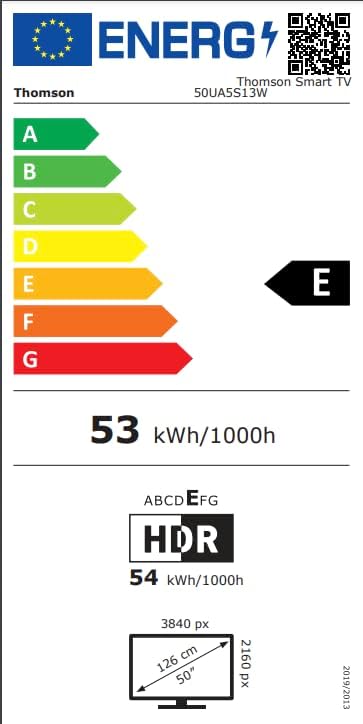
Image: Energy efficiency label for the Thomson 50UA5S13W TV, showing its 'E' rating for both SDR and HDR content.
9. Bermea eta Laguntza
Thomson offers a 3 urteko bermea on your television, ensuring peace of mind and reliable performance. For technical support, service, or warranty claims, please contact the manufacturer's authorized service center or refer to the contact information provided in your product documentation.
Fabrikatzailea: THOMSON (StreamView GmbH)
Webgunea: www.korronteaview.com
Posta elektronikoa: kontaktua@jarioaview.com
Telefonoa: +4318900066
Helbidea: Franz-Josefs-Kai 1, 1010 Viena, Austria


