1. Sarrera
This manual provides detailed instructions for setting up, operating, and maintaining your Mercusys MR27BE BE3600 Dual-Band Wi-Fi 7 Router. The MR27BE is designed to deliver high-speed wireless connectivity with Wi-Fi 7 technology, featuring dual-band operation and multiple high-speed Ethernet ports for a robust home or small office network.
2. Paketearen edukia
Egiaztatu zure paketeak elementu hauek dituela:
- Mercusys MR27BE Wi-Fi 7 Router
- Elikatze-moldagailua
- Ethernet kablea
- Instalazio azkarraren gida

This image displays the retail packaging for the Mercusys MR27BE BE3600 Dual Band Wi-Fi 7 Router, highlighting key features and branding.
3. Gainbehera fisikoaview
3.1 Atzeko panela
The rear panel of the MR27BE router features various ports and buttons for connectivity and control.
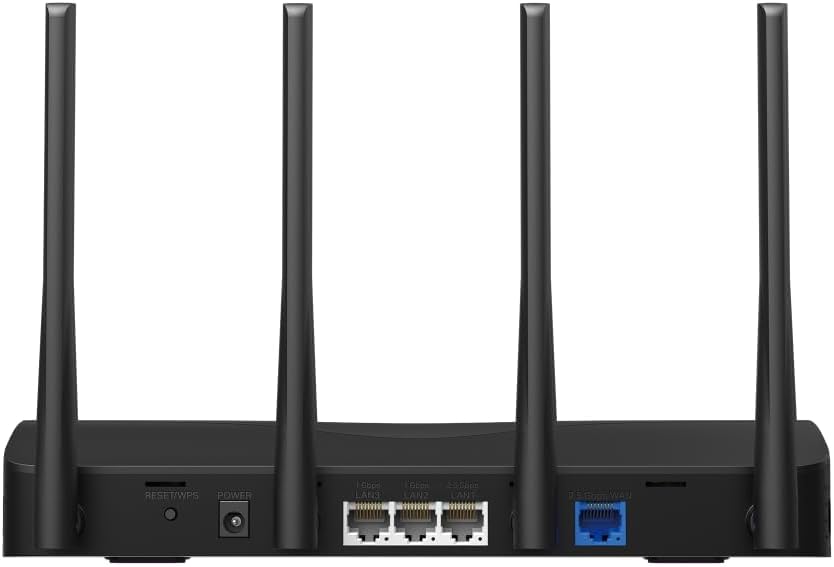
This image displays the rear panel of the MR27BE router, highlighting the 2.5 Gbps WAN port (blue), 2.5 Gbps LAN port, two 1 Gbps LAN ports, the Reset/WPS button, and the power input.
- Potentzia ataka: Konektatu hemen emandako energia-egokigailua.
- Berrezarri/WPS botoia: Press and hold for 1 second to activate WPS. Press and hold for more than 5 seconds to factory reset the router.
- LAN Ports (1 Gbps): Two Gigabit Ethernet ports for connecting wired devices.
- LAN Port (2.5 Gbps): One 2.5 Gigabit Ethernet port for high-speed wired connections.
- WAN ataka (2.5 Gbps): One 2.5 Gigabit Ethernet port for connecting to your modem or internet service provider's (ISP) network.
3.2 Ezaugarri nagusiak
The MR27BE router incorporates advanced features for enhanced network performance.

This graphic illustrates key features of the MR27BE, including its Wi-Fi 7 capabilities, the presence of 2x 2.5 Gbps ports and 2x Gigabit ports, four omni-directional high-gain antennas, EasyMesh compatibility, and easy app control.

This image demonstrates the speed performance of the MR27BE router, indicating up to 2880 Mbps on the 5 GHz band and 688 Mbps on the 2.4 GHz band, showcasing its Wi-Fi 7 capabilities.
4. Konfigurazioa
4.1 Hardware konexioa
- Itzali: Disconnect the power from your modem (if applicable).
- Konektatu WAN ataka: Connect one end of the Ethernet cable to your modem's Ethernet port and the other end to the blue 2.5 Gbps WAN port on your MR27BE router.
- Konektatu energia: Connect the power adapter to the router's Power port and plug it into an electrical outlet.
- Piztu: Wait for the router to power on completely. The LED indicator should turn solid green.
- Konektatu gailuak (aukerakoa): For wired devices, connect an Ethernet cable from your computer or other device to one of the yellow LAN ports on the router.

This image shows the 2.5 Gbps ports of the MR27BE router in use, illustrating connections for 2.5 Gbps wired devices and multi-gig internet access, emphasizing high-performance networking.
4.2 Hasierako konfigurazioa
You can configure your router using the MERCUSYS app or a web arakatzailea.
Using the MERCUSYS App:
- Download the MERCUSYS app from the App Store or Google Play.
- Connect your smartphone to the router's default Wi-Fi network (SSID and password are on the label at the bottom of the router).
- Open the MERCUSYS app and follow the on-screen instructions to complete the setup.
a erabiliz Web Arakatzailea:
- Connect your computer to the router via an Ethernet cable or the default Wi-Fi network.
- Ireki a web arakatzailea eta idatzi
mwlogin.netor192.168.1.1helbide barran sartu. - Sortu saioa hasteko pasahitza eskatzen zaizunean.
- Follow the Quick Setup wizard to configure your internet connection and Wi-Fi settings.
5. Routerraren funtzionamendua
5.1 Gailuak konektatzea
- Haririk gabeko gailuak: Bilatu your Wi-Fi network name (SSID) on your device and enter the Wi-Fi password you set during setup.
- Kable bidezko gailuak: Connect an Ethernet cable from your device to any available LAN port on the router.
5.2 EasyMesh-en bateragarritasuna
The MR27BE router supports EasyMesh, allowing you to create a seamless whole-home Wi-Fi network by adding compatible EasyMesh range extenders or other routers.

This diagram visually explains how the EasyMesh system, compatible with the MR27BE router, can expand Wi-Fi coverage throughout an entire home, ensuring seamless connections.
To set up an EasyMesh network, refer to the instructions provided with your EasyMesh compatible devices or the MERCUSYS app.
5.3 Advanced Settings (via Web Interfazea)
Sartu web interfazea (mwlogin.net) to configure advanced settings such as:
- Gonbidatuen sarea: Sortu Wi-Fi sare bereizi bat gonbidatuentzat.
- Gurasoen kontrolak: Kudeatu Interneteko sarbidea gailu espezifikoetarako.
- Sarearen segurtasuna: Configure firewall rules and access control.
- Eragiketa modua: Switch between Router, Access Point, or Range Extender modes.
6. Mantentzea
6.1 Firmware eguneratzea
Regularly updating the router's firmware ensures optimal performance and security. You can check for updates via the MERCUSYS app or the web interface under System Tools > Firmware Upgrade.
6.2 Routerraren berrabiarazpena
If you experience network issues, a simple restart can often resolve them. You can restart the router via the MERCUSYS app, the web interface, or by unplugging and replugging the power adapter.
6.3 Fabrika berrezarri
A factory reset will restore the router to its default settings. This can be done by pressing and holding the Reset/WPS button on the rear panel for more than 5 seconds until the LED blinks rapidly, or via the web interface under System Tools > Factory Defaults.
7. Arazoak
7.1 Interneterako sarbiderik ez
- Check all cable connections, especially the WAN port connection to your modem.
- Ziurtatu zure modema behar bezala funtzionatzen duela.
- Berrabiarazi modema eta bideratzailea.
- Egiaztatu zure Interneteko ezarpenak bideratzailearen web interfazea.
7.2 Wi-Fi seinalearen arazoak
- Ensure the router is placed in a central location, away from obstructions and interference sources (e.g., microwaves, cordless phones).
- Doitu bideratzailearen antenak estaldura optimoa lortzeko.
- Consider using EasyMesh compatible devices to extend coverage in larger homes.
7.3 Forgotten Wi-Fi Password or Login Password
- Wi-Fi pasahitza lehenetsia bideratzailearen beheko etiketan dago.
- If you changed it and forgot, you will need to perform a factory reset to restore default settings, then reconfigure the router.
8. Zehaztapenak
| Ereduaren izena | MR27BE |
| Haririk gabeko estandarra | 802.11be (Wi-Fi 7) |
| Maiztasun Banda Klasea | Banda Bikoitza |
| WAN ataka | 1x 2.5 Gbps WAN Port |
| LAN Portuak | 1x 2.5 Gbps LAN Port, 2x 1 Gbps LAN Ports |
| Ezaugarri Berezia | EasyMesh bateragarria |
| Produktuaren neurriak | 7.87 x 5.91 x 3.94 hazbete |
| Elementuaren pisua | 2.23 kilo |
| Dakarten osagaiak | MR27BE, Power Adapter, instruction manual |
9. Laguntza
For technical support, warranty information, or further assistance, please visit the official Mercusys website or contact Mercusys customer support.
- Mercusys Ofiziala Webgunea: www.mercusys.com
- Refer to the Quick Installation Guide for initial setup and contact details.


