1. Sarrera
Welcome to the user manual for your new MageGee SKY87 75% Wireless Mechanical Keyboard. This keyboard is designed for versatility and performance, offering multiple connectivity options, customizable features, and a comfortable typing experience. Please read this manual carefully to ensure proper setup and optimal use of your device.

This image displays the MageGee SKY87 75% Wireless Mechanical Keyboard in its Gradient White Blue color scheme, showcasinbere diseinu trinkoa eta RGB atzeko argiztapena esker.
2. Paketearen edukia
Mesedez, egiaztatu behean zerrendatutako elementu guztiak zure paketean sartuta daudela:
- MageGee SKY87 75% Wireless Mechanical Keyboard
- USB-C USB-A kablea
- 2.4GHz USB Receiver (stored in the keyboard's base)
- Keycap tiratzailea
- Switch Puller
- Spare Switches (quantity may vary)
- Erabiltzailearen eskuliburua (dokumentu hau)

This image shows the complete contents of the MageGee SKY87 keyboard package, including the keyboard, cables, tools, and documentation.
3. Ezaugarriak
The MageGee SKY87 keyboard boasts a range of features designed to enhance your typing and gaming experience:
- Gailu anitzeko konexioa: Supports BT5.0, 2.4GHz wireless, and USB wired modes, allowing connection to up to five devices simultaneously.
- Diseinu bero-aldagarria: Easily replace 3-pin or 5-pin switches without soldering, enabling full customization of your typing feel. Comes with pre-lubed linear switches for smooth operation.
- RGB atzeko argiztapena: Features 18+ RGB backlight modes and a separate strip light, with N-key rollover for responsive gaming.
- Junta egitura: Enhanced resilience and stability with an extended integrated silicone pad and PCB single key slotting, reducing hollow sounds.
- PBT teklak: Durable double-shot PBT keycaps ensure characters remain vibrant and do not fade over time.
- Edukiera handiko bateria: Built-in 8000mAh rechargeable battery for extended wireless use.
- Diseinu trinkoa % 75: 87 keys layout saves desktop space while retaining essential arrow keys and a number area.
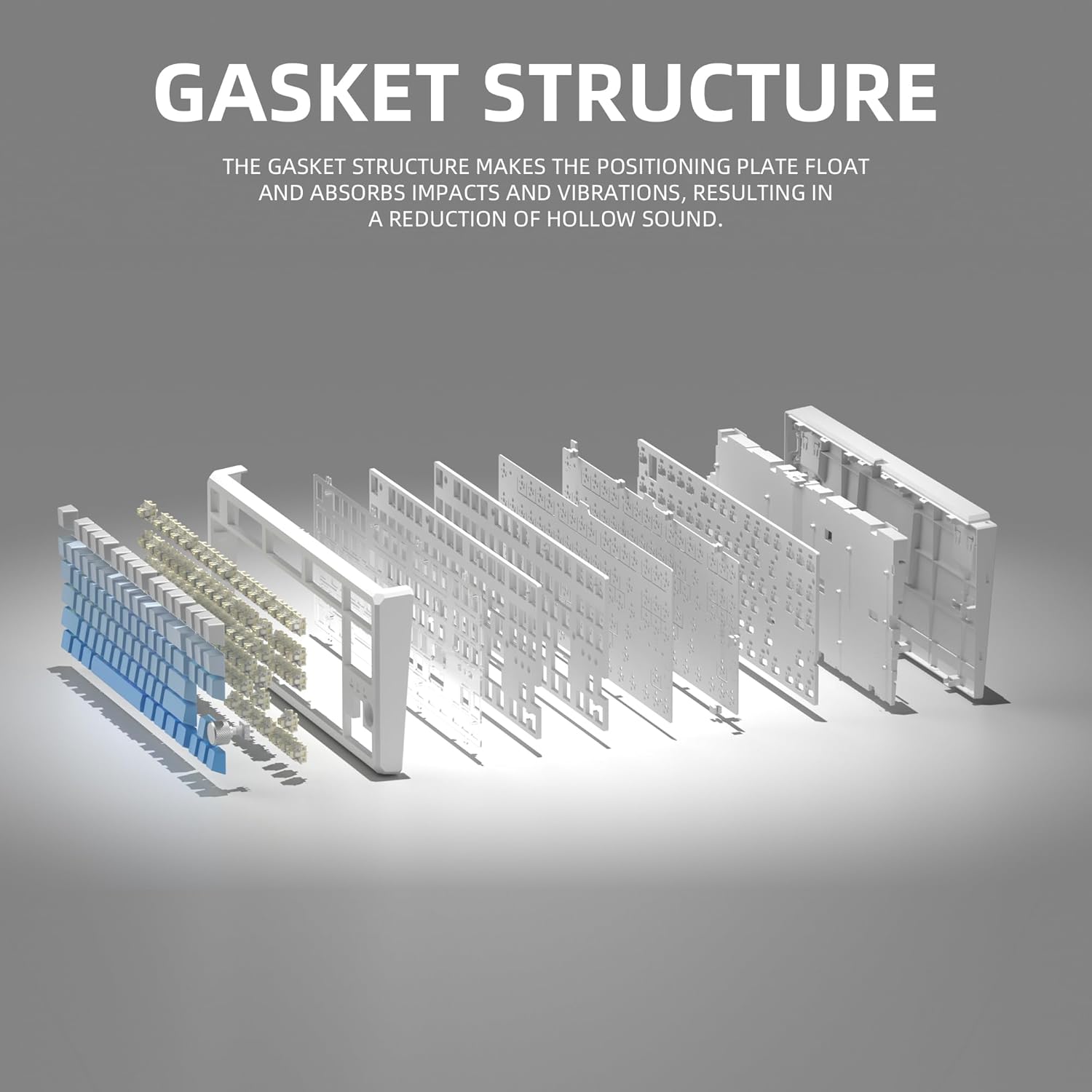
This image illustrates the internal gasket structure of the keyboard, highlighting its components that contribute to a softer and more elastic typing feel.

Bat eztanda egin zuen view detailing the various layers and components that form the keyboard's gasket structure, including the top case, keycaps, switches, foam pads, and PCB board.
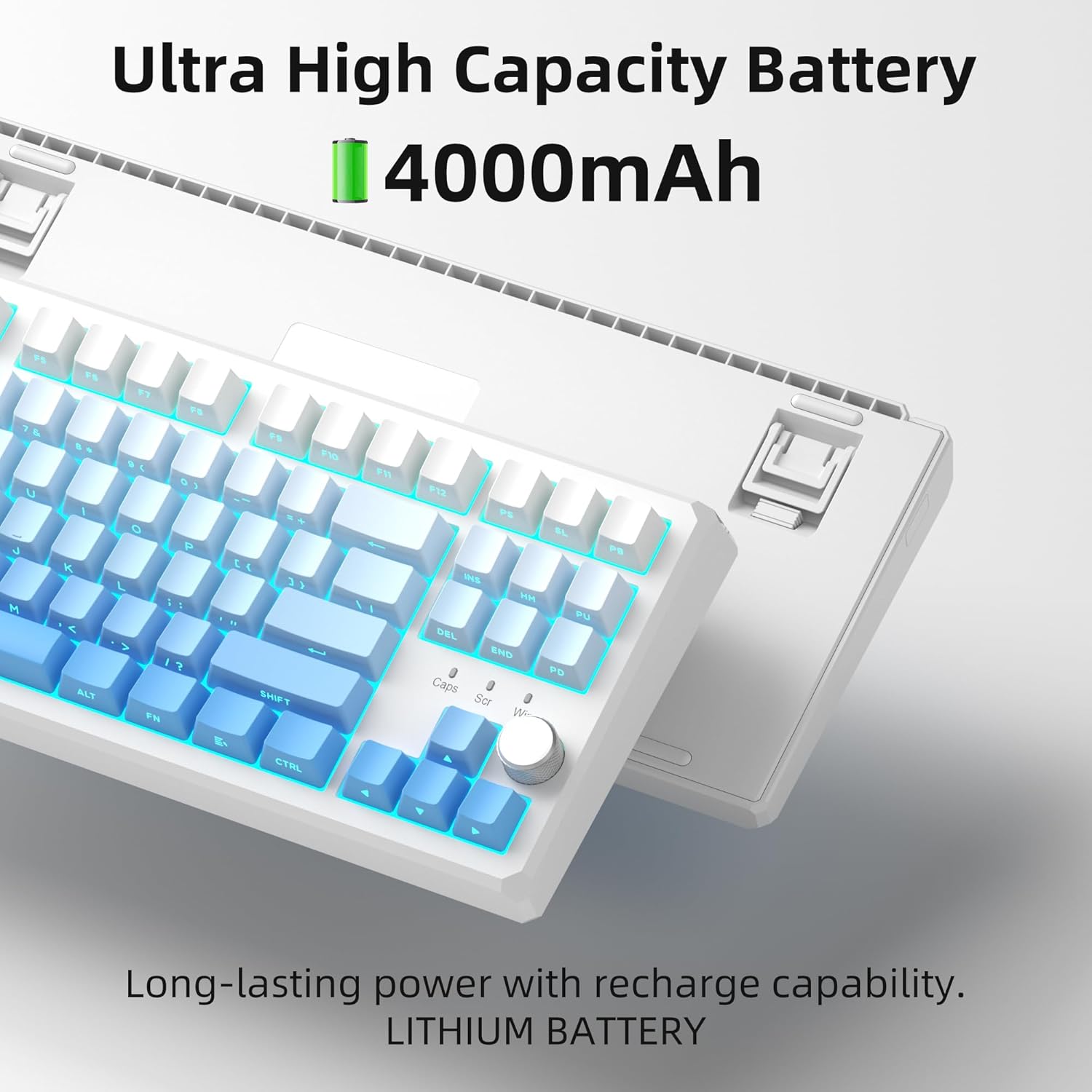
This image highlights the keyboard's internal battery, emphasizing its long-lasting power and rechargeable capability.
4. Konfigurazioa
4.1 Konexio moduak
The SKY87 keyboard supports three connection modes:
- 2.4 GHz Haririk gabeko modua: For a stable, low-latency connection.
- Bluetooth 5.0 modua: For connecting to multiple devices (up to 5) and easy switching.
- USB kable bidezko modua: For direct connection and charging.

This image visually explains the three available connection modes for the keyboard: 2.4GHz wireless, Type-C wired, and Bluetooth 5.1, showing how it connects to different devices like a laptop, monitor, and tablet.
4.2 Teklatua konektatzea
- 2.4 GHz haririk gabeko konexioa:
- Locate the 2.4GHz USB receiver stored in the magnetic compartment on the back of the keyboard.
- Konektatu hargailua ordenagailuko USB ataka erabilgarri batean.
- Ensure the keyboard is in 2.4GHz mode (refer to keyboard's mode switch, usually on the back or side).
- Teklatua automatikoki konektatu beharko litzateke.
- Bluetooth konexioa:
- Turn on the keyboard and switch it to Bluetooth mode.
- On your device (PC, Mac, Xbox, tablet), enable Bluetooth and search for new devices.
- Select 'MageGee SKY87' from the list of available devices to pair.
- You can pair up to 5 Bluetooth devices and switch between them using specific FN key combinations (refer to keyboard's keycap legends or quick guide).
- USB kable bidezko konexioa:
- Connect the provided USB-C cable to the keyboard's USB-C port (located on the top edge).
- Connect the other end of the cable to a USB-A port on your computer.
- The keyboard will function in wired mode and charge simultaneously.
4.3 Teklatuaren angelua doitzea
Teklatuak bi S ditutage adjustable feet on its underside, allowing you to set your preferred typing angle for ergonomic comfort.

This image shows the adjustable two-stage tripod feet on the underside of the keyboard, designed for ergonomic angle adjustment.
5. Funtzionamendu-argibideak
5.1 RGB argiztapenaren kontrola
The keyboard features a multi-function knob and dedicated keys for controlling the RGB backlighting:
- Biratu botoia: Turn left/right to adjust backlight brightness.
- Sakatu botoia laburki: Press the knob to cycle through different RGB lighting modes (18+ modes available).
- FN Key Combinations: Use FN + specific keys (refer to keycap legends) to change lighting effects, speed, or color.

This image focuses on the multi-function knob located on the keyboard, indicating its role in controlling the brightness of the RGB lighting.
5.2 Beroan alda daitezkeen etengailuak
The SKY87 keyboard allows for easy replacement of switches without soldering:
- Use the provided switch puller to gently remove the existing switch.
- Align the pins of the new 3-pin or 5-pin switch with the holes on the PCB.
- Press firmly until the switch clicks into place.
- Use the keycap puller to remove and replace keycaps as desired.

This image illustrates the hot-swappable sockets on the keyboard's PCB, demonstrating how switches can be easily inserted and removed, supporting both 3-pin and 5-pin switch types.

This image provides detailed specifications for the 'Blue Whale Switch', including its linear type, pre-travel, end force, tactile position, and total travel, along with a force curve graph.
5.3 Gailu Anitzeko Kommutazioa
When in Bluetooth mode, you can quickly switch between paired devices using the designated FN key combinations (e.g., FN + 1, FN + 2, etc.). Refer to the keyboard's quick guide or keycap legends for specific combinations.
5.4 N-Key Rollover
The keyboard supports N-key rollover, meaning it can accurately register multiple simultaneous key presses. This feature is particularly beneficial for fast-paced gaming and touch typing.
5.5 Produktu Ofizialen Bideoak
Video 5.1: SKY87 Bluetooth Keyboard Overview
Bideo honek gaina ematen duview of the SKY87 Bluetooth Keyboard, demonstrating its features, unboxing, and showcasing the typing sound and RGB lighting effects.
Video 5.2: SKY87 Side Printed PBT Keycaps Keyboard
This video offers a closer look at the SKY87 keyboard, focusing on its side-printed PBT keycaps and demonstrating the typing experience.
6. Mantentzea
To ensure the longevity and optimal performance of your MageGee SKY87 keyboard, follow these maintenance guidelines:
- Garbiketa: Regularly clean the keycaps and keyboard surface with a soft, dry cloth. For deeper cleaning, you can remove keycaps using the provided puller and use compressed air to clear debris from beneath.
- Aldaketa-zaintza: If replacing switches, handle them carefully to avoid bending the pins. Ensure switches are fully seated to prevent inconsistent key presses.
- Bateria zaintzea: Avoid fully discharging the battery frequently. For long-term storage, charge the keyboard to about 50% and store in a cool, dry place.
- Biltegiratzea: When not in use, especially for extended periods, consider using a dust cover or the original packaging to protect the keyboard from dust and spills.
7. Arazoak
Zure teklatuarekin arazorik baduzu, jarraitu arazoak konpontzeko ohiko urrats hauek:
- Teklatuak ez du erantzuten:
- Ensure the keyboard is charged. Connect it via USB-C cable.
- Check the connection mode switch (2.4G/BT/Wired) on the keyboard and ensure it matches your intended connection.
- For 2.4GHz, ensure the USB receiver is securely plugged in. Try a different USB port.
- Bluetooth-erako, ziurtatu Bluetooth gaituta dagoela zure gailuan eta teklatua parekatuta dagoela. Saiatu gailua berriro parekatzen.
- Berrabiarazi zure ordenagailua/gailua.
- RGB argiztapena ez dabil/okerra:
- Ziurtatu teklatua piztuta dagoela.
- Rotate or short press the knob to adjust brightness or change lighting modes.
- Check if any FN key combinations have disabled the lighting.
- Giltzak ez dira erregistratzen:
- If specific keys are not working, the switch might be faulty or not properly seated. Use the switch puller to remove and re-insert the switch.
- Ziurtatu ez dagoela hondakinik teklaren edo etengailuaren azpian.
- Connectivity Issues (Lag/Disconnections):
- For wireless modes, ensure there are no strong interferences (e.g., other 2.4GHz devices, large metal objects) between the keyboard and receiver/device.
- Hurbildu hartzailera/gailura.
- Ziurtatu teklatuaren bateria ez dagoela baxua.
If the issue persists after trying these steps, please contact MageGee customer support for further assistance.
8. Zehaztapenak
| Ezaugarri | Xehetasuna |
|---|---|
| Marka | MageGee |
| Eredua | Zerua87 |
| Konektibitate Teknologia | 2.4G Haririk gabekoa, Bluetooth 5.0, USB-C Kable bidezkoa |
| Teklatuaren diseinua | 75% (87 Keys), QWERTY |
| Aldatu mota | Linear (Hot-swappable 3-pin/5-pin) |
| Keycap materiala | PBT bikoitza |
| Atzeko argiztapena | RGB (18+ modes) |
| Bateria Edukiera | 8000mAh (kargagarria) |
| Gailu bateragarriak | PC, Xbox, MAC |
| Elementuaren pisua | 2 kilo |
| Paketearen neurriak | 13 x 13 x 1 hazbete |
| Fabrikatzailea | MAGOA |
| Lehen eskuragarri | 31ko urriaren 2024a |
9. Bermea eta Laguntza
Your MageGee SKY87 Mechanical Keyboard comes with a 1 urteko bermea erosketa-datatik aurrera.
This warranty covers manufacturing defects and issues arising from normal use. It does not cover damage caused by misuse, accidents, unauthorized modifications, or improper maintenance.
For warranty claims, technical support, or any questions regarding your product, please contact MageGee customer support. You can typically find contact information on the manufacturer's official webgunearen bidez edo erosketa puntuaren bidez.
MageGee aims to respond to inquiries within 12 hours and provide satisfactory solutions.