1. Sarrera
Thank you for choosing the WOLFANG WB03 Baby Monitor. This device is designed to provide reliable and secure monitoring of your baby, offering peace of mind through advanced features and a clear display. This manual provides essential information for setting up, operating, and maintaining your baby monitor.
The WOLFANG WB03 features a 5-inch HD display, a 1080P camera with 360-degree rotation and zoom, infrared night vision, two-way audio, temperature detection, and cry detection. It operates on a secure, non-Wi-Fi connection, ensuring privacy and stability.
2. Paketearen edukia
Mesedez, egiaztatu paketea elementu hauek dituen:
- Guraso Unitatea (monitorea)
- Haurra Unitatea (Kamera)
- Erabiltzailearen eskuliburua
- 2 x Elikadura egokigailuak
- 2 x USB kableak
- Horma-muntatzeko euskarria
- Horman muntatzeko torlojuak
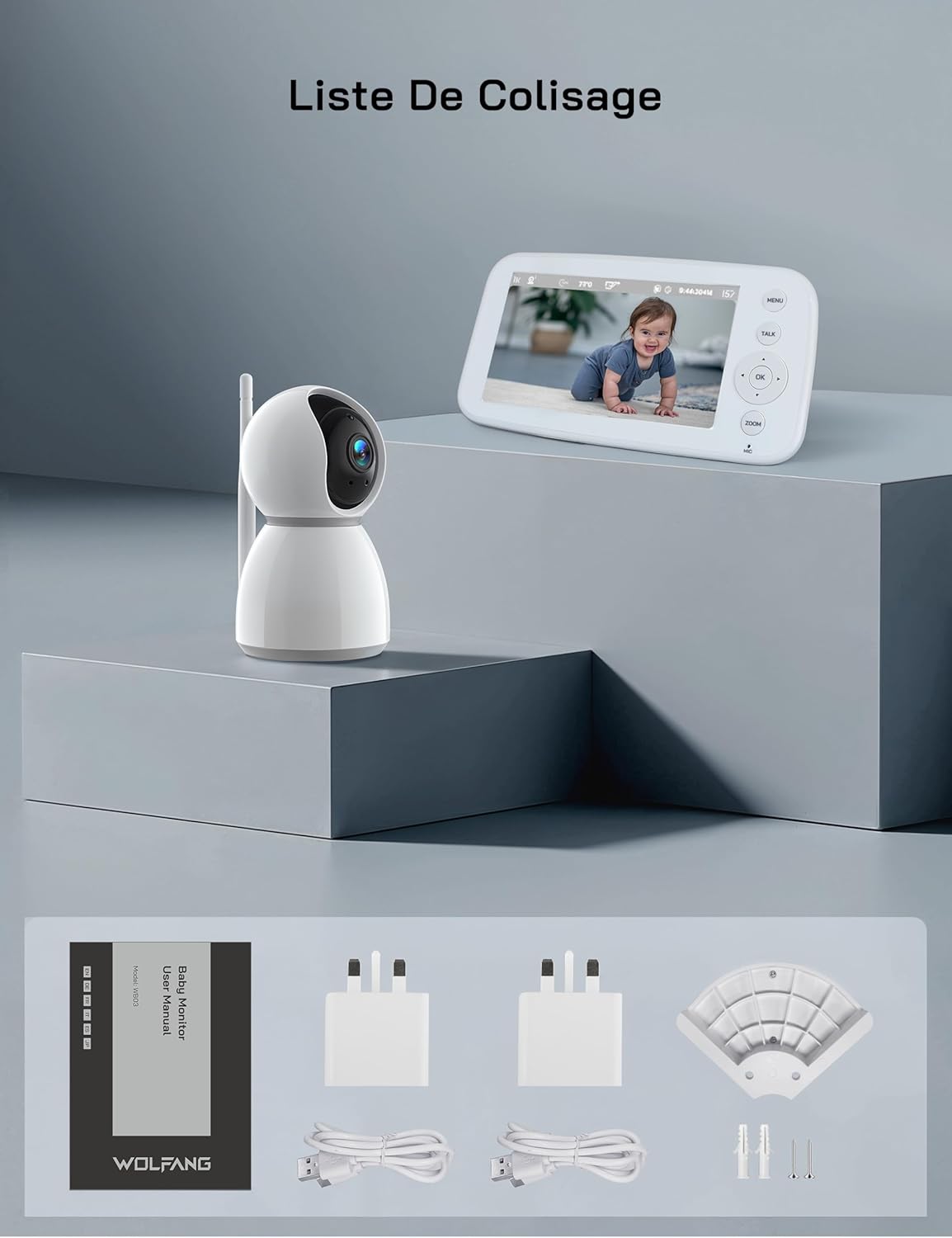
2.1. irudia: Visual representation of the WOLFANG WB03 baby monitor package contents, including the monitor, camera, user manual, two power adapters, two USB cables, and wall mounting hardware.
3. Produktua amaitu daview
The WOLFANG WB03 system consists of a Parent Unit (monitor) and a Baby Unit (camera). Familiarize yourself with the components and their functions.

3.1. irudia: The WOLFANG WB03 baby monitor system, featuring a white parent unit with a screen displaying a baby, and a white pan-tilt camera unit.
Guraso Unitatea (monitorea)
- 5 hazbeteko HD pantaila: For clear video feed.
- Kontrol-botoiak: Menu, Talk, OK, Navigation (Up/Down/Left/Right), Zoom.
- Mikrofonoa: For two-way talk.
- Hizlaria: For audio from the baby unit and lullabies.
- Antena: For wireless connection.
- Potentzia ataka: Type-C for charging.
Haurra Unitatea (Kamera)
- 1080P Camera Lens: High-resolution video capture.
- LED infragorriak: Gaueko ikusmenerako.
- Mikrofonoa: Haurraren soinuak jasotzeko.
- Hizlaria: Bi norabideko elkarrizketarako eta sehaska-kantetarako.
- Tenperatura-sentsorea: To monitor room temperature.
- Antena: For wireless connection.
- Potentzia ataka: Type-C for continuous power.

3.2. irudia: An illustration highlighting key features of the WOLFANG WB03 baby monitor, including VOX Mode, Night Vision, 8 Lullabies, Remote Pan/Tilt, Type-C charging, Two-Way Intercom, 2350 mAh Battery, and Temperature Detection.
4. Konfiguratzeko argibideak
4.1 Guraso Unitatea kargatzea
- Connect one USB cable to a power adapter and plug it into the Parent Unit's Type-C port.
- Entxufatu korronte-egokigailua hormako entxufe batera.
- Charge the Parent Unit for at least 3 hours before first use. The battery indicator on the screen will show charging status.
4.2 Haurtxoaren unitatea elikatzea
- Connect the second USB cable to a power adapter and plug it into the Baby Unit's Type-C port.
- Plug the power adapter into a wall outlet. The Baby Unit requires continuous power to operate.
- The Baby Unit will automatically power on once connected to power.
4.3 Haurtxoaren Unitatearen Kokapena
Place the Baby Unit in a location that provides a clear view of your baby. Ensure it is at least 1.5 to 2 meters (5 to 6 feet) away from the Parent Unit to avoid audio feedback (bip sound).
- Place the camera on a flat, stable surface, such as a dresser or shelf.
- Alternatively, use the included wall mount bracket to secure the camera to a wall.
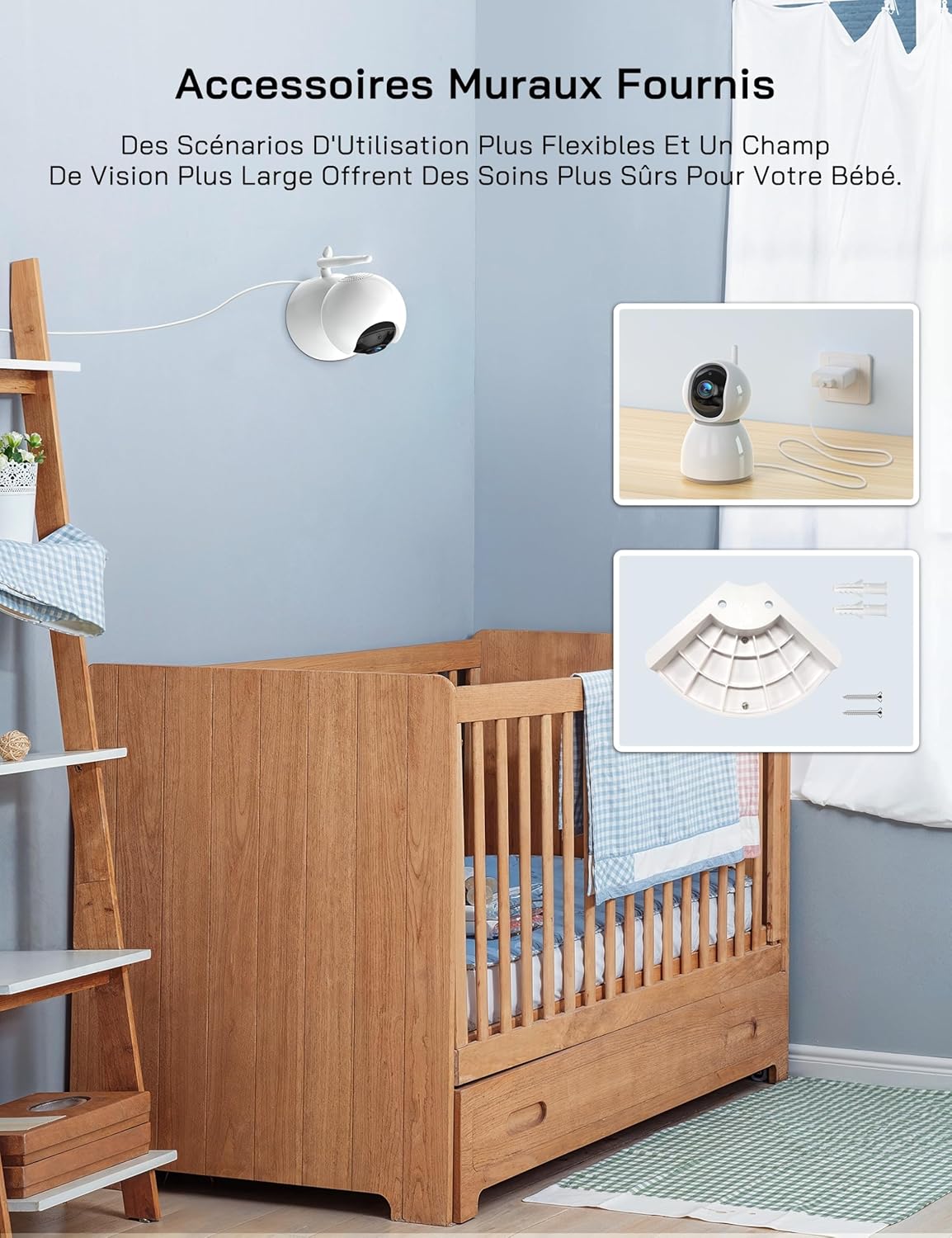
4.1. irudia: An image showing the included wall mount bracket and screws, demonstrating how the camera can be securely mounted to a wall above a crib.
4.4 Pairing (If Necessary)
The Parent Unit and Baby Unit are pre-paired at the factory. If the connection is lost or you are adding additional cameras (up to 4 cameras supported), follow these steps:
- Gurasoen unitatean, sakatu MENUA botoia.
- Navigate to the Camera icon (📷) and select it.
- Choose an empty camera channel (e.g., CAM 2, CAM 3, CAM 4).
- Select the 'Pair' option. The monitor will display 'Pairing...'.
- Within 10 seconds, press the pairing button on the back of the Baby Unit.
- Once paired, the video feed from the Baby Unit will appear on the Parent Unit screen.
5. Funtzionamendu-argibideak
5.1 Piztu/Itzali
- Guraso Unitatea: Press and hold the Power button on the side of the monitor to turn it on or off.
- Haurtxoen Unitatea: The camera powers on automatically when connected to a power source. Disconnect from power to turn off.
5.2 Basic Monitoring
Once both units are powered on and paired, the Parent Unit will automatically display the live video feed from the Baby Unit.
5.3 Panoramikoa, inklinatua eta zooma
The camera offers 360-degree horizontal rotation and 90-degree vertical tilt, along with 2x digital zoom.
- Panorama/Tilt: Use the navigation buttons (Up/Down/Left/Right) on the Parent Unit to adjust the camera's viewangelua.
- Zooma: Sakatu ZOOM button on the Parent Unit to activate 2x digital zoom. Use navigation buttons to move the zoomed area.

5.1. irudia: An image showing the camera's 360-degree rotation and 2x zoom capability, with the monitor displaying the zoomed view of a baby.
5.4 Bi norabideko elkarrizketa
Communicate with your baby remotely using the two-way talk feature.
- Eduki sakatuta HITZALDI botoia Gurasoen Unitatean.
- Speak clearly into the microphone on the Parent Unit. Your voice will be transmitted to the Baby Unit.
- Askatu HITZALDI button to hear your baby's sounds again.

5.2. irudia: An image depicting the two-way talk feature, with a mother in the kitchen communicating with her baby in the nursery via the monitor.
5.5 Gaueko Ikusmen Infragorria
The Baby Unit automatically activates infrared night vision in low-light conditions, providing a clear black-and-white video feed.

5.3. irudia: Two images demonstrating the clear infrared night vision feature, showing a sleeping baby in a dimly lit room.
5.6 Tenperaturaren monitorizazioa
The Baby Unit continuously monitors the room temperature and displays it on the Parent Unit screen. An alarm will sound if the temperature exceeds 30°C (86°F) or falls below 14°C (57.2°F).
5.7 Cry Detection (VOX Mode)
The VOX (Voice Operated eXchange) mode conserves battery life by turning off the screen when no sound is detected. The screen will automatically activate when your baby cries or makes significant noise.
- To enable/disable VOX mode or adjust sensitivity (Low/Medium/High), navigate to the VOX settings in the Parent Unit's menu.
- If you wish to keep the screen on continuously, you must disable cry detection and the automatic screen off feature in the settings.
5.8 Sehaska-kantak
Monitoreak 8 sehaska-kanta lasaigarri ditu zure haurra lasaitzen laguntzeko.
- Sakatu MENUA botoia Gurasoen Unitatean.
- Navigate to the Music icon (🎵) and select it.
- Choose a lullaby to play or select 'Loop' for continuous playback.
5.9 Elikaduraren abisua
Set a timer to remind you of feeding times.
- Sakatu MENUA botoia Gurasoen Unitatean.
- Navigate to the Timer icon (🕑) and select it.
- Set your desired feeding interval (e.g., 2h, 3h, 4h).
5.10 Multi-Camera Support and Split Screen
The WOLFANG WB03 supports connecting up to 4 cameras simultaneously. The 5-inch screen supports split-screen display for simultaneous viewing or scheduled rotation of camera feeds.
- To switch between cameras or activate split-screen mode, access the camera settings in the Parent Unit's menu.
- Ahal duzu view multiple cameras at once in split-screen or set a timed rotation to cycle through each camera's view.
6. Mantentzea
6.1 Garbiketa
- Wipe the surfaces of the Parent Unit and Baby Unit with a dry, soft cloth.
- Ez erabili spray garbitzailerik edo garbitzaile likidorik.
6.2 Bateriaren zaintza (Gurasoen unitatea)
- Bateriaren iraupena maximizatzeko, saihestu bateria maiz erabat deskargatzea.
- If storing the unit for an extended period, charge the battery to about 50% and store it in a cool, dry place.
7. Arazoak
| Arazoa | Irtenbidea |
|---|---|
| Monitor beeps or produces feedback noise. | Ensure the Baby Unit and Parent Unit are at least 1.5 to 2 meters (5 to 6 feet) apart. Proximity can cause audio interference. |
| No video/audio on the Parent Unit. |
|
| Kamera ez da pizten. | The camera must be continuously plugged into a power source. Ensure the power adapter and cable are securely connected and the outlet is functional. |
| Screen turns off automatically. | This is likely due to VOX mode. If you want the screen to stay on, disable cry detection and the automatic screen off feature in the Parent Unit's settings. |
| Temperature alarm sounds frequently. | Check the room temperature displayed on the monitor. Adjust the room's climate control if necessary to keep the temperature within the safe range (14°C to 30°C). |
8. Zehaztapenak
| Ezaugarri | Xehetasuna |
|---|---|
| Ereduaren izena | WB03 |
| Parent Unit Display Size | 5 hazbetekoa |
| Kameraren bereizmena | 1080p |
| Monitorearen bereizmena | 720p |
| Konektibitate Teknologia | Wireless (FHSS) |
| Wi-Fi eskakizuna | Bat ere ez |
| Parent Unit Battery Capacity | 2350 mAh |
| Battery Life (Normal Mode) | Gutxi gorabehera. 8 ordu |
| Bateriaren iraupena (VOX modua) | Gutxi gorabehera. 10 ordu baino gehiago |
| Kameraren panoramika-angelua | 360 gradu |
| Kameraren inklinazio angelua | 90 gradu |
| Zoom digitala | 2x |
| Ezaugarri bereziak | Two-Way Audio, Infrared Night Vision, Temperature Detection, Cry Detection, Feeding Alarm, 8 Lullabies, Split Screen, Wall Mountable |
| Produktuaren neurriak (L x W x H) | 16 x 8.3 x 1.9 cm |
| Elementuaren pisua | 411 gramo |
| Erabilera gomendatua | Baby Monitoring (Indoor) |
9. Bermea eta Laguntza
9.1 Bermearen informazioa
WOLFANG provides a 2 urteko produktuaren bermea and accessory upgrade services. We are committed to delivering high-quality imaging products and support.
9.2 Bezeroarentzako laguntza
Our customer service team is available 24 hours a day on weekdays to assist you. If you have any questions, require assistance, or need support, please contact us via our official email:
laguntza.vc@wolfang.co
We aim to resolve any issues to your satisfaction as quickly as possible.