Sarrera
Thank you for choosing the OMOTON Wireless Bluetooth Keyboard. This ultra-slim keyboard is designed for seamless compatibility with various Mac devices, offering a stable and efficient typing experience. This manual provides detailed instructions for setup, operation, maintenance, and troubleshooting to ensure optimal performance of your device.

OMOTON Wireless Keyboard compatible with various Mac devices including iMac, Mac mini, and MacBook Pro/Air. System requirement: Mac OS X 10.10 or above.
Konfigurazioa
1. Bateriaren instalazioa
The OMOTON Wireless Bluetooth Keyboard requires two AAA batteries (not included). Follow these steps to install them:
- Bilatu bateriaren konpartimentua teklatuaren atzealdean.
- Irristatu bateriaren estalkia.
- Sartu bi AAA pila, polaritate zuzena ziurtatuz (+/-).
- Itxi bateriaren estalkia ongi.
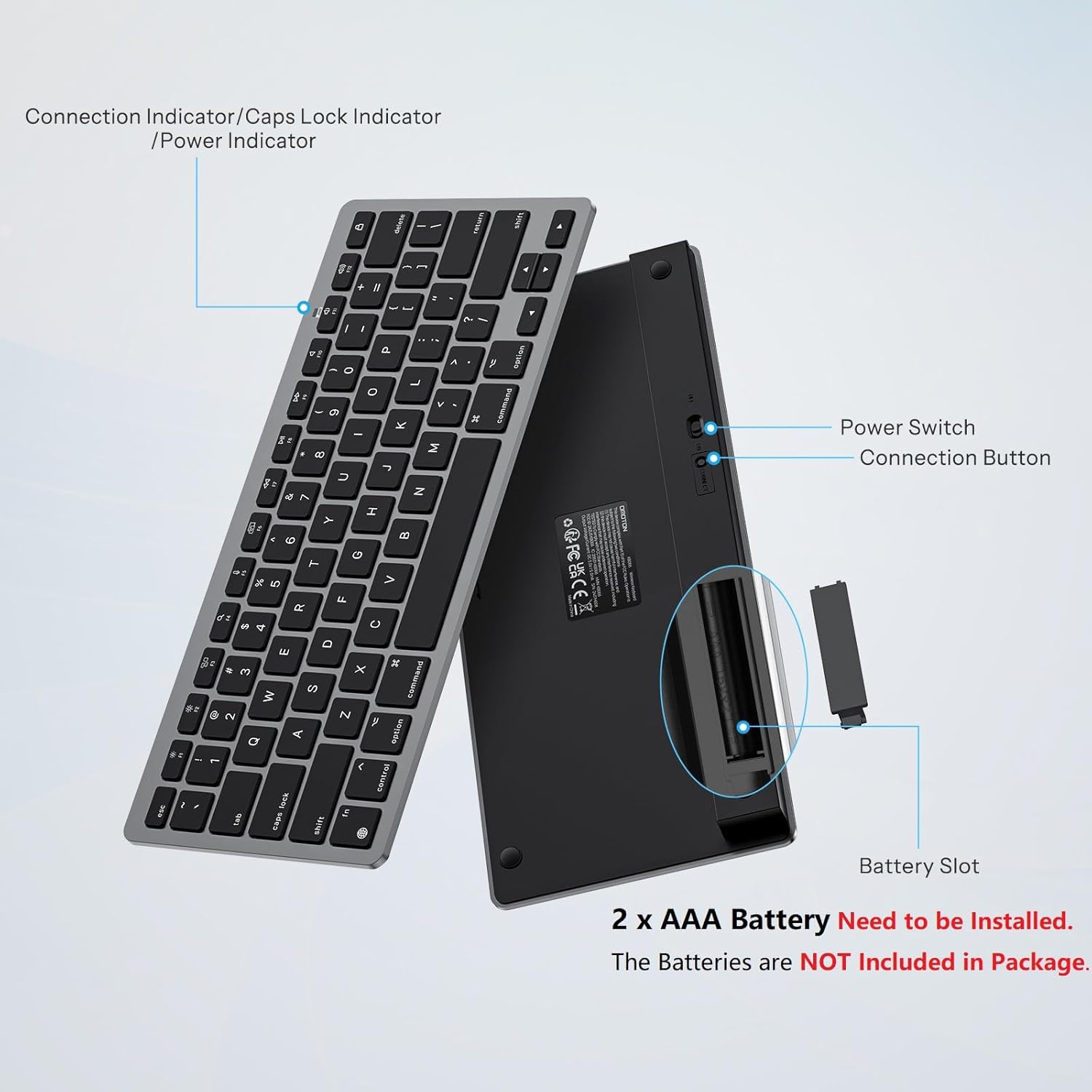
Atzekoa view of the OMOTON Wireless Keyboard showing the power switch, connection button, and battery slot for two AAA batteries.
2. Bluetooth parekatzea
To connect your keyboard to your Mac device, follow these steps:
- Ziurtatu teklatuak bateria berriak dituela instalatuta.
- Locate the power switch on the back of the keyboard and slide it to the "ON" position.
- Press the "Connect" button on the back of the keyboard. The Bluetooth indicator light on the keyboard will begin to flash, indicating it is in pairing mode.
- On your Mac device, go to Sistemaren ezarpenak (edo Sistemaren hobespenak) > Bluetootha.
- Ziurtatu Bluetooth aktibatuta dagoela.
- Look for "KB066 Mac Keyboard" (or similar) in the list of available devices and click "Connect" or "Pair".
- Once connected, the Bluetooth indicator light on the keyboard will stop flashing.

Step-by-step visual guide for connecting the OMOTON Wireless Keyboard via Bluetooth to a Mac device.
The keyboard maintains a stable Bluetooth connection range of up to 33 feet (10 meters).
Funtzionamendu-argibideak
Basic Typing
The keyboard features a standard QWERTY layout. The keys are designed for a quick and responsive typing experience.

Close-up of a key on the OMOTON Wireless Keyboard, illustrating the scissor-switch mechanism for quick and quiet typing.
Multimedia gakoak
The top row of keys (F1-F12) provides dedicated multimedia and function controls for Mac devices. These include:
- F1/F2: Distira doitzea
- F3: Misioaren Kontrola
- F4: Search
- F5: Diktaketa
- F6: Pantaila-argazkia
- F7/F8/F9: Aurreko pista, Erreproduzitu/Pausatu, Hurrengo pista
- F10/F11/F12: Isilarazi, bolumena jaitsi, bolumena igo
- Kanporatzeko tekla: Blokeatu pantaila

Layout of the OMOTON Wireless Keyboard highlighting the dedicated multimedia function keys for Mac.
Diseinu Ergonomikoa
The keyboard features an 8-degree tilt angle, designed to promote a comfortable typing posture and reduce strain during extended use. Four rubber feet on the bottom provide slip resistance for stability.

Aldea view of the OMOTON Wireless Keyboard demonstrating its 8-degree ergonomic tilt for comfortable typing.
Mantentzea
Garbiketa
Teklatuaren itxura eta funtzionaltasuna mantentzeko:
- Use a soft, lint-free cloth to wipe the surface.
- Zikinkeria egoskorrerako, apur bat lehortuampGarbitu zapi bat urarekin edo garbiketa-soluzio leun batekin. Saihestu gehiegizko hezetasuna.
- Ez erabili garbitzaile urratzailerik, disolbatzailerik edo aerosol-sprayrik zuzenean teklatuan.
Bateria ordezkatzea
When the keyboard's performance degrades or it fails to connect, it may be time to replace the batteries. Refer to the "Battery Installation" section for instructions on replacing the two AAA batteries. The energy-saving design and auto-sleep mode allow for a battery replacement interval of up to 6 months under typical usage.
Arazoak konpontzea
- Teklatua ez da konektatzen edo maiz deskonektatzen da:
- Ensure the keyboard is powered on and has fresh batteries.
- Verify that Bluetooth is enabled on your Mac device.
- Move the keyboard closer to your Mac to ensure it's within the 33-foot (10-meter) range.
- Try unpairing and re-pairing the keyboard through your Mac's Bluetooth settings. - Teklak ez dute erantzuten:
- Check battery levels and replace if necessary.
- Ensure the keyboard is properly connected via Bluetooth.
- If the keyboard has been idle, it may be in auto-sleep mode. Press any key and wait 2-3 seconds for it to wake up. - Lag or delayed input:
- This could be due to interference. Try moving other wireless devices away from your keyboard and Mac.
- Ensure your Mac's operating system is up to date.
Zehaztapenak
| Ezaugarri | Xehetasuna |
|---|---|
| Marka | OMOTON |
| Eredua | B0DLMXVTHM |
| Gailu bateragarriak | Mac/iMac/Macbook/Laptop etc. (macOS 10.10 and later) |
| Konektibitate Teknologia | Bluetootha |
| Teklatuaren deskribapena | Multimedia, Wireless |
| Gomendatutako Erabilerak | Bulegoa |
| Ezaugarri Berezia | Ergonomia, eramangarria |
| Kolorea | Gris Beltza |
| Materiala | Plastikoa |
| Energia iturria | Pilaz elikatzen da (2 x AAA, ez daude barne) |
| Teklatuaren diseinua | QWERTY |
| Elementuaren pisua | 11.7 ontza |
| Paketearen neurriak | 11.38 x 5 x 0.94 hazbete |

Dimensions of the OMOTON Wireless Keyboard (11.22 x 4.72 inches) shown in comparison to a MacBook and a smartphone.
Bermea eta Laguntza
OMOTON products are designed for reliability and performance. For specific warranty details, please refer to the warranty card included with your product packaging or visit the official OMOTON website. For technical support or further assistance, please contact OMOTON customer service through their official channels.


