Sarrera
Thank you for choosing the Vortex Blast Portable Bluetooth Speaker. This manual provides essential information for setting up, operating, and maintaining your speaker. Designed for home, outdoors, and parties, the Vortex Blast delivers powerful 30W sound with deep bass, features an IPX6 waterproof rating, Bluetooth 5.2 connectivity, TWS functionality for stereo sound, and dynamic LED light effects.
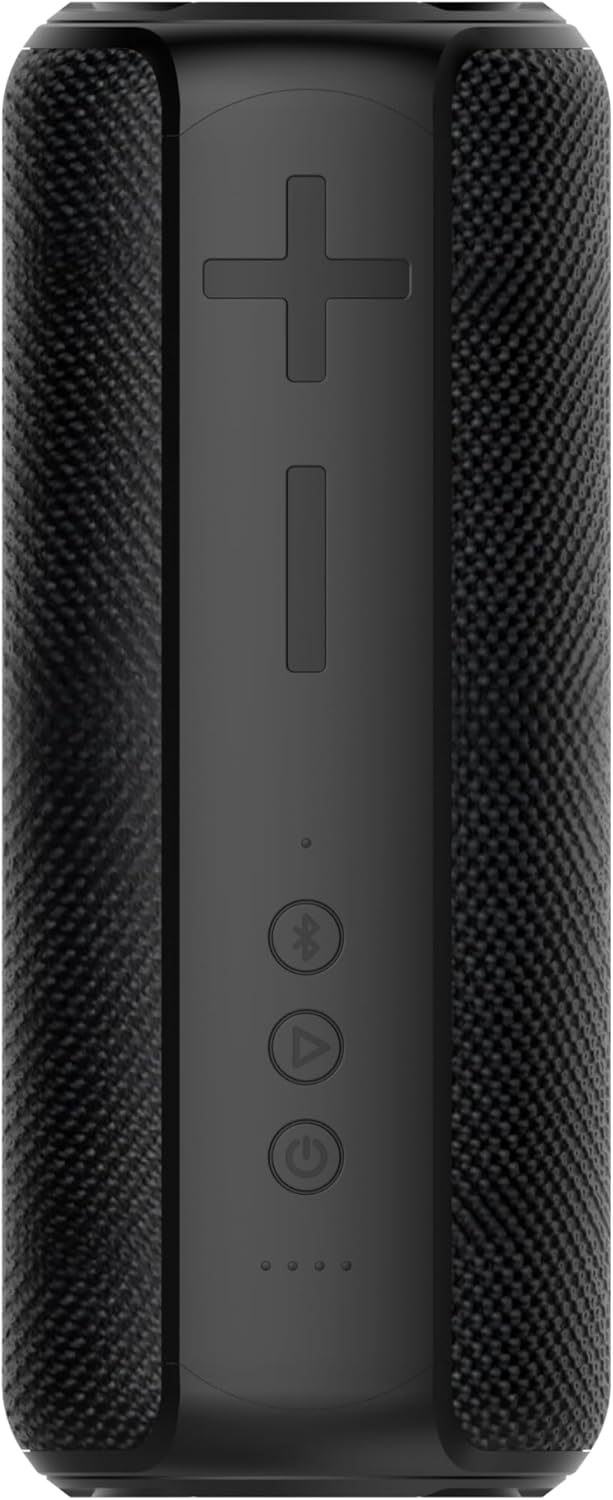
Image: The Vortex Blast Portable Bluetooth Speaker, showcasing its sleek black design and cylindrical shape.
Paketearen edukia
Mesedez, markatu laukitxoa elementu hauetarako:
- 1 x Vortex Blast Portable Bluetooth Speaker
- 1 x USB-C kargatzeko kablea
- 1 x AUX Audio kablea
- 1 x korronte egokitzailea
- 1 x Erabiltzailearen eskuliburua (dokumentu hau)
Produktua amaituview
Familiarize yourself with the controls and ports of your Vortex Blast speaker:

Irudia: Goitik behera view of the Vortex Blast speaker, highlighting the control panel with power, play/pause, Bluetooth, and volume buttons.
Kontrol-panela:
- Pizteko botoia (⑂): Sakatu eta eutsi pizteko/itzaltzeko. Sakatu labur musika erreproduzitzeko/pausatzeko.
- Bolumena igo (+): Sakatu labur bolumena igotzeko. Sakatu luze hurrengo abestia ikusteko.
- Bolumena jaitsi (-): Sakatu labur bolumena jaisteko. Sakatu luze aurreko abestira joateko.
- Bluetooth Button (⑃): Short press to enter pairing mode. Double tap to toggle LED lights on/off.
- LED adierazleak: Four small lights indicating battery level and charging status.

Irudia: Gertuko planoa view of the back of the Vortex Blast speaker, showing the charging port and auxiliary input port, protected by a rubber flap.
Ports (located under a protective flap):
- USB-C kargatzeko ataka: Bozgorailua kargatzeko.
- AUX sarrera: Gailuak 3.5 mm-ko audio-kable baten bidez konektatzeko.
Konfigurazioa
1. Bozgorailua kargatzea
Before first use, fully charge your Vortex Blast speaker. Connect the provided USB-C charging cable to the speaker's charging port and the power adapter to a wall outlet. The LED indicators will show charging progress and turn off when fully charged. A full charge provides approximately 10 hours of playtime.
2. Piztu/Itzali
- To power on: Press and hold the Power button (⑂) for 2-3 seconds until you hear an audible prompt and the LED lights illuminate.
- To power off: Press and hold the Power button (⑂) for 2-3 seconds until you hear an audible prompt and the LED lights turn off.
3. Bluetooth parekatzea
- Ensure the speaker is powered on and the Bluetooth indicator light is blinking, indicating it's in pairing mode.
- Zure gailuan (smartphone-a, tableta, ordenagailu eramangarria), gaitu Bluetooth-a eta bilatu eskuragarri dauden gailuak.
- Select "Vortex Blast" from the list.
- Konektatuta dagoenean, baieztapen-soinu bat entzungo duzu, eta Bluetooth adierazle-argia finko piztuta egongo da.
Oharra: Bozgorailuak automatikoki saiatuko da azken parekatutako gailura berriro konektatzen pizten denean.
4. Benetako haririk gabeko estereoa (TWS) parekatzea
To achieve a true stereo sound experience, you can pair two Vortex Blast speakers together:
- Ensure both Vortex Blast speakers are powered on and not connected to any other Bluetooth devices.
- On one speaker, short press the Bluetooth button (⑃). It will enter TWS pairing mode.
- The two speakers will automatically search for and connect to each other. You will hear a confirmation sound once paired.
- Once TWS paired, connect your device to one of the speakers via Bluetooth as described in step 3. Both speakers will now play audio in stereo.
Funtzionamendu-argibideak
Musika erreprodukzioa:
- Erreproduzitu/Pausatu: Sakatu labur pizteko botoia (⑂).
- Bolumenaren doikuntza: Sakatu labur Bolumena igotzeko (+) edo Bolumena jaisteko (-) botoiak.
- Hurrengo ibilbidea: Sakatu luze bolumena igotzeko (+) botoia.
- Aurreko pista: Sakatu luze Bolumena Jaisteko (-) botoia.
LED argi pantaila:
The Vortex Blast speaker features dynamic LED light effects that enhance your music experience.

Image: The Vortex Blast speaker with its vibrant LED light ring illuminated, showcasing the dynamic light effects.
- To toggle the LED lights on or off: Double tap the Bluetooth button (⑃).
- The lights will cycle through various modes automatically.
AUX modua:
Connect an external audio device using the provided 3.5mm AUX audio cable. The speaker will automatically switch to AUX mode. In this mode, volume control can be managed via the speaker or the connected device, but track control must be done on the connected device.
Mantentzea
- Garbiketa: Erabili zapi leun eta lehor bat bozgorailua garbitzeko. Ez erabili produktu kimiko gogorrik edo material urratzailerik.
- Uraren esposizioa: While IPX6 waterproof, avoid prolonged submersion. Ensure the protective flap over the ports is securely closed before exposure to water.
- Biltegiratzea: Gorde bozgorailua leku fresko eta lehor batean, tenperatura altuetatik eta eguzki-argitik babestuta.
- Bateria zaintzea: To prolong battery life, charge the speaker regularly, even if not in frequent use. Avoid completely draining the battery.
Arazoak konpontzea
| Arazoa | Irtenbidea |
|---|---|
| Bozgorailuak ez du pizten. | Ensure the battery is charged. Connect the speaker to a power source using the provided cable and adapter. |
| Ezin da Bluetooth gailuarekin parekatu. |
|
| Soinurik ez edo bolumen baxua. |
|
| LED argiak ez dira funtzionatzen. | Double tap the Bluetooth button (⑃) to toggle the LED lights on/off. |
| TWS parekatzeak huts egin du. |
|
Zehaztapenak
| Ezaugarri | Xehetasuna |
|---|---|
| Ereduaren izena | Leherketa |
| Marka | Zurrunbiloa |
| Hizlari mota | Hizlari eramangarria |
| Konektibitate Teknologia | Bluetooth 5.2 |
| Bozgorailuaren irteera-potentzia maximoa | 30 Watt |
| Audio irteera modua | Estereoa (TWS-rekin) |
| Uraren Erresistentzia Maila | IPX6 Iragazgaitza |
| Bateriaren iraupena | Gehienez 10 ordu |
| Energia iturria | Bateriaren bidez |
| Produktuaren neurriak | 3.34" L x 3.34" W x 8.46" H |
| Elementuaren pisua | 2.64 kilo |
| Kontrol-metodoa | Ukitu |
Bermea eta laguntza
The Vortex Blast Portable Bluetooth Speaker comes with a Berme mugatua. Please refer to the warranty card included in your package for specific terms and conditions.
For technical support, troubleshooting assistance, or warranty claims, please contact Vortex customer service through the retailer's platform or visit the official Vortex webgunea.


