Produktua amaituview
Virtavo 2K Haririk gabeko Kanpoko Bateria Kamera zure etxea edo jabetza zaintza fidagarria eta kalitate handikoa eskaintzeko diseinatuta dago. Bateria kargagarri indartsua, 2K QHD bereizmena eta gaueko ikusmen gaitasun aurreratuak dituenez, kamera honek egunez zein gauez zaintza garbia bermatzen du. Bere diseinu sendo eta iragazgaitzak kanpoan instalatzea ahalbidetzen du eguraldi baldintza desberdinetan.

1. irudia: virtavo 2K Haririk gabeko Kanpoko Bateria Kamera. Irudi honek kamera-unitate zuri trinkoa erakusten du, lente eta sentsore-eremu beltzarekin, hormako euskarri batean muntatuta.
Ezaugarri nagusiak hauek dira:
- Bateriaren iraupena hobetua: 4400 mAh-ko bateria kargagarri batekin hornituta dago, karga bakoitzeko 1-3 hilabeteko autonomia eskaintzen duena.
- 2K Bereizmena eta Gaueko Ikusmena Koloretan: 2K QHD irudi zorrotzak ateratzen ditu Starlight F1.6 lente batekin eta 2 IR LEDekin (850nm), eguneko eta gaueko koloretako ikusmen garbia lortzeko.
- PIR detekzioa eta bi norabideko audioa: PIR sentsoreak 10 metro arteko mugimendua detektatzen du, denbora errealeko jakinarazpenak bidaliz. Bi norabideko audioak aplikazioaren bidez komunikazio erraza ahalbidetzen du.
- Konfigurazio erraza eta urrutiko kontrola: Haririk gabeko instalazio azkarra eta urruneko kudeaketa HOME V aplikazioaren bidez.
- Biltegiratze segurua: 32 GB-tik 256 GB-ra bitarteko SD txartelak onartzen ditu tokiko biltegiratzerako eta aukerako hodeiko biltegiratzerako, datuen enkriptatzearekin.
- Eguraldiaren diseinua: Klima desberdinetan funtzionamendu fidagarria bermatzen du.
Paketearen edukia
Mesedez, egiaztatu paketea elementu hauek dituen:
- virtavo 2K haririk gabeko kanpoko bateria kamera
- Erabiltzailearen eskuliburua (dokumentu hau)
- Euskarria muntatzea
- Muntatzeko osagarriak (torlojuak, hormako takoak)
Zehaztapenak
| Ezaugarri | Zehaztapena |
|---|---|
| Ereduaren izena | LJH10 |
| Bideo Harrapaketa Ebazpena | 2K QHD |
| Energia iturria | Bateriaz elikatua (4400 mAh litio-ioizko bateria) |
| Konektibitate-protokoloa | Wi-Fi (2.4 GHz) |
| Kontrolagailu mota | HOME V aplikazioa |
| Muntatze Mota | Hormako Muntaia |
| Gaueko Ikusmenaren barrutia | 10 metro |
| Ezaugarri bereziak | Mugimendu sentsorea, gaueko ikusmena, bi norabideko audioa, tokiko grabaketa, eguraldiarekiko erresistentea |
| Biltegiratze-aukerak | MicroSD (32GB-256GB), hodeiko biltegiratzea |
| Neurriak (LxWxH) | 6.8 x 3.4 x 8.2 cm |
| Pisua | 190 gramo |
Konfigurazio Gida
-
Kamera kargatu: Lehenengo aldiz erabili aurretik, kargatu kamera guztiz 5V/1A-ko USB kargagailu estandar bat erabiliz (ez dago barne). Kargatzeko denbora 7-10 ordu ingurukoa da.

2. irudia: Bateriaren kargatzea eta iraupena. Irudi honek kameraren bateriaren iraupena erakusten du, 7-10 ordu kargatzen eta 30-90 egun irauten duelarik, 4400 mAh-ko bateria batek elikatuta.
- Deskargatu HOME V aplikazioa: Bilatu "HOME V" zure telefonoaren aplikazio dendan (iOS edo Android) eta deskargatu aplikazioa.
-
Sortu kontu bat eta gehitu gailua: Ireki HOME V aplikazioa, erregistratu kontu berri bat eta jarraitu pantailan agertzen diren argibideei zure virtavo kamera berria gehitzeko. Ziurtatu telefonoa 2.4 GHz-ko Wi-Fi sare batera konektatuta dagoela konfigurazioan zehar.

3. irudia: Erloju adimendunen bateragarritasuna. Irudi honek HOME V aplikaziotik mugimendu-detektatzeko alerta bat erakusten duen erloju adimendun bat erakusten du, urruneko sarbidea eta jakinarazpen-gaitasunak adieraziz.
-
Sartu MicroSD txartela (aukerakoa): Tokiko biltegiratzea erabiltzeko asmoa baduzu, sartu kontu handiz MicroSD txartel bateragarri bat (32 GB-256 GB, ez dago barne) kameraren zirrikitu zehatzean. Ziurtatu kamera itzalita dagoela txartela sartu edo atera aurretik.

4. irudia: MicroSD txartelaren zirrikitua eta aplikazioaren interfazea. Irudi honek kameraren MicroSD txartelaren zirrikitua nabarmentzen du eta HOME V aplikazioaren interfazea erakusten du, grabatutako mugimendu gertaeren denbora-lerro batekin.
-
Muntatu kamera:
Aukeratu instalaziorako kokapen egokia, Wi-Fi seinalearen intentsitate ona bermatuz. Kamera horman muntatu daiteke emandako euskarria eta torlojuak erabiliz. Beira edo teilak bezalako gainazal leunetarako, zulatu gabeko instalazio metodoa posible izan daiteke (osagarriak ez dira beti barne hartzen, kontsultatu produktuaren ontzian xehetasunak).

5. irudia: Zulorik gabeko instalazioa. Irudi honek leiho bat garbitzen duen pertsona bat erakusten du, eta horrek esan nahi du kamera gainazal leunetan muntatu daitekeela zulorik egin gabe.
Ziurtatu kamera nahi den zaintza-eremua estaltzeko moduan kokatuta dagoela. Kamera haririk gabekoa da, kokapenean malgutasuna eskainiz.

6. irudia: Haririk gabeko kameraren instalazioa. Irudi honek kamera horman muntatuta erakusten du, haririk gabeko izaera eta kablerik gabe jartzeko erraztasuna azpimarratuz.
Funtzionamendu-argibideak
- Zuzenean View: Ireki HOME V aplikazioa eta hautatu zure kamera view zuzeneko jarioa. Zure jabetza denbora errealean kontrolatu dezakezu Interneteko konexioa duen edozein lekutatik.
-
Mugimendu-detekzioa eta alertak: Kamerak PIR sentsore bat erabiltzen du mugimendua zehatz-mehatz detektatzeko. Mugimendua detektatzen denean, berehalako push jakinarazpenak jasoko dituzu zure telefonoan.

7. irudia: Denbora errealeko alertak. Irudi honek etxe batean sartzen saiatzen ari den pertsona bat erakusten du, kamera keinuka eta alerta-uhin gorriak dituela, mugimendua detektatzean berehalako jakinarazpenak adierazten dituena.
Mugimendu-detekzioaren sentsibilitatea pertsonaliza dezakezu eta jarduera-eremuak ezar ditzakezu aplikazioan bertan alarma faltsuak murrizteko.
-
Bi norabideko audioa: Erabili aplikazioko bi norabideko audio funtzioa kameraren ondoan dauden pertsonekin komunikatzeko. Hau erabilgarria da bisitariekin hitz egiteko edo intrusoak uxatzeko.
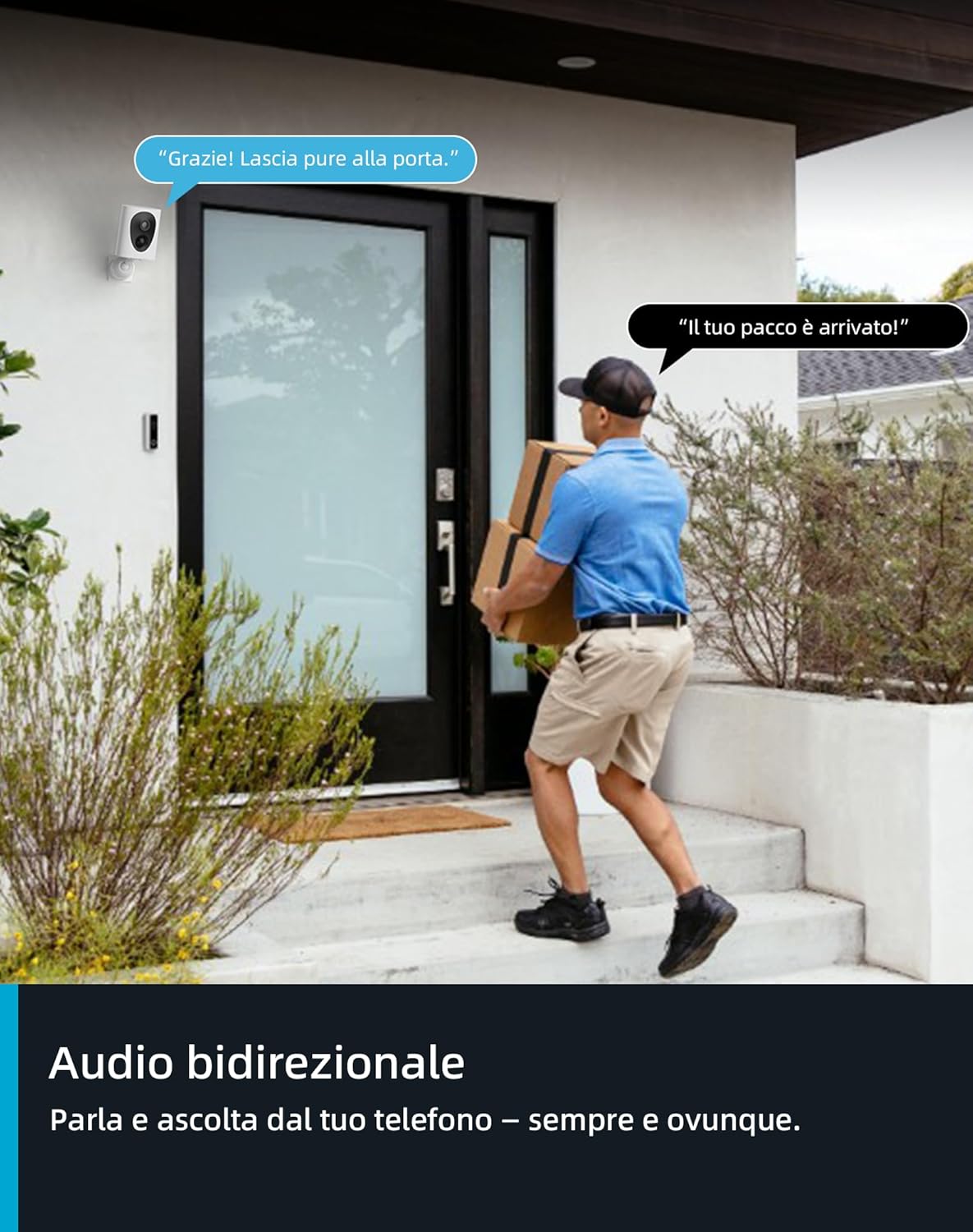
8. irudia: Bi norabideko audioa. Irudi honek banatzaile bat ate batean erakusten du, kameraren erabiltzailearen eta kanpoko pertsonaren arteko komunikazioa adierazten duten hizketa-burbuilekin, bi norabideko audioaren funtzioa erakutsiz.
-
Gaueko ikuspegia: Kamerak automatikoki gaueko ikusmenera aldatzen da argi gutxiko baldintzetan. Infragorrien (zuri-beltzeko) eta Starlight koloretako gaueko ikusmena onartzen ditu, iluntasunean ere irudi garbiak lortzeko.

9. irudia: 2K QHD eguneko eta gaueko koloretako ikusmena. Irudi honek kameraren eguneko 2K QHD ultra-garbiaren alboz alboko konparaketa eskaintzen du. view eta bere Starlight koloretako gaueko ikusmena aparkaleku batean.

10. irudia: Gaueko ikusmenaren koloretako konparaketa. Irudi honek Starlight gaueko ikusmena gaueko ikusmen normalarekin alderatzen du, argi gutxiko egoeran koloretako irudi argiagoa eta zehatzagoa erakutsiz.
- Grabaketa eta erreprodukzioa: Grabatutako bideoak MicroSD txartelean edo hodeian gordetzen dira (harpidetuta bazaude). Sartu eta erreproduzitu grabazioak HOME V aplikazioaren denbora-lerroaren edo gertaeren zerrendaren bidez.
Mantentzea
- Bateria kargatzea: Aplikazioak bateria baxua adierazten duenean, kargatu kameraren bateria berriro. Bateriaren iraupen optimoa lortzeko, saihestu maiz deskargatzea.
- Garbiketa: Aldian-aldian garbitu kameraren lentea eta gorputza oihal leun eta lehor batekin, irudiaren kalitate garbia bermatzeko. Ez erabili produktu kimiko gogorrik edo material urratzailerik.
- Firmware eguneraketak: Mantendu kameraren firmwarea eguneratuta HOME V aplikazioaren bidez. Eguneratzeek askotan errendimendu hobekuntzak eta funtzio berriak izaten dituzte.
- Eguraldiaren babesa: Kamera iragazgaitza den arren, ziurtatu eguraldi muturreko baldintzen eraginpean egon daitekeen leku batean instalatuta dagoela, iraunkortasun luzea izan dezan.
Arazoak konpontzea
| Arazoa | Irtenbide posiblea |
|---|---|
| Kamera ez da Wi-Fi sarera konektatzen. | Ziurtatu zure Wi-Fi sarea 2.4 GHz-koa dela. Egiaztatu Wi-Fi seinalearen indarra kameraren kokapenean. Berrabiarazi bideratzailea eta kamera. Saiatu berriro aplikazioan parekatzen. |
| Irudiaren kalitate eskasa. | Garbitu kameraren lentea. Ziurtatu ez dagoela oztoporik lentearen aurrean. Egiaztatu sarearen egonkortasuna zuzeneko konexiorako. view kalitatea. |
| Bateria azkar agortzen da. | Mugimendu detekzio maiztuak edo zuzenekoak view Erabilerak bateriaren iraupena murriztu dezake. Mugimenduaren detekzio-sentsibilitatea doitu. Ziurtatu kamera guztiz kargatuta dagoela. Kontuan hartu etengabeko jarduera gutxiago duen eremu batean instalatzea. |
| Ez dago mugimendu detektatzeko alertarik. | Egiaztatu aplikazioaren jakinarazpenen ezarpenak. Ziurtatu PIR sentsorea ez dagoela oztopatuta. Doitu mugimenduaren detekzio-sentsibilitatea eta jarduera-eremuak. Egiaztatu kamera linean dagoela. |
| Bi norabideko audioa ez dabil. | Ziurtatu mikrofonoaren eta bozgorailuen baimenak gaituta daudela telefonoko HOME V aplikaziorako. Egiaztatu kameraren audio ezarpenak aplikazioan. Ziurtatu kamera ez dagoela beira baten atzean instalatuta. |
Laguntza gehiago behar baduzu, jo aplikazio barruko laguntza atalera edo jarri harremanetan virtavo bezeroarentzako arreta-zerbitzuarekin.
Bermea eta Laguntza
Virtavo produktuak fidagarritasun eta errendimendu handikoak izateko diseinatuta daude. Zure virtavo 2K haririk gabeko kanpoko bateria kamerari buruzko edozein arazo edo galdera izanez gero, jarri harremanetan virtavo bezeroarentzako arreta-zerbitzuarekin. Laguntzarekin harremanetan jartzeko xehetasunak normalean HOME V aplikazioan edo virtavo-ren webgune ofizialean aurki daitezke. webgunea.
Gorde erosketaren egiaztagiria bermearen erreklamazioetarako. Bermearen baldintza espezifikoak eskualdearen eta erosketa-dataren arabera alda daitezke. Kontsultatu produktuaren ontzia edo virtavoren kanal ofizialak bermeari buruzko informazio eguneratuena lortzeko.
Lineako baliabideak eta maiz egiten diren galderak ikusteko, bisitatu virtavo laguntza orria.


