1. Sarrera
This manual provides essential information for the installation, operation, and maintenance of the Cisco IE-3400-8T2S-E Catalyst IE3400 Rugged Series Network Essential Switch. This device is designed for industrial environments, offering robust network connectivity. Please read this manual thoroughly before operating the device.
2. Segurtasun informazioa
Jarraitu segurtasun neurri hauek ekipamenduari lesioak eta kalteak saihesteko:
- Ziurtatu gailuaren lurra egokia.
- Deskonektatu energia mantentze-lan edo instalazio prozedurak egin aurretik.
- Operate the switch within the specified environmental conditions (temperature, humidity).
- Langile kualifikatuek bakarrik instalatu eta mantendu beharko lukete ekipamendu hau.
- Saihestu gailua hezetasun edo muturreko tenperaturetara.
3. Paketearen edukia
Egiaztatu zure paketeak elementu hauek dituela:
- Cisco IE-3400-8T2S-E Catalyst IE3400 Rugged Series Network Essential Switch
- Dokumentazioa (Hasierako Gida Azkarra, Segurtasun Informazioa)
- Mounting hardware (if included with specific model variant)
- Power connector terminal blocks
Elementuren bat falta bada edo hondatuta badago, jarri harremanetan berehala zure hornitzailearekin.
4. Gainbehera fisikoaview
The following diagram illustrates the front panel components of the Cisco IE-3400-8T2S-E switch.
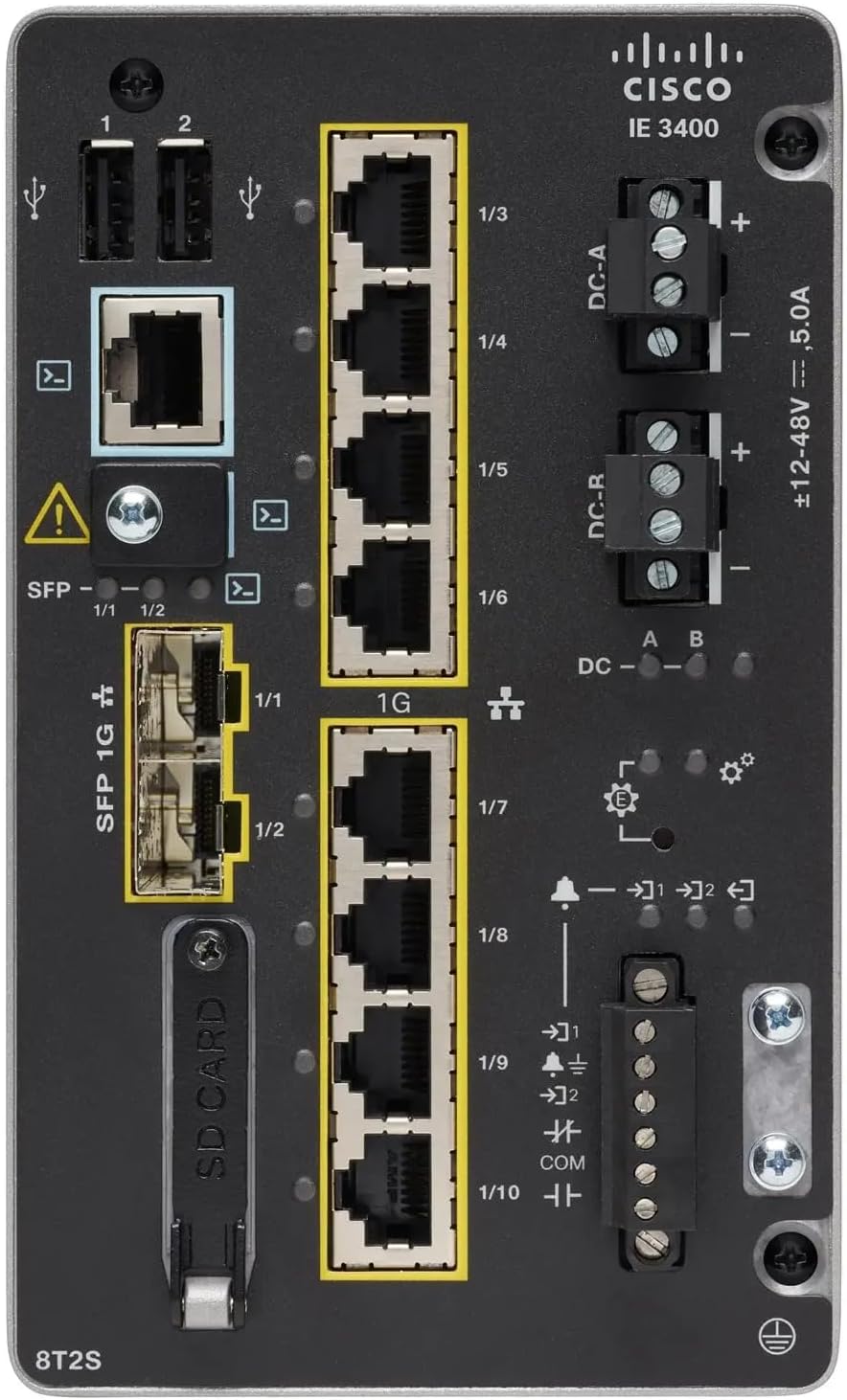
1. irudia: Front Panel Layout of the Cisco IE-3400-8T2S-E Switch
4.1. Front Panel Components Description
- USB Ports (1, 2): Two USB ports for connecting external devices or for configuration.
- Kontsolaren ataka: An RJ45 console port for local management and initial configuration.
- SFP 1G Ports (1/1, 1/2): Two Small Form-Factor Pluggable (SFP) ports supporting 1 Gigabit Ethernet for fiber optic connections.
- 1G Ethernet Ports (1/3 - 1/10): Eight 1 Gigabit Ethernet RJ45 ports for standard network connections.
- DC Power Inputs (DC-A, DC-R): Redundant DC power input terminals, supporting a voltage range of ±12-48V at 5.0A.
- Lurreratzeko torlojua: Terminal for connecting the chassis to earth ground.
- SD txartelaren zirrikitua: Slot for an SD card, typically used for configuration backup or software storage.
- Alarm/Relay Ports (1/9, 1/10): Terminals for connecting external alarm systems or relay controls.
- LED adierazleak: Various LEDs indicating power status (DC A/B), system status, link/activity for ports, and alarm status.
5. Konfigurazioa
5.1. Etengailua muntatzea
The IE3400 series switches are designed for industrial environments and typically support DIN rail or wall mounting. Refer to the specific mounting instructions provided with your mounting kit for detailed steps.
5.2. Potentzia konektatzea
- Ensure the power source is off before connecting.
- Connect the DC power cables to the DC-A and/or DC-R terminal blocks, observing polarity (+ and -). The switch supports redundant power inputs.
- Connect the grounding wire to the grounding screw on the front panel.
- Once all connections are secure, apply power to the switch. The DC-A and/or DC-B LEDs should illuminate.
5.3. Sare konexioak
- Ethernet portuak: Connect standard RJ45 Ethernet cables from your network devices to the 1G Ethernet ports (1/3 - 1/10).
- SFP portuak: Insert compatible SFP transceivers into the SFP 1G ports (1/1, 1/2) and connect fiber optic cables as required.
- Kontsolaren ataka: For initial configuration, connect a console cable from your management workstation to the RJ45 console port.
6. Funtzionamendu-argibideak
6.1. Hasierako piztea
Upon applying power, the switch will perform a power-on self-test (POST). The system LED will indicate the boot status. Once the boot process is complete, the switch will be ready for configuration.
6.2. Configuration Access
The switch can be configured via the console port using a terminal emulator or remotely via Telnet/SSH once an IP address is assigned. Refer to the Cisco IOS documentation for detailed configuration commands and procedures.
6.3. LED adierazleak
Monitor the LED indicators on the front panel to understand the switch's operational status:
- DC-A/DC-B LEDs: Indicate the status of the primary and redundant DC power inputs.
- Sistema LED: Indicates the overall operational status of the switch (e.g., green for normal operation, amber for warning, red for fault).
- Esteka/Jarduera LEDak (portu bakoitzeko): Indicate network link status and data activity on each Ethernet and SFP port.
- Alarma LED: Illuminates when a critical system alarm is triggered.
7. Mantentzea
7.1. Garbiketa
Aldian-aldian garbitu etengailuaren kanpoaldea oihal leun eta lehor batekin. Ez erabili garbitzaile likido edo aerosolik. Ziurtatu aireztapen-irekiduretan hautsik eta hondakinik gabe daudela.
7.2. Firmware eguneraketak
Aldian-aldian egiaztatu Cisco laguntza website for the latest firmware updates. Applying updates can improve performance, add features, and address security vulnerabilities. Follow Cisco's official procedures for firmware upgrades.
7.3. Ingurumenari buruzko gogoetak
Ensure the switch operates within its specified temperature and humidity ranges. Proper airflow around the device is crucial for heat dissipation.
8. Arazoak
Atal honek arazo ohikoenen oinarrizko arazoak konpontzeko urratsak eskaintzen ditu.
8.1. Botererik ez
- Verify that the power source is active and the power cables are securely connected to the DC-A/DC-R terminals.
- Check the DC-A/DC-B LEDs. If they are off, there is no power or a power supply issue.
8.2. No Network Link
- Ensure Ethernet or fiber optic cables are properly connected to both the switch port and the connected device.
- Check the Link/Activity LED for the specific port. If it is off, there is no link.
- Egiaztatu konektatutako gailua piztuta dagoela eta behar bezala funtzionatzen duela.
8.3. System Alarm
- If the Alarm LED is illuminated, consult the Cisco IOS documentation for specific alarm codes and their meanings.
- Check system logs via the console or network management interface for detailed error messages.
9. Zehaztapenak
| Ezaugarri | Zehaztapena |
|---|---|
| Eredua | IE-3400-8T2S-E |
| Fabrikatzailea | Cisco |
| Ethernet Portuak | 8 x 1 Gigabit RJ45 |
| SFP Portuak | 2 x 1 Gigabit SFP |
| Interfaze mota | RJ45, SFP, PoE, PoE+ (model dependent) |
| Potentzia Sarrera | ±12-48V DC, 5.0A (Redundant) |
| Produktuaren neurriak | 36 x 9 x 55 cm |
| Elementuaren pisua | 2.28 kilogramo |
| Gailu bateragarriak | Mahaigainekoa, ordenagailu eramangarria, inprimagailua |
| UPC | 703670760433 |
10. Bermea eta Laguntza
This product is offered as an Amazon Renewed item. Warranty and return policies are typically managed by the reseller (Amazon Renewed) for a specified period. Please refer to your purchase documentation or contact Amazon Renewed support for details regarding your specific warranty coverage.
For technical documentation, software downloads, and advanced support for the Cisco IE-3400-8T2S-E switch, please visit the official Cisco support website and search for your specific model.


