1. Sarrera
Thank you for choosing the IRONZON Fingerprint Door Lock with Mini G2 Gateway. This smart lock system provides advanced security and convenient access for various environments, including homes, hotels, offices, and apartments. It integrates multiple unlocking methods, including fingerprint recognition, passcodes, traditional keys, and smart app control via the included Mini G2 Gateway.
This manual will guide you through the installation, setup, operation, and maintenance of your new smart door lock, ensuring optimal performance and security.

Image 1.1: The IRONZON Fingerprint Door Lock, Mini G2 Gateway, and a smartphone displaying the control app.
2. Paketearen edukia
Mesedez, egiaztatu osagai guztiak paketean daudela instalazioarekin jarraitu aurretik:
- Front Handle Assembly (with fingerprint sensor and keypad)
- Atzeko heldulekuaren muntaia
- Lotura erregulagarria
- Greba-plaka eta greba-kutxa
- Muntatzeko torlojuak eta ardatzak
- 2 x giltza mekanikoak
- Mini G2 Gateway
- USB-C Power Cable for Gateway
- Erabiltzailearen eskuliburua (dokumentu hau)

2.1. irudia: Amaituview of the IRONZON Fingerprint Door Lock and its included accessories.
3. Ezaugarri nagusiak
- Desblokeatzeko hainbat metodo: Access your door using fingerprint, passcode, mechanical key, or the smart app.
- Fast Biometric Recognition: Unlock the door in under 1 second with advanced fingerprint technology.
- Remote Control & Monitoring: The included Mini G2 Gateway enables remote control and real-time status monitoring via the Tuya Smart App (2.4G Wi-Fi required).
- Temporary Access Codes: Generate and manage temporary passcodes for guests or service personnel.
- Jarduera-erregistroa: View a detailed history of who accessed the door and when through the app.
- Eraikuntza iraunkorra: All-metal design ensures longevity and blends with modern decor.
- Erregulagarria den giltzarrapoa: Compatible with most standard door preparations.
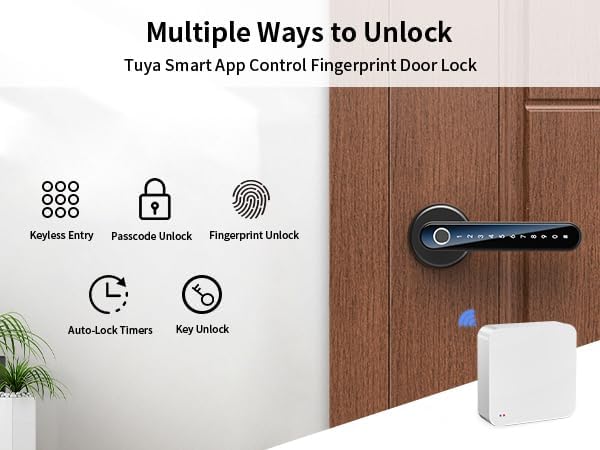
Image 3.1: Visual representation of the various unlocking methods available with the smart door lock.

Image 3.2: The Mini G2 Gateway enables remote control of the door lock from anywhere via the app.
4. Konfigurazio gida
4.1. Instalazioa
Before installation, ensure your door thickness is between 1⅜ inches (35mm) and 1¾ inches (45mm) and the backset distance is between 2⅜ inches (60mm) and 2¾ inches (70mm).
- Atea prestatu: If replacing an existing lock, remove it. Ensure the door boreholes are clean and correctly sized.
- Instalatu Latch-a: Insert the adjustable latch into the door edge. Ensure the latch bolt faces the correct direction (slanted side towards the door frame). Secure with screws.
- Install the Front Handle: Insert the spindle through the latch. Position the front handle assembly on the exterior side of the door, ensuring the cable passes through the borehole.
- Install the Rear Handle: Connect the cable from the front handle to the rear handle assembly. Align the rear handle with the spindle and mounting posts. Secure with mounting screws from the interior side.
- Sartu bateriak: Open the battery cover on the rear handle. Insert 4 AAA batteries (not included), ensuring correct polarity. Close the battery cover.
- Proba funtzionamendua: Manually test the handle and latch to ensure smooth operation.

Image 4.1: Detailed installation guide and applicable door dimensions for the smart lock.
4.2. Aplikazioaren deskarga eta konfigurazioa
The IRONZON Fingerprint Door Lock uses the Tuya Smart App for smart features.
- Deskargatu aplikazioa: Bilatu "Tuya Smart" in your smartphone's app store (iOS or Android) and download it.
- Erregistratu/Hasi saioa: Ireki aplikazioa eta erregistratu kontu berri bat edo hasi saioa dagoeneko baduzu.
- Gehitu gailua: Tap the "+" icon in the top right corner or select "Add Device." Choose "Security & Video Surveillance" > "Smart Lock" or use the auto-scan feature.
- Pair Lock: Follow the on-screen instructions to put the lock into pairing mode (usually by pressing a button on the interior handle or entering a specific code on the keypad). The app will detect and connect to the lock via Bluetooth.
- Administratzailea multzoa: Once connected, you will be prompted to set up the administrator fingerprint and passcode. This is crucial for initial access and managing other users.
4.3. Mini G2 Gateway Pairing
The Mini G2 Gateway enables remote control and monitoring of your lock via Wi-Fi.
- Pizteko atebidea: Connect the Mini G2 Gateway to a power source using the provided USB-C cable. The indicator light will flash.
- Add Gateway to App: In the Tuya Smart App, tap "+" to add a new device. Select "Gateway" > "Wireless Gateway (Wi-Fi)" or use auto-scan.
- Konektatu wifira: Follow the app instructions to connect the gateway to your 2.4GHz Wi-Fi network.
- Link Lock to Gateway: Once the gateway is online, navigate to your lock's settings within the Tuya Smart App. Select the option to link it to the newly added gateway. Ensure the gateway is within Bluetooth range of the lock for initial linking.

Image 4.2: Specifications and physical dimensions of the Mini G2 Gateway.
5. Funtzionamendu-argibideak
5.1. Desblokeatzeko metodoak
- Hatz-markak desblokeatzea: Jarri erregistratutako hatza sendo hatz-marken sentsorean. Blokeoa desblokeatuko da hatz-marka ezagutzen bada.
- Passcode Unlocking: Enter your registered passcode on the keypad, followed by the '#' key. The lock will unlock if the passcode is correct.
- Giltza mekanikoaren desblokeoa: Insert the mechanical key into the keyhole located on the front handle and turn to unlock. This is a backup method for emergencies or battery depletion.
- App Unlocking: Open the Tuya Smart App, select your lock, and tap the unlock icon. This can be done via Bluetooth (close range) or remotely via the Mini G2 Gateway (Wi-Fi).

Image 5.1: The Tuya Smart App provides multiple options for unlocking and managing the door lock.
5.2. User Management (via Tuya Smart App)
The app allows you to manage users, add/delete fingerprints and passcodes, and set access schedules.
- Gehitu erabiltzailea: In the app, navigate to your lock's settings and select "Member Management" or "Users." Follow the prompts to add new users, assigning them fingerprints or passcodes.
- Generate Temporary Codes: Select "Temporary Code" to create time-limited or one-time access codes for guests.
- View Jarduera-erregistroa: Access the "Log" section to review a chronological record of all lock and unlock events, including the method used and the user.
- Urruneko kontrola: With the gateway connected, you can lock/unlock the door remotely, modify user access, and receive notifications.

Image 5.2: The app allows for remote monitoring of door status, viewing activity logs, and managing access.
6. Mantentzea
6.1. Bateria ordezkatzea
The lock requires 4 AAA batteries. When the battery level is low, the lock will provide an audible warning. Replace batteries promptly to avoid loss of function.
- Locate the battery cover on the interior handle.
- Kendu bateriaren estalkia bermatzen duen torlojua.
- Remove the old batteries and insert 4 new AAA batteries, ensuring correct polarity.
- Jarri bateriaren estalkia eta lotu torlojuarekin.
Oharra: If batteries completely deplete, you can use the mechanical key or connect a USB-C power bank to the emergency power port on the exterior handle to temporarily power the lock for entry.
6.2. Garbiketa
To maintain the appearance and functionality of your lock:
- Garbitu giltzarrapoaren gainazala zapi leun eta lehor batekin.
- Saihestu garbitzaile urratzaileak, disolbatzaileak edo produktu kimiko gogorrak erabiltzea, hauek akabera eta osagai elektronikoak kaltetu baititzakete.
- Keep the fingerprint sensor and keypad clean and free of debris for optimal performance.
7. Arazoak
| Arazoa | Kausa posiblea | Irtenbidea |
|---|---|---|
| Blokeoak ez du erantzuten. | Bateria hilak. | Replace batteries. Use mechanical key or emergency USB-C power. |
| Hatz-marka ez da ezagutzen. | Finger is wet/dirty, sensor is dirty, or fingerprint not properly registered. | Ensure finger and sensor are clean and dry. Re-register fingerprint, trying different angles. |
| Passcode not working. | Incorrect passcode entered, or passcode not registered. | Verify passcode. Ensure '#' is pressed after the code. Register passcode via app. |
| Ezin da aplikaziora konektatu. | Bluetooth/Wi-Fi off, lock/gateway out of range, or pairing issue. | Ensure Bluetooth is on. Move closer to the lock/gateway. Check Wi-Fi connection (2.4GHz only). Re-pair device in app. |
| Pasabidea ez da Wi-Fi-ra konektatzen. | Wi-Fi pasahitz okerra, 5 GHz-ko sarea edo seinale ahula. | Verify Wi-Fi password. Ensure you are connecting to a 2.4GHz network. Move gateway closer to router. |
| Lock makes unexpected sounds or locks automatically. | Auto-lock feature enabled, or internal error. | Check auto-lock settings in the app. If persistent, perform a factory reset (refer to app instructions for reset procedure). |
8. Zehaztapenak
| Ezaugarri | Xehetasuna |
|---|---|
| Marka | IRONZON |
| Ereduaren izena | LOC191GWBUSIR |
| Blokeo mota | Biometric (Fingerprint) |
| Desblokeatzeko metodoak | Fingerprint, Passcode, Key, App (Bluetooth/Wi-Fi via Gateway) |
| Kontrol-metodoa | Aplikazioa, Urrunekoa |
| Elikatze Hornidura | 4 x AAA bateria (ez daude barne) |
| Larrialdi Potentzia | USB-C ataka |
| Atearen Lodiera | 1.38 - 1.77 inches (35mm - 45mm) |
| Backset Distance | 2.36 - 2.75 inches (60mm - 70mm) |
| Elementuaren neurriak (L x W x H) | 6.3 x 2.3 x 2.3 hazbete |
| Elementuaren pisua | 1.94 libra (0.88 kilogramo) |
| Pasabide Sarea | Wi-Fi 2.4G |
| Gateway Power Interface | C motako USBa (DC 5V/1A) |
| Gateway Bluetooth | Potentzia baxuko Bluetooth 4.2 |
9. Bermea eta Laguntza
IRONZON products are designed for reliability and performance. This product comes with a standard manufacturer's warranty against defects in materials and workmanship. Please refer to the warranty card included in your package for specific terms and conditions, including the warranty period and coverage details.
For technical support, troubleshooting assistance, or warranty claims, please contact IRONZON customer service through the following channels:
- Posta elektronikoa: Refer to your product packaging or the IRONZON official webkontaktu-helbide elektroniko eguneratuena lortzeko gunea.
- Lineako laguntza: Visit the IRONZON official webMaiz egiten diren galderen, laguntza-artikuluen eta harremanetarako formularioen gunea.
When contacting support, please have your product model number (LOC191GWBUSIR) and purchase information readily available.


