Sarrera
This manual provides essential information for the safe and efficient use of your Itel A50 Dual SIM smartphone. Please read this manual carefully before using the device to ensure optimal performance and to prevent damage.

Figure 1: Itel A50 Dual SIM Smartphone (Cyan Blue)
The image displays the Itel A50 smartphone in cyan blue, showcasing both its front screen and the textured back panel with the triple camera module and flash. The phone has a sleek design with rounded corners.
Konfigurazioa
1. SIM txartelak eta memoria txartela sartzea
The Itel A50 supports dual SIM cards and an external memory card (up to 2TB). Ensure the device is powered off before inserting or removing cards.
- Bilatu SIM txartelaren erretilua gailuaren alboan.
- Erabili SIM txartelaren kanporatzeko tresna erretilua irekitzeko.
- Carefully place your Nano-SIM cards and microSD card into the designated slots on the tray. Ensure the gold contacts face downwards.
- Sakatu astiro-astiro erretilua gailuan sartu arte.
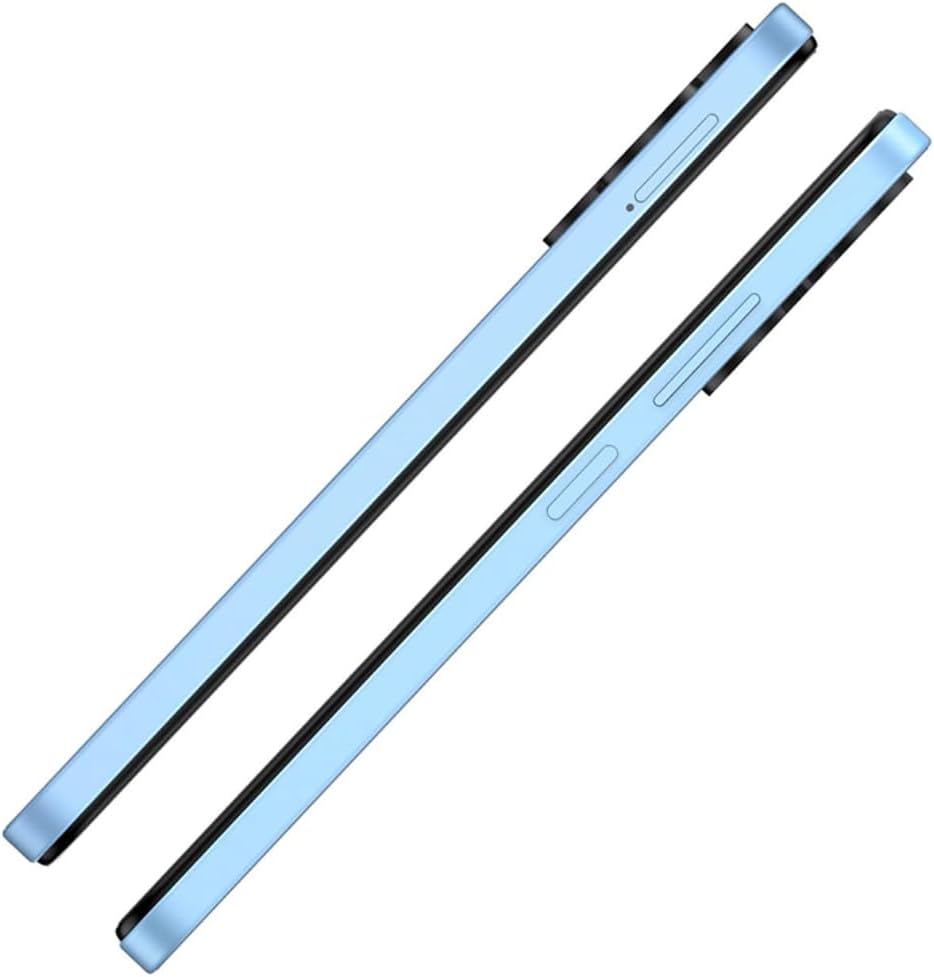
2. irudia: Aldea View SIM erretiluarekin
This image shows the right side of the Itel A50 smartphone, highlighting the elongated volume rocker and the power button below it. The SIM card tray slot is visible above the volume buttons.
2. Bateria kargatzea
Before first use, fully charge the device battery. The Itel A50 comes with a 5000mAh battery.
- Konektatu USB C motako kablea telefonoaren beheko aldean dagoen kargatzeko atakara.
- Konektatu kablearen beste muturra korronte egokitzaile batera eta konektatu hormako entxufe batera.
- Kargatzeko adierazlea pantailan agertuko da.

3. irudia: Kargatzeko ataka
The image shows the bottom edge of the Itel A50 smartphone with a white USB-C charging cable plugged into the central port. To the left of the charging port, a 3.5mm headphone jack is visible, and to the right, a speaker grille.
Funtzionamendu-argibideak
1. Piztu/Itzali
- Pizteko: Press and hold the Power button (located on the right side) until the Itel logo appears.
- Itzaltzeko: Sakatu eta eutsi pizteko botoia energia aukeren menua agertu arte, eta ondoren hautatu "Itzali".
- Berrabiarazteko: Sakatu eta eutsi pizteko botoia energia aukeren menua agertu arte, eta ondoren hautatu "Berrabiarazi".

Figure 4: Front Display
This image displays the front of the Itel A50 smartphone, showing its large screen with a waterdrop notch at the top for the front camera. The display shows a vibrant, abstract wallpaper.
2. Oinarrizko nabigazioa
- Ukipen-pantaila: Tap, swipe, pinch-to-zoom to interact with the interface.
- Hasierako pantaila: Aplikazio eta widgetetara sartzeko pantaila nagusia.
- Jakinarazpenak: Irristatu hatza behera pantailaren goialdetik view notifications and quick settings. The integrated Dynamic Bar provides essential notifications more seamlessly.
3. Kameraren erabilera
The Itel A50 features a rear camera system for capturing photos and videos.
- Ireki Kamera aplikazioa hasierako pantailatik edo aplikazioen tiradertik.
- Hautatu nahi duzun modua (Argazkia, Bideoa, Erretratua, etab.).
- Sakatu obturadorearen botoia argazki bat ateratzeko edo bideo bat grabatzen hasteko/gelditzeko.

Figure 5: Rear Camera Module
This image shows the back of the Itel A50 smartphone, highlighting the prominent camera island in the upper left corner. The island contains three circular lenses and a flash, with "AI CAMERA" text visible. The back panel has a subtle textured pattern.
Mantentzea eta zaintzea
- Garbiketa: Erabili zapi leun eta lihorik gabeko bat pantaila eta gorputza garbitzeko. Saihestu garbitzaile edo disolbatzaile urratzaileak.
- Tenperatura: Ez jarri gailua tenperatura altuetan (beroan edo hotzean).
- Uraren erresistentzia: The Itel A50 is not water-resistant. Avoid contact with liquids.
- Bateriaren iraupena: To prolong battery life, avoid fully discharging the battery frequently. Optimize power consumption using the built-in power-saving solutions.
- Software eguneraketak: Mantendu zure gailuaren softwarea eguneratuta errendimendu eta segurtasun optimoa bermatzeko.
Arazoak konpontzea
| Arazoa | Irtenbide posiblea |
|---|---|
| Gailua ez da pizten. | Ziurtatu bateria kargatuta dagoela. Konektatu kargagailu batera eta itxaron minutu batzuk berriro pizten saiatu aurretik. |
| Pantailak ez du erantzuten. | Perform a forced restart by pressing and holding the Power button for about 10-15 seconds. |
| Sare-seinale eskasa. | Egiaztatu SIM txartela sartuta dagoela. Mugitu sare-estaldura hobea duen eremu batera. Berrabiarazi gailua. |
| Aplikazioak motel doaz edo huts egiten dute. | Close background apps. Clear app cache. Ensure sufficient storage space. Restart the device. The device is designed for smooth and efficient operations, optimizing performance for specific scenarios. |
| Bateria azkar agortzen da. | Reduce screen brightness. Disable unnecessary features (Wi-Fi, Bluetooth, GPS) when not in use. Use power-saving modes. |
Zehaztapenak
| Ezaugarri | Xehetasuna |
|---|---|
| Ereduaren izena | T603 (Item model number: A667LP) |
| Marka | Itel |
| Sistema eragilea | OS 14 |
| Instalatutako RAM memoriaren tamaina | 8 GB (3+5GB RAM) |
| Memoria Biltegiratzeko Ahalmena | 128 GB (Supports up to 2TB external memory) |
| CPU eredua | 1.2 GHz-ko Cortex A8 prozesadorea |
| CPU Abiadura | 2 GHz |
| Pantailaren tamaina | 6.6 hazbete (pantailaren diagonala ikusgai: 7" / 17 cm) |
| Haririk gabeko garraiolaria | Desblokeatua |
| Teknologia Zelularra | 4G |
| Pilak | 1 Lithium Ion battery required (included), 5000mAh |
| Paketearen neurriak | 18 x 9 x 4.5 cm; 187 g |
| Eskuragarri dagoen lehen data | 25ko irailaren 2024a |
| Fabrikatzailea | itel |
Bermea eta Laguntza
For warranty information and technical support, please refer to the warranty card included in your product packaging or visit the official Itel webgunea. Gorde erosketaren egiaztagiria bermearen erreklamazioetarako.
For further assistance, you may contact Itel customer service through their official channels.