Sarrera
The MiBOXER PW5 5-in-1 LED Controller is designed for precise and convenient management of various LED lighting systems. It supports multiple LED types and offers dual wireless connectivity for seamless integration and control.
This manual provides essential information for the safe and efficient installation, operation, and maintenance of your PW5 LED Controller.
Ezaugarri nagusiak
- 5-in-1 bateragarritasuna: Supports Single Color, Dual White (CCT), RGB, RGBW, and RGB+CCT LED setups.
- Dual Wireless Connectivity: Features WiFi and 2.4GHz technology for stable operation and smart app integration.
- High Output Capacity: Handles up to 20A output, suitable for high-power LED installations.
- Kontrol adimenduna: Compatible with "Tuya Smart" app and third-party voice control systems like Alexa and Google Assistant.
- Color and Dimming Control: Offers 16 million colors, adjustable color temperature, brightness, and saturation.
- PUSH Dimming Support: Allows for flexible dimming control.
- Memoria Funtzioa: Retains the last-used settings.
- Zabala Voltage Barrutia: Operates on DC12-24V.
Paketearen edukia
- MiBOXER PW5 5-in-1 LED Controller
- Erabiltzailearen eskuliburua

Image: The MiBOXER PW5 LED Controller shown alongside its retail packaging and a small instruction manual.
Konfigurazioa eta Instalazioa
Segurtasun-neurriak
- Ziurtatu energia deskonektatuta dagoela instalatu aurretik.
- Install in a dry environment, away from moisture and extreme temperatures.
- Egiaztatu liburu zuzenatage (DC12-24V) and current ratings for your LED strips and power supply.
- Do not exceed the maximum output current of 20A.
Kableatu-diagrama
Connect your LED strips and power supply to the controller as shown in the diagram below. Ensure correct polarity for all connections.

Image: Detailed wiring diagram of the MiBOXER PW5 controller. It shows the V+ and V- input terminals, GND and PUSH dimming terminals, and output terminals labeled V+, W, WW, CW, R, G, B for various LED strip types. An indicator output mode table is also visible, showing White for Single Color, Yellow for Dual White, Red for RGB, Green for RGBW, and Blue for RGB+CCT.
- Connect the DC12-24V power supply to the SARRERA V+ eta V- terminalak.
- Connect your LED strip(s) to the corresponding IRTEERA terminals based on your LED type:
- Kolore bakarra: Connect to V+ and W (White)
- Dual White (CCT): Connect to V+, WW (Warm White), and CW (Cool White)
- RGB: Connect to V+, R (Red), G (Green), and B (Blue)
- RGBW: Connect to V+, R, G, B, and W (White)
- RGB+CCT: Connect to V+, R, G, B, WW, and CW
- For PUSH dimming functionality, connect a compatible PUSH switch to the GND eta BULTZATU terminalak.
Muntaketa
The controller is designed for tabletop mounting. Ensure it is placed on a stable, flat surface with adequate ventilation.

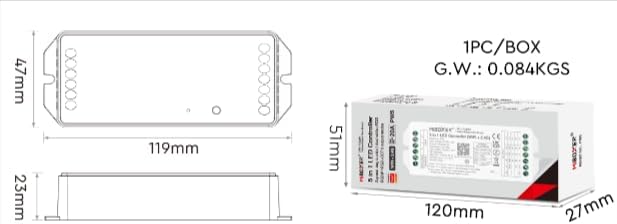
Image: Two diagrams illustrating the physical dimensions of the MiBOXER PW5 controller. The first shows a top-down view with a length of 119mm and width of 47mm. The second shows a side view with a height of 23mm, and also includes package dimensions of 120mm x 51mm x 27mm.
Funtzionamendua
Switching Output Modes
The PW5 controller supports 5 different output modes. To switch between these modes:
- Sakatu "EZARRI" button once to cycle through the output modes.
- The indicator light on the controller will change color to reflect the current mode:
- White: Single Color
- Yellow: Dual White
- Red: RGB
- Green: RGBW
- Blue: RGB+CCT
2.4G RF urrutiko kontrola
The controller can be linked to a compatible 2.4G RF remote control (sold separately).
- To link: Power on the controller. Within 3 seconds, press the "ON" button on the remote control 3 times. The LED strip will flash to confirm successful linking.
- To unlink: Power on the controller. Within 3 seconds, press the "ON" button on the remote control 5 times. The LED strip will flash to confirm unlinking.
WiFi and App Control (Tuya Smart)
The PW5 controller integrates with the "Tuya Smart" app for advanced control via WiFi.
- Download the "Tuya Smart" app from your device's app store.
- Erregistratu edo hasi saioa zure Tuya Smart kontuan.
- To activate WiFi pairing mode: Long press the "EZARRI" button for 3 seconds until the indicator flashes quickly.
- In the Tuya Smart app, follow the instructions to add a new device. Select the appropriate lighting device type.
- Once connected, you can control brightness, color, color temperature, saturation, and set up group/multi-zone control.
- The app also supports music rhythm functions.
Voice Control (Alexa, Google Assistant)
After successful integration with the Tuya Smart app, you can link your account to voice assistants like Amazon Alexa or Google Assistant for hands-free control.
- Ireki Alexa edo Google Home aplikazioa.
- Joan "Trebetasunak" edo "Google-rekin funtzionatzen du" atalera.
- Bilatu and enable the "Tuya Smart" skill/service.
- Lotu zure Tuya Smart kontua eskatzen zaizunean.
- Discover devices. Your MiBOXER PW5 controller should appear.
- Orain ahots-komandoak erabil ditzakezu, hala nola:
- "Alexa, piztu egongelako argiak."
- "Hey Google, set the kitchen lights to blue."
- "Alexa, dim the bedroom lights to 50%."
Mantentzea
- Keep the controller clean and free from dust. Use a soft, dry cloth for cleaning.
- Ez erabili produktu kimiko gogorrik edo garbigailu urratzailea.
- Ziurtatu gailuaren inguruan aireztapen egokia gehiegi berotzea saihesteko.
- Aldian-aldian egiaztatu kableatu-konexioen segurtasuna eta osotasuna bermatzeko.
Arazoak konpontzea
| Arazoa | Kausa posiblea | Irtenbidea |
|---|---|---|
| LEDak ez dira pizten | No power to controller; incorrect wiring; faulty LED strip. | Check power supply connection; verify input/output wiring polarity; test LED strip with another power source. |
| Urruneko kontrola ez dabil | Remote not linked; remote battery low; interference. | Re-link the remote control; replace remote battery; reduce interference sources. |
| Aplikazioen kontrola ez dabil | Controller not connected to WiFi; incorrect app settings; WiFi signal weak. | Ensure controller is in WiFi pairing mode and connected to your network; check app settings; move controller closer to WiFi router. |
| Incorrect colors or dimming | Wrong output mode selected; incorrect wiring for LED type. | Press "SET" button to cycle to the correct output mode; verify LED strip wiring matches the selected mode. |
Zehaztapenak
| Modelo zenbakia | PW5 |
| Sarrera boltage | DC12-24V |
| Irteera Korrontea | Gehienez 20 A |
| Kanal kopurua | 5 |
| Konektibitatea | WiFi, 2.4GHz RF |
| Control Distance (2.4G) | 30 m |
| Funtzionamendu-tenperatura | -10°C eta 40°C artean |
| Neurriak | 119 mm x 47 mm x 23 mm (gutxi gorabehera 4.68 x 1.85 x 0.9 hazbete) |
| Elementuaren pisua | 3.2 ontza (gutxi gorabehera 90 g) |
| Fabrikatzailea | Miboxer |
Bermea eta Laguntza
Bermeari buruzko informazioa eta laguntza teknikoa lortzeko, jo MiBOXER-en webgune ofizialera. webwebgunearekin edo jarri harremanetan zure saltzailearekin. Gorde erosketa-agiria berme-erreklamazioetarako.
Laguntza gehiago lortzeko, bisita dezakezu MiBOXER denda Amazonen.


