1. Sarrera
The Devo G4 Smart Lock provides advanced security and convenient access for your home. This keyless entry deadbolt features multiple unlocking methods, Bluetooth app control, and intelligent automation functions. This manual will guide you through the installation, setup, and operation of your new smart lock.

This image displays the complete Devo G4 Smart Lock system, including the sleek black exterior keypad with touchscreen, the interior deadbolt mechanism, and a smartphone screen showing the lock's control application.
2. Produktuaren ezaugarriak
- Aplikazioen kontrola: Connect via Bluetooth to the Tuya Smart app for remote locking/unlocking, user management, event history, and low battery reminders.
- Desblokeatzeko hainbat metodo: Offers four ways to unlock: smartphone app, password keypad, physical key, and IC card. Two physical keys and two IC cards are included.
- Segurtasun hobetua: Features include wrong input restriction, temporary PIN code generation for guests, and anti-peeping password protection. Operates without constant network reliance, enhancing security against online attacks.
- Bateriaren iraupen luzea eta iraunkortasuna: Powered by 4 AA batteries (not included) for approximately 8 months of use. Equipped with a Type-C emergency charging port. IP54 waterproof design withstands temperatures from 5°F to 122°F (-15°C to 50°C). BHMA Grade 3 certified for security and durability.
- Automatic & One-Touch Locking: Customizable auto-lock time (5-900 seconds) and one-touch locking for convenience and security.
- Instalazio erraza: Designed for straightforward installation without specialized tools, compatible with most American standard doors.

This graphic illustrates the four convenient methods to unlock the Devo G4 Smart Lock: using the smartphone app, entering a code on the keypad, tapping an IC card, or using a traditional physical key.
3. Paketearen edukia
Mesedez, egiaztatu osagai guztiak daudela instalazioa hasi aurretik.
- Devo G4 Smart Door Lock (1 unit)
- IC Cards (2 units)
- Installation Accessories (screws, plates, etc.)
- Mechanical Keys (2 units)
- Erabiltzailearen eskuliburua (dokumentu hau)
4. Instalazio gida
4.1 Instalazioaren aurreko egiaztapena
Before installation, ensure your door meets the following specifications for compatibility:
- Atearen lodiera: 1-3/8" to 2-1/8" (35-55mm)
- Atearen zuloaren diametroa: 1-1/2" or 2-1/8" (38 or 54mm)
- Aurrealdea: 2-3/8" or 2-3/4" (60 or 70mm)
- Compatible with chiselled and single-cylinder door types. Not compatible with unchiselled or mortise/integrated locks.
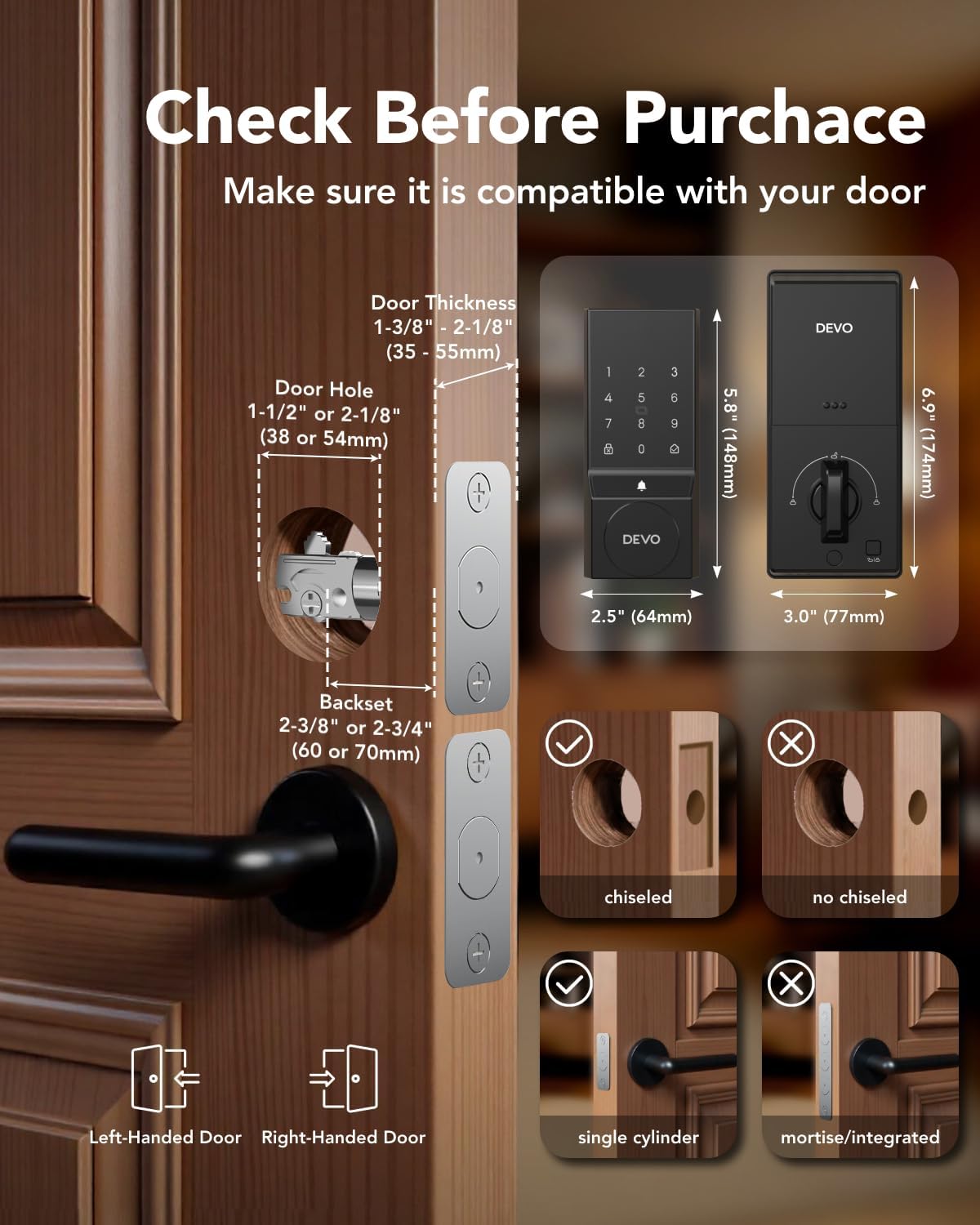
This diagram provides essential measurements and door type compatibility checks for installing the Devo G4 Smart Lock, detailing requirements for door thickness, bore hole diameter, backset, and confirming suitability for chiselled and single-cylinder doors.
4.2 Instalazio Urrats Orokorrak
The Devo G4 Smart Lock is designed for easy installation. While specific steps are detailed in the included printed user manual, the general process involves:
- Kendu zure egungo sarraila.
- Sartu atearen ertzean sarraila berria.
- Muntatu kanpoko teklatuaren multzoa.
- Install the interior assembly, ensuring proper cable connection.
- Lotu osagai guztiak emandako torlojuekin.
- Sartu 4 AA pila (ez daude barne) barneko unitatean.
Refer to the detailed graphical instructions in your physical user manual for precise steps and diagrams.
5. Konfigurazioa eta konfigurazioa
5.1 App Setup (Tuya Smart App)
- Deskargatu Tuya Smart aplikazioa zure telefonoaren aplikazio dendatik.
- Sortu kontu bat edo hasi saioa.
- Gaitu Bluetootha zure telefonoan.
- In the app, select 'Add Device' and follow the on-screen instructions to connect to your Devo G4 Smart Lock via Bluetooth.
5.2 User Management and Passcodes
The app allows you to manage various users and access methods.
- Erabiltzaileak gehitzea: Navigate to 'Member Management' in the app to add family members, roommates, or other authorized individuals.
- Setting Passcodes: Create permanent or temporary passcodes for different users. The anti-peeping password feature allows you to enter random digits before or after your actual code to prevent others from guessing it.
- Aldi baterako pasahitzak: Generate time-limited or single-use passcodes for guests or service providers directly from the app.
5.3 IC Card Setup
To program the included IC cards:
- Access the 'Accessories Management' section in the Tuya Smart app.
- Follow the prompts to add a new IC card.
- Present the IC card to the lock's sensor when instructed by the app.
6. Funtzionamendu-argibideak
6.1 Desblokeatzeko metodoak
- Aplikazioa desblokeatzea: Ireki Tuya Smart aplikazioa, hautatu zure giltzarrapoa eta sakatu desblokeatzeko ikonoa.
- Pasahitz bidezko desblokeoa: Enter your programmed passcode on the touchscreen keypad, followed by the '#' key.
- IC txartelaren desblokeoa: Tap a programmed IC card against the designated sensor area on the lock's exterior unit.
- Physical Key Unlock: Insert the mechanical key into the hidden keyhole and turn to unlock. This serves as a backup method.

A woman is shown operating the Devo G4 Smart Lock keypad, emphasizing its versatility for various applications such as side doors, garage doors, rental properties, and home offices.
6.2 Auto-Lock and One-Touch Lock
- Blokeo automatikoa: Customize the auto-lock delay (5-900 seconds) via the app. The lock will automatically engage after the door closes and the set time elapses.
- Ukitu bakarreko blokeoa: Simply press and hold the '#' key on the keypad to instantly lock the door from the outside.

This image demonstrates the automatic locking feature of the Devo G4 Smart Lock, showing a door that can be set to auto-lock after a customizable delay, such as 5 seconds, 30 seconds, 1 minute, or 10 minutes.
6.3 Adjustable Volume Doorbell
The Devo G4 Smart Lock includes an integrated doorbell function. You can customize the chime volume through the Tuya Smart app to suit your preferences.
7. Mantentzea
- Garbiketa: Wipe the touchscreen and lock body with a soft, dry cloth. Avoid abrasive cleaners or solvents.
- Bateria ordezkatzea: The app will provide a low battery warning. Replace all 4 AA batteries promptly when indicated. Use high-quality alkaline batteries for optimal performance.
- Larrialdi potentzia: If batteries completely drain, use the Type-C emergency charging port with a power bank to temporarily power the lock and gain access.

This image highlights the long-lasting battery life of the Devo G4 Smart Lock, showing the battery compartment designed for 4 AA batteries (not included) which provide approximately 8 months of operation.
8. Arazoak
- Blokeoak ez du erantzuten: Check battery levels. If low, replace batteries or use the emergency Type-C charging port.
- Aplikazioen konexio arazoak: Ensure Bluetooth is enabled on your phone and the lock is within range. Restart the app and try reconnecting.
- Pasakodea ez dabil: Verify the correct passcode is being entered. Ensure the anti-peeping feature is not causing confusion.
- IC card not recognized: Ensure the IC card is properly programmed and presented to the correct sensor area.
- Blokeo automatikoa ez da aktibatzen: Check the auto-lock settings in the app to ensure it is enabled and the delay time is set correctly.
For further assistance, refer to the comprehensive troubleshooting section in the physical user manual or contact customer support.
9. Zehaztapenak
| Ezaugarri | Xehetasuna |
|---|---|
| Marka | Devo |
| Ereduaren izena | G4 |
| Blokeo mota | deadbolt |
| Materiala | Aluminioa |
| Akabera mota | Hauts estalita |
| Elementuaren neurriak (L x W x H) | 9.5 x 7.3 x 3.8 hazbete |
| Elementuaren pisua | 2.44 kilo |
| Ezaugarri bereziak | Auto-Lock, One-Touch Lock, Passcode Unlock, Touchscreen, Weather Resistant |
| Gomendatutako Erabilerak | Sarrerako Atea |
| Kontrol-metodoa | Aplikazioa, ukitu |
| Konektibitate-protokoloa | Bluetootha |
| Beharrezko bateriak | Bai (4 AA bateria, ez dago barne) |
| IP balorazioa | IP54 (iragazgaitza) |
| Funtzionamendu-tenperatura | 5 °F eta 122 °F (-15 °C eta 50 °C) |
10. Bermea eta Laguntza
Devo provides a 12 hilabeteko bermea for the G4 Smart Lock. Technical support is also available to assist with any questions or issues you may encounter.
If you have any questions or require assistance, please refer to the contact information provided in your product packaging or visit the official Devo weblaguntza baliabideen gunea.


