1. Produktua amaitu daview
The DEVO G3 Smart Lock is a versatile keyless entry system designed for enhanced home security and convenience. It integrates multiple unlocking methods, including advanced AI fingerprint recognition, keypad passcodes, IC cards, physical keys, and smart app control via Wi-Fi. This smart deadbolt also features a built-in doorbell function and is compatible with voice assistants like Alexa and Google Home. Its durable, IP54-rated waterproof design ensures reliable performance in various weather conditions.

Image: DEVO G3 Smart Lock exterior unit, showcasing its fingerprint sensor, keypad, and key features like quick access and IP54 waterproofing.
2. Zer dago kutxan
Instalazioa hasi aurretik, egiaztatu osagai guztiak paketean daudela:
- Smart Lock Exterior Assembly (1)
- Smart Lock Interior Assembly (1)
- Deadbolt (1)
- Strike Plate and Box (1)
- Giltzak (2)
- IC Txartelak (2)
- Erabiltzailearen eskuliburua (1)
- Measuring Cardboard (1)
- Screws (various sizes: A, B, C, D)
- Plug (E)
Video: Unboxing the DEVO G3 Smart Lock and identifying all included components for installation.
3. Instalazio gida
Follow these steps carefully to install your DEVO G3 Smart Lock. Ensure you have the necessary tools before starting.
1. urratsa: Neurtu neurriak
Use the provided measuring cardboard to check your door's dimensions. Verify the cross bore diameter (38mm or 54mm), door hole diameter (25mm), and backset (60mm or 70mm). The door thickness should be between 35mm and 55mm.

Image: Diagram illustrating the required door measurements for proper smart lock installation.
Video: Demonstrates how to measure door dimensions using the provided template.
2. urratsa: instalatu Deadbolt
Ensure the latch is in the retracted (unlocked) position before installation. If your backset is 70mm, rotate the faceplate 180 degrees to extend the latch length. For a 60mm backset, install the latch as is. Insert the latch into the door frame and secure it with screws. Make sure the 'UP' marking on the deadbolt faces upwards.
Video: Step-by-step guide on installing the deadbolt, including backset adjustment.
3. urratsa: instalatu kanpoko muntaia
If your door's cross bore is 38mm, remove the adapter from the exterior assembly. If it's 54mm, keep the adapter. Keep the torque blade vertical, align it with the latch hole, and pass the cable through. Ensure the cable runs underneath the deadbolt.
Video: Instructions for installing the exterior smart lock assembly, including adapter adjustment for cross bore size.
4. Urratsa: Instalatu Barruko Batzarra
Detach the mounting plate from the interior assembly. Install the mounting plate, securing it with screws (use screw A for door thickness 45-55mm, screw B for 35-45mm). Connect the cable from the exterior assembly to the back of the interior assembly. Remove the double-sided tape sticker and tuck the remaining cable into the back of the internal assembly, passing the tailpiece through the latch hole. After fixing, check if the latch can be twisted normally using the knob or a key. Insert and tighten screw D and screw C. Install plug E. Finally, insert 8 AA batteries (not included) and replace the battery cover. Remove the protective film from the keypad.
Video: Detailed steps for installing the interior smart lock assembly, including wiring, securing, and battery installation.
4. Funtzionamendu-argibideak
The DEVO G3 Smart Lock offers multiple convenient ways to unlock and lock your door.
Kanpotik desblokeatzea
- Giltza fisikoa: Insert and turn the physical key to unlock.
- Pasahitza desblokeatzea: Enter your 6-8 digit user password on the keypad. The lock supports up to 50 user passwords.
- Hatz-marka desblokeatzea: Place your registered fingerprint on the sensor. The lock uses AI technology for quick and accurate recognition, storing up to 100 unique fingerprints.
- IC txartelaren desblokeoa: Tap your registered IC card against the designated area on the lock. Two IC cards are included.
- Smart APP Unlock: Use the Tuya Security app on your smartphone to remotely unlock the door.
Video: Demonstrates various methods to unlock the DEVO G3 Smart Lock from the exterior, including key, password, fingerprint, IC card, and app.

Image: Visual representation of the six primary unlocking methods available for the DEVO G3 Smart Lock.
Barrutik desblokeatzea
- Knob Unlock: Rotate the interior knob to unlock the deadbolt.
- ON/OFF botoia: Press the ON/OFF button on the interior unit to lock or unlock.
Video: Shows how to unlock the DEVO G3 Smart Lock from the interior using the knob and the ON/OFF button.
Ezaugarri adimendunak
- Ahots kontrola: Connects to 2.4GHz Wi-Fi and works with Amazon Alexa and Google Assistant for voice-activated unlocking.
- Aplikazioaren urrutiko kontrola: Manage access permissions, view event logs, and generate one-time passwords remotely via the Tuya Security app.
- Blokeo automatikoa: Customize auto-lock timing from 5-900 seconds. The door automatically locks after closing.
- Peeping-aren aurkako pasahitza: Sartu ausazko digituak zure benetako pasahitzaren aurretik edo ondoren, besteek zure kodea asmatu ez dezaten.
- Anti-Cracking: The lock restricts entry after multiple incorrect attempts, enhancing security.

Image: A family interacting with a smart speaker to unlock the DEVO G3 Smart Lock using voice commands.

Image: The Tuya Smart app interface displaying options for one-time passwords and real-time event logs for the smart lock.

Image: The DEVO G3 Smart Lock highlighting its convenient automatic locking feature.
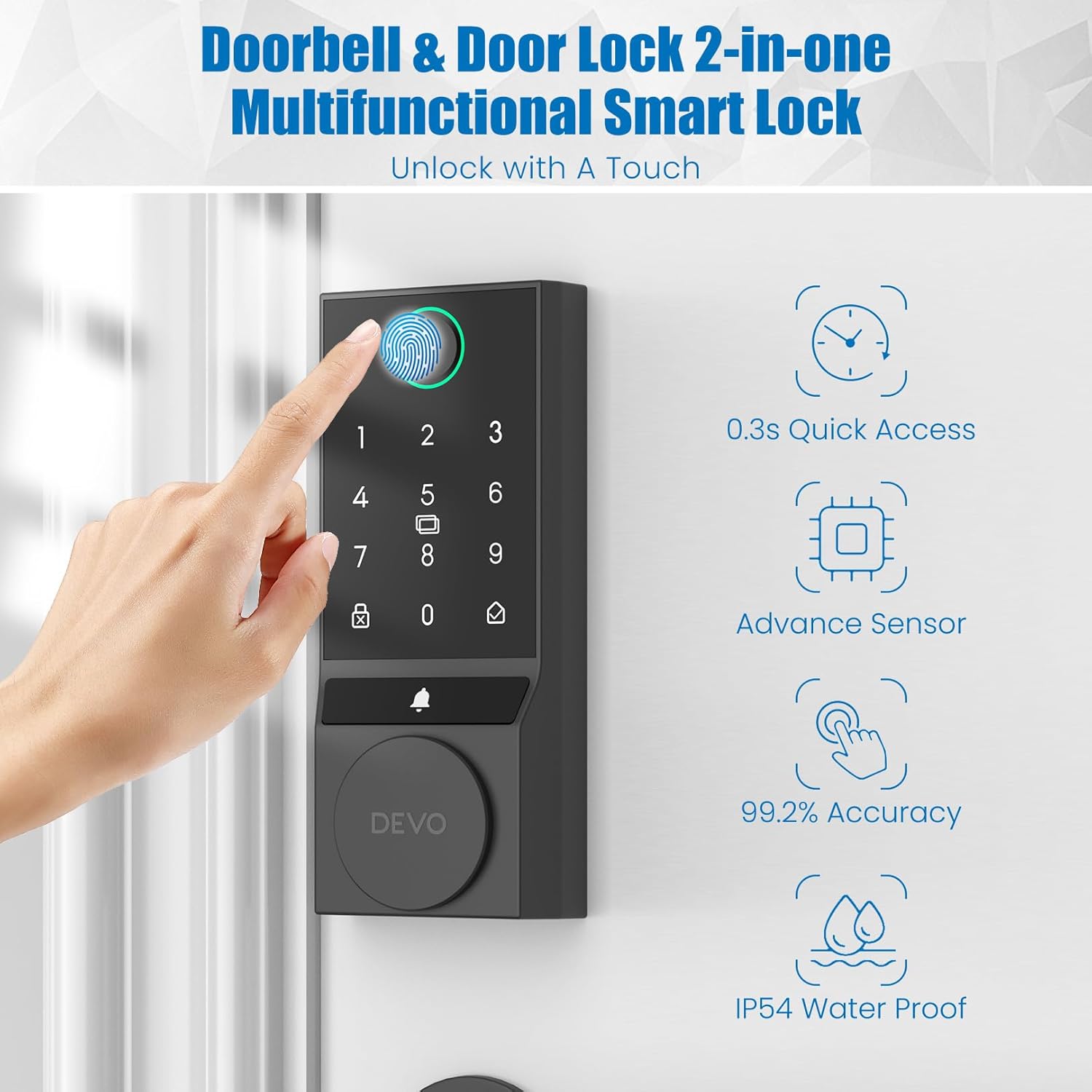
Image: The DEVO G3 Smart Lock keypad illustrating the anti-peeping password and anti-cracking security features.
5. Mantentzea
To ensure optimal performance and longevity of your DEVO G3 Smart Lock, follow these maintenance guidelines:
- Bateria ordezkatzea: The lock is powered by 8 AA batteries (not included) and operates for approximately 8 months. The Tuya Security app provides real-time battery level display, and the lock will issue low battery alerts. Replace all batteries promptly when alerted.
- Garbiketa: Use a soft, dry cloth to clean the keypad and fingerprint sensor. Avoid abrasive cleaners or solvents that could damage the finish or electronic components.
- Larrialdi potentzia: In case of complete battery depletion, the lock features a Type-C emergency port for temporary power access.
Image: The interior unit of the DEVO G3 Smart Lock revealing the battery compartment and the Type-C emergency charging port, alongside a smartphone displaying the lock's battery percentage.
6. Arazoak
If you encounter issues with your DEVO G3 Smart Lock, consider the following common solutions:
- Blokeoak ez du erantzuten: Check battery levels. If batteries are low, replace them or use the Type-C emergency power port.
- Hatz-marka ez da ezagutzen: Ensure your finger is clean and dry. Re-register your fingerprint if the issue persists. The AI recognition improves with repeated use.
- Teklatuak ez du erantzuten: Verify that the keypad is clean. If the lock is unresponsive after multiple incorrect entries, it may be in anti-cracking mode; wait for the lockout period to expire.
- Aplikazioen konexio-arazoak: Ensure your Wi-Fi network is 2.4GHz and stable. Restart your router and the smart lock. Check the Tuya Security app for any error messages or updates.
- Latch Mechanism Problems: Ensure the deadbolt is correctly installed and aligned. Refer to the installation guide (Section 3) for proper deadbolt and assembly alignment.
- Doorbell Not Functioning: Check app settings for doorbell notifications and ensure the lock has power.
For further assistance, consult the detailed troubleshooting section in the full user manual or contact customer support.
7. Zehaztapenak
| Ezaugarri | Xehetasuna |
|---|---|
| Marka | Devo |
| Ereduaren izena | G3 |
| Blokeo mota | Biometric, Combination Lock, Deadbolt, Keypad |
| Ezaugarri bereziak | Anti-Peeping Password, Auto-Lock, Fingerprint, Fob Unlock, One-Touch Lock |
| Konektibitate-protokoloa | Wi-Fi (2.4 GHz) |
| Kontrol-metodoa | Aplikazioa, Urrunekoa, Ukimena, Ahotsa |
| Kontrolagailu mota | iOS edo Android |
| Materiala | Aluminioa |
| Kolorea | Beltza |
| Elementuaren neurriak (L x W x H) | 2.5 x 1.24 x 5.8 hazbete |
| Elementuaren pisua | 2.75 kilo |
| Energia iturria | 8 AA bateria (ez daude barne) |
| Iragazgaitzaren balorazioa | IP54 |
| Funtzionamendu-tenperatura | 5 °F eta 122 °F (-15 °C eta 50 °C) |
Image: The DEVO G3 Smart Lock demonstrating its durability and suitability for various environments, including resistance to extreme temperatures and IP54 waterproofing.
8. Bermea eta laguntza
The DEVO G3 Smart Lock includes a 12-month warranty from the date of purchase. For technical support, warranty claims, or any questions regarding your product, please refer to the contact information provided in your product packaging or visit the official Devo webgunea.


