1. Sarrera
This manual provides comprehensive instructions for the installation, operation, maintenance, and troubleshooting of your Fanvil 8-Port 2-Wire PoE Switch (Model PN8). Please read this manual thoroughly before using the device to ensure proper functionality and to prevent damage.
2. Produktua amaitu daview
The Fanvil PN8 is an 8-port 2-wire Power over Ethernet (PoE) switch designed to transmit both power and data over existing 2-wire cables. This unique capability simplifies installation, especially in environments where traditional Ethernet cabling is not feasible or cost-effective. It supports up to 8 PoE-enabled devices and can transmit data and power over distances up to 300 meters.
2.1 Ezaugarri nagusiak
- 8 PoE ports for data and power transmission.
- Supports power and data over 2-wire connections.
- Long transmission distance of up to 300 meters.
- User-friendly setup with no complex configuration required.
2.2 Gailuaren diseinua
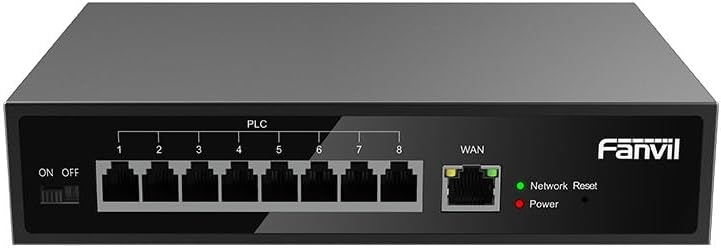
1. irudia: Aurrealdea view of the Fanvil PN8 switch, showing 8 PLC ports, a WAN port, ON/OFF switch, and LED indicators for Network Reset and Power.

2. irudia: Angelukoa view of the Fanvil PN8 switch, highlighting the side ventilation and port layout.
2.3 LED adierazleak
- Network Reset (Green LED): Indicates network activity or status. A steady light typically means a stable connection, while blinking indicates data transmission.
- Power (Red LED): Illuminates when the device is powered on and receiving electrical current.
3. Konfiguratzeko argibideak
3.1 Paketearen edukia
Instalatu aurretik, egiaztatu paketean elementu guztiak daudela:
- Fanvil 8-Port 2-Wire PoE Switch (PN8)
- Elikatze-moldagailua
- Erabiltzailearen eskuliburua (dokumentu hau)
- Muntatzeko osagarriak (barnekoak badira)
3.2 Etengailua konektatzea
- Potentzia-konexioa: Connect the provided power adapter to the power input port on the switch and then plug it into a standard electrical outlet (100-240V AC). Ensure the ON/OFF switch is in the OFF position before connecting power.
- WAN konexioa: Connect your main network router or modem to the WAN port on the Fanvil PN8 switch using a standard Ethernet cable.
- PoE Device Connection: Connect your 2-wire PoE-enabled devices (e.g., IP phones, cameras) to any of the 8 PLC ports on the switch. The switch will automatically detect and provide power and data to these devices.
- Piztu: Flip the ON/OFF switch to the ON position. The Power LED should illuminate, indicating the switch is operational.
4. Etengailuaren funtzionamendua
Once connected, the Fanvil PN8 switch operates automatically. It provides power and data to connected PoE devices without requiring additional configuration. The LED indicators provide visual feedback on the device's status.
4.1 Piztu/Itzaltzea
- To power on the switch, ensure the power adapter is connected and flip the ON/OFF switch to the 'ON' position. The red Power LED will light up.
- To power off the switch, flip the ON/OFF switch to the 'OFF' position. The red Power LED will turn off.
5. Mantentzea
To ensure optimal performance and longevity of your Fanvil PN8 switch, follow these maintenance guidelines:
- Garbiketa: Erabili zapi leun eta lehor bat etengailuaren kanpoaldea garbitzeko. Ez erabili garbitzaile likido edo aerosolik. Ziurtatu gailua itzalita dagoela garbitu aurretik.
- Aireztapena: Ensure the switch is placed in a well-ventilated area. Do not block the ventilation openings on the sides of the device.
- Ingurumena: Saihestu etengailua tenperatura altuen, hezetasun handien edo eguzki-argiaren eraginpean jartzea.
6. Arazoak
If you encounter issues with your Fanvil PN8 switch, refer to the following table for common problems and solutions:
| Arazoa | Kausa posiblea | Irtenbidea |
|---|---|---|
| No power (Power LED off) | Power adapter not connected or faulty; ON/OFF switch is off. | Check power adapter connection and outlet. Ensure ON/OFF switch is in the 'ON' position. |
| Ez dago sare-konektibitaterik | WAN cable disconnected; faulty cable; upstream network issue. | Verify WAN cable connection. Test with a different cable. Check your router/modem. |
| PoE device not receiving power/data | Device not PoE-compatible; faulty 2-wire cable; device drawing too much power. | Ensure device is PoE-compatible. Test with a different 2-wire cable. Check device power requirements. |
| Sareko abiadura motela | Kablearen kalitatea; sarearen pilaketak; gailuen mugak. | Ensure high-quality 2-wire cables are used. Reduce network traffic if possible. |
7. Zehaztapen Teknikoak
| Zehaztapena | Balioa |
|---|---|
| Modelo zenbakia | PN8 |
| Produktu Mota | 2-Wire PoE Switch |
| Portuak | 8 |
| Sarrera boltage | 100~240V AC |
| Bolumen eragileatage | 28 Volt |
| Transmisio Distantzia Luzea | 300 metro |
| Produktuaren neurriak | 5.91 x 78.74 x 5.91 hazbete |
| Elementuaren pisua | 2.49 kilo |
| Beharrezko bateriak | 1 AAAA batteries (included) |
| ASIN | B0DP5HXVQJ |
| UPC | 6937295605105 |
| Eskuragarri dagoen lehen data | 27ko azaroaren 2024a |
8. Bermea eta Laguntza
For warranty information and technical support, please refer to the documentation provided with your purchase or visit the official Fanvil website. Contact their customer service for assistance with product issues, repairs, or further inquiries.