Sarrera
Thank you for choosing the Diivoo 4 Zone Sprinkler Timer. This programmable automatic irrigation timer is designed to simplify your garden watering, offering independent control over four separate zones. With features like rain delay and manual watering modes, it provides flexibility and efficiency for your lawn, yard, and pool watering needs. Please read this manual thoroughly before operation to ensure proper setup and optimal performance.
Segurtasun Informazioa
- Do not immerse the timer in water. The unit is IP54 rated for water resistance, but not submersion.
- Use only 2 AA 1.5V alkaline batteries. Do not mix old and new batteries, or different types of batteries.
- Ziurtatu konexio guztiak estu daudela ihesak saihesteko.
- Operate within recommended water pressure limits to avoid damage.
- Mantendu haurren eskura.
- Protect from freezing temperatures. Remove batteries and store indoors during winter.
Produktua amaituview
Osagaiak

1. irudia: Aurrealdea view of the Diivoo 4 Zone Sprinkler Timer, showing the large LCD display, control buttons, and four hose outlets.
- Unitate nagusia: Houses the control panel, LCD display, and battery compartment.
- Sarrerako konektorea: Connects to your outdoor faucet (standard 3/4" garden hose thread). Features reinforced nylon fiber for durability.
- Four Outlet Connectors: Each outlet can be connected to a separate hose or irrigation line.
- Kontrol-botoiak: For navigation and setting adjustments (OK, ESC/OFF, +, -, DELAY).
- LCD pantaila: Large screen showing current time, program settings for each zone (A, B, C, D), and status indicators.
Ezaugarri nagusiak
- 4 Ureztatze Eremu Independente: Allows separate scheduling for different areas.
- Programa daitezkeen ordutegiak: Set start time, watering duration (1s-360min), and frequency (every 1 min to 24 hrs, or every day to every 15 days).
- Euriaren atzerapen funtzioa: Skip watering cycles to conserve water during rainy periods.
- Eskuzko ureztatze modua: Initiate immediate watering without affecting programmed schedules.
- Pantaila LCD handia: 3.2 x 2 inch screen for easy readability and quick operation.
- IP54 Urarekiko Erresistentzia: Durable and suitable for outdoor use.
- Energia-kontsumo baxua: Battery life up to 6-8 months with 2 AA batteries (not included).
- Potentzia baxuko babesa: Valve automatically shuts off when battery is too low to prevent water waste.
Konfigurazioa
1. Bateriaren instalazioa
The timer requires 2 AA 1.5V alkaline batteries (not included).
- Aurkitu bateriaren konpartimentua tenporizadorearen atzealdean.
- Ireki bateriaren estalkia.
- Sartu bi AA pila alkalino berri, polaritate zuzena ziurtatuz (+/-).
- Close the battery cover securely. The battery cover has a seal to isolate moisture.

Figure 2: Image showing the battery compartment and reinforced nylon fiber connection, highlighting the leakproof design.
2. Tenporizadorea konektatzea
- Ensure your outdoor faucet is turned off.
- Screw the timer's inlet connector onto any standard 3/4" garden outdoor faucet. Hand-tighten only. Do not overtighten.
- Connect your garden hoses to the four independent outlets (A, B, C, D) at the bottom of the timer.
- Turn on your outdoor faucet. The timer is designed to withstand typical household water pressure.
Funtzionamendu-argibideak
Understanding the LCD Display and Controls

Figure 3: Close-up of the large LCD screen and the 7-button quick setup panel.
The large LCD display shows various information including the current time, battery level, active zone indicators (A, B, C, D), start time, watering duration, watering frequency, and next start time. The control panel features buttons for navigation and setting adjustments:
- ADOS: Confirm selection or enter setting mode.
- ESC/OFF: Exit current setting, return to previous screen, or turn off the timer.
- +: Increase value or move forward in menu.
- -: Decrease value or move backward in menu.
- ATZERAPENA: Activate/deactivate rain delay.
- NOW/ABCD: Switch between current time display and zone selection.
1. Uneko ordua ezartzea
- Sakatu OK button to enter setting mode. The time display will flash.
- Erabili + or - botoiak ordua doitzeko. Sakatu OK baieztatzeko.
- Doitu minutuak erabiliz + or -, gero sakatu OK baieztatzeko.
- Sakatu ESC ezarpen modutik irteteko.
2. Programming Automatic Watering Schedules (4 Zones)
The Diivoo timer allows you to set independent watering schedules for each of its four zones (A, B, C, D).

Figure 4: Visual representation of four independent irrigation zones (Zone 1, Zone 2, Zone 3, Zone 4) for customized watering.

Figure 5: Display showing options for setting Start Time, Watering Duration (1s to 360min), and Watering Frequency (Every 1H-23H or Every 1-15 Days).
- Sakatu NOW/ABCD button to select the desired zone (A, B, C, or D). The selected zone indicator will flash.
- Sakatu OK to enter programming for the selected zone.
- Ezarri hasiera-ordua: Erabili + or - to adjust the hour and minutes for the watering start time. Press OK doikuntza bakoitzaren ondoren.
- Set Watering Duration ("How Long"): Erabili + or - to set the watering duration from 1 second to 360 minutes. Press OK baieztatzeko.
- Set Watering Frequency ("How Often"):
- Erabili + or - to select frequency in hours (e.g., every 1 hour to 23 hours). Press OK.
- Alternatively, select frequency in days (e.g., every 1 day to 15 days). Press OK.
- You can also set specific days of the week for watering. Navigate through the days and press OK to select/deselect.
- After setting all parameters for the zone, press ESC to save and exit. Repeat for other zones as needed.
Oharra: Adequate water pressure is required when all 4 zone ports are operating simultaneously. If water pressure is insufficient, it is recommended to rotate the use of the 4 zone ports to avoid reduced water flow through each port.
3. Manual Watering Mode
Manual watering allows you to water immediately without interrupting your preset programs.
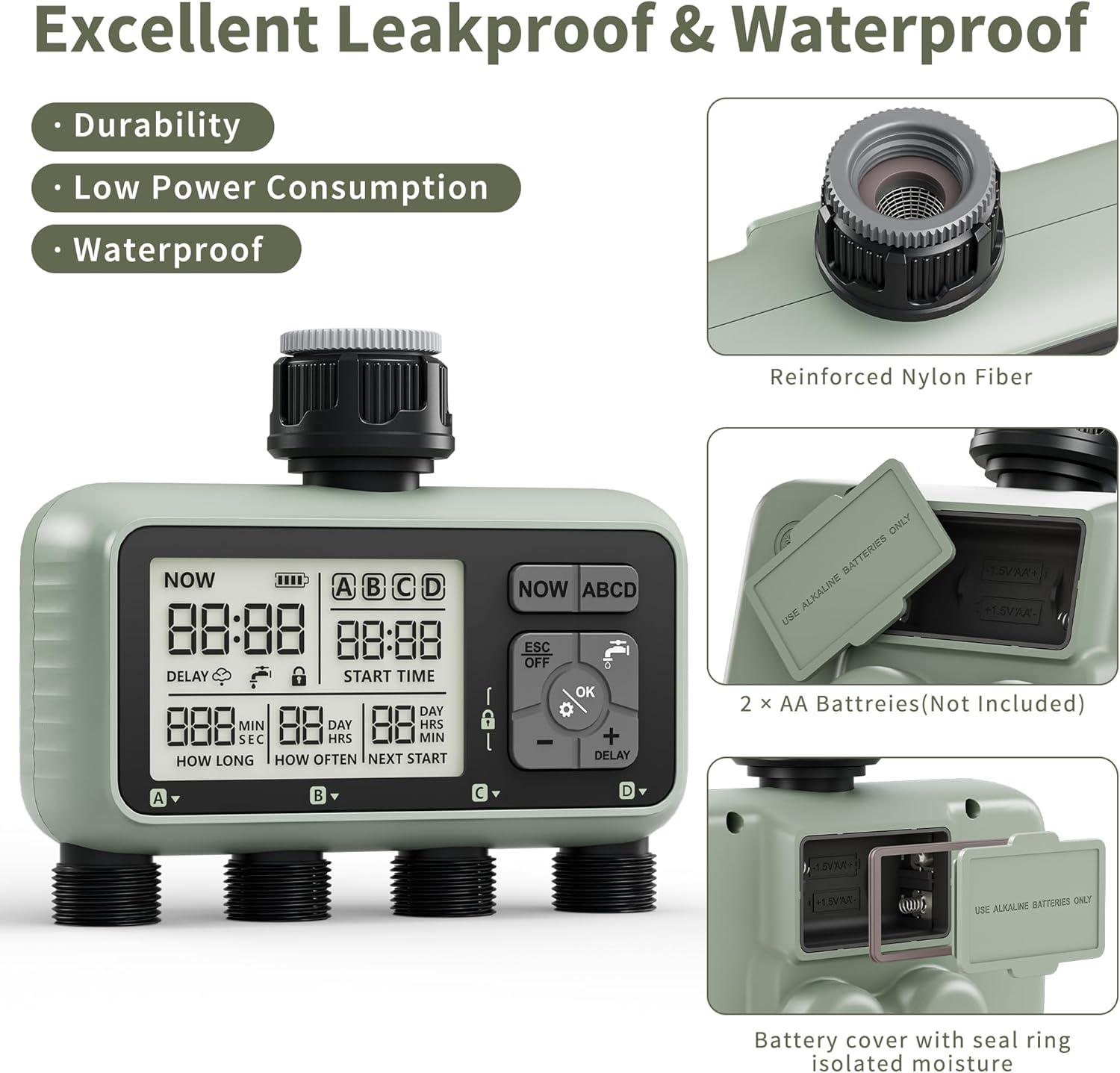
Figure 6: Illustration of manual watering in progress, showing the ability to set individual watering times for each zone from 1 second to 360 minutes.
- Pantaila nagusian, sakatu OK button (water drop icon).
- Erabili + or - to select the desired watering duration (from 1 second to 360 minutes).
- Sakatu OK to start manual watering. The selected zone(s) will begin watering immediately.
- Eskuzko ureztatzea gelditzeko, sakatu ESC/OFF.
4. Euri-atzerapen funtzioa
The rain delay feature allows you to temporarily pause your watering schedule to avoid overwatering and save water during rainy conditions. The timer does not have a rain sensor, so you will need to activate this manually based on local weather forecasts.

Figure 7: Display showing the Rain Delay feature, indicating that the next watering schedule will be skipped. This feature aids in water conservation and allows for postponed schedules.
- In the "ON" state (main display), press and hold the + botoia 5 segundoz.
- The "DELAY" icon will appear on the screen, and the "NEXT START" time will update to reflect the postponed schedule.
- To deactivate rain delay, press and hold the + botoia berriro 5 segundoz.
5. Produktuaren bideo gida
Video 1: An official product video demonstrating the features of the Diivoo 4 Zone Sprinkler Timer, including manual watering, automatic watering, and rain delay functionality.
Mantentzea
- Garbiketa: Garbitu tenporizadorea iragarkiarekinamp oihal. Ez erabili garbitzaile edo disolbatzaile urratzailerik.
- Bateria ordezkatzea: Replace batteries when the low battery indicator appears on the LCD. It is recommended to replace batteries every 6-8 months or at the start of each watering season.
- Neguan egitea: Before the first frost, remove the timer from the faucet. Remove the batteries. Store the timer indoors in a dry, protected area to prevent damage from freezing water.
- Iragazkien garbiketa: Periodically check the filter washer inside the inlet connector for debris. Clean if necessary to ensure proper water flow.
Arazoak konpontzea
| Arazoa | Kausa posiblea | Irtenbidea |
|---|---|---|
| Timer does not turn on/LCD is blank. | Bateriak hilda edo gaizki instalatuta. | Ordeztu bateriak AA bateria alkalino berriekin, polaritate zuzena ziurtatuz. |
| Water does not flow or flow is weak. |
|
|
| Timer leaks from connections. | Loose connections or missing/damaged O-rings. | Ensure all connections are hand-tight. Check and replace O-rings if damaged. |
| Watering schedule not activating. |
|
|
Zehaztapenak
- Eredua: HCT-379
- Produktuaren neurriak: 6.46 x 5.59 x 2.99 hazbete
- Elementuaren pisua: 1.85 kilo
- Energia iturria: 2 x AA 1.5V-ko pila alkalinoak (ez dira barne hartzen)
- Ureztatze Iraupena: 1 segundotik 360 minutura
- Ureztatze maiztasuna: Every 1 minute to 24 hours, or Every 1 day to 15 days
- Uraren erresistentzia: IP54
- Sarrerako haria: Standard 3/4" Garden Hose Thread
- Ezarpen kopurua: 16
Bermea eta Laguntza
Diivoo products are designed for reliability and performance. For warranty information, technical support, or any questions regarding your Diivoo 4 Zone Sprinkler Timer, please contact Diivoo customer service. Our team of experts is available to assist you.
Please refer to the contact information provided with your product packaging or visit the official Diivoo webwebgunea laguntza-xehetasun eguneratuenak lortzeko.
Diivoo Official Store: Diivoo Store on Amazon


