1. Sarrera
Thank you for choosing the MESWAO 15.6 inch Android 14 Tablet Pro. This tablet is designed to provide a superior visual and performance experience with its large Full HD display, powerful octa-core processor, and extended battery life. This manual will guide you through the setup, operation, maintenance, and troubleshooting of your new device, ensuring you get the most out of its advanced features.
2. Zer dago kutxan
Mesedez, egiaztatu paketearen edukia. Elementuren bat falta bada edo hondatuta badago, jarri harremanetan bezeroarentzako arreta-zerbitzuarekin.
- 1 x MESWAO 15.6 inch Android Tablet
- 1 x korronte egokitzailea
- 1 x C motako kablea
- 1 x Erabiltzailearen eskuliburua
- 1 x C motako USBrako egokigailua
- 1 x Stuck pin (SIM ejector tool)

Image: Visual representation of the MESWAO tablet and its included accessories.
3. Produktua amaitu daview
3.1 Ezaugarri nagusiak
- 15.6-inch 1080P FHD IPS Display: Large screen with 1920x1080p resolution, 16:9 aspect ratio, 85% screen-to-body ratio, and 350 nits adjustable brightness for clear visuals.
- Android 14 sistema eragilea: Latest Android version for faster app launches, intuitive user interface, split-screen multitasking, and GMS certification for Google Play access.
- MediaTek Helio G99 CPU: Octa-core processor (6nm, up to 2.2GHz) and ARM Mali-G57 GPU for smooth performance in multitasking, streaming, and gaming.
- 12,000mAh Mega Battery & 30W Fast Charging: Provides up to 15 hours of video playback and 12+ hours of daily use, with 90% charge in 3 hours.
- 6GB RAM + 128GB ROM (Expandable to 1TB): Ample storage for apps, photos, and videos, with expandable memory via microSD card (FAT32 format).
- Dual-band Wi-Fi & Bluetooth 5.0: High-speed 2.4G/5G Wi-Fi and efficient Bluetooth connectivity for peripherals.
- 5MP Front + 32MP Rear Cameras: Capture moments and conduct clear video calls.
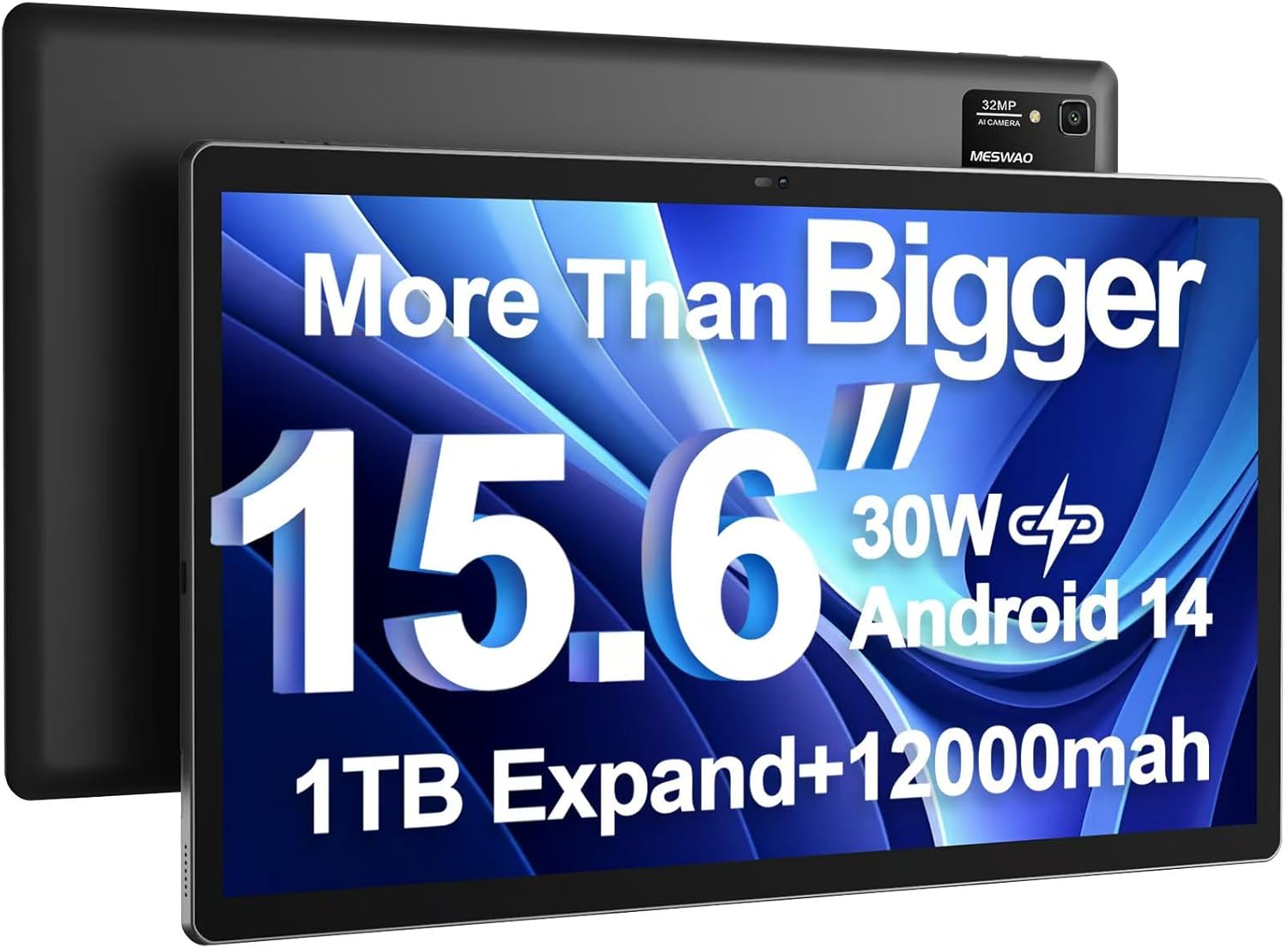
Image: The MESWAO 15.6 inch Android 14 Tablet Pro, showcasing its large display and rear camera module.

Image: Visual comparison highlighting the significantly larger screen area of the 15.6-inch tablet compared to a standard 10-inch tablet.

Image: Illustration of the tablet's 12,000mAh ultra-large capacity battery and 30W fast charging, indicating quick charge times and extended usage.
3.2 Tabletaren osagaiak
Familiarize yourself with the physical components of your MESWAO tablet:
- Pizteko botoia: Alboan kokatuta, tableta pizteko/itzaltzeko edo pantaila esnatzeko/lo hartzeko erabiltzen da.
- Bolumen-botoiak: Doitu audio irteerako mailak.
- Aurrealdeko kamera: 5MP camera for video calls and selfies.
- Atzeko kamera: 32MP camera with flash for high-resolution photos and videos.
- C motako ataka: Kargatzeko eta datuak transferitzeko.
- TF txartelaren zirrikitua: For expanding storage with a microSD card.
- Bozgorailu estereoa: Quad speakers for enhanced audio experience.
- 3.5 mm-ko entzungailuen konektua: For wired audio connection (requires included Type-C to 3.5mm adapter).
4. Konfigurazioa
4.1 Hasierako piztea
- Eduki sakatuta Pizteko botoia until the MESWAO logo appears on the screen.
- Jarraitu pantailan agertzen diren argibideei zure hizkuntza eta eskualdea hautatzeko eta Wi-Fi sare batera konektatzeko.
- Sign in with your Google account or create a new one to access Google Play Store and other services.
4.2 Tableta kargatzea
Before first use, fully charge the tablet. Use the provided power adapter and Type-C cable.
- Connect the Type-C cable to the tablet's Type-C port.
- Entxufatu korronte-egokigailua hormako entxufe batera.
- The charging indicator will appear on the screen. A full charge takes approximately 3 hours with the 30W fast charger.
4.3 MicroSD txartel bat sartzea
To expand storage, insert a microSD card (FAT32 format, up to 1TB, sold separately).
- Bilatu tabletaren alboan dagoen TF txartelaren zirrikitua.
- Use the provided stuck pin to gently press into the small hole next to the slot to eject the tray.
- Jarri microSD txartela erretiluan, urre-koloreko kontaktuak behera begira dituela.
- Kontu handiz sartu erretilua berriro zirrikituan klik egin arte.
5. Funtzionamendu-argibideak
5.1 Oinarrizko nabigazioa
- Hasierako pantaila: Irristatu ezkerrera edo eskuinera hasierako pantailen artean nabigatzeko.
- Aplikazioen tiradera: Access all installed applications (if using a launcher with an app drawer, otherwise apps are on home screens).
- Jakinarazpenak eta ezarpen azkarrak: Irristatu hatza pantailaren goialdetik behera jakinarazpenak eta ezarpen azkarren aukerak (Wi-Fi, Bluetooth, Distira, etab.) atzitzeko.
- Azken aplikazioak: Sakatu ikono karratua (edo irristatu gora eta eutsi behetik keinu-nabigazioa erabiltzen baduzu) view eta azkenaldian erabilitako aplikazioen artean aldatu.
5.2 Multitasking with Split Screen
The Android 14 OS supports split-screen functionality for enhanced productivity.
- Ireki erabili nahi duzun lehenengo aplikazioa.
- Go to the Recent Apps view.
- Tap the app icon at the top of the first app's card and select 'Split screen'.
- Choose the second app from your recent apps or app drawer to open it in the other half of the screen.
- Aplikazio bakoitzaren tamaina doitzeko, erdiko banatzailea arrastatu.

Irudia: Gainetikview of key features of the Android 14 operating system on the tablet, including multitasking capabilities.
5.3 Konektibitatea
- Wi-Fi: Joan zaitez Ezarpenak > Sarea eta internet > Wi-Fi to connect to available networks. Supports 2.4Ghz and 5Ghz bands.
- Bluetootha: Joan zaitez Ezarpenak> Konektatutako gailuak> Konexio hobespenak> Bluetooth to pair with Bluetooth headphones, keyboards, or other devices.
- Pantaila-igorpena: The tablet supports wireless screen casting to compatible displays. Access this feature from Quick Settings or Ezarpenak > Konektatutako gailuak > Konexio-hobespenak > Igorri.

Image: Depiction of the tablet's stable dual-band Wi-Fi and Bluetooth 5.0 capabilities, enabling seamless wireless connections.
6. Mantentzea
6.1 Bateria zaintzea
- Saihestu tenperatura muturrekoak (beroak edo hotzak), bateriaren iraupena murriztu baitezakete.
- Do not let the battery completely drain frequently. Charge it before it reaches 0%.
- Use only the provided charger or a certified 30W PD fast charger.
6.2 Garbiketa
- Erabili zapi leun eta lihorik gabeko bat pantaila eta gorputza garbitzeko.
- Orban egoskorretarako, apur bat dampGarbitu zapi bat urarekin edo pantaila-garbitzaile batekin. Saihestu produktu kimiko gogorrak.
- Ez bota likidoak zuzenean tabletaren gainean.
6.3 Software eguneraketak
Egiaztatu eta instalatu sistemaren eguneraketak aldizka, errendimendu eta segurtasun optimoa bermatzeko.
- Connect your tablet to a stable Wi-Fi network.
- Joan zaitez Ezarpenak > Sistema > Sistemaren eguneraketa.
- Jarraitu pantailan agertzen diren argibideei eskuragarri dauden eguneratzeak deskargatu eta instalatzeko.
7. Arazoak
Tabletarekin arazoak badituzu, jo ezazu honako ohiko irtenbide hauetara:
| Arazoa | Kausa posiblea | Irtenbidea |
|---|---|---|
| Tableta ez da pizten | Bateria baxua; Sistemaren kraskadura | Kargatu tableta gutxienez 30 minutuz. Berrabiaraztea behartzeko, sakatu eta eutsi pizteko botoia 10-15 segundoz. |
| Slow performance/Lag | Aplikazio gehiegi martxan; Biltegiratze gutxi; Software zaharkitua | Itxi atzeko planoan dauden aplikazioak. Garbitu cachea. Askatu biltegiratzea. Bilatu sistemaren eguneraketak. |
| Wi-Fi konexio arazoak | Incorrect password; Router issue; Tablet Wi-Fi off | Ensure Wi-Fi is on. Re-enter password. Restart router. Forget and reconnect to network. |
| Bateria azkar agortzen da | High screen brightness; Background apps; Heavy usage | Reduce screen brightness. Close unused apps. Limit background data. Check battery usage in settings. |
| Touchscreen unresponsive/Phantom touches | Temporary software glitch; Defective unit | Restart the tablet. If the issue persists, contact MESWAO customer support for assistance. |
If the problem persists after trying these solutions, please contact MESWAO customer support for further assistance.
8. Zehaztapenak
| Ezaugarri | Xehetasuna |
|---|---|
| Ereduaren izena | MES-B3 Pro |
| Sistema eragilea | Android 14 |
| Pantailaren tamaina | 15.6 hazbete |
| Pantailaren bereizmena | 1920 x 1080 pixel (Full HD IPS) |
| Prozesadorea | MediaTek Helio G99 zortzi nukleokoa (2.2 GHz-raino) |
| Koprozesadore grafikoa | ARM Mali-G57 |
| RAM | 6 GB |
| Barne biltegiratzea (ROM) | 128 GB |
| Biltegiratze zabalgarria | Up to 1TB via MicroSD card (FAT32 format) |
| Bateria Edukiera | 12,000mAh |
| Bateriaren iraupena (batez bestekoa) | 13 ordu (gehienez 15 orduko bideo erreprodukzioa) |
| Kargatzen | 30 W-ko PD kargatze azkarra |
| Haririk gabeko konexioa | 802.11a/b/ac/ax (2.4G/5G Dual-band Wi-Fi), Bluetooth 5.0 |
| Aurrealdeko kamera | 5MP |
| Atzeko kamera | 32MP |
| Elementuaren pisua | 4.42 libra (gutxi gorabehera 2 kg) |
| Produktuaren neurriak | 14.49 x 8.66 x 0.39 hazbete (36.8 x 22 x 1 cm) |
9. Bermea eta Laguntza
MESWAO products come with a standard manufacturer's warranty. Please refer to the warranty card included in your package for specific terms and conditions. For technical support, troubleshooting assistance, or warranty claims, please contact MESWAO customer service through the contact information provided on the official MESWAO webgunea edo zure erosketa plataforma.
Harremanetarako informazioa: Please visit the official MESWAO website or refer to the support card included in your product packaging for the most up-to-date contact details.


