1. Sarrera
Thank you for choosing the FLYLINKTECH 5000A Jump Starter. This portable device is designed to provide instant power to jump-start 12V vehicles, charge electronic devices, and offer emergency lighting. Please read this manual thoroughly before use to ensure safe and optimal performance.
2. Segurtasun informazio garrantzitsua
- Always ensure the jump starter is fully charged before use.
- Ez saiatu bateria izoztuta bat martxan jartzen.
- Konektatu clamps correctly: red to positive (+), black to negative (-). Reverse polarity can cause damage.
- Ez konektatu cl gorria eta beltzaamps elkarrekin.
- Mantendu haurren eskura.
- Erabil ezazu ondo aireztatutako eremuan.
- Saihestu gailua denbora luzez muturreko tenperaturetara edo eguzki-argitara zuzeneko argitan jartzea.
- If the device becomes excessively hot during use, disconnect it immediately.
- Kontsultatu zure ibilgailuaren erabiltzailearen eskuliburua abiarazteko prozedura espezifikoak ikusteko.
3. Paketearen edukia
Egiaztatu elementu guztiak zure paketean daudela:
- FLYLINKTECH 5000A Jump Starter (Model BD10)
- Smart Jumper kableak
- USB-C kargatzeko kablea
- EVA biltegiratze-zorroa
- Erabiltzailearen eskuliburua

Image: Contents of the FLYLINKTECH 5000A Jump Starter package, including the jump starter unit, smart jumper cables, USB-C charging cable, and EVA storage case.
4. Produktua amaitu daview
Familiarize yourself with the components and ports of your jump starter:
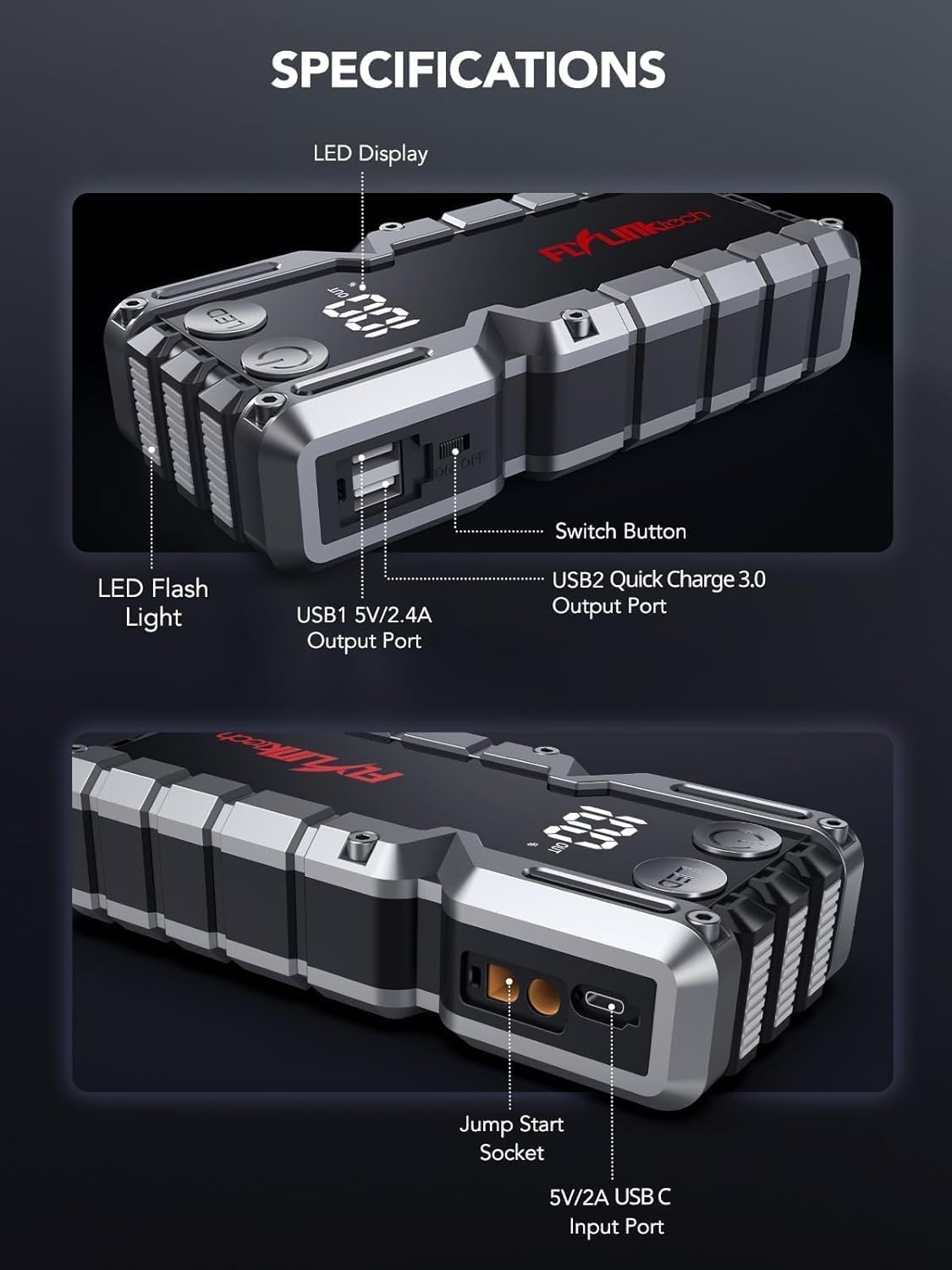
Irudia: Xehetasun handikoa view of the jump starter showing the LED display, LED flashlight, power button, switch button, USB1 5V/2.4A output port, USB2 Quick Charge 3.0 output port, Jump Start Socket, and 5V/2A USB-C input port.
- LED pantaila: Bateriaren ehunekoa erakusten dutage.
- LED linterna: Argiztapena hainbat modutan eskaintzen du.
- Pizteko botoia: Activates the device and controls flashlight modes.
- Aldatu botoia: Energia nagusiaren kontrola.
- USB1 irteera (5V/2.4A): Standard USB charging port.
- USB2 Output (QC3.0): Quick Charge 3.0 port for faster charging.
- Abiarazteko entxufea: Connects to the smart jumper cables.
- USB-C Input (5V/2A): Used to recharge the jump starter.
5. Abiarazle elektrikoa kargatzea
Before first use, fully charge the jump starter. It is recommended to recharge the unit every 3-6 months to maintain battery health.
- Connect the provided USB-C charging cable to the USB-C input port on the jump starter.
- Connect the other end of the USB-C cable to a 5V/2A USB wall adapter (not included) or a car charger.
- The LED display will show the charging progress. The unit is fully charged when the display shows 100%.

Image: The jump starter connected via USB to charge a smartphone and a tablet, demonstrating its power bank functionality.
6. Ibilgailua martxan jartzea laguntzaz
Follow these steps carefully to safely jump-start your 12V vehicle:
- Prepare the Jump Starter: Ensure the jump starter is at least 50% charged. Turn off your vehicle's ignition and all accessories (headlights, radio, etc.).
- Connect Smart Jumper Cables: Insert the blue plug of the smart jumper cables into the Jump Start Socket on the jump starter. Ensure a firm connection. The indicator light on the smart clamp will flash red and green.
- Ibilgailuaren bateriara konektatu:
- Erantsi red (+) clamp to the positive terminal of your vehicle's battery.
- Erantsi black (-) clamp to the negative terminal of your vehicle's battery.
Once connected correctly, the indicator light on the smart clamp berde finko bihurtuko da.
- Ibilgailua martxan jarri: Go into your vehicle and start the engine. If the vehicle does not start immediately, wait 30 seconds and try again. If it still doesn't start, press the "BOOST" button on the smart clamp for 3 seconds until the green light turns solid, then try starting the car again within 30 seconds.
- Kableak kendu: Once the engine starts, immediately remove the smart jumper cables from the vehicle battery, then disconnect them from the jump starter.

Image: Visual guide for jump-starting: 1. Insert jump clamp into booster. 2. Connect clamps to car battery. 3. Start your car. 4. Remove clamps.

Image: The smart clamps connected to the jump starter, illustrating the 10-layer safety protections including short circuit, reverse charge, over charge, reverse polarity, over discharge, over current, reverse connection, and high temperature protection.
7. Power Bank gisa erabiltzea
The jump starter can also be used to charge your electronic devices.
- Connect your device's USB charging cable to either the USB1 (5V/2.4A) or USB2 (QC3.0) output port on the jump starter.
- Abiarazleak automatikoki hasiko da zure gailua kargatzen.
- The LED display will show the remaining battery capacity of the jump starter.

Image: The jump starter functioning as a portable power bank, with two USB output ports (5V/2.4A and Quick Charge 3.0) actively charging a smartphone and a tablet.
8. LED linterna erabiltzea
The built-in 600-lumen LED flashlight has three modes for various situations:
- Pizteko/Desaktibatzeko: Press and hold the LED button for 3 seconds.
- Ziklo moduak aldatzeko: Once the light is on, short press the LED button to switch between:
- Etengabea: Argiztapen orokorrerako.
- SOS modua: Flashes the international SOS signal for emergencies.
- Strobe modua: Rapid flashing for warning or signaling.

Image: The jump starter with its LED flashlight active, illustrating the three available modes: standard flashlight, SOS signal, and strobe light for emergencies.
9. Mantentzea
- Garbiketa: Garbitu unitatea zapi leun eta lehor batekin. Ez erabili produktu kimiko gogorrik edo material urratzailerik.
- Biltegiratzea: Store the jump starter in its EVA case in a cool, dry place away from direct sunlight. Ensure it is charged to at least 50% before storing for extended periods. Recharge every 3-6 months.
- Bateria zaintzea: The internal lithium-ion battery is designed for long life. Avoid fully discharging the unit frequently.

Urarekiko erresistentea den diseinua.

Rugged ABS shell for drop resistance.

Operates in extreme temperatures (-4°F to 140°F).
10. Arazoak
| Arazoa | Kausa posiblea | Irtenbidea |
|---|---|---|
| Vehicle won't start after connecting. | Jump starter battery too low; incorrect clamp connection; vehicle battery completely dead. | Ziurtatu abiarazlea guztiz kargatuta dagoela. Egiaztatu klisazioaamp connections (red to +, black to -). Press the "BOOST" button on the smart clamp for 3 seconds and try again. |
| Smart clamp indicator light is red/flashing. | Reverse polarity; short circuit; over-temperature. | Deskonektatu clamps and re-connect correctly. Check for any short circuits. Allow unit to cool down if overheated. |
| Abiarazle elektrikoak ez du kargatzen. | Faulty charging cable or adapter; loose connection. | Ensure USB-C cable and adapter are working and connected securely. Try a different cable or adapter. |
| LED flashlight not working. | Not activated correctly; low battery. | Press and hold the LED button for 3 seconds to activate. Ensure the jump starter has sufficient charge. |
11. Zehaztapenak
| Ezaugarri | Xehetasuna |
|---|---|
| Goiko Korronte | 5000A |
| Bateria Edukiera | 18000mAh (66.6Wh) |
| Hasi Voltage | 12V |
| Motorra bateragarritasuna | Gehienez 9.0L gasolina / 8.0L diesel |
| USB irteera 1 | 5V/2.4A |
| USB irteera 2 | QC3.0 |
| USB-C sarrera | 5V/2A |
| LED linterna | 600-Lumen (Constant, SOS, Strobe) |
| Funtzionamendu-tenperatura | -4°F eta 140°F (-20°C eta 60°C) |
| Neurriak | 4.2 x 9 x 19 cm |
| Pisua | 540 g (1.19 lb) |
| Segurtasun Babesak | 10-Layer (Short Circuit, Reverse Polarity, Over-Current, etc.) |
12. Bermea eta Laguntza
The FLYLINKTECH 5000A Jump Starter comes with an industry-leading 3 urteko bermea erosketa-datatik aurrera. Berme honek fabrikazio-akatsak estaltzen ditu eta errendimendu fidagarria bermatzen du.
For technical support, warranty claims, or any questions regarding your product, please contact FLYLINKTECH customer service through the retailer's platform or visit our official webgunea.
Gorde erosketaren egiaztagiria bermea balioztatzeko.


