1. Sarrera
Eskerrik asko erosketagatik.asing the XO F41 Mirror Bluetooth Speaker. This device combines a digital clock display with a portable Bluetooth speaker, offering multiple playback options including Bluetooth, TF card, and FM radio. Please read this manual carefully before use to ensure proper operation and to maximize your experience with the product.

Image 1.1: The XO F41 Mirror Bluetooth Speaker in use, showing its digital clock display.
2. Produktuaren ezaugarriak
- Bluetooth 5.3 konexioa: For stable and efficient wireless audio streaming.
- Ispiluaren pantaila: Clear digital time display with adjustable brightness.
- Erreprodukzio modu anitz: Supports Bluetooth, TF card, and FM radio.
- Mikrofono integratua: Esku libreko deiak egiteko.
- Erreprodukzio denbora luzea: Up to 8 hours at 50% volume, 5 hours at 100% volume.
- Diseinu trinkoa eta eramangarria: Easy to carry and place anywhere.
- USB-C kargatzea: Modern and convenient charging port.
3. Paketearen edukia
Mesedez, egiaztatu paketea elementu hauek dituen:
- XO F41 Mirror Bluetooth Speaker
- USB-C kargatzeko kablea
- Erabiltzailearen eskuliburua

Image 3.1: The XO F41 Mirror Bluetooth Speaker packaging.
4. Gailuaren diseinua eta kontrolak
Ezagutu bozgorailuen botoiak eta atakak:
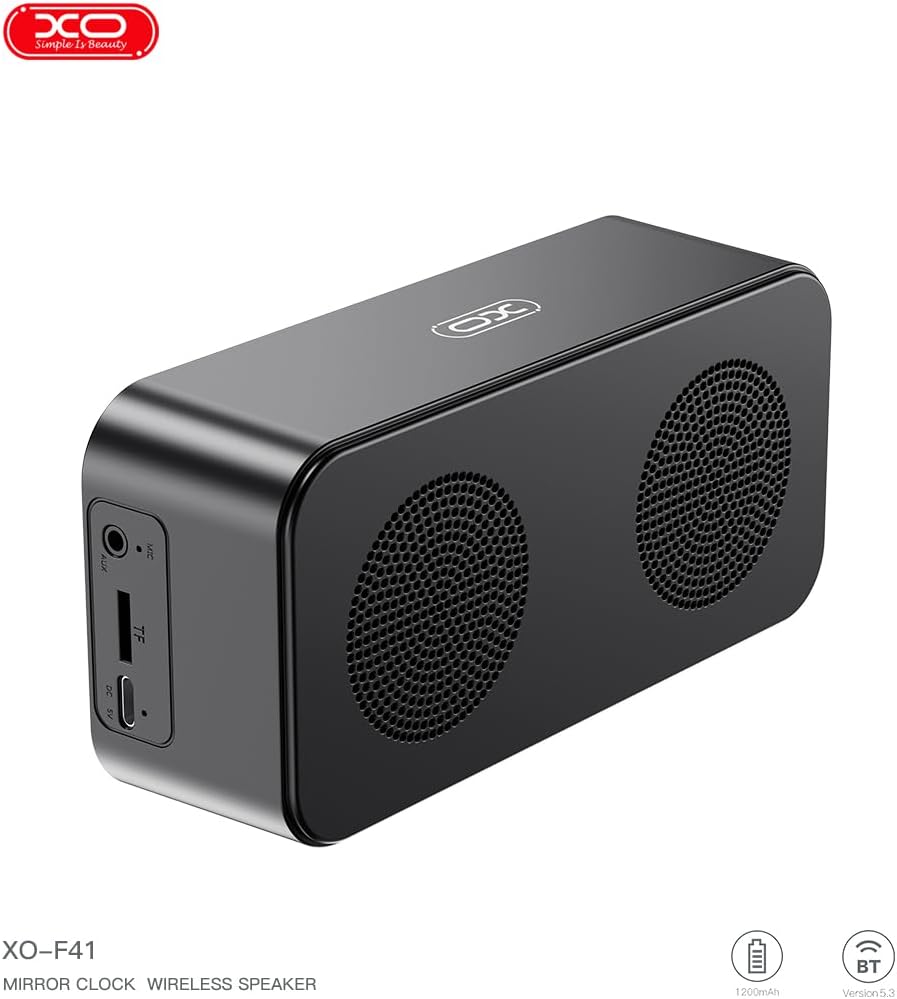
4.1 irudia: Albokoa view of the XO F41 with ports labeled.
- Pizteko botoia: Press and hold to power on/off. Short press to switch modes.
- Erreproduzitu/Pausatu botoia: Erreproduzitu edo pausatu audioa. Erantzun/amaitu deiak.
- Bolumena igo / Hurrengo pista: Sakatu labur bolumena igotzeko, sakatu luze hurrengo abestia ikusteko.
- Bolumena jaitsi / Aurreko pista: Sakatu labur bolumena jaisteko, sakatu luze aurreko abestira joateko.
- USB-C ataka: Gailua kargatzeko.
- TF txartelaren zirrikitua: Insert a TF (MicroSD) card for local music playback.
- AUX ataka: Kable bidezko audio sarrerarako.
5. Konfigurazioa
5.1 Bozgorailua kargatzea
- Konektatu emandako USB-C kablea bozgorailuaren kargatzeko atakara.
- Konektatu kablearen beste muturra USB elikatze-egokitzaile batera (ez dago barne) edo ordenagailuaren USB atakara.
- The charging indicator will illuminate. It takes approximately 3 hours for a full charge.
- The indicator will turn off or change color once fully charged.
5.2 Piztu/Itzali
- Pizteko: Sakatu eta eutsi pizteko botoia 3 segundo inguru. Soinu-abisu bat entzungo duzu.
- Itzaltzeko: Sakatu eta eutsi pizteko botoia 3 segundo inguru. Soinu-abisu bat entzungo duzu.
6. Funtzionamendu-argibideak
6.1 Bluetooth parekatzea
- Ensure the speaker is powered on and in Bluetooth mode. If not, short press the Power button to cycle through modes until "BT" or a Bluetooth icon appears on the display.
- Zure gailu mugikorrean, gaitu Bluetootha eta bilatu eskuragarri dauden gailuak.
- Select "XO-F41" from the list of devices.
- Behin parekatuta, bozgorailuak konexio arrakastatsua adieraziko du, eta zure gailutik audioa erreproduzitzen has zaitezke.
6.2 TF Txartelaren Modua
- Sartu MP3 audioa duen TF (MicroSD) txartel bat files TF txartelaren zirrikituan sartu.
- The speaker will automatically switch to TF card mode and begin playing music. If not, short press the Power button to cycle to TF card mode.
- Use the Volume Up/Down buttons for track navigation and the Play/Pause button for playback control.
6.3 FM Irrati modua
- Short press the Power button to switch to FM radio mode. The display will show the FM frequency.
- Sakatu luze Erreproduzitu/Pausatu botoia eskuragarri dauden FM irratiak automatikoki eskaneatu eta gordetzeko.
- Short press the Volume Up/Down buttons to switch between saved stations.
6.4 Erlojuaren eta alarmaren ezarpenak
The XO F41 features a digital clock display. Specific instructions for setting the time and alarm are typically found in the detailed manual included with the product. Generally, a dedicated 'M' (Mode) or 'Set' button is used to enter time/alarm setting mode, and volume buttons are used to adjust values.

Image 6.1: The XO F41 speaker functioning as a bedside clock.
6.5 Pantailaren distira doitzea
The display brightness is adjustable. Look for a dedicated button (often labeled with a sun icon or similar) or a combination of button presses (e.g., double-pressing the Power button) to cycle through brightness levels. Refer to the included quick start guide for exact steps.
7. Mantentzea
- Garbiketa: Erabili zapi leun eta lehor bat bozgorailuen gainazala garbitzeko. Ez erabili garbitzaile edo disolbatzaile urratzailerik.
- Biltegiratzea: Denbora luzez erabiltzen ez duzunean, gorde bozgorailua leku fresko eta lehor batean, eguzki-argitik eta muturreko tenperaturetatik babestuta.
- Uraren erresistentzia: Gailu hau ez da iragazgaitza. Saihestu uraren edo gehiegizko hezetasunaren eraginpean jartzea.
- Bateria zaintzea: Bateriaren iraupena luzatzeko, saihestu bateria maiz erabat deskargatzea. Kargatu gailua aldizka, etengabe erabiltzen ez baduzu ere.
8. Arazoak
| Arazoa | Kausa posiblea | Irtenbidea |
|---|---|---|
| Bozgorailuak ez du pizten. | Bateria baxua. | Kargatu bozgorailua gutxienez 30 minutuz. |
| Ezin da Bluetooth bidez parekatu. | Speaker not in pairing mode; Bluetooth disabled on device; too far from device. | Ensure speaker is in Bluetooth mode. Enable Bluetooth on your device. Move speaker closer to your device (within 10 meters). |
| Ez dago soinurik TF txarteletik. | TF txartela ez da behar bezala sartu; ez da bateragarria file format; no audio filetxartelean daude. | Sartu berriro TF txartela. Ziurtatu files are in MP3 format. Verify audio files are present on the card. |
| FM irratiaren harrera eskasa. | Seinale ahula; ingurumen-interferentziak. | Move the speaker to a different location. Re-scan for stations. |
9. Zehaztapenak
| Ezaugarri | Xehetasuna |
|---|---|
| Modelo zenbakia | XO-F41 |
| Bluetooth bertsioa | Bluetooth V5.3 |
| Bluetooth maiztasuna | 2.402 GHz-2.480 GHz |
| Bateria Edukiera | 1200mAh |
| Kargatzeko sarrera | USB-C, DC5V/0.5A |
| Kargatzeko Denbora | 3 ordu gutxi gorabehera |
| Jolas ordua | 8H (50% volume); 5H (100% volume) |
| Distantzia eraginkorra | 10 metro baino gutxiago |
| Gehienezko potentzia | 5W |
| Bozgorailu Unitatea | 52 mm |
| Seinaleen eta zarataren arteko erlazioa | > 80 dB |
| Produktuaren neurriak | 15 x 3.81 x 11 cm (approx. 150 x 45 x 72 mm) |
| Produktuaren pisua | 320 g (gutxi gorabehera 0.28 kg) |
| Materiala | Plastikoa |
| Ezaugarri Berezia | Distira erregulagarria |

Image 9.1: Detailed product parameters.
10. Bermearen informazioa
The XO F41 Mirror Bluetooth Speaker comes with a standard manufacturer's warranty. Please refer to the warranty card included in your package for specific terms, conditions, and duration. Keep your purchase receipt as proof of purchase for any warranty claims.
11. Bezeroarentzako arreta
For further assistance, technical support, or inquiries regarding your XO F41 Mirror Bluetooth Speaker, please contact the retailer or manufacturer's customer service department. Contact details are typically provided on the product packaging or the official brand webgunea.