Produktua amaituview
The SMART Board MX286-V5 is an 86-inch 4K Ultra HD collaboration display designed for interactive learning and professional environments. Featuring HyPr Touch Technology, this touchscreen monitor offers a responsive and intuitive user experience. It comes equipped with 8 GB DDR4 SDRAM, a 16:9 aspect ratio, and a resolution of 3840 x 2160 pixels, delivering crisp and vibrant visuals. Connectivity options include USB, HDMI, VGA, and Bluetooth, running on Android 13 for versatile functionality.
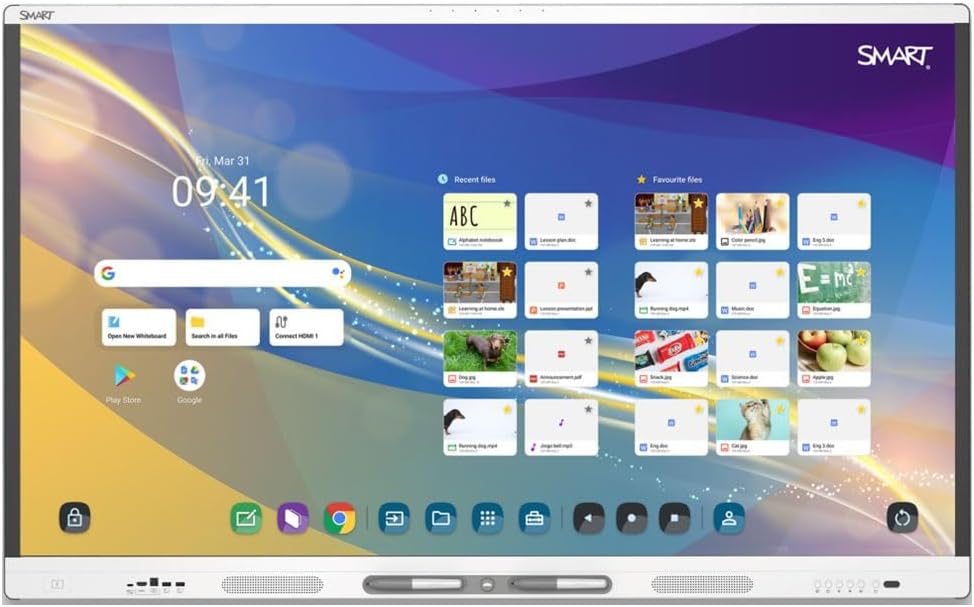
Figure 1: The SMART Board MX286-V5 display showing its interactive home screen with various applications and files.
Konfigurazio Gida
1. Deskargatzea
- Carefully open the packaging and remove the display. It is recommended to have at least two people for safe handling due to the size and weight (149.6 pounds).
- Check all contents against the packing list to ensure all accessories are present.
- Gorde jatorrizko ontzia etorkizunean garraiatzeko edo biltegiratzeko.
2. Mounting/Placement
- Ensure the mounting surface or stand can support the display's weight (149.6 pounds).
- Follow the instructions provided with your specific wall mount or stand for secure installation.
- Place the display in a location with adequate ventilation and away from direct sunlight or heat sources.
3. Periferikoak konektatzea
- Potentzia: Connect the power cable to the display's power input and then to a grounded electrical outlet.
- HDMI/VGA: Connect external devices (e.g., computers, media players) using HDMI or VGA cables to the corresponding input ports on the display.
- USBa: Use the USB ports to connect external storage devices, cameras, or other USB peripherals.
- Sarea: Connect an Ethernet cable for wired network access, or configure Wi-Fi settings after powering on.
Funtzionamendu-argibideak
1. Piztu/Itzaltzea
- Piztu: Press the power button located on the display's frame. The display will boot up to the Android 13 home screen.
- Itzali: Press and hold the power button until a power-off menu appears, then select 'Power Off'. Alternatively, a short press will put the display into standby mode.
2. Oinarrizko nabigazioa
- Ukipen-keinuak: Use single tap for selection, drag for moving items, pinch-to-zoom for scaling, and swipe for scrolling.
- Hasierako pantaila: The central hub for accessing apps, settings, and input sources.
- Side Toolbar: Access common tools like pen, eraser, and screenshot from the floating toolbar on the side of the screen.

Figure 2: The SMART Board MX286-V5 demonstrating its interactive whiteboard feature with numbered elements, ideal for educational activities.
3. Touchscreen Functionality
- The HyPr Touch Technology supports multiple touch points, allowing for collaborative interaction.
- Use your finger or the included stylus for precise input.

Figure 3: The SMART Board MX286-V5 showcasing various ready-made activity templates within its software, facilitating quick content creation.
4. Sarrera-iturria hautatzea
- From the home screen or the quick settings panel, select the desired input source (e.g., HDMI 1, VGA, Internal Android).
5. Android OS Features
- Access pre-installed applications or download new ones from the Google Play Store.
- Adjust display settings, network connections, and user profiles through the Settings menu.

Figure 4: A user interacting with the SMART Board MX286-V5, demonstrating its large interactive surface and collaborative capabilities.
Mantentzea eta zaintzea
1. Pantaila garbitzea
- Turn off and unplug the display before cleaning.
- Erabili lipurrik gabeko zapi leun bat dampUrarekin edo pantaila-garbitzaile ez-urratzaile batekin garbitu.
- Do not spray liquid directly onto the screen. Avoid using harsh chemicals, alcohol, or ammonia-based cleaners.
2. Zaintza orokorra
- Keep the display free from dust by regularly wiping the frame and vents.
- Ensure proper ventilation around the display to prevent overheating.
- Avoid placing heavy objects on the display or subjecting it to physical shock.
Arazoak konpontzea
| Arazoa | Kausa posiblea | Irtenbidea |
|---|---|---|
| Botererik ez | Kable elektrikoa deskonektatuta; Entxufearen arazoa | Check power cable connection; Try a different outlet; Ensure power button is pressed. |
| Ez dago irudirik pantailan | Incorrect input source; Loose video cable | Select correct input source (HDMI/VGA); Reconnect video cables securely. |
| Ukipen-pantailak ez du erantzuten | Software glitch; Calibration needed | Restart the display; Check for firmware updates; Perform touchscreen calibration if available in settings. |
| Soinurik ez | Volume too low; Muted; External device audio settings | Increase volume; Unmute display; Check audio output settings on connected device. |
| Wi-Fi konexio-arazoak | Incorrect password; Router issue; Signal interference | Verify Wi-Fi password; Restart router; Move display closer to router or reduce interference. |
Zehaztapen Teknikoak
| Ezaugarri | Zehaztapena |
|---|---|
| Produktuaren neurriak | 3.5 x 47.2 x 78.03 hazbete |
| Elementuaren pisua | 149.6 kilo |
| Pantaila zutik bistaratzeko tamaina | 86 hazbetekoa |
| Aspektu-erlazioa | 16:9 |
| Ebazpena | 4K UHD 2160p (3840 x 2160) |
| Pantailaren gainazalaren deskribapena | Distiratsua |
| Bistaratzeko Teknologia | LCD LED atzeko argiarekin |
| Distira | 400 nit |
| RAM | 8 GB DDR4 SDRAM |
| Sistema eragilea | Android 13 |
| Ukitu teknologia | HyPr Touch Technology |
| Konektibitatea | USB, HDMI, VGA, Bluetooth |
Bermea eta Laguntza
For detailed warranty information and technical support, please refer to the official Smart Ink webwebgunera edo jarri harremanetan zuzenean bezeroarentzako arreta-zerbitzuarekin. Bermearen baldintzak eta zehaztapenak eskualdearen eta erosketa-dataren arabera alda daitezke.
Lineako laguntza: Bisitatu Smart Ink Store on Amazon produktuen informazioa eta baliabideak lortzeko.


