1. Sarrera
The ASUS ROG RYUJIN III 360 ARGB EXTREME is an advanced all-in-one (AIO) CPU liquid cooler designed to provide superior thermal performance for high-end computing systems. It features the latest Asetek Gen8 V2 pump technology, high-airflow magnetic ARGB fans, and a customizable 3.5-inch LCD screen for real-time system monitoring and personalized aesthetics. This cooler is engineered to efficiently manage heat from powerful AMD Ryzen 9000 Series and Intel Core Ultra Processors, ensuring stable and optimal performance.

Image: The ASUS ROG RYUJIN III 360 ARGB EXTREME AIO Liquid Cooler, showcasing its radiator, three ARGB fans, and the pump block with its integrated LCD screen.
2. Zer dago kutxan
Paketea irekitzean, egiaztatu behean zerrendatutako osagai guztiak daudela eta egoera onean daudela:
- ROG RYUJIN III 360 ARGB Extreme All-in-one AIO CPU Liquid Cooler (pre-assembled with radiator, pump, and tubing)
- Magnetic ROG ARGB Fans (3 units for 360mm model)
- Accessory Pack of Screws and Brackets (for various CPU sockets)
- ROG VIP Card
- ROG Sticker Sheet
- ROG Cable Organizer
- Daisy-chainable Fan Cables

Image: A detailed layout of all components included in the ASUS ROG RYUJIN III 360 ARGB EXTREME packaging, including the cooler unit, fans, mounting hardware, and accessories.
3. Konfigurazioa eta instalazioa
Before beginning installation, ensure your system is powered off and unplugged. Refer to your motherboard's manual for specific CPU socket and case compatibility.
3.1. Bateragarritasuna
This cooler supports a wide range of CPU sockets, including:
- Intel: LGA 1851, 1700, 1200, 115X series
- AMD: AM5, AM4

Image: Diagram illustrating the supported Intel LGA and AMD AM CPU sockets for the cooler's installation.
3.2. Fan Instalazioa
The included ARGB fans feature a magnetic daisy-chain design for simplified installation. Simply align and snap the fans together before mounting them to the radiator. This reduces cable clutter and streamlines the setup process.

Irudia: Gertuko planoa view of the magnetic daisy-chainable fans, highlighting their design for easy connection and improved airflow.
3.3. Pump and Radiator Mounting
Mount the radiator to an available fan mount location in your PC case (typically top or front). Ensure adequate clearance for the radiator and fans. The pump block features an adjustable bracket design to ensure consistent contact pressure with your CPU for optimal thermal transfer. Apply thermal paste to your CPU if not pre-applied on the cooler's cold plate.
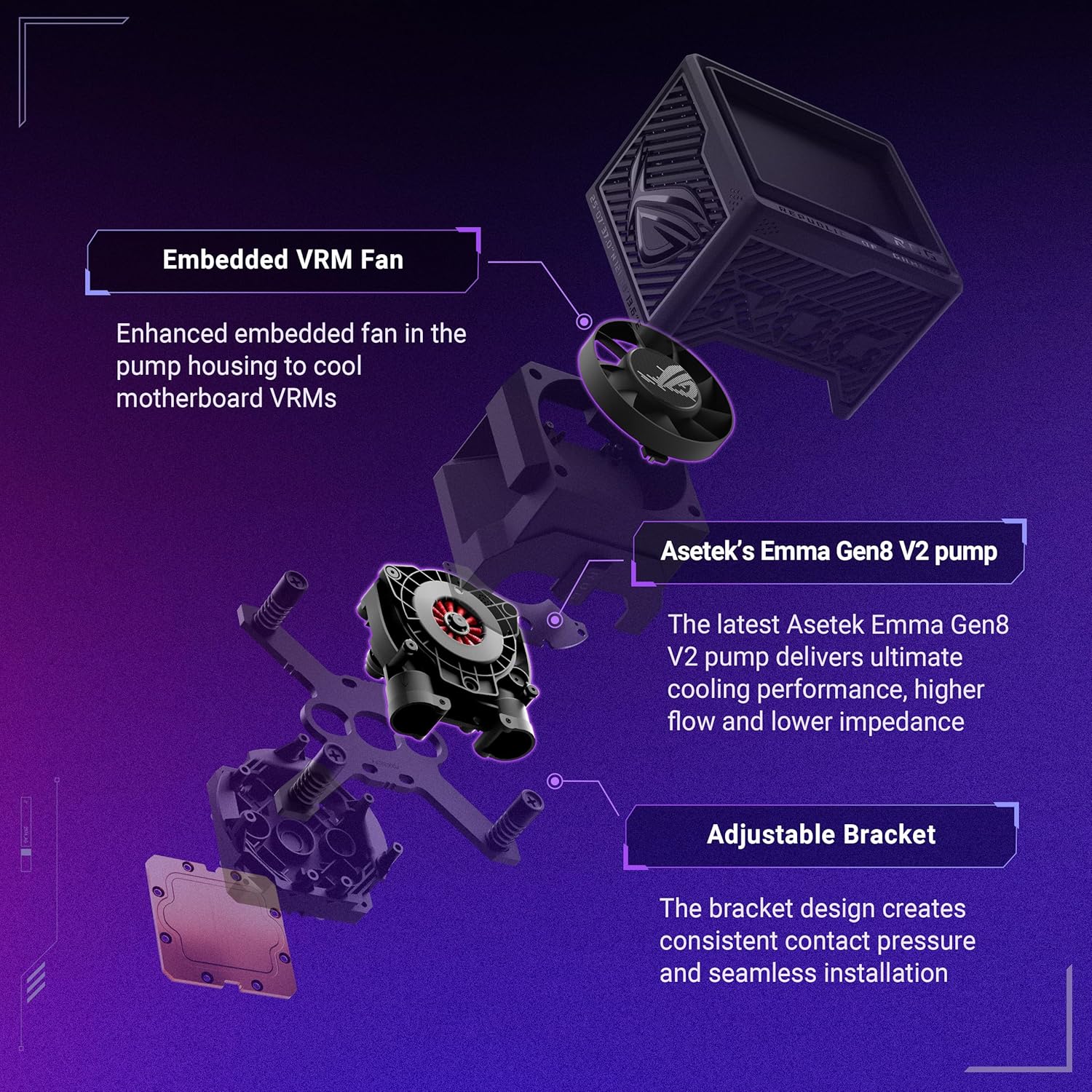
Image: An exploded diagram showing the internal components of the pump block, including the Asetek Gen8 V2 pump, embedded VRM fan, and the adjustable mounting bracket.
3.4. Kableen konexioak
Connect the pump and fan cables to the appropriate headers on your motherboard. The pump typically requires a dedicated AIO_PUMP or CPU_FAN header, while the fans connect to fan headers or a dedicated fan controller. Ensure all ARGB cables are connected to compatible ARGB headers for lighting control.
4. Funtzionamendua
Once installed, the ROG RYUJIN III 360 ARGB EXTREME offers advanced features for cooling and customization.
4.1. LCD Screen Customization
The 3.5-inch LCD screen on the pump block provides a vibrant display for system information and personalized content. With a 640x480 resolution and 60Hz refresh rate, you can:
- Monitor real-time system metrics such as CPU clock frequency, voltage, temperature, fan speed, and coolant flow.
- Display custom animated GIFs or static images.
- Set personalized wallpapers.

Image: The 3.5-inch LCD screen displaying various customizable options, including system monitoring, personalized animations, and custom wallpapers.
4.2. Softwarearen kontrola
Utilize the ASUS software (e.g., Armoury Crate) to gain full control over the cooler's performance and aesthetics. Key software features include:
- Adjusting pump and embedded fan speeds for optimal cooling and noise levels.
- Customizing ARGB lighting effects for the fans and pump block.
- Integrating with AIDA64 for advanced monitoring with special ROG themes.
5. Mantentzea
Regular maintenance ensures the longevity and optimal performance of your liquid cooler.
- Hautsa kentzea: Periodically clean dust from the radiator fins and fan blades using compressed air or a soft brush. Accumulated dust can impede airflow and reduce cooling efficiency.
- Fan ikuskapena: Check fan blades for any obstructions or signs of wear. Ensure fans are securely mounted.
- Hodiak eta konexioak: Inspect the tubing for any kinks, leaks, or damage. Ensure all cable connections are secure.
- Coolant (AIO): As an all-in-one closed-loop system, the cooler does not require coolant refills or maintenance. Do not attempt to open the loop.
6. Arazoak
If you encounter issues with your cooler, refer to the following common troubleshooting steps:
| Arazoa | Kausa posiblea | Irtenbidea |
|---|---|---|
| CPUaren tenperatura altuak | Insufficient thermal paste, poor contact with CPU, dust buildup on radiator, low pump speed, incorrect fan orientation. | Reapply thermal paste, reseat pump block, clean radiator/fans, increase pump/fan speeds via software, ensure fans are pushing air through radiator correctly. |
| Fans Not Spinning / ARGB Not Working | Loose cable connections, incorrect header connection, software issue. | Check all fan and ARGB cable connections. Ensure fans are connected to appropriate headers. Reinstall or update cooling software. |
| Ponpa Zarata | Aire burbuilak begiztan, ponpa abiadura maximoan dabil. | Orient radiator higher than pump block to allow air to settle. Adjust pump speed via software to a lower, quieter setting if temperatures allow. |
| LCD pantaila ez da bistaratzen | Loose USB connection, software not running, driver issue. | Ensure USB cable from pump to motherboard is securely connected. Verify cooling software is running and updated. Check device manager for driver issues. |
7. Zehaztapenak
| Ezaugarri | Xehetasuna |
|---|---|
| Modelo zenbakia | ROG RYUJIN III 360 ARGB EXTREME |
| Produktuaren neurriak | 16.7 x 7.4 x 7.4 hazbete |
| Elementuaren pisua | 7.8 kilo |
| Fabrikatzailea | ASUS |
| Pump Technology | Asetek Gen8 V2 (3-phase motor) |
| Zaleak | Thickened ARGB Magnetic Fans |
| LCD pantaila | 3.5" IPS, 640x480 resolution, 60Hz refresh rate, 24bit Full Color Depth |
| Embedded Fan | Yes, for VRM cooling |
| Hozteko metodoa | Fan, Water |
| Gailu bateragarriak | Desktop, Server |
| Zarata Maila | 16 dB (gutxienez) |
| Materiala | Aluminum, Copper, Plastic, Metal, Glass |
| Energia konektore mota | 4-Pin |
| liburukiatage | 2 Volt |
| Wattage | 1.2 kWh |
| UPC | 197105715240 |
8. Bermea eta laguntza
ASUS provides a limited warranty for the ROG RYUJIN III 360 ARGB EXTREME. For detailed warranty terms and conditions, please refer to the warranty card included in your product packaging or visit the official ASUS support webgunea.
For technical support, driver downloads, and software updates, please visit the official ASUS support page:
Laguntza-zerbitzura deitzean, gorde erosketa-agiria eta produktuaren serie-zenbakia eskura.