Sarrera
This manual provides detailed instructions for the setup, operation, and maintenance of your Weofly Nova Active Noise Cancelling Headphones. Please read this manual thoroughly before using the product to ensure optimal performance and longevity.
Kutxan dagoena
Upon unboxing your Weofly Nova headphones, please verify that all the following components are included:
- Weofly Nova Over-Ear Headphones
- USB-A USB-C kargatzeko kablea
- 3.5mm AUX Cable (USB-C to 3.5mm TRS)
- Erabiltzailearen eskuliburua

Image: The Weofly Nova Active Noise Cancelling Headphones in Sliver, showcasinberen diseinua.
Produktua amaituview
The Weofly Nova headphones are designed for comfort and high-quality audio, featuring Active Noise Cancellation and Bluetooth 5.4 connectivity.

Image: A woman wearing the Weofly Nova headphones, illustrating their lightweight and stylish design. The headphones weigh only 130g.

Image: Two pairs of Weofly Nova headphones, one in brown and one in white, highlighting their distinct aesthetic and color options.
Ezaugarri nagusiak:
- Zarata kentzea aktiboa (ANC): Advanced technology to reduce ambient noise.
- Bluetooth V5.4: For faster and more stable wireless connections.
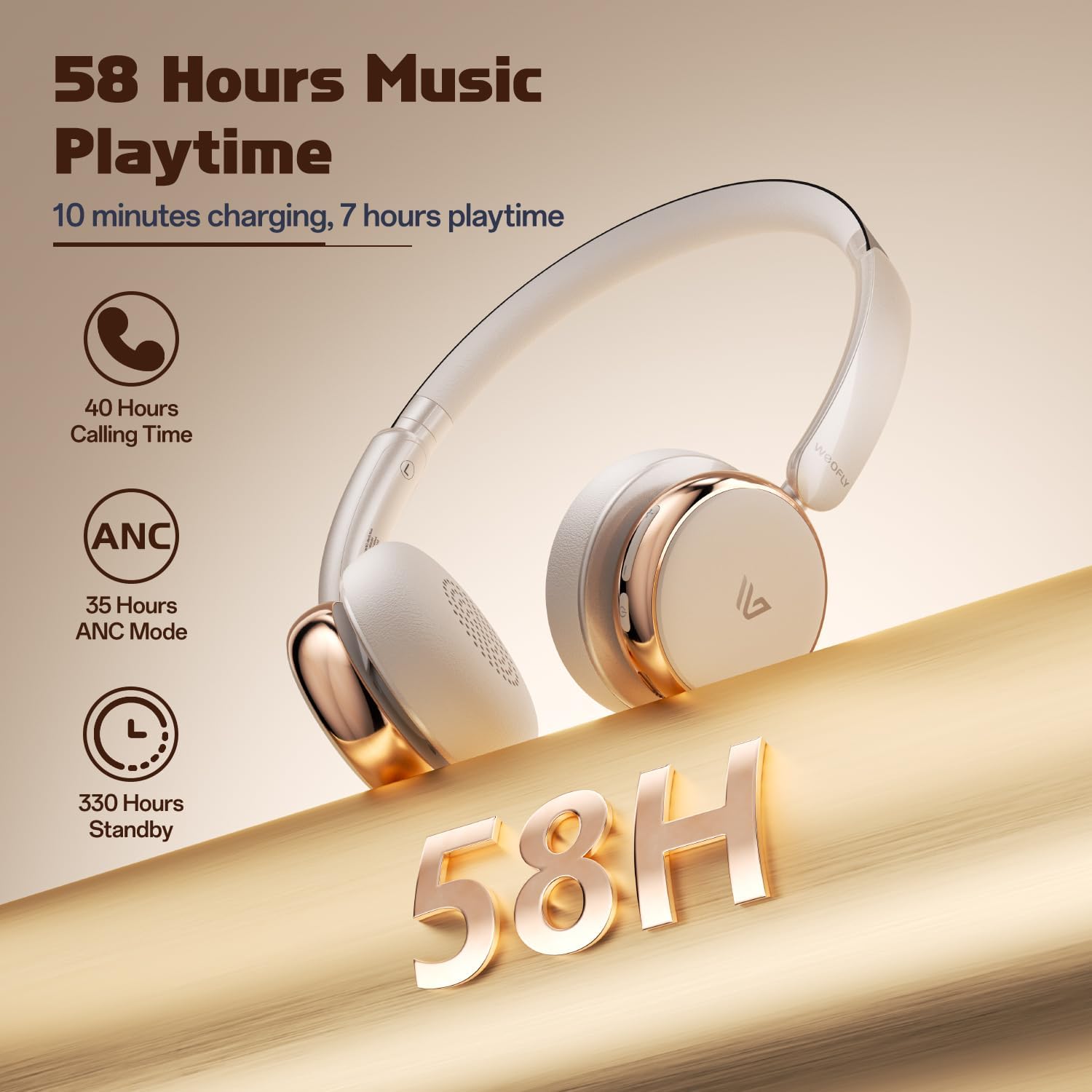
- Bateriaren iraupen luzea: Up to 58 hours of music playtime on a single charge.
- Diseinu erosoa: Ultra-soft memory protein earcups and adjustable headband.
- Fideltasun handiko soinua: 40mm dynamic drivers for clear audio with rich bass.
- Gailu anitzeko konektibitatea: Connect to two smart devices simultaneously.
Bideoa: Amaiera batview of the Weofly Nova Active Noise Cancelling Headphones, demonstrating their features and design.
Konfigurazio Argibideak
1. Entzungailuak kargatzea
Before first use, fully charge your Weofly Nova headphones. A full charge takes approximately 2 hours.
- Connect the USB-C end of the charging cable to the headphone's charging port.
- Konektatu USB-A muturra USB elikatze-egokitzaile bateragarri batera (ez dago barne) edo ordenagailu baten USB ataka batera.
- Adierazle-argiak kargatze-egoera erakutsiko du eta itzali edo kolorez aldatuko da guztiz kargatuta dagoenean.

Image: The Weofly Nova headphones being charged via a USB-C cable, illustrating the fast charging capability.
2. Piztu/Itzaltzea
- Pizteko: Sakatu eta eutsi pizteko botoia adierazlearen argia keinuka hasi arte.
- Itzaltzeko: Sakatu eta eutsi pizteko botoia adierazle-argia itzali arte.
3. Bluetooth parekatzea
The headphones support quick pairing. The first time you power them on, they will automatically enter pairing mode.
- Ziurtatu entzungailuak itzalita daudela.
- Press and hold the Power button for approximately 5 seconds until the indicator light flashes blue and red alternately, indicating pairing mode.
- Zure gailuan (smartphone-a, tableta, ordenagailu eramangarria), gaitu Bluetooth-a eta bilatu eskuragarri dauden gailuak.
- Select "Weofly Nova" from the list of devices.
- Behin konektatuta, adierazle-argia urdin finko jarriko da edo urdin keinuka poliki egingo du.
The headphones can connect to two devices simultaneously. To connect a second device, repeat the pairing process. The headphones will automatically switch between devices for calls or media playback.

Image: An illustration showing the Weofly Nova headphones connecting to a laptop and a smartphone via advanced Bluetooth 5.4, highlighting faster transmission and stable connection.
Funtzionamendu-argibideak
1. Zarata Ezabatze Aktiboa (ANC)
The Weofly Nova headphones feature Active Noise Cancellation to minimize ambient sounds.
- To Activate/Deactivate ANC: Press the dedicated ANC button on the earcup. An audible prompt will confirm the status.

Image: A woman wearing Weofly Nova headphones while focused on her laptop, demonstrating the effectiveness of ANC in reducing distractions.
2. Musika erreproduzitzea
Kontrolatu zure musika zuzenean entzungailuetatik:
- Erreproduzitu/Pausatu: Sakatu funtzio anitzeko botoia behin.
- Hurrengo ibilbidea: Sakatu eta eutsi bolumena igotzeko botoiari.
- Aurreko pista: Eduki sakatuta bolumena jaisteko botoia.
- Bolumena igo: Sakatu laburki bolumena igotzeko botoia.
- Bolumena jaitsi: Sakatu laburki Bolumena Jaisteko botoia.
3. Deien kudeaketa
Kudeatu telefono deiak erraz:
- Deia erantzun/amaitu: Sakatu funtzio anitzeko botoia behin.
- Deia baztertu: Eduki sakatuta funtzio anitzeko botoia 2 segundoz.
- Berriz markatu azken zenbakia: Sakatu birritan funtzio anitzeko botoia.
4. Ahots Laguntzailea
Aktibatu zure gailuaren ahots-laguntzailea:
- Aktibatu Ahots Laguntzailea: Sakatu hiru aldiz funtzio anitzeko botoia.

Image: A multi-panel image illustrating the comfort of the headphones during travel, and the functionality of voice assistance and built-in microphone for hands-free calls.
5. Joko modua
For reduced latency during gaming, activate Game Mode:
- Activate/Deactivate Game Mode: Press and hold the Multi-function button for 2 seconds (while not on a call or playing music).
6. Kable bidezko konexioa
Use the provided 3.5mm AUX cable for a wired connection:
- Connect the USB-C end of the AUX cable to the headphone's USB-C port.
- Connect the 3.5mm end to your audio source's headphone jack.
- Entzungailuak automatikoki aldatuko dira kable bidezko modura.
Mantentzea
To ensure the longevity and optimal performance of your Weofly Nova headphones, follow these maintenance guidelines:
- Garbiketa: Erabili zapi leun eta lehor bat entzungailuak garbitzeko. Ez erabili garbitzaile edo disolbatzaile urratzailerik.
- Biltegiratzea: Gorde entzungailuak leku fresko eta lehor batean, eguzki-argitik eta muturreko tenperaturetatik babestuta.
- Saihestu hezetasuna: Ez jarri entzungailuak uretan edo gehiegizko hezetasunean.
- Kontuz maneiatu: Saihestu entzungailuak erortzea edo kolpe gogorren eraginpean jartzea.
Arazoak konpontzea
If you encounter issues with your Weofly Nova headphones, refer to the following common solutions:
| Arazoa | Irtenbidea |
|---|---|
| Entzungailuak ez dira pizten | Ensure the headphones are fully charged. Connect to a power source and allow to charge for at least 30 minutes before attempting to power on again. |
| Ezin da gailuarekin parekatu | Ensure headphones are in pairing mode (flashing blue/red). Turn off and on your device's Bluetooth. Move headphones closer to the device. Clear previous Bluetooth connections on your device. |
| Soinurik ez edo bolumen txikia | Check headphone and device volume levels. Ensure headphones are properly connected via Bluetooth or AUX cable. Test with a different audio source. |
| ANCk ez du eraginkortasunez funtzionatzen | Ensure ANC is activated. Adjust headphone fit to ensure a good seal around your ears. ANC is most effective against low-frequency, constant noise. |
| Etengabeko konexioa | Ensure no obstacles are between the headphones and your device. Move away from other wireless devices that may cause interference. Ensure headphones are fully charged. |
Zehaztapenak
Technical details for the Weofly Nova Active Noise Cancelling Headphones:
- Ereduaren izena: Nova
- Konektibitate Teknologia: Haririk gabeko (Bluetooth)
- Haririk gabeko komunikazio teknologia: Bluetooth 5.4
- Audio kontrolatzaile mota: 40 mm-ko gidari dinamikoa
- Zarata kontrola: Zarata Deuseztatze Aktiboa
- Bateriaren iraupena: Up to 58 hours (music playtime), 40 hours (talk time), 35 hours (ANC mode)
- Kargatzeko denbora: 2 ordu gutxi gorabehera
- Bateriaren edukiera: 500mAh
- Elementuaren pisua: 0.26 kilogramo (9.1 ontza)
- Belarrien kokapena: Belarri gainean
- Gailu bateragarriak: Telefono mugikorrak, tabletak, ordenagailu eramangarriak, bozgorailu adimendunak
Irudia: Xehetasun zehatza view of the Weofly Nova earcup, emphasizing the 40mm dynamic driver responsible for high-fidelity sound quality.

Image: The Weofly Nova headphones prominently displaying '58H', signifying their extended battery life of 58 hours for music playback.
Bermea eta Laguntza
Weofly products come with a standard manufacturer's warranty. For specific warranty details, please refer to the warranty card included in your product packaging or visit the official Weofly website. For technical support, troubleshooting assistance, or any inquiries regarding your Weofly Nova headphones, please contact Weofly customer service through the contact information provided on our webgunean edo zure produktuaren dokumentazioan.


