1. Produktua amaitu daview
The Roborock QV 35A is an advanced robot vacuum and mop designed to provide comprehensive floor cleaning. It features powerful suction, intelligent navigation, and a multi-functional docking station for automated maintenance.

Image 1.1: The Roborock QV 35A robot vacuum, its multi-functional docking station, and companion app interfaces on a smartphone and smartwatch.
Ezaugarri nagusiak:
- HyperForce 8000 Pa xurgapena: Delivers powerful vacuuming for deep cleaning carpets and hard floors.
- Multi-functional Docking Station: Automates dust emptying, water refilling, mop washing, and mop drying.
- Dual Rotating Mops: Two high-speed rotating mops (200 RPM) with 30 adjustable water levels for effective stain removal.
- 10mm Mop Lifting: Automatically lifts mops when detecting carpets to prevent wetting.
- Anti-Tangle Brush System: Features an asymmetric side brush and an all-rubber main brush to prevent hair entanglement.
- Oztopo teknologiko erreaktiboak saihestea: Intelligently detects and avoids obstacles, and suggests no-go zones.
- PreciSense LiDAR nabigazioa: Rapid 360° scanning for precise mapping and efficient cleaning paths, supporting multi-floor mapping (up to 4 levels).
- Roborock aplikazioaren kontrola: Offers customized cleaning routes, scheduling, map management, and compatibility with voice assistants.
2. Konfigurazio gida
2.1 Kutxatik ateratzea eta osagaien egiaztapena
Carefully unpack all components and verify against the packing list:
- Robot Vacuum * 1
- Dock (with pre-installed disposable dust bag) * 1
- Dock Base * 1
- Mop Module * 1
- Elikatze kablea * 1
- Erabiltzailearen eskuliburua * 1

Image 2.1: A visual representation of the Roborock QV 35A package contents, including the robot, dock, and accessories, along with their dimensions.
2.2 Ainguratze-estazioaren kokapena
Place the multi-functional docking station on a hard, level surface against a wall. Ensure there is adequate clear space around the dock (at least 0.5 meters on both sides and 1.5 meters in front) for the robot to maneuver easily. Connect the power cord to the dock and plug it into a power outlet.
2.3 Hasierako karga
Place the robot onto the docking station. Ensure the charging contacts align. The robot will begin charging automatically. For first-time use, it is recommended to fully charge the robot before operation.
2.4 Aplikazioaren instalazioa eta konexioa
- Download the Roborock app from your smartphone's app store.
- Open the app and follow the on-screen instructions to create an account and add your Roborock QV 35A device.
- Aplikazioak robota etxeko Wi-Fi sarera konektatzen lagunduko dizu.
2.5 Hasierako mapaketa
Once connected, initiate a mapping run through the app. The robot will use its PreciSense LiDAR navigation system to scan your home and create a detailed map. This map is crucial for efficient cleaning and allows for advanced features like zone cleaning and virtual walls.
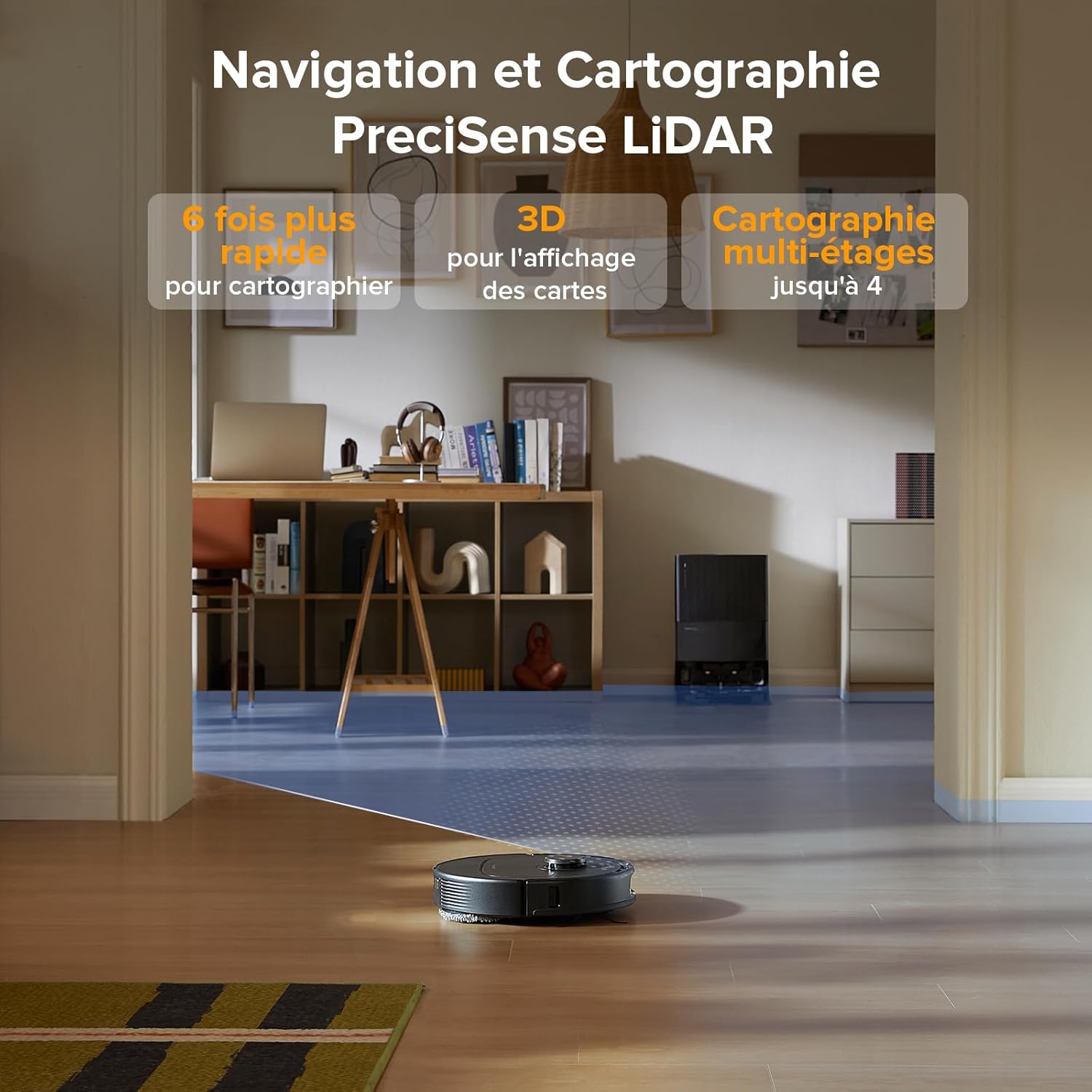
Image 2.2: The Roborock QV 35A utilizing its LiDAR sensor to rapidly map a room, displaying the 3D mapping capability.
3. Funtzionamendu-argibideak
3.1 Garbiketa-ziklo bat abiaraztea
Garbiketa-ziklo bat hainbat modutan has dezakezu:
- Via Roborock App: Tap 'Clean' on the main screen. You can select full house cleaning, specific rooms, or custom zones.
- Robotaren gainean: Sakatu robotaren pizteko botoia behin garbiketa-ziklo osoa hasteko.
- Ahots kontrola: Use compatible voice assistants (Alexa, Google Home) with commands like "Start cleaning."

Image 3.1: Various control methods for the Roborock QV 35A, including third-party voice commands, launch widgets, and the Apple Watch application.
3.2 Garbiketa moduak eta pertsonalizazioa
The Roborock app offers extensive customization:
- Xurgatze potentzia: Adjust suction levels (e.g., Quiet, Balanced, Turbo, Max, Max+).
- Ur-emaria: Control the water output for mopping (30 levels available).
- Roborock SmartPlan: Define room types and floor materials in the app for the robot to automatically adapt water flow and suction power.
- Alfonbra bultzatzea: Automatically increases suction power when a carpet is detected.
- Mop Lifting: The robot automatically lifts its mops by 10mm when transitioning from hard floors to carpets.

Image 3.2: The Roborock SmartPlan feature, showing how the robot adapts cleaning settings based on room type and floor material defined in the app.
3.3 Scheduling and Routines
Set up cleaning schedules and personalized routines via the Roborock app:
- Eguneko garbiketa: Program the robot to clean at specific times and days.
- Custom Routines: Create shortcuts for frequently used cleaning tasks (e.g., 'After Meals' for kitchen cleaning).
- Temporary Cleaning: Add or temporarily ignore zones as needed, then resume the original cleaning task.

Image 3.3: The Roborock app interface demonstrating how to program daily cleaning schedules and save frequently used operations as shortcuts.
3.4 Obstacle Avoidance and No-Go Zones
The Reactive Tech system enables the robot to detect and avoid common household obstacles. You can also define specific areas:
- Horma Birtualak: Create invisible barriers the robot will not cross.
- Joan ezineko guneak: Designate specific areas the robot should avoid entirely.
- Intelligent Suggestions: The robot can suggest areas where it might get stuck as potential no-go zones.

Image 3.4: The Reactive Tech system in action, showing the Roborock QV 35A detecting and navigating around common household items like a teddy bear and slippers.
4. Mantentzea
Regular maintenance ensures optimal performance and extends the lifespan of your Roborock QV 35A.
4.1 Docking Station Maintenance
- Auto Dust Emptying: The dock automatically empties the robot's dustbin into a 2.7L sealed bag, requiring manual emptying approximately every 7 weeks.
- Auto Water Refill: The dock refills the robot's water tank from its 4L reservoir, covering up to 330 m² on a single fill.
- Mop Washing and Drying: The dock washes the robot's mops and then air-dries them to prevent odors and mildew.
- Detachable Dock Base: The base of the dock is fully removable for easy cleaning to prevent clogging.

4.1 irudia: Gehiegizko batview of the Roborock QV 35A's multi-functional docking station, highlighting its automated maintenance capabilities.

Image 4.2: The detachable base of the docking station being cleaned under a faucet, demonstrating ease of maintenance.
4.2 Robotaren osagaien garbiketa
- Eskuila nagusia: Regularly check and clean the main brush for tangled hair or debris. The all-rubber design helps prevent entanglement.
- Alboko eskuila: Inspect and clean the asymmetric side brush.
- Fregona-zapiak: While the dock washes them, periodically check the mop pads for excessive wear or stubborn stains.
- HEPA iragazkia: Clean or replace the HEPA filter as indicated by the app or every 3-6 months, depending on usage.
- Sentsoreak: Wipe the robot's sensors (LiDAR, cliff sensors, obstacle avoidance sensors) with a dry cloth to ensure accurate navigation.

Image 4.3: The anti-tangle brush system of the Roborock QV 35A, featuring an asymmetric side brush and an all-rubber main brush designed to prevent hair entanglement.
5. Arazoak
If you encounter issues with your Roborock QV 35A, refer to the following common solutions:
5.1 Robota ez da kargatzen
- Ensure the power cord is securely plugged into both the dock and the wall outlet.
- Verify that the robot is correctly docked and its charging contacts are aligned with the dock's contacts. Clean contacts if dirty.
- Egiaztatu korronte-hartunea funtzionala den.
5.2 Robot Stuck or Not Moving
- Clear any obstacles (cables, small toys, clothing) from the robot's path.
- Check if the main brush, side brush, or wheels are entangled with hair or debris.
- Clean the cliff sensors and obstacle avoidance sensors.
- If the robot is stuck on a threshold, ensure it is within the 2cm climbing capacity.
5.3 Poor Cleaning Performance
- Empty the dustbin and check the dust bag in the dock.
- Garbitu edo ordeztu HEPA iragazkia.
- Clean the main brush and side brush.
- Ziurtatu ur-depositua beteta dagoela eta fregona-zapiak garbi eta behar bezala lotuta daudela.
- Adjust suction power and water flow settings in the app to a higher level if needed.
5.4 Aplikazioen konexio arazoak
- Ensure your Wi-Fi network is stable and the robot is within range.
- Restart your Wi-Fi router and the robot.
- Verify that the Roborock app is updated to the latest version.
- If issues persist, try re-pairing the robot with the app.
6. Zehaztapenak
| Ezaugarri | Zehaztapena |
|---|---|
| Marka | roborock |
| Modelo zenbakia | roborock QV 35A |
| Kolorea | Beltza |
| Robotaren neurriak (L x Z x A) | 35L x 35W x 9.65H cm |
| Kaiaren neurriak (L x Z x A) | 34L x 48.7W x 51.9H cm |
| Robotaren pisua | 11.8 Kilograms (Total product weight) |
| Ur deposituaren edukiera | 370 Milliliters (Robot) / 4 Liters (Dock) |
| Boterea | 60 Watt |
| Itzaltze automatikoa | Bai |
| Zarata Maila | 64 dB (Balanced Mode) / 55 dB (Mop-only Mode) |
| Bateragarritasuna | Alexa, Amazon Echo, Google Home, Smartphone, Smartwatch |
| Ezaugarri bereziak | Intelligent Mapping, Automatic Mop Washing, LiDAR Navigation, Advanced Personalized Cleaning, Obstacle Avoidance |
| Iragazki mota | HEPA |
| Energia iturria | Bateriaren bidez |
| Kontrol-metodoa | Aplikazioa |
7. Bermea eta Laguntza
For warranty information, please refer to the documentation included with your product or visit the official Roborock website. For technical support or service inquiries, please contact Roborock customer service through their official channels.
You can typically find support contact details within the Roborock app under the 'Help' or 'Support' section.


