1. Sarrera
Thank you for choosing the MageGee Light84 Transparent Mechanical Keyboard. This wired gaming keyboard features a unique transparent design, vibrant RGB backlighting, and crystal switches, offering a superior typing and gaming experience. This manual provides detailed instructions for setup, operation, maintenance, and troubleshooting to help you get the most out of your new keyboard.

Figure 1: MageGee Light84 Transparent Mechanical Keyboard
2. Ezaugarri nagusiak
- Transparent Keycaps and RGB Backlighting: Features blue transparent keycaps that are delicate and smooth to the touch, with clear, fade-resistant characters. Full RGB backlighting offers cool, eye-catching effects with adjustable light modes and brightness, enhancing the transparent design.
- Customizable Crystal Switches and Double Layer Sound Deadening Structure: Equipped with dust-proof transparent axles for fast, no-delay response and tactile feedback. The gasket structure and EVA sound deadening cotton effectively eliminate most cavity sound, optimizing typing feel and sound consistency.
- Hot-swappable Full-Key Replacement Design: Compatible with most three-legged and five-legged shafts, allowing for DIY customization. Supports simultaneous keystrokes without conflict for fast trigger continuous skills.
- Gasket Mount Mechanical Keyboard: Utilizes high-quality gasket material and silicone pad to absorb vibrations and eliminate noise. Includes Poron sandwich foam, Poron socket foam, and PET sound pads for a quieter and smoother typing experience.
- Simple Button to Switch WIN/MAC/Xbox Layouts: Easily switch between Mac and Windows operating systems. The 84-key, 70% layout saves desk space and offers maximum comfort, suitable for gamers, office workers, and writers.
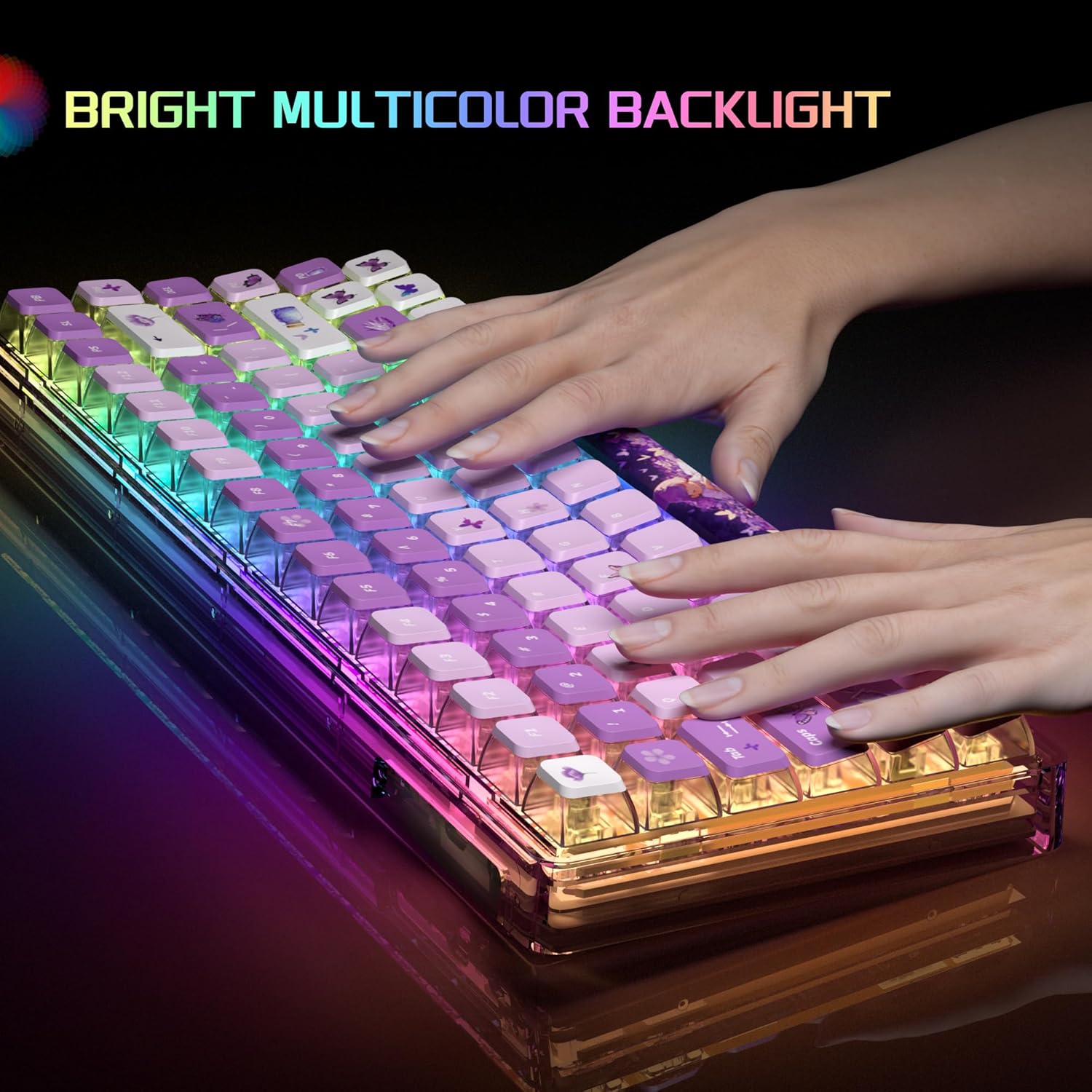
Figure 2: Bright Multicolor Backlight in action

Figure 3: Crystal Switch Components
Produktua amaituview Bideoa
Video 1: A short demonstration of the MageGee Transparent Keyboard, showcasing its RGB lighting effects and overall design.
3. Konfigurazio gida
- Deskonprimitu teklatua: Kontu handiz atera teklatua eta osagarriak paketetik.
- Konektatu gailura: Locate the USB cable provided with your keyboard. Plug the USB-C end into the keyboard's port and the USB-A end into an available USB port on your computer (PC, Laptop, Gaming Console) or Mac.
- Sistemaren Ezagutza: Your operating system (Windows, macOS) should automatically detect and install the necessary drivers. This process usually takes a few moments.
- Proba funtzionaltasuna: Open a text editor or browser and test typing to ensure all keys are functioning correctly.
4. Funtzionamendu-argibideak
4.1. RGB atzeko argiaren kontrola
The MageGee Light84 keyboard features customizable RGB backlighting. Specific key combinations are used to change lighting modes and brightness. Refer to the quick start guide included in your packaging for detailed key combinations, as these can vary.
- Argiztapen moduak aldatzea: Typically, use Fn + [Tekla] combinations to cycle through various lighting effects (e.g., wave, breathing, static).
- Distira doitzea: Erabili Fn + Gora/Behera gezia keys to increase or decrease backlight brightness.
- Abiadura doitzea: Erabili Fn + Left/Right Arrow keys to adjust the speed of dynamic lighting effects.
4.2. Switching WIN/MAC/Xbox Layouts
The keyboard allows for quick switching between different operating system layouts to optimize key functions.
- Switching Layout: Press the dedicated key button (often marked with a system icon or located near the function keys) to instantly change the keyboard's working system to Mac, Windows, or Xbox mode.
4.3. Hot-Swappable Key Replacement
The hot-swappable design allows you to easily change mechanical switches without soldering. This feature is ideal for customization and maintenance.
- Etengailu bat kentzea: Erabili emandako etengailua ateratzeko tresna etengailua astiro-astiro heltzeko eta zuzen gora tiratzeko.
- Etengailu bat instalatzea: Lerrokatu etengailu berriaren pinak PCBko zuloekin. Sakatu ondo etengailua bere lekuan klik egin arte. Ziurtatu pinak ez daudela tolestuta.
4.4. Lock WIN Key Function
To prevent accidental presses of the Windows key during gaming, you can lock its functionality.
- Lock/Unlock WIN Key: Typically, press Fn + WIN key to toggle the Windows key lock on or off. An indicator light may show its status.
5. Mantentzea
Proper maintenance ensures the longevity and optimal performance of your MageGee Light84 keyboard.
- Garbiketa orokorra: Regularly use a soft brush or compressed air to remove dust and debris from between the keycaps.
- Tekla-tapoien garbiketa: For deeper cleaning, you can carefully remove the keycaps using a keycap puller. Clean them with a mild soap solution and a soft cloth, then ensure they are completely dry before reattaching. Avoid harsh chemicals that may damage the transparent material or legends.
- Gainazalaren garbiketa: Wipe the keyboard surface with a slightly damp, lint-free cloth. Do not use excessive moisture.
- Saihestu isurketak: Keep liquids away from the keyboard to prevent damage to internal components. In case of a spill, immediately unplug the keyboard, dry it thoroughly, and allow it to air dry completely before reconnecting.
6. Arazoak
Teklatuarekin arazoak badituzu, saiatu arazoak konpontzeko urrats hauekin:
| Arazoa | Irtenbide posiblea |
|---|---|
| Teklatuak ez du erantzuten |
|
| Atzeko argia ez dabil edo keinuka ari da |
|
| Giltza batzuk ez dira funtzionatzen |
|
| WIN key is locked |
|
If these steps do not resolve your issue, please contact MageGee customer support for further assistance.
7. Zehaztapenak
- Marka: MageGee
- Eredua: Argia84
- Kolorea: Purple Butterfly
- Konektibitate Teknologia: Kableatua
- Etengailu mota: Tactile (Crystal Switches)
- Teklatuaren deskribapena: Ergonomic, 70% Layout (84-key)
- Gailu bateragarriak: Joko kontsola, ordenagailu eramangarria, ordenagailua
- Compatible Operating System Family: Windows, Mac, Xbox
- Elementuaren pisua: 2.92 libra (gutxi gorabehera 1.32 kg)
- Paketearen neurriak: 13.94 x 6.3 x 2.44 hazbete (gutxi gorabehera 35.4 x 16 x 6.2 cm)

4. irudia: Teklatuaren neurriak
8. Bermea eta Laguntza
MageGee products are designed and manufactured to the highest quality standards. For information regarding warranty coverage, please refer to the warranty card included with your product or visit the official MageGee webgunea.
For technical support, troubleshooting assistance, or any other inquiries, please contact MageGee customer service through their official channels. You can often find contact information on the product packaging or the brand's official webgunea.
MageGee Official Store: Visit the MageGee Store on Amazon


