1. Sarrera
This manual provides detailed instructions for setting up, operating, and maintaining your BenQ EW2790U 27-inch 4K monitor. Please read this manual thoroughly before using the monitor to ensure proper functionality and to prevent damage.
2. Segurtasun informazioa
Always follow these basic safety precautions to reduce the risk of fire, electric shock, and injury:
- Ez jarri monitoreari euri edo hezetasun eraginpean.
- Ez ireki monitorearen casing; jo ezazu mantentze-lanetarako langile kualifikatuen eskuetara.
- Ziurtatu aireztapen egokia monitorearen inguruan.
- BenQ-ek emandako elikatze-kablea eta egokitzailea soilik erabili.
- Deskonektatu monitorearen entxufea tximista-ekaitzetan edo denbora luzez erabili gabe dagoenean.
3. Paketearen edukia
Egiaztatu elementu guztiak zure paketean daudela:
- BenQ EW2790U 27 hazbeteko 4K monitorea
- Elikatze kablea
- HDMI kablea
- USB-C kablea
- Hasierako gida azkarra
- Berme Txartela
4. Konfigurazioa
4.1 Standa muntatzea
- Jarri monitorearen aurpegia behera gainazal leun eta garbi batean, marradurak saihesteko.
- Lotu euskarriaren oinarria euskarriaren lepoari eta finkatu emandako torlojuarekin.
- Align the stand assembly with the mounting slot on the back of the monitor and push until it clicks into place.

Figure 4.1: Assembled BenQ EW2790U monitor.
4.2 Konektatzeko kableak
Konektatu beharrezko kableak monitoreari eta ordenagailura:
- Potentzia: Konektatu elikatze-kablea monitorearen elikatze-sarrerara eta gero entxufe batera.
- Bideoa:
- HDMI: Connect an HDMI cable from your computer's HDMI output to one of the monitor's HDMI ports (HDMI 1, 2, or 3).
- USB-C: Connect a USB-C cable from your computer's USB-C port to the monitor's USB-C (65W) port for video, data, and power delivery.
- USB beherantz: Connect USB-A devices to the USB-A 3.2 downstream ports on the monitor.
- Audioa: Konektatu entzungailuak aurikularretarako konektorera, nahi izanez gero.

4.2. Irudia: Atzealdea view of BenQ EW2790U showing connectivity ports.

4.3. irudia: Xehetasuna view of BenQ EW2790U input/output ports.
4.3 Adjusting Ergonomics
The EW2790U monitor offers various adjustments for comfortable viewesan:
- Altuera doitzea: Altxa edo jaitsi monitorearen maila nahiago duzunera.
- okertu: Doitu pantailaren angelu bertikala.
- Birakaria: Biratu pantaila horizontalki.
- Pibota: Rotate the screen 90 degrees for portrait mode.

Figure 4.4: BenQ EW2790U monitor pivot adjustment.
5. Monitorea funtzionatzea
5.1 Piztu/Itzali
Press the Power key located on the bottom right of the monitor to turn it on or off.

Figure 5.1: Monitor controls: Scenario hotkey, 5-way controller, and Power key.
5.2 Pantailan bistaratzeko (OSD) menua
Use the 5-way controller on the bottom bezel to navigate the OSD menu and adjust settings such as brightness, contrast, color mode, and input source.
5.3 Scenario Hotkey
The Scenario hotkey allows quick access to custom or preset optimal monitor settings for various uses like work, studying, gaming, or watching movies.
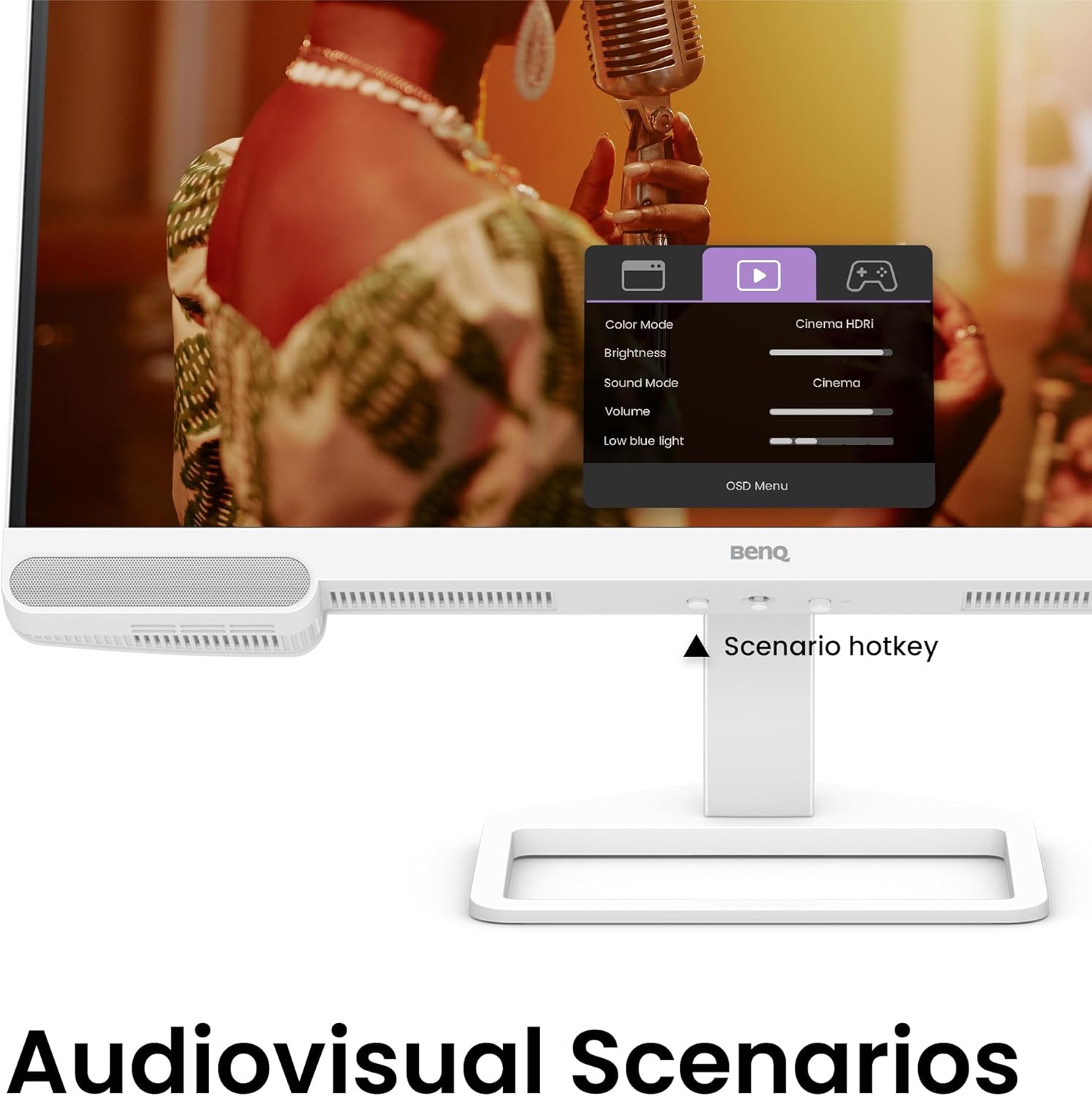
Figure 5.2: OSD menu accessed via Scenario hotkey.
5.4 AI Kontraste Teknologia
The exclusive AI Contrast technology intelligently adjusts the contrast based on the displayed content, optimizing image quality without affecting other areas of the screen.

Figure 5.3: Demonstration of AI Contrast technology.
5.5 Barneko bozgorailuak
The monitor includes a pair of 5W built-in speakers for audio output. Adjust the volume through the OSD menu or your connected device.

Figure 5.4: BenQ EW2790U built-in 5W speakers.
6. Mantentzea
6.1 Monitorea garbitzea
- Deskonektatu beti monitorea garbitu aurretik.
- Erabili lipurrik gabeko zapi leun bat dampurarekin edo garbitzaile leun eta ez-urratzaile batekin garbitu.
- Ez ihinztatu garbitzailea zuzenean pantailan.
- Avoid using alcohol, ammonia, or abrasive cleaners, as they may damage the screen or casing.
6.2 Biltegiratzea
Store the monitor in a cool, dry place away from direct sunlight and extreme temperatures. If storing for an extended period, consider using the original packaging for protection.
7. Arazoak
| Arazoa | Kausa posiblea | Irtenbidea |
|---|---|---|
| Ez dago irudirik pantailan | Kable elektrikoa deskonektatuta; bideo-kablea deskonektatuta; sarrera-iturri okerra hautatuta. | Ensure power and video cables are securely connected. Press the Scenario hotkey to select the correct input source. |
| Irudia lausoa edo distortsionatua dago | Bereizmen okerra; Bideo-kablea soltea. | Set the display resolution to 3840x2160. Check video cable connections. |
| Bozgorailuen soinurik ez | Bolumena baxuegia; Isilarazita; Ordenagailuan audio irteera okerra hautatu da. | Adjust volume via OSD menu or computer settings. Ensure monitor is selected as audio output device. |
| AI Contrast not working as expected | Feature disabled; Specific content not optimized. | Check OSD settings to ensure AI Contrast is enabled. Performance may vary with different content. |
8. Zehaztapenak
| Ezaugarri | Xehetasuna |
|---|---|
| Pantailaren tamaina | 27 hazbete |
| Ebazpena | 3840x2160 (4K UHD) |
| Aspektu-erlazioa | 16:9 |
| Koloreen estaldura | %95 P3 |
| AI Contrast Technology | Bai |
| Bozgorailu integratuak | 2 x 5W |
| Konektibitatea | 1x USB Type-C (65W), 3x HDMI (2.0), USB-C 3.2 downstream, USB-A 3.2 downstream, Headphone Jack |
| Diseinu Ergonomikoa | Altuera doikuntza, inklinazioa, biraketa, biraketa |
| Elementuaren pisua | 21.4 kilo |
| Produktuaren neurriak (LxWxH) | 17 x 8 x 21 hazbete |
9. Bermea eta Laguntza
Your BenQ EW2790U monitor is covered by a manufacturer's warranty. Please refer to the warranty card included in your package for specific terms and conditions. For technical support, product registration, or service inquiries, please visit the official BenQ webwebgunean edo jarri harremanetan bere bezeroarentzako arreta zerbitzuarekin.
Official BenQ Webgunea: www.benq.com