1. Sarrera
Thank you for choosing the Taiahiro Bk6301 Wireless Mechanical Gaming Keyboard and Mouse Combo. This manual provides detailed instructions for setting up, operating, and maintaining your new peripheral devices. This combo offers versatile connectivity options including 2.4G wireless, Bluetooth 5.0, and wired USB-C, ensuring compatibility with various devices.
2. Paketearen edukia
Mesedez, egiaztatu elementu guztiak zure paketean daudela:
- Taiahiro Bk6301 Wireless Mechanical Gaming Keyboard
- Taiahiro Wireless Gaming Mouse
- USB 2.4G Receiver (stored in mouse battery compartment)
- USB-C USB-A kargatzeko/datuen kablea
- Erabiltzailearen eskuliburua
- 1 AA Battery (for mouse, may be pre-installed or included separately)

Image 2.1: Contents of the Taiahiro Bk6301 Keyboard and Mouse Combo package, including the keyboard, mouse, USB receiver, and USB-C cable.
3. Produktua amaitu daview
3.1 Teklatuaren ezaugarriak
- 98 teklako diseinua: Compact design with a full numeric keypad.
- Etengailu urdin mekanikoak: Provide tactile and audible feedback for typing.
- RGB atzeko argiztapena: Argiztapen efektu pertsonalizagarriak.
- Adjustable Keyboard Stand: Allows for ergonomic positioning.
- Konexio multimodala: Supports 2.4G wireless, Bluetooth 5.0, and wired USB-C.
- Bateria kargagarria: Built-in 2000mAh battery for wireless operation.
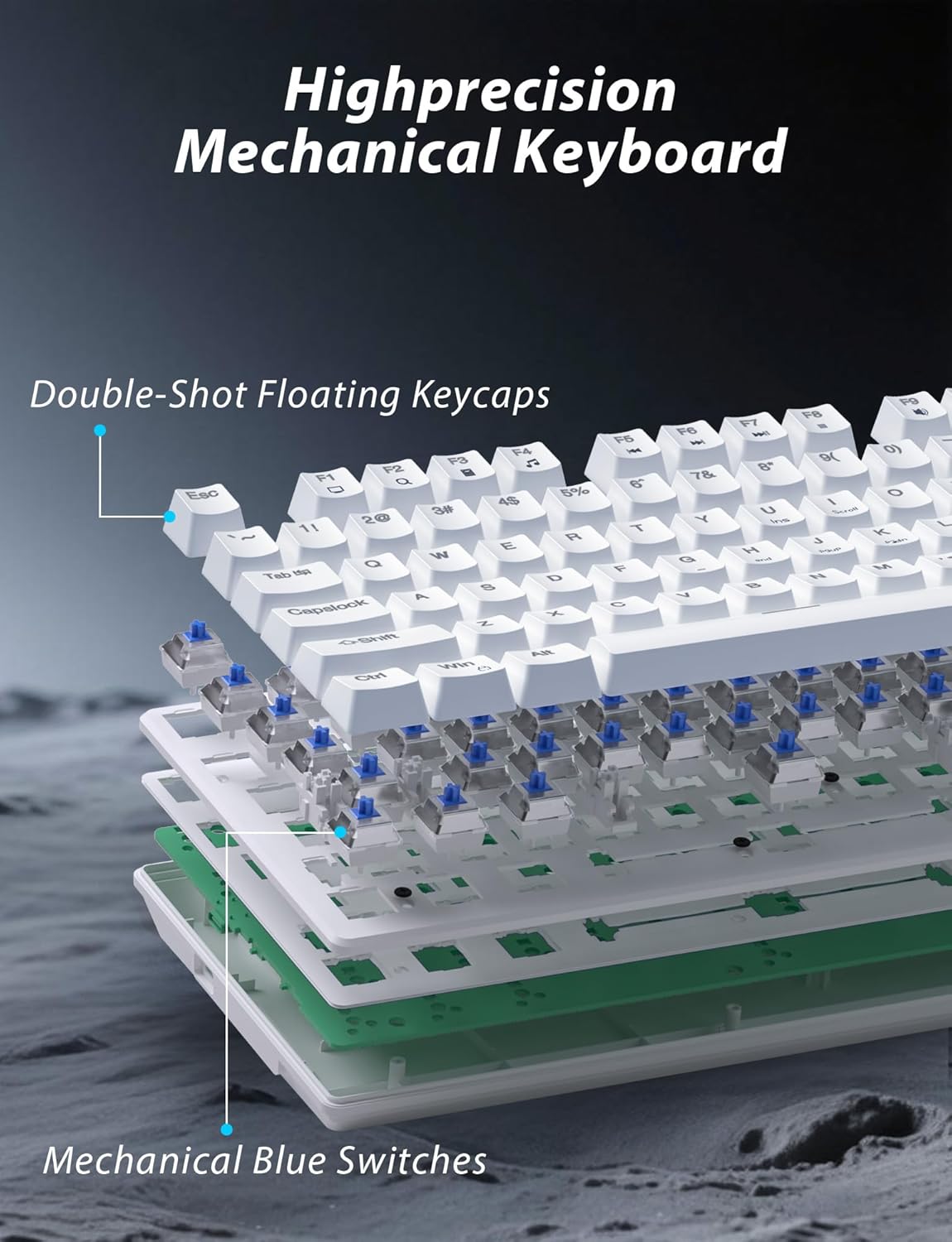
3.1. irudia: Lehertua view illustrating the internal structure of the mechanical keyboard, highlighting the double-shot floating keycaps and mechanical blue switches.

3.2 irudia: Albokoa view of the keyboard demonstrating its ergonomic design and adjustable stand for comfortable use.
3.2 Saguaren ezaugarriak
- Diseinu ergonomikoa: Shaped for comfortable grip.
- DPI erregulagarria: Four levels (800/1600/2400/3200) for precision control.
- Aurrera/Atzera botoiak: Convenient side buttons for navigation.
- Konexio bikoitzeko modua: Supports 2.4G wireless and Bluetooth.

Image 3.3: The wireless gaming mouse, highlighting its ergonomic shape and four adjustable DPI levels.
4. Konfiguratzeko argibideak
4.1 Teklatuaren konexioa
The keyboard supports three connection modes: 2.4G wireless, Bluetooth, and wired USB-C.

Image 4.1: The keyboard displaying its three connectivity options: Bluetooth, 2.4GHz wireless, and USB-C wired connection.
2.4G Haririk gabeko modua:
- Locate the USB 2.4G receiver, typically stored in the mouse's battery compartment.
- Sartu USB hargailua zure ordenagailuko USB ataka erabilgarri batean.
- On the keyboard, slide the mode switch (usually located on the top edge or bottom) to the '2.4G' position.
- Teklatua automatikoki konektatu beharko litzateke.
Bluetooth modua:
- Slide the mode switch on the keyboard to the 'BT' (Bluetooth) position.
- The keyboard's indicator light will flash, indicating it is in pairing mode.
- On your device (computer, laptop, smartphone), open Bluetooth settings and search for new devices.
- Select "Taiahiro Bk6301" or a similar name from the list of available devices to pair.
- Behin parekatuta, adierazle-argia finko egongo da.
Wired USB-C Mode:
- Konektatu emandako USB-C kablea teklatuaren USB-C atakara.
- Connect the other end (USB-A) to an available USB port on your computer.
- The keyboard will function as a wired device and will charge simultaneously.
4.2 Mouse Connection
The mouse supports 2.4G wireless and Bluetooth connectivity.

Image 4.2: The underside of the mouse, illustrating the battery compartment for one AA battery and the storage slot for the tiny USB receiver.
Bateriaren instalazioa:
- Ireki saguaren azpialdean dagoen bateriaren konpartimentua.
- Insert one AA battery, ensuring correct polarity.
- Itxi bateriaren konpartimendua.
2.4G Haririk gabeko modua:
- Ensure the USB 2.4G receiver is plugged into your computer.
- Irristatu saguaren azpialdean dagoen modu-etengailua '2.4G' posiziora.
- Sagua automatikoki konektatu beharko litzateke.
Bluetooth modua:
- Slide the mode switch on the underside of the mouse to the 'BT' (Bluetooth) position.
- Sagua parekatze moduan sartuko da.
- On your device, open Bluetooth settings and search for new devices.
- Select "Taiahiro Mouse" or a similar name from the list to pair.
5. Funtzionamendu-argibideak
5.1 Teklatuaren funtzioak
Atzeko argiaren kontrola:
The keyboard features customizable RGB backlighting.
- Aldatu atzeko argiztapen modua: Sakatu Fn + Etxea 18 argiztapen-efektu desberdinen artean ziklatzeko.
- Doitu distira: Sakatu Fn + ↑ (Gora gezia) or Fn + ↓ (Behera gezia) to adjust between 5 brightness levels.
- Abiadura doitzea: Sakatu Fn + ← (Ezkerreko gezia) or Fn + → (Eskuineko gezia) to adjust between 5 lighting speed levels.

Image 5.1: Keyboard layout highlighting the function key combinations for controlling backlight modes, brightness, and speed.
Multimedia funtzioak:
Access multimedia controls by pressing the Fn key in combination with the designated F-keys (F1-F12).
- Fn+F1: Multimedia erreproduzitzailea
- Fn+F2: Bolumena jaitsi
- Fn+F3: Bolumena igo
- Fn+F4: Isildu
- Fn+F5: Gelditu
- Fn+F6: Aurreko Pista
- Fn+F7: Erreproduzitu/Pausatu
- Fn+F8: Hurrengo Pista
- Fn+F9: Posta elektronikoa
- Fn+F10: Web Arakatzailea
- Fn+F11: Nire Ordenagailua
- Fn+F12: Kalkulagailua
5.2 Saguaren funtzioak
DPI doikuntza:
Sakatu DPI botoia (located behind the scroll wheel) to cycle through the four DPI settings: 800, 1600, 2400, and 3200. Each press changes the sensitivity, allowing you to adjust cursor speed to your preference.
6. Mantentzea
6.1 Garbiketa
- Teklatua: Use a soft, dry cloth to wipe the surface. For deeper cleaning, use compressed air to remove debris from between keys. Avoid using harsh chemicals or abrasive materials.
- Sagua: Garbitu saguaren gainazala zapi leun eta apur batekinamp cloth. Ensure no liquid enters the internal components.
6.2 Bateriaren kudeaketa
- Teklatua: The keyboard has a built-in rechargeable battery. Connect the USB-C cable to a power source (e.g., computer USB port, USB wall adapter) to charge. The indicator light will show charging status.
- Sagua: The mouse uses one AA battery. Replace the battery when the mouse performance degrades or it stops responding. Ensure proper polarity when inserting a new battery.
7. Arazoak
If you encounter issues with your Taiahiro keyboard and mouse combo, please refer to the following solutions:
| Arazoa | Irtenbide posiblea |
|---|---|
| Teklatua/Sagua ez da erantzuten (2.4G) |
|
| Teklatua/Sagua ez da konektatzen (Bluetooth) |
|
| Keyboard backlight not working or stuck |
|
| Teklak ez dute erantzuten edo bi aldiz idazten ari dira |
|
8. Zehaztapenak
| Ezaugarri | Xehetasuna |
|---|---|
| Modelo zenbakia | Bk6301 |
| Konektibitatea | Bluetooth 5.0, 2.4G haririk gabekoa, USB-C kable bidezkoa |
| Teklatu mota | Joko Teklatu Mekanikoa |
| Gakoen diseinua | 98 Keys (with Numeric Keypad) |
| Aldatu mota | Etengailu urdin mekanikoak |
| Teklatuaren atzeko argia | RGB (18 modes, 5 brightness, 5 speed levels) |
| Teklatuaren bateria | 2000mAh kargagarria |
| Saguaren DPI mailak | 800 / 1600 / 2400 / 3200 |
| Saguaren bateria | 1 x AA bateria |
| Gailu bateragarriak | Personal Computer, Laptop, Smartphone |
| Elementuaren pisua | 2.72 kilo (konbinazioa) |
| Paketearen neurriak | 15 x 5.59 x 3.11 hazbete |
9. Bermea eta Laguntza
9.1 Bermearen informazioa
Taiahiro products are covered by a limited warranty from the date of purchase. Please refer to the warranty card included in your package or visit the official Taiahiro website for detailed warranty terms and conditions. This warranty typically covers manufacturing defects and material faults under normal use.
9.2 Bezeroarentzako laguntza
For technical assistance, troubleshooting, or any questions regarding your Taiahiro Bk6301 combo, please contact our customer support team. You can find contact information on the Taiahiro official website or through your purchase platform. When contacting support, please have your product model number (Bk6301) and purchase details ready.