Sarrera
The My Arcade Atari Pixel Pocket Pro is a portable, officially licensed Atari video game system designed for on-the-go entertainment. This compact device includes 25 classic Atari games, offering a nostalgic gaming experience in a convenient keychain format. This manual provides essential information for setting up, operating, and maintaining your device.
Paketearen edukia
- My Arcade Atari Pixel Pocket Pro device
- Erabiltzailearen gida (dokumentu hau)

Image: The My Arcade Atari Pixel Pocket Pro device shown within its retail packaging, highlighting the product's branding and key features.
Produktua amaituview
The Pixel Pocket Pro features a 2-inch full-color screen and intuitive button controls for an authentic arcade experience. Its compact design includes a keychain for easy portability.

Irudia: Aurrealdea view of the My Arcade Atari Pixel Pocket Pro, displaying the screen, directional pad, SELECT, START, VOLUME, and 'A' buttons.
Image: The My Arcade Atari Pixel Pocket Pro with visual callouts indicating 25 officially licensed Atari titles, a 2-inch full-color screen, and power via 3 AAA batteries.
Konfigurazioa
Bateriaren instalazioa
- Kokatu bateriaren konpartimendua gailuaren atzealdean.
- Using a small Phillips head screwdriver (not included), carefully remove the screw securing the battery compartment cover.
- Kendu estalkia.
- Insert three (3) AAA batteries (not included) into the compartment, ensuring correct polarity (+/-) as indicated inside the compartment.
- Jarri bateriaren konpartimenduaren estalkia eta lotu torlojuarekin.
Oharra: Erabili beti bateria berriak eta bota bateria zaharrak arduraz. Ez nahastu bateria zaharrak eta berriak edo bateria mota desberdinak.

Irudia: Atzealdea view of the My Arcade Atari Pixel Pocket Pro, showing the location of the battery compartment cover.
Funtzionamendu-argibideak
Piztu/Itzali
- Gailua pizteko, sakatu HASI botoia.
- Gailua itzaltzeko, eduki sakatuta HASI button for approximately 3 seconds until the screen turns off.
Joko hautaketa
- After powering on, use the directional pad to navigate through the list of available games.
- Sakatu A button to select a game and begin playing.
Bolumen kontrola
- Erabili BOLUMENA button to adjust the sound level. Pressing it cycles through different volume settings.
Jokatzeko
- The directional pad controls movement within the game.
- The A button typically serves as the action or fire button.
- The AUKERATU button may be used for in-game options or pausing, depending on the specific game.
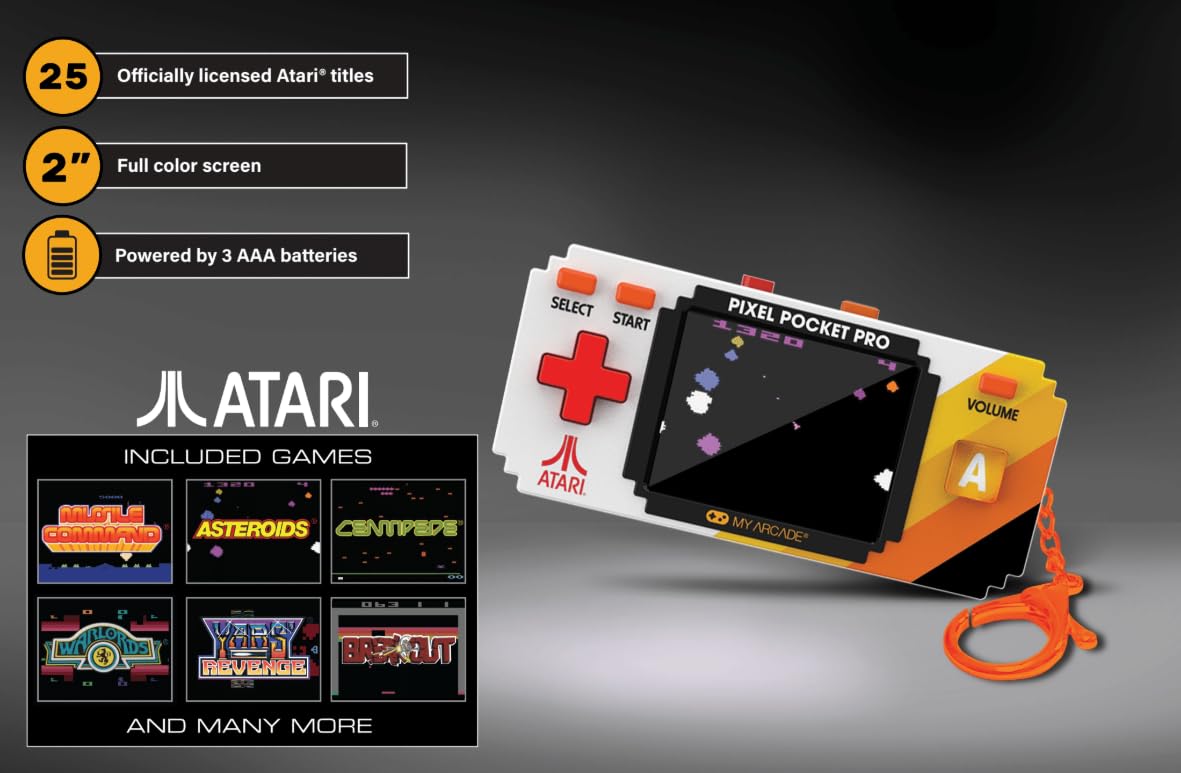
Image: A hand holding the My Arcade Atari Pixel Pocket Pro, demonstrating its portable size and how it is used for gameplay.
Mantentzea
Garbiketa
- Garbitu gailua zapi leun eta lehor batekin.
- Do not use liquid cleaners or abrasive materials, as these can damage the screen or casing.
Bateria zaintzea
- Kendu bateriak gailua denbora luzez erabiliko ez bada, isuriak saihesteko.
- Gorde gailua leku fresko eta lehor batean, eguzki-argitik urrun.
Arazoak konpontzea
Device Does Not Power On
- Ziurtatu bateriak polaritate zuzenarekin behar bezala sartuta daudela.
- Ordeztu AAA bateria berriekin.
- Egiaztatu bateriaren konpartimentuaren estalkia ondo itxita dagoela.
Ez dago soinurik edo soinu baxurik
- Sakatu BOLUMENA button to increase the sound level.
- Ziurtatu bozgorailua ez dagoela oztopatzen.
Screen Issues (e.g., Blurry, Flickering)
- Ensure the screen is clean and free of smudges.
- Replace batteries, as low power can sometimes affect screen performance.
- Arazoak jarraitzen badu, jarri harremanetan bezeroarentzako laguntza-zerbitzuarekin.
Zehaztapenak
| Modelo zenbakia | DGUNL-7134 |
| Marka | Nire Arcade |
| Pantailaren tamaina | 2 inches (full color) |
| Kontrolagailu mota | Botoien Kontrola |
| Energia iturria | Bateriaren bidez |
| Beharrezko bateriak | 3 x AAA (ez dago barne) |
| Neurriak (W x H x D) | 1.75" x 3.8" x 1" (approximately) |
| Pisua | 4.5 ontza (gutxi gorabehera) |
| Materiala | Plastikoa |
| Number of Games | 25 Officially Licensed Atari Titles |
Bermea eta Laguntza
For warranty information or technical support, please refer to the contact details provided on the product packaging or visit the official My Arcade webgunea. Gorde erosketa-agiria erosketaren frogagiri gisa.
Image: A QR code for collecting more My Arcade products. Scan this code to explore other available items.
Explore more My Arcade products: https://qrco.de/collectthem


