1. Sarrera
This manual provides detailed instructions for the setup, operation, maintenance, and troubleshooting of your Transformers TF-Crystal 85 Keys Mechanical Keyboard. Please read this manual thoroughly before using the product to ensure proper functionality and longevity.
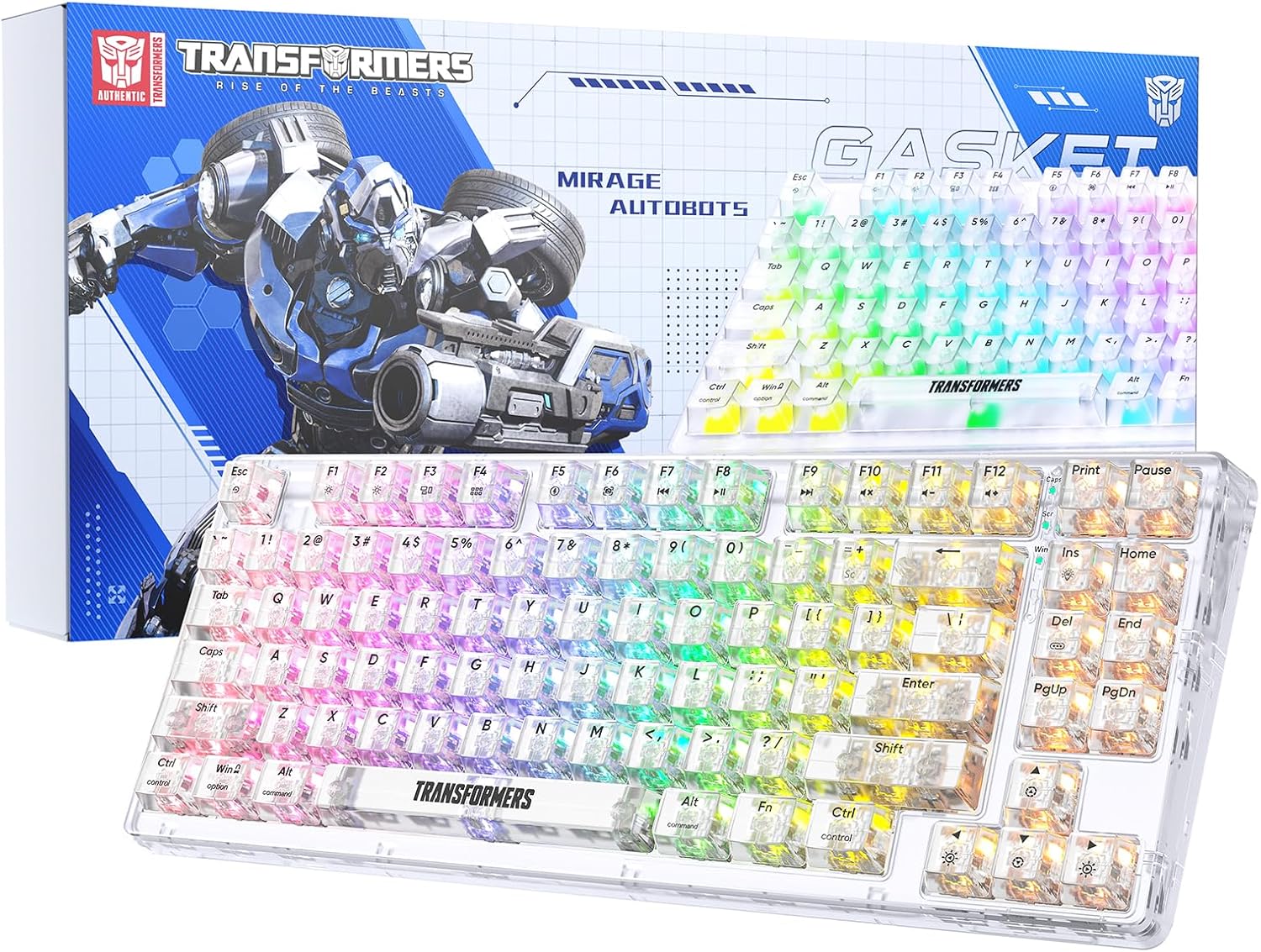
Image 1.1: Transformers TF-Crystal 85 Keys Mechanical Keyboard with its packaging, showcasing the transparent design and RGB lighting.
2. Produktua amaitu daview
2.1 Ezaugarri nagusiak
- 85 teklako diseinua: Compact 75% design retaining essential functions, arrow, and navigation keys.
- Hiru moduko konexioa: Bluetooth 5.0, 2.4 GHz haririk gabeko eta USB-C kable bidezko konexioak onartzen ditu.
- PCB bero-trukagarria: Compatible with most 3-pin and 5-pin mechanical switches, allowing for easy customization and replacement.
- Linear Switches: Pre-lubricated switches with a 50 million keystroke lifespan for durability and smooth operation.
- Junta egitura: Incorporates high-quality gasket materials and a silicone pad to absorb vibrations and reduce typing noise.
- Customizable RGB Backlight: Features 20 built-in backlight modes, 16.8 million color options, and dynamic music rhythm effects.
- Programmable Driver: Enables macro customization, key function remapping, and advanced lighting control.
- Bateriaren iraupen luzea: Equipped with a 4000mAh battery, providing up to 240 hours of continuous use in 2.4GHz mode without backlighting.
- Bateragarritasun zabala: Supports Mac, Windows, iOS, Android, PC, Laptop, Smartphone, Tablet, Switch, Xbox, and PlayStation.
- Diseinu gardena: Features transparent keycaps and base for enhanced aesthetic appeal.
3. Konfigurazioa
3.1 Teklatua kargatzea
Before initial use, fully charge the keyboard. Connect the provided USB-C cable to the keyboard's USB-C port and the other end to a powered USB port (e.g., computer, wall adapter). The charging indicator will show the charging status.
3.2 2.4GHz haririk gabeko moduaren bidez konektatzea
- Locate the 2.4GHz USB receiver, typically stored in a compartment on the keyboard.
- Konektatu USB hargailua zure ordenagailuko USB ataka erabilgarri batean.
- Toggle the mode switch on the keyboard to the 2.4G posizioa.
- The keyboard will automatically connect to your device.
3.3 Connecting via Bluetooth 5.0 Mode
- Toggle the mode switch on the keyboard to the BT posizioa.
- Luze sakatu fn+1 (edo fn+2, fn+3) for 3-5 seconds until the indicator light flashes rapidly, indicating pairing mode.
- Zure gailuan (ordenagailuan, tabletan, telefonoan), gaitu Bluetooth-a eta bilatu gailu berriak.
- Select "TF-Crystal 85" from the list of available devices to pair.
- Once paired, the indicator light will stop flashing and remain solid. You can pair up to three Bluetooth devices using fn+1, fn+2, eta fn+3.
3.4 USB-C kable bidez konektatzea
- Konektatu emandako USB-C kablea teklatuaren USB-C atakara.
- Konektatu USB-C kablearen beste muturra zure ordenagailuko USB ataka libre batera.
- The keyboard will automatically switch to wired mode and function without battery power.

Image 3.1: Diagram illustrating the three connection modes: Bluetooth 5.0, 2.4GHz wireless, and USB-C wired, compatible with various devices.
4. Funtzionamendu-argibideak
4.1 Moduen artean aldatzea
Use the physical switch located on the keyboard to select between BT (Bluetooth), 2.4G (2.4GHz wireless), and USB-C (wired) modes.
4.2 RGB atzeko argiaren kontrola
The keyboard features customizable RGB backlighting. Use the following key combinations to adjust:
- Fn + Ins: Cycle through 20 different backlight effects.
- Fn + Del: Switch backlight colors within certain modes.
- Fn + ↑ / ↓: Doitu atzeko argiaren distira (5 maila).
- Fn + ← / →: Adjust backlight effect speed (5 levels).
- Fn + Esc (hold for 3s): Reset backlight settings to default.

Image 4.1: Visual guide for controlling RGB backlight effects, brightness, and speed using Fn key combinations.
4.3 Programmable Driver Usage
The keyboard includes a programmable driver for advanced customization. This driver allows you to:
- Makroen edizioa: Record and edit complex key sequences.
- Gakoen birdefinizioa: Customize the function of individual keys.
- RGB Effect Customization: Fine-tune lighting modes, colors, and speeds, including music rhythm lighting effects.
Refer to the software's dedicated user interface for detailed instructions on using these features.

Image 4.2: Screenshot of the programmable driver interface, showing options for macro editing, RGB effects, and key redefinition.
4.4 Bero-trukeko etengailuak
The TF-Crystal 85 keyboard features a hot-swappable PCB, allowing you to change mechanical switches without soldering. This supports most 3-pin and 5-pin mechanical switches.
- Itzali teklatua edo deskonektatu gailutik.
- Erabili emandako tekla-tapa ateratzeko tresna nahi duzun tekla-tapa kontu handiz kentzeko.
- Use the provided switch puller to gently grip the switch from its top and bottom clips, then pull it straight up to remove it.
- Lerrokatu etengailu berriaren pinak PCBko zuloekin. Ziurtatu pinak zuzen daudela.
- Gently press the new switch into place until it clicks securely. Do not force it.
- Ordeztu giltza-tapoia.

Image 4.3: Illustration of the hot-swappable feature, showing how to remove and insert 3-pin/5-pin switches and the linear switch specifications.
5. Mantentzea
5.1 Teklatua garbitzea
- Deskonektatu teklatua energia-iturri guztietatik garbitu aurretik.
- Erabili lipurrik gabeko zapi leun bat dampGarbitu urarekin edo garbiketa-soluzio leun batekin teklak eta xasisa garbitzeko.
- Teklen arteko hautsa eta hondakinak kentzeko, erabili aire konprimatua edo eskuila txiki bat.
- Avoid using harsh chemicals or abrasive materials that could damage the keyboard's surface.
5.2 Bateria zaintzea
- Saihestu bateria maiz erabat deskargatzea.
- Gorde teklatua leku fresko eta lehor batean denbora luzez erabiltzen ez duzunean.
- Teklatua denbora luzez erabiliko ez baduzu, kargatu % 50 inguru gorde aurretik.
6. Arazoak
| Arazoa | Kausa posiblea | Irtenbidea |
|---|---|---|
| Teklatuak ez du erantzuten haririk gabeko moduan. | Low battery, incorrect mode selected, receiver not connected, Bluetooth not paired. | Charge the keyboard. Ensure the mode switch is set correctly (2.4G or BT). Re-insert the 2.4G receiver. Re-pair Bluetooth. |
| Giltzak ez dira erregistratzen edo bi aldiz idazten dira. | Etengailu akastuna, teklaren azpian hondakinak, software arazoa. | Clean under the keycap. Try hot-swapping the switch with a known working one. Restart your computer. |
| RGB backlight not working or incorrect. | Backlight turned off, incorrect settings, software conflict. | Doitu distira erabiliz Fn + ↑. Cycle modes with Fn + Ins. Reset backlight with Fn + Esc (hold 3s). Check programmable driver settings. |
| Teklatua ez da kargatzen. | Faulty USB-C cable, power source issue, keyboard port damage. | Try a different USB-C cable. Use a different USB port or power adapter. Ensure the cable is fully inserted. |
7. Zehaztapenak
| Ezaugarri | Xehetasuna |
|---|---|
| Modelo zenbakia | TF-Crystal 85 |
| Gakoen diseinua | 85 tekla (% 75 trinkoa) |
| Konektibitatea | Bluetooth 5.0, 2.4 GHz haririk gabekoa, USB-C kable bidezkoa |
| Aldatu mota | Pre-lubricated Linear Mechanical Switches |
| Aldatu bizimodua | 50 milioi tekla sakatzea |
| Bero-trukagarria | Yes (3-pin/5-pin compatible) |
| Atzeko argia | RGB (20 modes, 16.8 million colors) |
| Bateria Edukiera | 4000mAh |
| Battery Life (2.4G, no light) | Gehienez 240 ordu |
| Bateriaren iraupena (atzeko argia piztuta) | 22 ordu gutxi gorabehera |
| Neurriak (L x W x H) | 34.7 cm x 14 cm x 4.5 cm |
| Bateragarritasuna | Mac, Windows, iOS, Android, PC, Laptop, Smartphone, Tablet, Switch, Xbox, PlayStation |

Image 7.1: Visual representation of the keyboard's battery life: 240 hours with backlight off, 22 hours with backlight on, powered by a 4000mAh battery.
8. Bermea eta Laguntza
Transformers is committed to providing exceptional customer service. If you encounter any problems with your TF-Crystal 85 Keys Mechanical Keyboard, our after-sales support team is available to assist you. This includes technical support, exchanges, or installation guidance.
Please contact our customer service for assistance. We guarantee a hassle-free service experience.


