Sarrera
This manual provides essential information for the setup, operation, maintenance, and troubleshooting of your Onn 22 inch 1080P 100 Hz FHD LED Monitor. Please read this guide thoroughly before using the product to ensure optimal performance and safety.
The Onn 22 inch FHD LED Monitor is designed for a variety of applications, offering a vivid 1920x1080 resolution, a 100Hz refresh rate, and a 6.5ms response time for efficient performance. Its slim profile and T-shaped base are ideal for saving desk space.
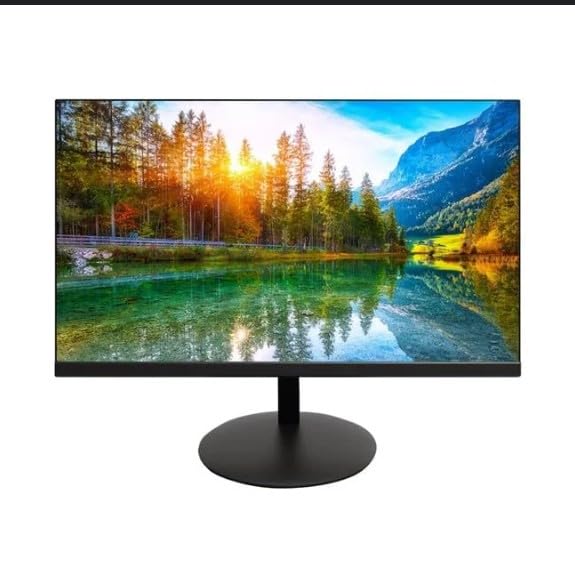
The image shows the Onn 22 inch FHD LED Monitor, highlighting its 100Hz refresh rate and 1080p resolution. The monitor features a slim design and a T-shaped base.
Konfigurazio Argibideak
- Despaketatzea: Carefully remove the monitor and all accessories from the packaging. Ensure all components are present: monitor, T-shaped base, HDMI cable, and power adapter.
- Standa muntatzea: Attach the T-shaped base to the monitor. The design is screw-less for easy assembly. Ensure it is securely fastened.
- Gailu batera konektatzea:
The monitor supports both HDMI and VGA inputs. Connect the provided HDMI cable from your computer's HDMI output to the HDMI IN port on the monitor. Alternatively, use a VGA cable for VGA input.

This image displays the rear panel of the Onn monitor, illustrating the available input ports: HDMI IN, VGA IN, and the DC 12V power input. These ports are essential for connecting the monitor to a computer or other devices.
- Potentzia-konexioa: Connect the power adapter to the DC 12V input port on the monitor, then plug the adapter into a power outlet.
- Monitorea doitzea: The monitor is capable of swivel, tilt, rotation, and height adjustment. Adjust the screen to your preferred viewangelua erosotasun ergonomikorako.
- Monitore bikoitzeko konfigurazioa: This monitor is suitable for a fully functioning dual monitor setup. Connect a second monitor using the appropriate cables and configure your operating system's display settings.
Funtzionamendu-argibideak
- Piztu/Itzali: Press the power button, usually located on the bottom or back of the monitor, to turn it on or off.
- Sarrera hautatzea: If the monitor does not automatically detect the input source, use the On-Screen Display (OSD) menu buttons to manually select between HDMI and VGA inputs.
- OSD menuko nabigazioa: Use the physical buttons on the monitor (typically on the back or bottom edge) to navigate the OSD menu. This allows you to adjust settings such as brightness, contrast, color temperature, and input source.
- Bereizmena eta freskatze-tasa: The monitor supports a native resolution of 1920x1080 at a 100Hz refresh rate. Ensure your computer's display settings are configured to these specifications for the best visual experience.
- Sinkronizazio egokitzailea: The monitor features Adaptive Sync for gaming, which helps to reduce screen tearing and stuttering. Ensure this feature is enabled in your graphics card settings if supported.
Mantentzea
- Pantaila garbitzea: Garbitu pantaila astiro-astiro zapi leun eta pelusik gabeko batekin. Orbanik egoskorrak izanez gero, garbitu astiro-astiro.ampen the cloth with water or a non-abrasive, monitor-specific cleaning solution. Avoid spraying liquids directly onto the screen.
- C garbiketaasing: Erabili zapi leun eta lehor bat monitorearen garbiketa egiteko.asing. Do not use strong detergents or solvents, as they may damage the finish.
- Aireztapena: Ziurtatu monitorearen aireztapen-irekidurak ez daudela blokeatuta gehiegi berotzea saihesteko.
- Biltegiratzea: Denbora luzez erabiltzen ez baduzu, gorde monitoreak leku fresko eta lehor batean, eguzki-argitik eta muturreko tenperaturetatik urrun.
Arazoak konpontzea
- Potentziarik gabe:
- Egiaztatu elikadura-kablea monitoreari zein korronte-hartuneari ongi konektatuta dagoen.
- Egiaztatu korronte-hartunea behar bezala funtzionatzen ari dela.
- Seinalerik ez:
- Ensure the video cable (HDMI or VGA) is firmly connected to both the monitor and the computer.
- Hautatu sarrera-iturri zuzena monitorearen OSD menua erabiliz.
- Egiaztatu zure ordenagailua piztuta dagoen eta lo moduan ez dagoen.
- Flickering Screen or Poor Image Quality:
- Egiaztatu bideo-kablea kaltetuta edo konexio solterik dagoen.
- Adjust the resolution and refresh rate settings on your computer to match the monitor's specifications (1920x1080, 100Hz).
- Berrezarri monitorearen ezarpenak fabrikako balio lehenetsietara OSD menuaren bidez.
- Erantzuten ez duten botoiak:
- Unplug the monitor from the power outlet, wait for 30 seconds, and then plug it back in.
If problems persist, please refer to the support information provided in the "Support and Warranty" section.
Zehaztapenak
| Marka | Onn |
| Modelo zenbakia | 100140681 |
| Ereduaren izena | OTTO |
| Pantailaren tamaina | 21.5 hazbete |
| Bistaratzeko mota | LED, LCD |
| Ebazpena | 1920 x 1080 (FHD 1080p) |
| Freskatze tasa | 100 Hz |
| Erantzun Denbora | 6.5 milisegundo |
| Hardware interfazea | hdmi, vga |
| Ezaugarri bereziak | Altuera doitzea |
| Viewangelua | 160 gradu |
| Aspektu-erlazioa | 16:9 |
| Produktuaren neurriak | 49.2 x 20 x 37.2 cm; 3.24 kg |
Laguntza eta Bermea
For technical support, product inquiries, or warranty information, please visit the official Onn support webwebgunean edo jarri harremanetan bere bezeroarentzako zerbitzuarekin.
- Laguntza Ofiziala Webgunea: onnsupport.ca
- Bermea: Specific warranty details may vary by region and purchase date. Please refer to the documentation included with your product or visit the support webwebgunea bermeari buruzko informazio eguneratuena lortzeko.