1. Sarrera
This manual provides detailed instructions for the setup, operation, and maintenance of your artfone G3 Flip Cell Phone. Designed with ease of use in mind, this phone features large buttons, a clear display, and essential functions for seniors, including an SOS button and speed dial capabilities. Please read this manual thoroughly to ensure proper use and to maximize your phone's functionality.
2. Paketearen edukia
Kutxa irekitzean, egiaztatu paketean elementu hauek guztiak daudela:
- 1x artfone G3 Flip Phone
- 1x 1300mAh Lithium-ion Battery
- 1x USB-C kargatzeko kablea
- 1x korronte egokitzailea
- 1x Charging Station (Cradle)
- 1x Argibide eskuliburua

Image: Contents of the artfone G3 Flip Phone package.
3. Produktua amaitu daview
The artfone G3 is a clamshell-design flip phone featuring a 2.4-inch color display and a large, backlit keypad for easy dialing and navigation. It is equipped with a rear camera and a dedicated SOS button for emergencies.

Image: The artfone G3 Flip Phone in its open position, alongside its charging cradle.

Image: Detail of the phone's large fonts, symbols, and backlit buttons for enhanced visibility.
4. Konfigurazioa
4.1. SIM txartelaren eta mikro SD txartelaren instalazioa
The artfone G3 supports Nano SIM cards and Micro SD cards (up to 64GB) for expanded storage. To install:
- Kontu handiz kendu telefonoaren atzeko estalkia.
- Insert your Nano SIM card(s) into the designated slot(s). Ensure the gold contacts face downwards.
- If desired, insert a Micro SD card into its slot.
- Insert the 1300mAh battery into the battery compartment, aligning the contacts.
- Jarri berriro atzeko estalkia ondo sartu arte klik egin arte.

Image: Diagram illustrating the placement of Nano SIM, Micro SD card, and battery.
4.2. Bateria kargatzea
Before first use, fully charge the phone's battery. The artfone G3 offers two charging methods:
- Kargatzeko sehaska erabiliz: Place the phone into the charging station. Ensure the phone is seated correctly and the charging indicator appears on the screen.
- Direct USB-C Cable Charging: Connect the USB-C cable directly to the phone's charging port and then to the power adapter. Plug the adapter into a wall outlet.
A full charge typically takes several hours. The phone features a 1300mAh battery, providing extended standby time.

Image: Illustration of direct cable charging and charging via the desktop cradle.
5. Oinarrizko Funtzionamendua
5.1. Piztu/Itzali
- Pizteko: Open the flip and press and hold the red 'End Call' button (power button) until the screen illuminates.
- Itzaltzeko: Open the flip and press and hold the red 'End Call' button until the power-off options appear. Select 'Power Off'.
5.2. Deiak egitea eta jasotzea
- Dei bat egiteko: Open the flip, dial the number using the keypad, and press the green 'Call' button.
- Dei bat jasotzeko: When the phone rings, open the flip or press the green 'Call' button to answer.
- Dei bat amaitzeko: Close the flip or press the red 'End Call' button.
5.3. Bolumenaren doikuntza
Use the dedicated volume buttons on the side of the phone to adjust the call volume or ringtone volume.
6. Ezaugarri nagusiak
6.1. SOS Larrialdi Botoia
The SOS button is located on the back of the phone. It allows you to quickly contact up to five pre-programmed emergency contacts. In a crisis, press and hold the SOS button for 3 seconds. The phone will sequentially call each contact until one answers. It will also send an emergency text message to these contacts.

Image: Visual representation of the SOS button functionality and emergency contact setup.
6.2. Markaketa bizkorra
The phone features dedicated A/B keys and numbers 2-9 for speed dial. You can assign frequently called contacts to these keys for quick access. Refer to the phone's menu for instructions on setting up speed dial contacts.
6.3. Photo Contacts
For users with visual or memory impairment, the phone supports photo contacts, making it easier to identify and call loved ones by associating their picture with their contact entry.
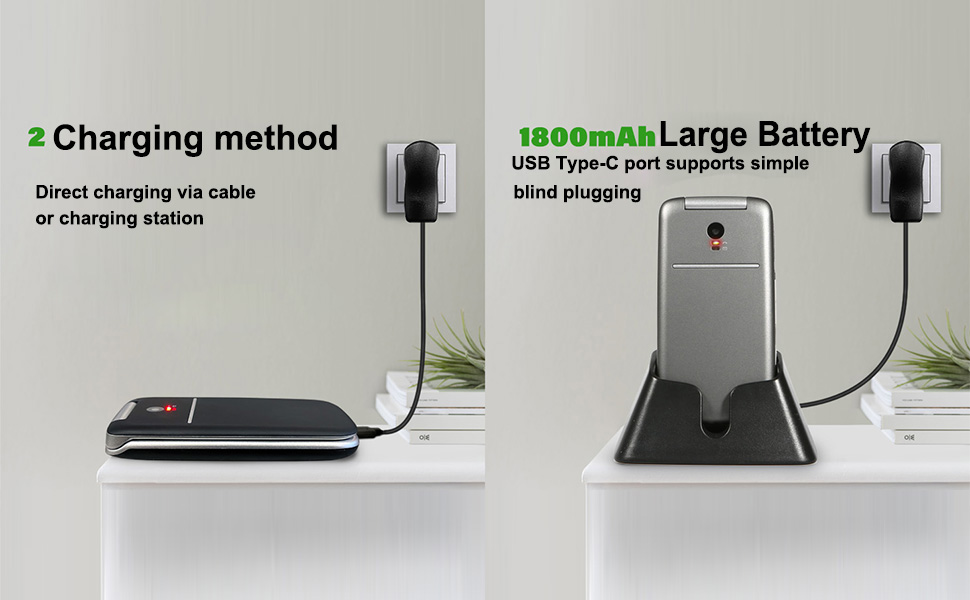
Image: The photo contacts feature, simplifying calling by visual recognition.
6.4. Talking Numbers
For the visually impaired, the phone can announce numbers as they are dialed. Additionally, long-pressing the volume button can activate a real-time voice broadcast function to read out the current time.
6.5. Other Practical Features
The artfone G3 includes several other useful features:
- FM irratia: Enjoy radio broadcasts without needing headphones.
- Linterna: Erosotasunerako linterna integratua.
- Bluetootha: For wireless connectivity with compatible devices.
- Egutegia: Jarrai ezazu datak eta hitzorduak kontrolatzen.
- Kalkulagailua: Oinarrizko funtzio aritmetikoak.
- Iratzargailua: Ezarri alarmak abisuetarako.
- Teklaren blokeoa: Prevent accidental presses.

Irudia: Gainetikview of the phone's practical features.
7. Mantentzea
- Mantendu telefonoa lehor. Hezetasunak zirkuitu elektronikoak kaltetu ditzake.
- Saihestu muturreko tenperaturak. Tenperatura altuek gailu elektronikoen bizitza laburtu eta plastiko batzuk deformatu edo urtu ditzakete.
- Ez erabili produktu kimiko gogorrik, garbiketa-disolbatzailerik edo detergente sendorik telefonoa garbitzeko. Garbitu zapi leun eta lehor batekin.amp oihal.
- Handle the phone gently. Dropping, knocking, or shaking it can damage internal circuit boards.
- Do not attempt to disassemble the phone. Unauthorized disassembly voids the warranty.
8. Arazoak
If you encounter issues with your artfone G3, please refer to the following common solutions:
| Arazoa | Kausa posiblea | Irtenbidea |
|---|---|---|
| Telefonoa ez da pizten | Bateria agortuta dago edo ez dago behar bezala instalatuta. | Charge the battery fully. Ensure the battery is correctly inserted and contacts are clean. |
| Ezin ditut deiak egin edo jaso | SIM txartelik ez, SIM txartela ez dago behar bezala sartuta edo sareko seinalerik ez. | Ensure SIM card is correctly installed. Check for network coverage. Contact your service provider if issues persist. |
| Kargatzeko arazoak | Charging cable/adapter faulty, phone not properly seated in cradle, or charging port obstruction. | Try a different USB-C cable or power adapter. Ensure the phone is correctly placed in the charging cradle. Check the charging port for debris. |
| SOS botoia ez dabil | Emergency contacts not set up or incorrect numbers. | Verify that emergency contacts are correctly programmed in the phone's settings. |
Konponbide hauek saiatu ondoren arazoa konpontzen ez bada, jarri harremanetan bezeroarentzako arreta-zerbitzuarekin.
9. Zehaztapenak
- Eredua: ARF-G3+001
- Neurriak: 4.02 x 2.01 x 0.73 hazbete (102 x 50 x 18 mm)
- Pisua: 3.17 ontza (88 g)
- Pantaila: 2.4 Inches, 240 x 320 Resolution
- Sistema eragilea: Nucleus OS
- CPU eredua: MTK 8121
- CPU abiadura: 128 MHz
- RAM memoria: 48 MB
- Barne biltegiratzea: 0.2 GB
- Biltegiratze zabalgarria: Supports Micro SD cards up to 64GB
- Bateria: 1300mAh Lithium-ion (included)
- Telefonoz hitz egiteko denbora: Gehienez 6 ordu
- Konektibitatea: 4G, 3G, 2G, Bluetooth, USB-C
- Audio Jack: 3.5 mm
- Ezaugarri bereziak: SOS Button, Speed Dial, Photo Contact, Talking Numbers, FM Radio, Flashlight, Calendar, Calculator, Alarm Clock

Image: Physical dimensions and weight of the artfone G3 Flip Phone.
10. Bermea eta Laguntza
Bermeari buruzko informazioa eta bezeroarentzako laguntza lortzeko, kontsultatu erosketarekin batera datorren dokumentazioa edo jarri harremanetan saltzailearekin zuzenean. Gorde erosketaren frogagiria bermearen erreklamazioetarako.


