1. Produktua amaitu daview
The Mastech MS850D is a 6000-count True RMS auto-ranging digital multimeter designed for precise electrical measurements. It is suitable for professionals, technicians, and enthusiasts, offering a wide range of functions for various electrical applications.

1. irudia: Aurrealdea view of the Mastech MS850D Digital Multimeter, displaying a measurement of 198.7 mV.
Ezaugarri nagusiak:
- 6000 Counts Auto Ranging: Provides precise measurements across various ranges automatically.
- Egiazko RMS: Ensures accurate readings for non-sinusoidal AC waveforms.
- Comprehensive Measurement Capabilities: Neurriak AC/DC Voltage, AC/DC Current, Resistance, Capacitance, Frequency, and Temperature.
- Segurtasun Ziurtagiria: CAT III 600V rating for safe use in electrical testing environments.
- Erabiltzaileentzako funtzio atseginak: Includes Buzzer/Continuity, Diode Test, Transistor Test (optional), MAX/MIN, REL, Non-Contact Voltage (NCV) Detection, Live Wire Recognition, Data Hold, Flashlight, and Auto Power Off.
- Diseinu trinkoa: Ergonomic dimensions (150mm x 75mm x 47mm) and lightweight (284g) for easy handling.
2. Paketearen edukia
Egiaztatu behean zerrendatutako elementu guztiak zure paketean sartuta daudela:
- 1 x Mastech MS850D-6000 Counts True RMS Auto Ranging Digital Multimeter
- 1 x Temperature probe
- 1 x Pair of Test leads
- 2 x Batteries (AAA type, 1.5V)
- 1 x Erabiltzailearen eskuliburua
3. Segurtasun informazioa
OHARRA: To avoid electric shock or personal injury, read all safety information before using this product. Use the multimeter only as specified in this manual; otherwise, the protection provided by the multimeter may be impaired.
- Erabili aurretik, ziurtatu beti multimetroa funtzionamendu-egoera onean dagoela.
- Ez aplikatu bolumen baloratua baino gehiagotage, as marked on the multimeter, between the terminals or between any terminal and earth ground. The MS850D is rated for CAT III 600V.
- Kontuz ibili voltag30V AC RMS, 42V peak edo 60V DC-tik gorakoak. Bolumen hauektagshock arriskua dakar.
- Do not use the multimeter if the test leads are damaged or if the meter appears damaged.
- Ensure the rotary switch is in the correct position for the measurement you intend to make.
- Inoiz ez konektatu proba-buruak voltage source when the rotary switch is set to current, resistance, or continuity mode.
- Replace the battery and fuses only with the specified type and rating.
- Ez erabili multimetroa gas, lurrun edo hautsez betetako ingurune lehergarrietan.
- Mantendu hatzak proba-zunden hatz-babesleen atzean neurketak egiten ari zaren bitartean.
4. Konfigurazioa
4.1 Bateriaren instalazioa
The MS850D multimeter requires two 1.5V AAA batteries for operation. To install or replace batteries:
- Ziurtatu multimetroa itzalita dagoela eta deskonektatu proba-kable guztiak.
- Bilatu bateriaren konpartimentuaren estalkia multimetroaren atzealdean.
- Erabili bihurkin bat bateriaren estalkia lotzen duen torlojua askatzeko.
- Kendu estalkia eta sartu bi AAA pilak, polaritate zuzena errespetatuz (+ eta -).
- Jarri bateriaren estalkia eta estutu torlojua.
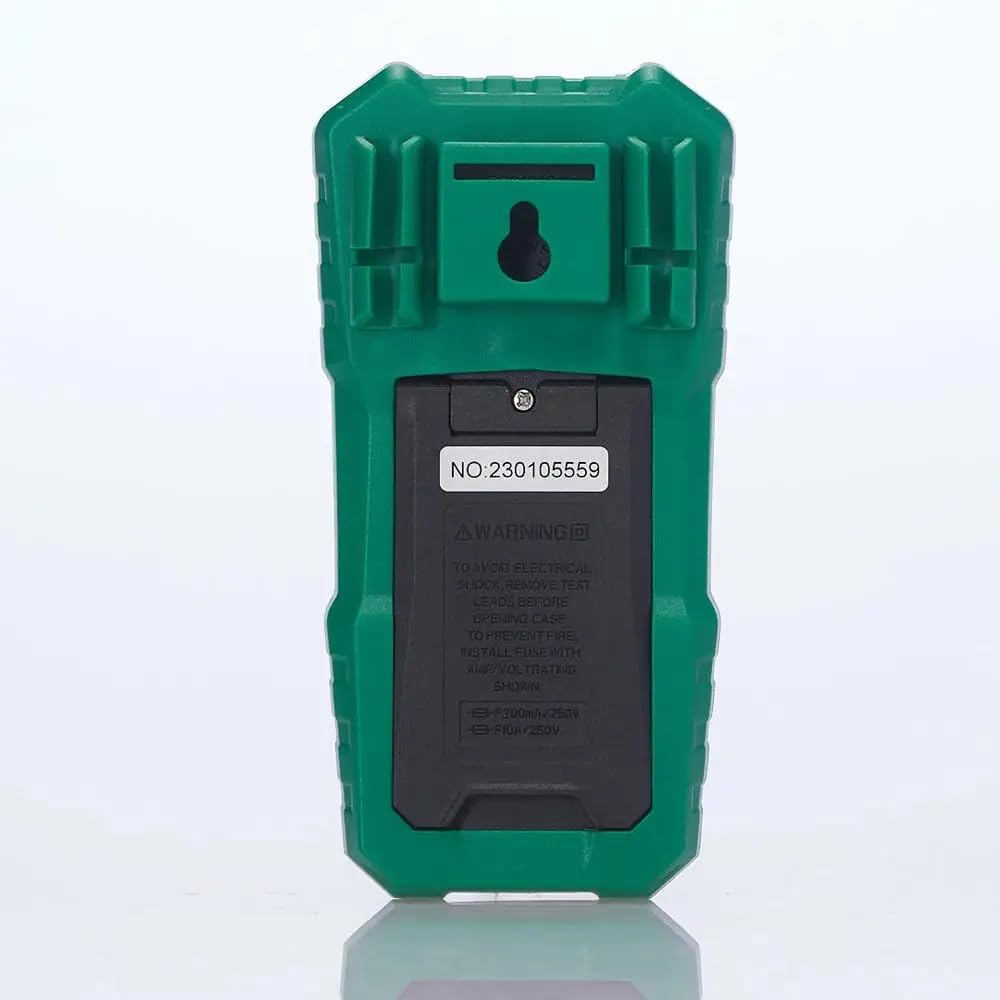
2. Irudia: Atzealdea view of the multimeter, illustrating the battery compartment and safety warnings.
4.2 Proba-kableak konektatzea
Neurketa zehatzak eta seguruak egiteko, ezinbestekoa da proba-kableen konexio egokia.
- Sartu probako kable beltza COM (Arrunta) sarrera-jacka.
- Bolumen gehienarentzattage, resistance, continuity, capacitance, frequency, and temperature measurements, insert the red test lead into the VΩmA sarrerako jack.
- 600 mA-rainoko korronte neurketetarako, sartu proba-kable gorria VΩmA sarrerako jack.
- For current measurements between 600mA and 10A, insert the red test lead into the 10A GEHIENEZ sarrerako jack.

3. irudia: Angeludun view of the multimeter, highlighting the input jacks for test leads.
5. Funtzionamendu-argibideak
This section details how to use the Mastech MS850D for various measurements.
5.1 Piztu/Itzaltzea
Rotate the central dial from the "OFF" position to any desired measurement function to power on the multimeter. To power off, rotate the dial back to the "OFF" position.
5.2 Rotary Switch Functions
The rotary switch selects the primary measurement function:
- V~ (AC bolumenatage): Korronte alternoaren bolumena neurtzen dutage.
- V- (DC Voltage): Korronte zuzeneko bolumena neurtzen dutage.
- Hz/% (Frequency/Duty Cycle): Measures frequency and duty cycle.
- Ω (Erresistentzia): Erresistentzia elektrikoa neurtzen du.
- Continuity/Diode: Checks for circuit continuity and tests diodes.
- NCV/Live: Kontaktu gabeko boltage detection and Live Wire recognition.
- °C/°F (Temperature): Measures temperature using the included probe.
- hFE (Transistor Test): Measures transistor gain (requires optional socket).
- μA~ / μA- (AC/DC Microamperes): Measures microampere korronte.
- mA~ / mA- (AC/DC Milliamperes): Measures milliampere korronte.
- A~ / A- (AC/DC Amperes): Neurriak ampere current (up to 10A).
5.3 Botoien funtzioak
- SEL (Select): Toggles between different functions within a single rotary switch position (e.g., AC/DC voltage, continuity/diode, °C/°F).
- EUTSI: Uneko irakurketa pantailan izozten du. Sakatu berriro askatzeko.
- MIN/MAX/REL:
- Press once to enter MIN/MAX mode. The multimeter will record the minimum and maximum values. Press again to cycle between MIN, MAX, and current reading.
- Long press to activate REL (Relative) mode. This subtracts the current reading from all subsequent readings, useful for measuring changes.
- Flashlight Button (often combined with backlight): Activates the built-in flashlight for illuminating the measurement area.
5.4 Neurketa-prozedura espezifikoak
5.4.1 liburukiatage Neurketa (AC/DC)
- Ezarri etengailua V~ AC voltage edo V- DC voltage. Use the SEL button to switch between AC and DC if the position combines them.
- Konektatu probako kable beltzara COM jack-a eta proba-kable gorria VΩmA jack.
- Konektatu proba-zundak paraleloan neurtu beharreko zirkuituan edo osagaian.
- Irakurri liburukiatagPantailako balioa.
5.4.2 Korrontearen neurketa (AC/DC)
KONTUZ: Ez konektatu inoiz multimetroa bolumen batekin paraleloan.tagKorrontea neurtzean, korronte-iturria. Konektatu beti kargarekin seriean.
- Determine if the current is AC or DC.
- Set the rotary switch to the appropriate current range (μA, mA, or A). Use the SEL button to switch between AC and DC.
- Konektatu probako kable beltzara COM jack.
- For currents up to 600mA, connect the red test lead to the VΩmA jack. For currents up to 10A, connect the red test lead to the 10A GEHIENEZ jack.
- Open the circuit where the current is to be measured and connect the multimeter in series.
- Irakurri uneko balioa pantailan.
5.4.3 Erresistentzia Neurketa
- Ezarri etengailua Ω posizioa.
- Konektatu probako kable beltzara COM jack-a eta proba-kable gorria VΩmA jack.
- Ziurtatu zirkuitua edo osagaia deskonektatuta dagoela erresistentzia neurtu aurretik.
- Konektatu proba-zundak osagaiaren artean.
- Irakurri erresistentziaren balioa pantailan.
5.4.4 Jarraitasun proba
- Ezarri etengailua Continuity/Diode position. Use SEL to select continuity mode (usually indicated by a speaker icon).
- Konektatu probako kable beltzara COM jack-a eta proba-kable gorria VΩmA jack.
- Konektatu proba-zundak zirkuituan edo osagaian.
- Erresistentzia 50Ω gutxi gorabehera baino txikiagoa bada, txisteak joko du jarraitutasuna adieraziz.
5.4.5 Diodoaren proba
- Ezarri etengailua Continuity/Diode position. Use SEL to select diode mode (usually indicated by a diode symbol).
- Konektatu probako kable beltzara COM jack-a eta proba-kable gorria VΩmA jack.
- Konektatu zunda gorria diodoaren anodora eta zunda beltza katodora. Pantailak aurreranzko bolumena erakutsiko du.tage tanta.
- Alderantziz jarri zundak. Diodo ona dagoenean, pantailak "OL" (Ireki Begizta) erakutsi beharko luke.
5.4.6 Kapazitatearen Neurketa
- Ezarri etengailua Kapazitatea position (often combined with Hz/% or other functions, use SEL to select).
- Konektatu probako kable beltzara COM jack-a eta proba-kable gorria VΩmA jack.
- Ensure the capacitor is fully discharged before measurement to prevent damage to the multimeter.
- Konektatu proba-zundak kondentsadorearen terminaletara.
- Irakurri kapazitantziaren balioa pantailan.
5.4.7 Maiztasunaren Neurketa
- Ezarri etengailua Hz /% position. Use SEL to select frequency mode.
- Konektatu probako kable beltzara COM jack-a eta proba-kable gorria VΩmA jack.
- Konektatu proba-zundak seinale-iturrira.
- Irakurri maiztasunaren balioa pantailan.
5.4.8 Tenperaturaren Neurketa
- Ezarri etengailua ° C / ° F position. Use SEL to switch between Celsius and Fahrenheit.
- Konektatu tenperatura-sonda COM eta VΩmA jacks, observing polarity if specified by the probe.
- Jarri tenperatura-sendaren punta neurtu beharreko tenperatura duen objektuaren gainean edo haren ondoan.
- Irakurri tenperaturaren balioa pantailan.
5.4.9 Harremanik gabeko Voltage (NCV) Detekzioa
- Ezarri etengailua NCV/Zuzenean posizioa.
- Move the top front part of the multimeter close to the conductor or outlet.
- The multimeter will emit an audible beep and the NCV indicator light will flash if AC voltage is detected, with the frequency of beeps and flashes increasing bolumenarekintageta indarra.
6. Mantentzea
Mantentze egokiak zure multimetroaren iraupena eta zehaztasuna bermatzen ditu.
6.1 Garbiketa
- Garbitu kasua iragarkiarekinamp oihala eta detergente leuna. Ez erabili urratzaileak edo disolbatzaileak.
- Keep the input terminals free of dirt and moisture.
6.2 Bateria ordezkatzea
Refer to Section 4.1 for detailed instructions on battery replacement. Replace batteries when the low battery indicator appears on the display.
6.3 Fusiblearen ordezkapena
If the current measurement function fails, the fuse may need replacement. The MS850D uses two fuses:
- F1: F300mA/250V (for mA/μA range)
- F2: F10A/250V (for 10A range)
To replace fuses:
- Ziurtatu multimetroa itzalita dagoela eta deskonektatu proba-kable guztiak.
- Ireki bateriaren konpartimentuaren estalkia (ikusi 4.1 atala).
- Carefully remove the old fuse(s) and replace with new fuses of the exact same type and rating.
- Jarri bateriaren estalkia eta estutu torlojua.
7. Arazoak
If you encounter issues with your Mastech MS850D, refer to the following common problems and solutions:
| Arazoa | Kausa posiblea | Irtenbidea |
|---|---|---|
| Pantailarik ez edo pantaila iluna | Bateria gutxi edo agortuta | Ordeztu bateriak (ikusi 4.1 atala). |
| Irakurketa okerrak | Incorrect function selected; Loose test leads; Damaged test leads; Out of range measurement | Verify rotary switch position; Ensure test leads are securely connected; Inspect test leads for damage; Check if the measurement is within the multimeter's specified range. |
| Korrontearen neurketa ez dabil | Fusionatua | Replace the appropriate fuse (refer to Section 6.3). |
| "OL" (Gainkarga) bistaratzen da | Measurement exceeds the selected range or multimeter's maximum capacity | Select a higher range if available, or confirm the measurement is within the multimeter's limits. |
8. Zehaztapenak
Detailed technical specifications for the Mastech MS850D Digital Multimeter:

Figure 4: Detailed specifications and packaging information for the Mastech MS850D.
| Neurketa | Barrutia | Zehaztasuna |
|---|---|---|
| DC bolumenatage | 600mV, 6V, 60V, 600V | ±(%0.8+5) |
| AC Boltage | 600mV, 6V, 60V, 600V | ±(%1.0+10) |
| Korronte DC | 600μA, 6000μA, 60mA, 600mA, 6A, 10A | ±(2.0%+5) (μA/mA), ±(3.0%+5) (A) |
| AC korrontea | 600mA, 6A, 10A | ±(2.5%+5) (mA), ±(3.0%+5) (A) |
| Erresistentzia | 600Ω, 6KΩ, 60KΩ, 600KΩ, 6MΩ, 60MΩ | ±(1.0%+5) (600Ω-6MΩ), ±(1.2%+5) (60MΩ) |
| Kapazitatea | 60nF, 600nF, 6μF, 60μF, 600μF, 6mF, 60mF, 100mF | ±(4.0%+25) (60nF-600μF), ±(5.0%+25) (6mF-100mF) |
| Maiztasuna | 10Hz, 100Hz, 1KHz, 10KHz, 100KHz, 1MHz, 10MHz | ±(%0.5+4) |
| Tenperatura | -20°C to 0°C, 0°C to 400°C, 400°C to 1000°C | ±(4°C), ±(3.0%+3), ±(2.0%+3) |
| Bistaratzea | 6000 zenbaketa | |
| Segurtasun Balorazioa | CAT III 600V | |
| Energia iturria | 2 x 1.5V AAA bateria | |
| Neurriak (L x W x H) | 150 mm x 75 mm x 47 mm (gutxi gorabehera) | |
| Pisua | 284 g (gutxi gorabehera) | |
9. Bermea eta Laguntza
The Mastech MS850D Digital Multimeter is manufactured by Mastech and imported by REES52. For warranty information, technical support, or service inquiries, please refer to the warranty card included with your product or contact the seller/manufacturer directly.
Mesedez, gorde zure erosketa-froga berme-erreklamazioetarako.
- Fabrikatzailea: mastek
- Inportatzailea: REES52
- Modelo zenbakia: MS850D


