Sarrera
This manual provides essential information for the installation, operation, maintenance, and troubleshooting of your Sapphire Nitro+ AMD Radeon RX 9070 XT Gaming OC Graphics Card. Please read this manual thoroughly before installing and using your new graphics card to ensure optimal performance and longevity.

Image: The Sapphire Nitro+ AMD Radeon RX 9070 XT Graphics Card shown alongside its retail packaging.
Paketearen edukia
Egiaztatu elementu guztiak zure produktuaren paketean daudela:
- Sapphire Nitro+ AMD Radeon RX 9070 XT Graphics Card
- Erabiltzailearen eskuliburua (dokumentu hau)
- Txartel grafikoen euskarria
- Power Cable Adapter (if applicable)
- ARGB sinkronizazio kablea
Video: An unboxing video demonstrating the contents of the Sapphire Nitro+ AMD Radeon RX 9070 XT Graphics Card package, including the card and accessories.
Konfigurazioa eta Instalazioa
Jarraitu urrats hauek zure grafiko-txartela behar bezala instalatzeko:
- Prestaketa: Itzali ordenagailua eta deskonektatu kable guztiak. Ireki ordenagailuaren karkasa.
- Kendu txartel grafiko zaharra (hala badagokio): If you are replacing an existing graphics card, carefully remove it by unscrewing its retention bracket and releasing the PCIe slot latch.
- Insert New Graphics Card: Align the Sapphire Nitro+ RX 9070 XT with an available PCI Express x16 slot on your motherboard. Press down firmly until the card is securely seated and the PCIe slot latch engages. This card typically occupies three expansion slots.
- Ziurtatu txartela: Use screws to secure the graphics card's retention bracket to your computer case.
- Konektatu elikatze-kableak: Connect the necessary PCIe power cables from your power supply to the graphics card. Ensure all connections are firm. This model features a hidden power cable design for a cleaner aesthetic.
- Instalatu euskarri-euskarria: Due to the size and weight of the card, it is recommended to install the included anti-sag support bracket to prevent GPU sag over time.
- Itxi kasua eta berriro konektatu: Itxi ordenagailuaren karkasa, konektatu berriro kable guztiak eta piztu sistema.
- Gidariaren instalazioa: Once your operating system loads, install the latest AMD Radeon drivers from the official AMD or Sapphire webgunea.

Image: The rear I/O panel of the graphics card, featuring multiple DisplayPort and HDMI outputs for connecting to monitors.

Irudia: Diagrama batek erakusten duasing the STEALTH Hidden Power Cable design, which routes power connectors for a cleaner build appearance.
Zure Txartel Grafikoa Erabiltzea
After successful installation and driver setup, your Sapphire Nitro+ RX 9070 XT is ready for use. Connect your display(s) to the available ports (2 x HDMI, 2 x DisplayPort). For optimal performance, ensure your display cables are securely connected and your monitor is set to the correct input source.
Regularly check for driver updates through the AMD Radeon Software application to benefit from performance improvements and bug fixes. You can also utilize Sapphire's Trixx software for advanced monitoring, fan control, and RGB lighting customization.

Image: The graphics card displaying its integrated ARGB lighting, which can be customized for various visual effects.
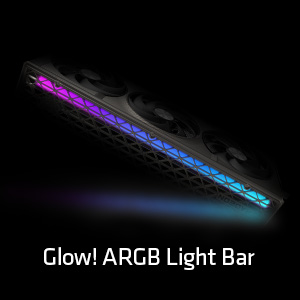
Irudia: Xehetasun zehatza view of the Glow! ARGB Light Bar, highlighting its customizable illumination capabilities.
Mantentzea
To maintain optimal performance and extend the lifespan of your graphics card, periodic cleaning is recommended.
- Hautsa kentzea: Use compressed air to gently clear dust from the fans and heatsink fins. Ensure the fans do not spin rapidly during cleaning to prevent damage.
- Fan ikuskapena: Periodically check the fans for any obstructions or unusual noises. The Quick Connect Fan feature allows for easy removal and cleaning of individual fans.
- Garbiketa orokorra: Wipe the exterior of the card with a soft, dry, anti-static cloth. Avoid using liquid cleaners directly on the card.

Image: A diagram demonstrating the Quick Connect Fan system, which allows for easy removal and replacement of the cooling fans.
Arazoak konpontzea
Zure txartel grafikoarekin arazoak badituzu, kontuan hartu ohiko irtenbide hauek:
- Ez dago pantaila-irteerarik:
- Ziurtatu monitorearen kablea ondo konektatuta dagoela bai txartel grafikoari bai monitoreari.
- Verify that the graphics card is fully seated in the PCIe slot and the power cables are properly connected.
- Egiaztatu zure monitorearen sarrera-iturri zuzena konfiguratuta dagoen.
- Sistemaren ezegonkortasuna edo matxurak:
- Eguneratu zure grafikoen kontrolatzaileak azken bertsiora.
- Ziurtatu zure elikatze-iturriak (PSU) gutxieneko energia-kontsumoa betetzen duelatage requirements for the graphics card and your system.
- Monitor GPU temperatures using software like AMD Radeon Software or Sapphire Trixx. Overheating can cause instability.
- Errendimendu eskasa:
- Confirm that your display is connected to the graphics card, not the motherboard's integrated graphics.
- Check in-game settings to ensure they are appropriate for your system's capabilities.
- Ensure background applications are not consuming excessive system resources.
- Fan zarata:
- Clean the fans and heatsink to remove dust buildup.
- Adjust fan curves using AMD Radeon Software or Sapphire Trixx to find a balance between cooling and noise.
If issues persist, consult the Sapphire support webwebgunean edo jarri harremanetan bere bezeroarentzako zerbitzuarekin.
Zehaztapenak
| Ezaugarri | Xehetasuna |
|---|---|
| Modelo zenbakia | 11348-01-20G |
| Koprozesadore grafikoa | AMD Radeon RX 9070 XT |
| Memoria Tamaina | 16 GB GDDR6 |
| Memoria Interfazea | 256 bitekoa |
| Memoria Abiadura | 20 GHz |
| GPU erlojuaren abiadura | 3060 MHz |
| Gehienezko pantailaren bereizmena | 3840x2160 |
| Irteera Portuak | 2 x HDMI, 2 x DisplayPort |
| Elementuaren pisua | 5.72 kilo |
| Produktuaren neurriak (LxWxH) | 13.02 x 5.06 x 0.04 hazbete |
Bermea eta Laguntza
Your Sapphire Nitro+ AMD Radeon RX 9070 XT Graphics Card is covered by a manufacturer's warranty. Please refer to the warranty card included in your product packaging or visit the official Sapphire webwebgunean bermearen baldintza zehatzak ikusteko.
For technical assistance, driver downloads, FAQs, and further support, please visit the Sapphire Technology webgunea. You may also find helpful resources and community support through the official AMD Radeon channels.


