Sarrera
Eskerrik asko erosketagatik.asing the Memorex MX-SBDA220 32-inch Bluetooth Dolby Atmos Soundbar. This soundbar is designed to enhance your home audio experience with immersive Dolby Atmos sound, delivering powerful and clear audio for movies, music, and gaming. This manual provides essential information for setting up, operating, and maintaining your new soundbar. Please read it thoroughly before use and retain it for future reference.
Segurtasun-argibide garrantzitsuak
- Read all instructions before operating the soundbar.
- Gorde eskuliburu hau etorkizunean erreferentzia izateko.
- Ez erabili aparatu hau uraren ondoan.
- Garbitu zapi lehor batekin bakarrik.
- Ez blokeatu aireztapen-irekidurak. Instalatu fabrikatzailearen argibideen arabera.
- Ez instalatu bero-iturri inongo ondoan, esate baterako, erradiadoreak, bero-erregistroak, sukaldeak edo beste aparatu batzuk (barne ampberoa sortzen duten argitzaileak).
- Babestu korronte-kablea oinez ibiltzetik edo atxilotzetik, batez ere entxufeetan, erosotasun-harguneetan eta aparatutik irteten diren puntuetan.
- Erabili soilik fabrikatzaileak zehaztutako eranskinak/osagarriak.
- Deskonektatu aparatu hau tximista-ekaitzetan edo denbora luzez erabiltzen ez duzunean.
- Jarri zerbitzu-zerbitzu guztiak zerbitzu-pertsonal kualifikatuari. Zerbitzua behar da aparatua edozein modutan hondatu denean, hala nola, elikatze-kablea edo entxufea hondatuta dagoenean, likidoa isuri denean edo objektuak aparatura erori direnean, aparatua euria edo hezetasuna jasan duenean, ez du normalean funtzionatzen. , edo erori egin da.
Kutxan dagoena
Kontu handiz deskonprimitu soinu-barra eta ziurtatu elementu guztiak bertan daudela:
- Memorex MX-SBDA220 Soundbar
- Urruneko Kontrola
- Elikatze-kablea
- Hasierako gida azkarra

Image: The Memorex MX-SBDA220 soundbar displayed with various connection cables including Optical, HDMI, and USB, alongside the Bluetooth logo, illustrating the multiple connectivity options.
Produktua amaituview
Aurrealdea View
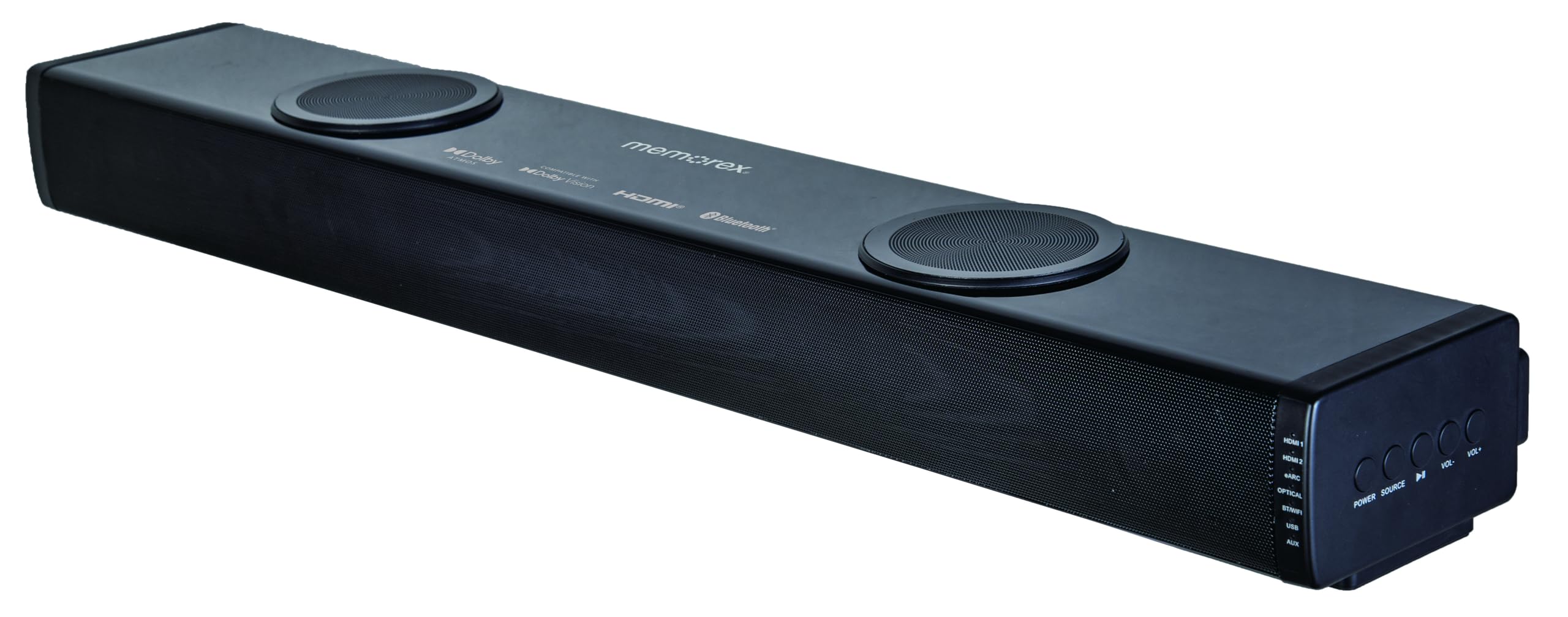
Irudia: Aurrealde zuzena view of the Memorex MX-SBDA220 soundbar, highlighting its sleek design, front speaker grille, and the two circular top-firing speakers for Dolby Atmos effects.
Alboko panelaren kontrolak

Irudia: Angelu formakoa view of the Memorex MX-SBDA220 soundbar, revealing the control panel on the right side. Buttons for Power, Source selection, Play/Pause, Volume Down, and Volume Up are visible, along with input indicators.
Urruneko Kontrola

Image: The Memorex MX-SBDA220 soundbar shown with its full-function remote control positioned above it. The remote features buttons for power, input selection, sound modes, volume, bass, and treble adjustments.
Konfigurazio Gida
1. Kokapen fisikoa
Place the soundbar on a stable, flat surface directly in front of your television. Ensure there are no obstructions blocking the front or top-firing speakers for optimal sound delivery, especially for Dolby Atmos effects.
2. Connecting to Your TV/Devices
The MX-SBDA220 offers multiple connectivity options:
- HDMI ARC (Audio Return Channel): For the best audio quality and control, connect an HDMI cable from the soundbar's HDMI ARC output to your TV's HDMI ARC input. This allows your TV remote to control the soundbar's volume.
- Sarrera optikoa: Connect an optical cable from the soundbar's OPTICAL input to your TV's optical digital audio output.
- HDMI IN (x2): Connect external devices like Blu-ray players or gaming consoles to the soundbar's HDMI IN ports. Then, connect the soundbar's HDMI ARC output to your TV's HDMI ARC input.
- Bluetootha: For wireless audio streaming from smartphones or tablets, select the Bluetooth input on the soundbar and pair your device.
- USB erreproduzitzailea: Sartu USB disko bat audioarekin files USB atakan zuzenean erreproduzitzeko.
- AUX sarrera: Use a 3.5mm audio cable to connect devices with an analog audio output to the soundbar's AUX input.
3. Energia-konexioa
Connect the provided power cable to the soundbar's power input and then plug it into a wall outlet. The soundbar will enter standby mode.
Funtzionamendu-argibideak
Piztu/Itzali
Sakatu BOTEREA soinu-barran edo urrutiko agintean dagoen botoia unitatea pizteko edo itzaltzeko.
Sarrera hautatzea
Sakatu ITURRIA button on the soundbar or the corresponding input button (HDMI1, HDMI2, eARC, OPT, BT, USB, AUX) on the remote control to switch between audio sources. The LED display will indicate the active input.
Bolumen kontrola
Sakatu VOL+ or Boluntario buttons on the soundbar or remote control to adjust the master volume.
Soinu moduak
The soundbar features 5 optimized sound modes. Press the corresponding button on the remote control to select:
- Filma: Enhances cinematic audio with dynamic range.
- Musika: Musika erreproduzitzeko soinua optimizatzen du.
- Gaua: Entzute lasaiagoa lortzeko, aproposa gau beranduetarako, gama dinamikoa murrizten du viewing.
- Ahotsa: Enhances vocal clarity for dialogue-heavy content.
- Jokoa: Jokoetarako audio esperientzia murgilgarria eskaintzen du.
Baxu eta agudoen doikuntza
Erabili BASS+ / BASS- eta TREBLE+ / TREBLE- urrutiko agintearen botoiak maiztasun baxuak eta altuak zure lehentasunen arabera doitzeko.
Bluetooth parekatzea
- Hautatu BT input on the soundbar. The LED display will flash, indicating pairing mode.
- On your mobile device, enable Bluetooth and search for "MX-SBDA220".
- Select the soundbar to pair. Once connected, the LED display will stop flashing.
USB erreprodukzioa
Sartu USB flash unitate bat USB atakan. Soinu-barra automatikoki aldatuko da USB sarrerara eta audio bateragarria erreproduzitzen hasiko da. files. Erabili urrutiko agintea erreprodukzio funtzioetarako (Erreproduzitu/Pausatu, Saltatu pista).
Zainketa eta Mantentzea
- Garbiketa: Erabili zapi leun eta lehor bat soinu-barraren gainazala garbitzeko. Ez erabili garbitzaile likidorik edo aerosol-sprayrik.
- Aireztapena: Ziurtatu aireztapen-zuloak ez daudela blokeatuta, gehiegi berotzea saihesteko.
- Biltegiratzea: Soinu-barra denbora luzez gordetzen baduzu, deskonektatu entxufetik eta gorde leku fresko eta lehor batean.
- Saihestu hezetasuna: Keep the soundbar away from water, rain, and excessive humidity.
Arazoak konpontzeko gida
| Arazoa | Irtenbide posiblea |
|---|---|
| Botererik ez |
|
| Soinurik ez |
|
| Urruneko kontrola ez dabil |
|
| Bluetooth-a parekatzeko arazoak |
|
Zehaztapen Teknikoak
| Ezaugarri | Zehaztapena |
|---|---|
| Modelo zenbakia | MX-SBDA220 |
| Hizlari mota | Atmospheric (Dolby Atmos 2.0.2CH) |
| Irteera Potentzia osoa | 100 Watts (20W x 2 front + 30W x 2 top) |
| Konektibitate Teknologia | Bluetooth 5.0, HDMI (ARC x1, IN x2), Optical, USB, AUX |
| Bluetooth barrutia | Gehienez 10 metro (33 oin) |
| Produktuaren neurriak (L x W x H) | 5.93" x 8.1" x 37.57" (gutxi gorabehera) |
| Elementuaren pisua | 2.2 kilo |
| Dakarten osagaiak | Soundbar, Remote Control, Power Cable, Quick Start Guide |
| UPC | 838689000208 |
Bermearen informazioa
Memorex products are manufactured to the highest quality standards. For specific warranty details, including coverage period and terms, please refer to the warranty card included with your product or visit the official Memorex webgunea. Gorde erosketa-agiria erosketaren frogagiri gisa, berme-erreklamazioetarako.
Bezeroarentzako Arreta
If you encounter any issues or have questions regarding your Memorex MX-SBDA220 Soundbar that are not covered in this manual, please contact Memorex customer support. Contact information can typically be found on the official Memorex webgunean edo zure produktuarekin batera emandako Hasiera Azkarreko Gidan.


