1. Sarrera
This user manual provides essential information for the safe and efficient installation, operation, and maintenance of your Marstek Venus-E 5.12 kWh All-in-One Solar Energy Storage System. Please read this manual thoroughly before using the product and keep it for future reference. Adhering to these guidelines will ensure optimal performance and extend the lifespan of your device.
The Marstek Venus-E is designed to store solar energy, optimize energy costs, and provide reliable power for various applications, from balcony power plants to larger household systems.
2. Segurtasun-argibideak
WARNING: Failure to follow these safety instructions may result in electric shock, fire, serious injury, or property damage.
- Always disconnect the system from all power sources before performing any installation, maintenance, or troubleshooting.
- Langile kualifikatuek bakarrik instalatu eta mantendu beharko lukete ekipamendu hau.
- Do not expose the unit to excessive moisture, rain, or direct water spray. The unit has an IP65 rating, but proper installation is crucial.
- Ziurtatu aireztapen egokia unitatearen inguruan, gehiegi berotzea saihesteko.
- Ez desmuntatu, konpondu edo aldatu unitatea zeuk. Jarri harremanetan baimendutako zerbitzu-langileekin.
- Mantendu material sukoiak unitatetik urrun.
- Ziurtatu konexio elektriko guztiak ondo daudela eta tokiko araudi elektrikoak betetzen dituztela.
- Do not insert foreign objects into any openings of the unit.
3. Produktua amaitu daview
The Marstek Venus-E is a compact and powerful all-in-one solar energy storage solution. It features a robust design suitable for various environments and offers intelligent energy management capabilities.
3.1 Ezaugarri nagusiak
- Edukiera: Base storage capacity of 5.12 kWh, expandable up to 20.48 kWh.
- Iraunkortasuna: IP65 protection class, ensuring reliable performance in demanding environmental conditions.
- Funtzionamendu-tenperatura: Funtzionamendu-tenperatura tarte zabala -20 °C-tik +55 °C-ra.
- Eraginkortasuna: Optimizes energy costs by charging during off-peak hours and utilizing stored energy during peak times.
- Jarraipena: Real-time monitoring and control via the Marstek App, allowing for energy trading and excess energy negotiation.
- Bateriaren iraupena: Features an ESS-class LFP storage battery with over 6000 charge cycles and an estimated lifespan of 15 years.
- Kudeaketa Adimenduna: Equipped with an Intelligent Battery Management System (BMS) for enhanced safety and performance.
- Instalazioa: Designed for quick 5-second plug & play installation.
- Babeskopia potentzia: Provides 2.5 kW backup power capacity for uninterrupted supply.
3.2 Product Components and Indicators
The main unit includes various ports and indicators for status monitoring and connectivity.

3.1. irudia: Aurrealdea view of the Marstek Venus-E unit, highlighting the 5120Wh capacity and status indicators (MAIN, SRO, BACKUP, BATTERY, CT, WIFI, BT).

Figure 3.2: Illustration of the 5kW high-performance plug-and-play storage system, showing AC-coupled energy storage and island operation for grid-independent use. Also highlights IP65 rating and 10-year warranty.
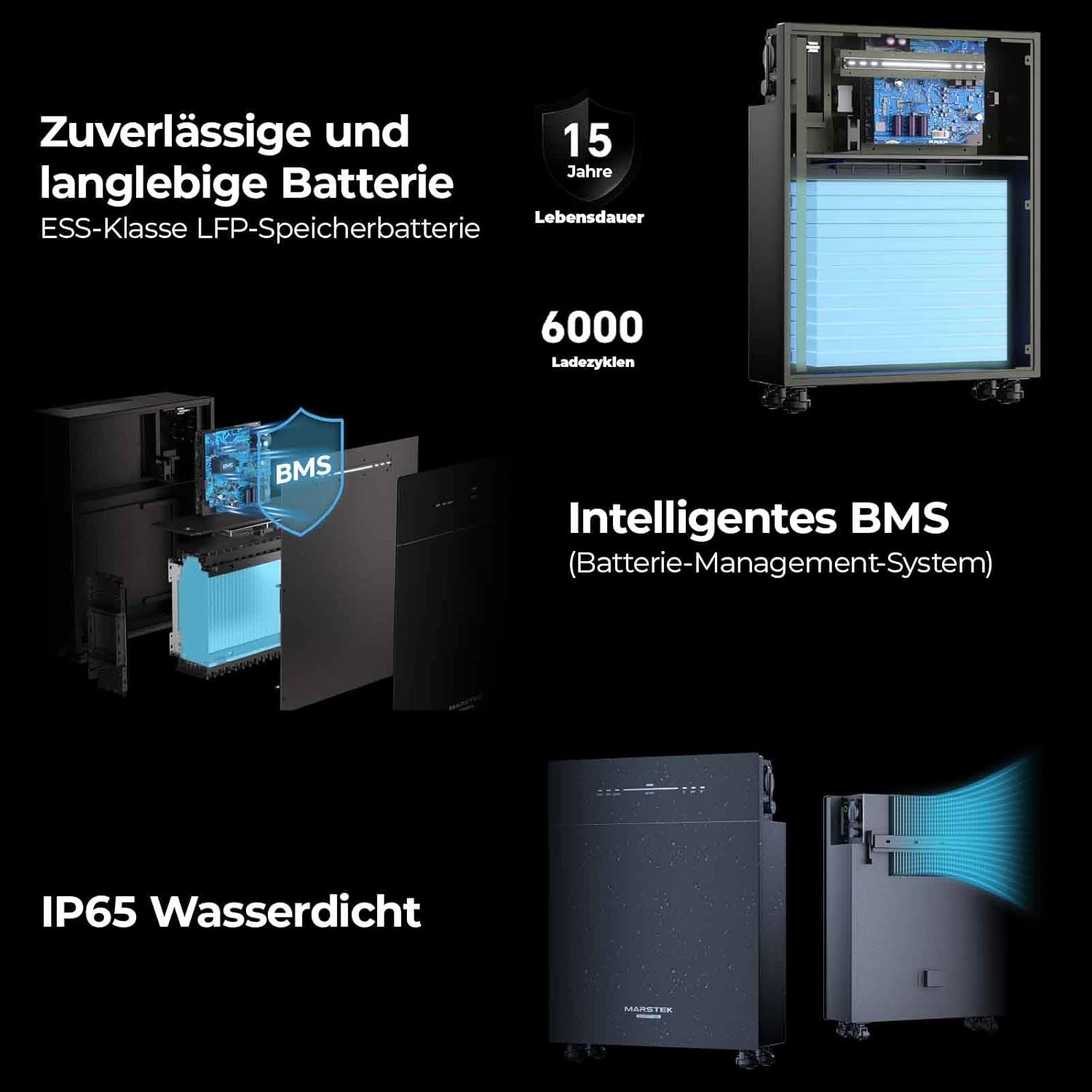
3.3. irudia: Xehetasuna view of the reliable and durable battery, intelligent BMS (Battery Management System), and IP65 waterproof design. Shows internal battery cells and cooling system.
4. Konfigurazioa eta instalazioa
The Marstek Venus-E is designed for quick and easy installation. Follow these steps for a successful setup.
4.1 Desontziratzea eta hasierako ikuskapena
- Carefully unpack the unit and all accessories from the packaging.
- Inspect the unit for any visible damage. If damage is found, do not proceed with installation and contact customer support.
- Ziurtatu ontziratze-zerrendan zerrendatutako osagai guztiak daudela.
4.2 Jartzea
Choose a suitable location for the Venus-E unit. Consider the following:
- Aireztapena: Ziurtatu aire-fluxu egokia unitatearen inguruan.
- Ingurumena: While IP65 rated, avoid direct exposure to extreme weather conditions if possible. The unit can be placed in various locations such as a garden, balcony, garage, or living room.
- Egonkortasuna: Place the unit on a flat, stable surface. Attach the provided wheels for easy mobility if desired.

4.1. irudia: Adibamples of flexible energy supply locations for the Marstek Venus-E, including garden, balcony, garage, and living room setups.
4.3 Electrical Connection (Plug & Play)
The Venus-E is designed for simple plug & play installation, often taking as little as 5 seconds for initial setup.
- Connect the AC input cable from your solar inverter or grid connection to the designated AC input port on the Venus-E.
- Connect the AC output cable from the Venus-E to your household electrical system or designated loads.
- Jarraitu aurretik, ziurtatu konexio guztiak seguru daudela.

Figure 4.2: Illustration demonstrating the 5-second plug & play installation process and the backup power connection with 2.5 kW capacity.
4.4 Marstek App Setup
For real-time monitoring and advanced control, download and set up the Marstek App.
- Download the "Marstek" app from your smartphone's app store (iOS or Android).
- Ireki aplikazioa eta jarraitu pantailako argibideei kontu bat sortzeko edo saioa hasteko.
- Use the app's pairing function (via Dual Bluetooth and WiFi modules) to connect to your Venus-E unit.
- Once connected, you can monitor energy flow, battery status, and configure operating modes.

Figure 4.3: Screenshot of the Marstek App interface, showing options for energy trading mode, self-adjustment mode, and manual mode, along with real-time data display.
5. Funtzionamendua
The Marstek Venus-E offers flexible operation modes to optimize your energy usage.
5.1 Operating Modes via Marstek App
The Marstek App provides comprehensive control over your energy storage system:
- Energy Trading Mode: Allows for automated charging and discharging based on electricity tariffs, optimizing cost savings.
- Self-Adjustment Mode: The system intelligently adapts to your energy consumption patterns.
- Eskuzko modua: Provides direct control over charging and discharging parameters.
The app also displays real-time data such as power input/output, battery charge level, and cumulative energy discharged.

Figure 5.1: Diagram illustrating how the Venus-E optimizes energy costs by charging when electricity is cheap (e.g., at night) and discharging when it's expensive (e.g., during the day).
5.2 Backup Power Function
Sare bat gertatuz gerotage, the Venus-E can provide backup power to connected loads. Ensure critical appliances are connected to the designated backup output. The system offers 2.5 kW backup capacity.
6. Mantentzea
Regular maintenance ensures the longevity and optimal performance of your Marstek Venus-E system.
- Ohiko karga: To maintain optimal performance and battery lifespan, charge the battery at least every three months, even if it is not currently in use.
- Garbiketa: Periodically clean the exterior of the unit with a soft, dry cloth. Do not use abrasive cleaners or solvents. Ensure vents are clear of dust and debris.
- Ikuskapena: Aldian-aldian egiaztatu kableak eta konexioak higadura edo kalteen zantzurik dagoen.
- Software eguneraketak: Keep the Marstek App updated to the latest version to benefit from new features and performance improvements.
7. Arazoak
This section addresses common issues you might encounter with your Marstek Venus-E system. For problems not listed here, please contact customer support.
| Arazoa | Kausa posiblea | Irtenbidea |
|---|---|---|
| Unitatea ez da pizten. | No power input; main switch off; faulty cable. | Check AC input connection; ensure main power switch is ON; inspect cables for damage. |
| Red warning light illuminated. | Internal fault; short circuit; overcurrent. | Disconnect from power, wait 5 minutes, then reconnect. If the light persists, contact support. Do not attempt to open the unit. |
| Marstek App not connecting. | Bluetooth/WiFi off; unit not in pairing mode; app outdated. | Ensure Bluetooth/WiFi is enabled on your device and the Venus-E. Restart the app and unit. Update the app to the latest version. |
| Battery not charging/discharging. | Incorrect operating mode; solar input insufficient; grid connection issue. | Check operating mode in the app. Verify solar panel connection and output. Ensure grid connection is stable. |
8. Zehaztapenak
Technical specifications for the Marstek Venus-E 5.12 kWh system.
| Kategoria | Parametroa | Balioa |
|---|---|---|
| Model & Battery Information | Eredua | VENUS-E |
| Balorazio baloratuatage | 51.2V (16S) | |
| Edukiera | 5120Wh | |
| Cycle Life (Cycles) | >6000 (25 °C) | |
| Bateria mota | LiFePO₄ | |
| DOD (Depth of Discharge) | %90 | |
| AC Input/Output (On-Grid) | Sarrerako potentzia nominala | 2.5kVA / 800VA |
| Irteerako potentzia | 2.5kVA / 800VA | |
| Funtzionamendu Fasea | 1 / H / PE | |
| Balorazio baloratuatage | 230V | |
| Grid Voltage Barrutia | 187V - 253V | |
| Sarearen maiztasun baloratua | 50Hz | |
| Sarearen irteerako korronte nominala | 10.9A | |
| Potentzia-faktorea | >0.99 (Standard) / 0.8 leading - 0.8 lagging (adjustable) | |
| Backup (Off-Grid) | Irteerako potentzia | 2.5kVA |
| Max. Itxurazko Irteera Potentzia | 3.5kVA | |
| Balorazio baloratuatage | 230V | |
| Irteera-korronte nominala | 10.9A | |
| Irteera nominaleko boltage Maiztasuna | 50Hz | |
| Efficiency & Protection | Max. AC Side Efficiency | > %93.5 |
| Babes Maila | I | |
| General & Environmental | Funtzionamendu-tenperatura-tartea | -20°C ~ +55°C (Storage: -30°C ~ +85°C) |
| Hezetasun erlatiboa | % 0 - % 95 | |
| Babes mota | IP65 | |
| Hoztea | Konbekzio naturala | |
| Max. Altuera operatiboa | 2000 m | |
| Sarearen konexio estandarra | NFEN50549-1, VDE4105/0124,G98,CEI0-21,PETREL,PN-EN50549-1/-2,TORRES,UNI217001/217002,NT5631, AS47772 | |
| Regulation/EMC | IEC62040,IEC62477,IEC/EN 61000-6-1/-2/-3/-4,IEC/EN 61000-3-2/-3,EN 300 328,EN 301 489 -1 / -17, EN 50665, CB 62619 | |
| Dimensions & Connectivity | Neurriak | 560 x 201 x 890 mm |
| Pisua | 60 ± 0.5 kg | |
| Grid-Tied AC Connection | Three-pole household plug (Euro 16A) | |
| Onartutako Komunikazio Interfazea | WiFi & Bluetooth & RS485 (Waterproof Aviation Plug) |
Figure 8.1: Detailed technical specifications of the Marstek Venus-E.
9. Bermea eta Laguntza
Marstek is committed to providing high-quality products and excellent customer service.
- Bermea: The Marstek Venus-E comes with a 10-year warranty, ensuring peace of mind regarding your investment. The battery itself has an estimated lifespan of 15 years.
- Lineako eskuliburua: For the latest version of the product manual and additional resources, please visit the official product page: Marstek Venus-E Online Manual
9.1 Harremanetarako informazioa
For technical support, warranty claims, or any inquiries, please contact Marstek Energy Co., Limited:
- Helbidea: A eraikina, Changfang Industrialdea, Guihua 5. errepidea, 2. zk., Pingshan barrutia, Shenzhen, Guangdong, Txina
- Tel: 86-755-28398778
- Posta elektronikoa: market@marstekenergy.com
- Web: www.marstekenergy.com

Figure 9.1: Marstek Energy Co., Limited contact details and a QR code for the product manual.