1. Sarrera
Thank you for choosing the Shokz Opencomm2 2025 Wireless Earphones. These open-ear bone conduction headphones are designed for clear communication and comfortable listening, particularly in professional and active environments. This manual provides essential information for the proper use, setup, and maintenance of your device.

Image: The Shokz Opencomm2 2025 Wireless Earphones, showcasing their flexible, open-ear design and integrated microphone boom.
2. Produktua amaitu daview
2.1 Zer dago kutxan
- Shokz Opencomm2 2025 Wireless Earphones
- USB-C kargatzeko kablea
- Eramateko zorroa
- Erabiltzailearen gida (dokumentu hau)
- Legal Statement & Warranty Card

Image: Contents of the Shokz Opencomm2 2025 package, including the earphones, charging cable, carrying case, and documentation.
2.2 Entzungailuen osagaiak
Familiarize yourself with the key components of your Opencomm2 earphones:
- Hezur-eroaleko transduktoreak: These rest on your cheekbones, delivering audio without blocking your ear canals.
- Mikrofonoaren boom-a: Adjustable boom for clear voice pickup.
- Funtzio anitzeko botoia: For power, pairing, play/pause, and call management.
- Bolumen-botoiak: For adjusting volume and track control.
- USB-C kargatzeko ataka: Gailua kargatzeko.

Irudia: Gertutik view of the Shokz Opencomm2 earphone's right side, highlighting the multi-function button, volume controls, and the USB-C charging port.
3. Konfigurazioa
3.1 Entzungailuak kargatzea
- Connect the USB-C charging cable to the charging port on the earphones.
- Konektatu kablearen beste muturra USB elikatze-egokitzaile batera (ez dago barne) edo ordenagailuaren USB atakara.
- LED adierazleak kargatze-egoera erakutsiko du. Karga oso batek ordu eta erdi inguru behar ditu.
3.2 Gailu batekin parekatzea
- Ziurtatu entzungailuak itzalita daudela.
- Press and hold the multi-function button for 5-7 seconds until the LED indicator flashes red and blue alternately, indicating pairing mode.
- On your device (e.g., smartphone, computer), enable Bluetooth and search for available devices.
- Select "Opencomm2" from the list of found devices.
- Once connected, the LED indicator will flash blue once every few seconds, and you will hear a voice prompt "Connected".
4. Funtzionamendu-argibideak
4.1 Entzungailuak janztea
Place the flexible band behind your head, with the bone conduction transducers resting comfortably on your cheekbones, just in front of your ears. Adjust the microphone boom so it is positioned near your mouth for optimal voice clarity.
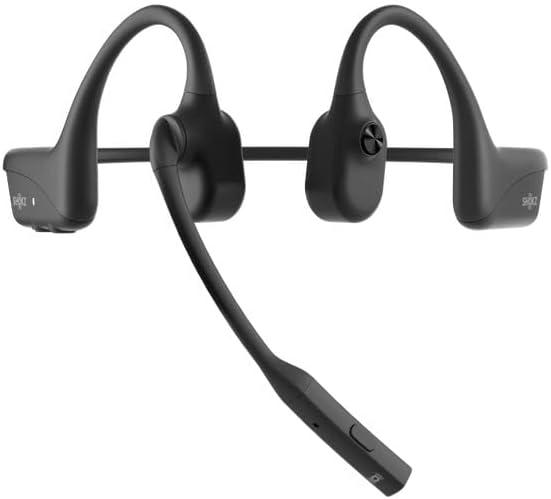
Image: The Shokz Opencomm2 2025 earphones positioned on a head, demonstrating the correct placement of the bone conduction transducers and microphone boom.
4.2 Oinarrizko kontrolak
- Piztu/Itzali: Eduki sakatuta funtzio anitzeko botoia 2 segundoz.
- Erreproduzitu/Pausatu: Sakatu funtzio anitzeko botoia behin.
- Bolumena igo/behera: Press the respective volume buttons.
- Hurrengo ibilbidea: Sakatu eta eutsi Bolumen + botoia 2 segundoz.
- Aurreko pista: Sakatu eta eutsi Bolumenaren botoia 2 segundoz.
- Deia erantzun/amaitu: Sakatu funtzio anitzeko botoia behin.
- Deia baztertu: Eduki sakatuta funtzio anitzeko botoia 2 segundoz.
- Mikrofonoa mututu: During a call, press the multi-function button twice.
5. Mantentzea
5.1 Garbiketa
Garbitu entzungailuak zapi leun batekin,amp oihal. Ez erabili produktu kimiko gogorrik edo garbitzaile urratzailerik. Ziurtatu kargatzeko ataka lehor dagoela kargatu aurretik.
5.2 Biltegiratzea
Store the earphones in their carrying case when not in use to protect them from dust and damage. Avoid storing in extreme temperatures.
5.3 Urarekiko erresistentzia
The Opencomm2 earphones are water resistant, meaning they can withstand sweat and light splashes. They are not designed for submersion in water. Do not charge if wet.
6. Arazoak
- Potentziarik gabe: Ensure the earphones are fully charged. Connect to a power source and check the LED indicator.
- Ezin da parekatu: Ensure the earphones are in pairing mode (red and blue flashing LED). Turn off and on your device's Bluetooth, then try pairing again. Move closer to your device.
- Soinurik ez: Check the volume levels on both the earphones and your connected device. Ensure the earphones are properly connected via Bluetooth.
- Deien kalitate eskasa: Ensure the microphone boom is positioned correctly near your mouth. Check for environmental noise interference.
- Etengabeko konexioa: Move closer to your connected device. Avoid obstacles between the earphones and the device.
7. Zehaztapenak
| Ezaugarri | Zehaztapena |
|---|---|
| Ereduaren izena | Opencomm2 |
| Konektibitatea | Haririk gabekoa (Bluetooth 5.0) |
| Bluetooth barrutia | Gehienez 10 metro (33 oin) |
| Audio kontrolatzaile mota | Hezur-eroapenaren gidaria |
| Maiztasun Erantzuna | 20 Hz - 20 kHz (Resonant Mode) |
| Sentikortasuna | 96 dB |
| Inpedantzia | 32 Ohm |
| Kargatzeko Denbora | 1.5 ordu gutxi gorabehera |
| Elementuaren pisua | 35 gramo (1.23 ontza) |
| Uraren Erresistentzia Maila | Urarekiko erresistentea |
| Mikrofonoa | Boom Mikrofonoa |
| Kargatzeko ataka | USB-C |
8. Bermea eta Laguntza
Your Shokz Opencomm2 2025 Wireless Earphones come with a limited warranty. Please refer to the included Warranty Card for detailed terms and conditions. For technical support, product registration, or further assistance, please visit the official SHOKZ webwebgunean edo jarri harremanetan bere bezeroarentzako arreta zerbitzuarekin.
Lineako laguntza: Bisitatu SHOKZ denda Amazonen