Sarrera
This manual provides essential information for the safe and efficient use of your Qubo X-10BL mobile phone. Designed with ease of use in mind, this phone is particularly suitable for elderly users, featuring a clear 2.4-inch screen, a robust design, and essential communication functions. Please read this manual thoroughly before operating your device.
Ezaugarri nagusiak:
- Eredua: X-10BL
- Pantaila: 2.4-inch display (6.1 cm diagonal)
- RAM: 32 MB
- Bateria: 900 mAh-ko edukiera
- Konektibitatea: Bluetootha
- Portuak: 3.5mm Jack, Micro USB
- Diseinua: Includes a protective cover
- Kolorea: Urdina
Produktua amaituview
The Qubo X-10BL is a compact and user-friendly mobile phone. Below is an image illustrating the device's general appearance.
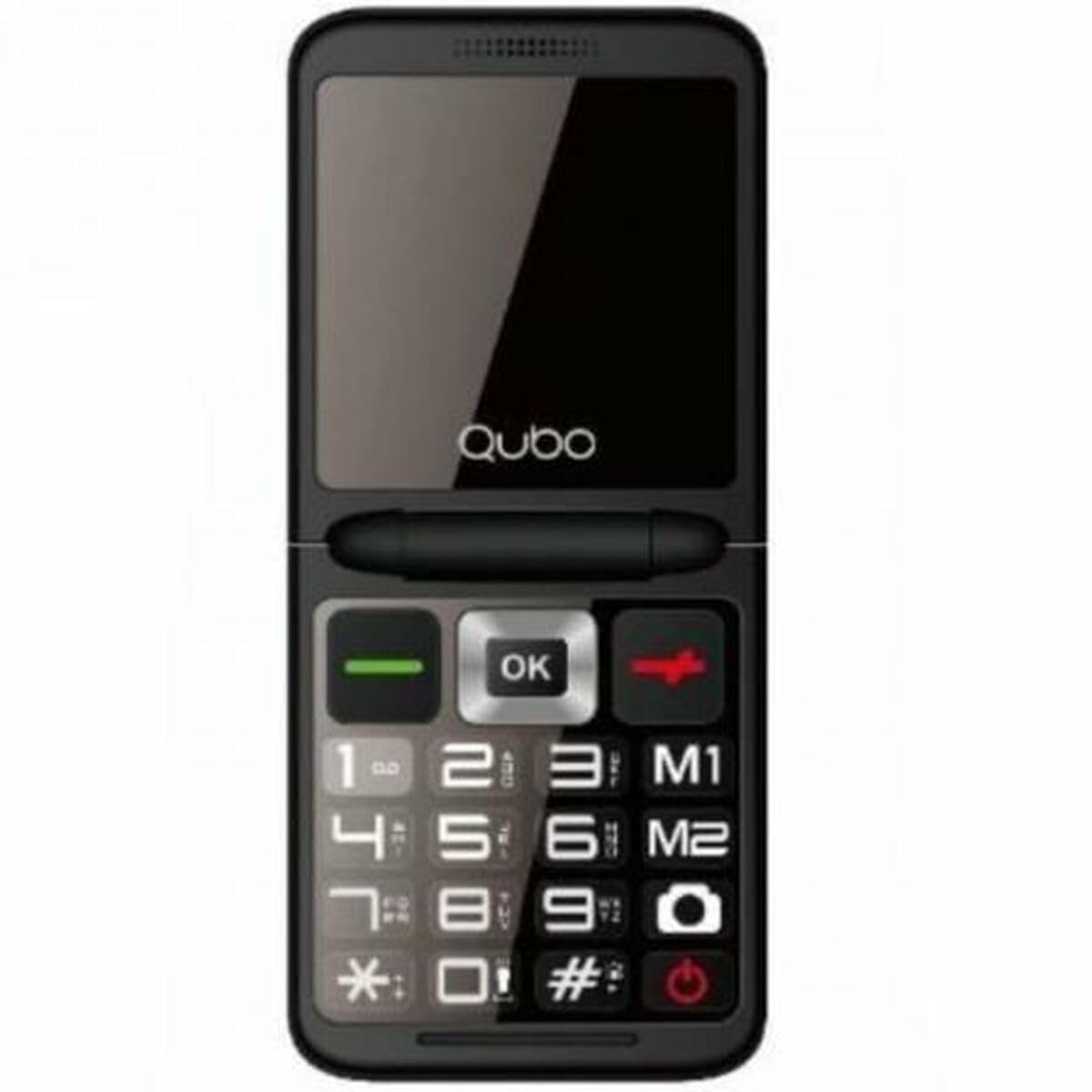
1. irudia: Aurrealdea view of the Qubo X-10BL mobile phone. The image displays the phone in blue, featuring a clear screen, a numerical keypad, and navigation buttons. The phone is designed for straightforward operation.
Familiarize yourself with the phone's buttons and ports before proceeding with setup. Typically, these include a power button, call/end call buttons, navigation keys, a numerical keypad, and charging/headphone ports.
Konfigurazioa
1. Install SIM Card and Battery
- Kontu handiz kendu telefonoaren atzeko estalkia.
- Insert your SIM card into the designated slot. Ensure it is correctly oriented as indicated by the diagram near the slot.
- Place the battery into its compartment, aligning the contacts.
- Jarri berriro atzeko estalkia ondo sartu arte klik egin arte.
2. Kargatu gailua
- Connect the Micro USB cable to the charging port on your phone.
- Plug the other end of the cable into the provided European plug adapter, then into a wall outlet.
- Allow the phone to charge fully before first use. The charging indicator on the screen will show the battery status.
3. Piztu/Itzali
- Pizteko: Sakatu eta eutsi pizteko/deia amaitzeko botoia pantaila piztu arte.
- Itzaltzeko: Press and hold the Power/End Call button until the power-off options appear, then select 'Power Off' or continue holding until the device shuts down.
Funtzionamendu-argibideak
Deiak egitea eta jasotzea
- Dei bat egiteko: Enter the phone number using the keypad and press the Call button (usually a green phone icon).
- Dei bati erantzuteko: When the phone rings, press the Call button.
- Dei bat amaitzeko: Press the End Call button (usually a red phone icon).
SMS mezuak bidaltzea eta jasotzea
- Joan 'Mezuak' menura.
- Select 'New Message' or 'Write Message'.
- Sartu hartzailearen zenbakia edo aukeratu kontaktuetatik.
- Idatzi zure mezua teklatua erabiliz.
- Sakatu 'Bidali'.
Bluetooth konexioa
The Qubo X-10BL supports Bluetooth for connecting to compatible devices such as headsets or other phones.
- Joan 'Ezarpenak' atalera eta gero 'Bluetooth' atalera.
- Piztu Bluetooth-a.
- Hautatu 'Bilatu devices' or 'Pair new device'.
- Choose the desired device from the list and follow the on-screen prompts to pair.
Using the Phone Cover
The phone comes with a protective cover. Ensure the phone is securely placed within the cover to protect it from minor impacts and scratches. The cover may also feature cutouts for easy access to buttons and ports.
Mantentzea
Garbiketa
- Erabili zapi leun eta lehor bat telefonoaren pantaila eta gorputza garbitzeko.
- Avoid using liquid cleaners, aerosols, or harsh chemicals, as these can damage the device.
Bateria zaintzea
- Bateriaren iraupena luzatzeko, saihestu telefonoa tenperatura altuen eraginpean jartzea.
- Do not leave the phone charging for excessively long periods after it is fully charged.
- Telefonoa denbora luzez erabiliko ez baduzu, kargatu % 50 inguru gorde aurretik.
Biltegiratzea
Gorde telefonoa leku fresko eta lehor batean, erabiltzen ez duzunean, eguzki-argitik eta hezetasunetik babestuta.
Arazoak konpontzea
If you encounter issues with your Qubo X-10BL, refer to the table below for common problems and solutions.
| Arazoa | Kausa posiblea | Irtenbidea |
|---|---|---|
| Telefonoa ez da pizten | Low battery; Battery not installed correctly | Charge the battery; Reinstall the battery |
| Ez dago sareko seinalerik | SIM card issue; Out of network coverage | Check SIM card installation; Move to an area with better coverage |
| Ezin ditut deiak egin/jaso | No network; Incorrect number dialed; Call barring activated | Check network signal; Verify number; Check call settings |
| Bateria ez da kargatzen | Charger faulty; Charging port damaged | Try a different charger; Contact support if port is damaged |
Zehaztapenak
Detailed technical specifications for the Qubo X-10BL mobile phone.
| Ezaugarri | Xehetasuna |
|---|---|
| Marka | Qubo |
| Ereduaren izena | X-10BL |
| Elementuaren eredu-zenbakia | S9914467 |
| Produktu Mota | Tabernako telefonoa |
| Forma-faktorea | Taberna |
| Pantailaren tamaina | 6.1 zentimetro (2.4 hazbete) |
| Instalatutako RAM tamaina | 32 MB |
| Haririk gabeko sarearen teknologia | Bluetootha |
| Fabrikatzailea | Qubo |
| Jatorrizko Herrialdea | Espainia |
| Lehenengo data Amazon.com.be-n eskuragarri | 11ko urtarrilaren 2025a |
| Ordezko piezen erabilgarritasuna | Informazioa ez dago erabilgarri |
| Software eguneraketak bermatuta arte | Informazioa ez dago eskuragarri |
Bermea eta Laguntza
Bermeari buruzko informazioa eta bezeroarentzako laguntza lortzeko, kontsultatu erosketarekin batera emandako dokumentazioa edo jarri harremanetan saltzailearekin. Gorde erosketaren frogagiria bermearen erreklamazioetarako.


