Sarrera
This manual provides comprehensive instructions for the setup, operation, maintenance, and troubleshooting of your COLMI C8 MAX Smartwatch. Please read this manual carefully before using the device to ensure proper functionality and longevity.

1. irudia: The COLMI C8 MAX Smartwatch in gold with a beige strap, displaying the main watch face with fitness data and time.
1. Konfigurazioa
1.1 Kutxatik ateratzea eta osagaiak
Paketea irekitzean, ziurtatu osagai guztiak daudela:
- COLMI C8 MAX Smartwatch
- Replacement Strap (if included in your package)
- Kargatzeko kablea
- Erabiltzailearen eskuliburua (dokumentu hau)
1.2 Gailua kargatzea
Lehenengo aldiz erabili aurretik, kargatu guztiz zure erloju adimenduna. Konektatu kargatzeko kable magnetikoa erlojuaren atzealdeko kargatzeko puntuetara eta sartu USB muturra USB elikatze-egokitzaile estandar batera (ez dago barne).
- Kargatzeko denbora: Gutxi gorabehera 2 ordu karga oso bat egiteko.
- Battery capacity: 250 mAh Lithium Polymer.
1.3 Piztu/Itzaltzea
- Pizteko: Press and hold the side button until the COLMI logo appears.
- Itzaltzeko: From the watch face, swipe down to access quick settings, or navigate to 'Settings' > 'System' > 'Power Off'. Confirm your selection.
1.4 Aplikazioaren instalazioa eta parekatzea
To unlock the full features of your COLMI C8 MAX Smartwatch, you need to install the companion application on your smartphone or tablet. The watch is compatible with both Android and iOS operating systems.
- Scan the QR code provided in the quick start guide or search for the official COLMI app in your device's app store (Google Play Store for Android, Apple App Store for iOS).
- Deskargatu eta instalatu aplikazioa.
- Ireki aplikazioa eta jarraitu pantailako argibideei kontu bat sortzeko edo saioa hasteko.
- Enable Bluetooth on your smartphone/tablet.
- In the app, navigate to the device pairing section and select "Add Device" or similar.
- The app will search for available devices. Select "COLMI C8 MAX" from the list.
- Confirm the pairing request on both your smartphone and the smartwatch. The watch utilizes Bluetooth 5.3 for stable connectivity.
2. Erloju adimendunaren funtzionamendua
2.1 Pantaila eta nabigazioa
The COLMI C8 MAX features a 1.93-inch IPS touchscreen with a resolution of 240 x 288 pixels, offering clear visuals and responsive touch control.
- Irristatu gora: Jakinarazpenetarako sarbidea.
- Irristatu hatza behera: Access quick settings (brightness, battery, DND, etc.).
- Irristatu ezkerrera/eskuinera: Navigate through widgets and main functions (activity, heart rate, weather, etc.).
- Sakatu: Hautatu elementu bat edo ireki aplikazio bat.
- Sakatu alboko botoia: Itzuli erlojuaren aurpegira edo ireki aplikazioaren menua.
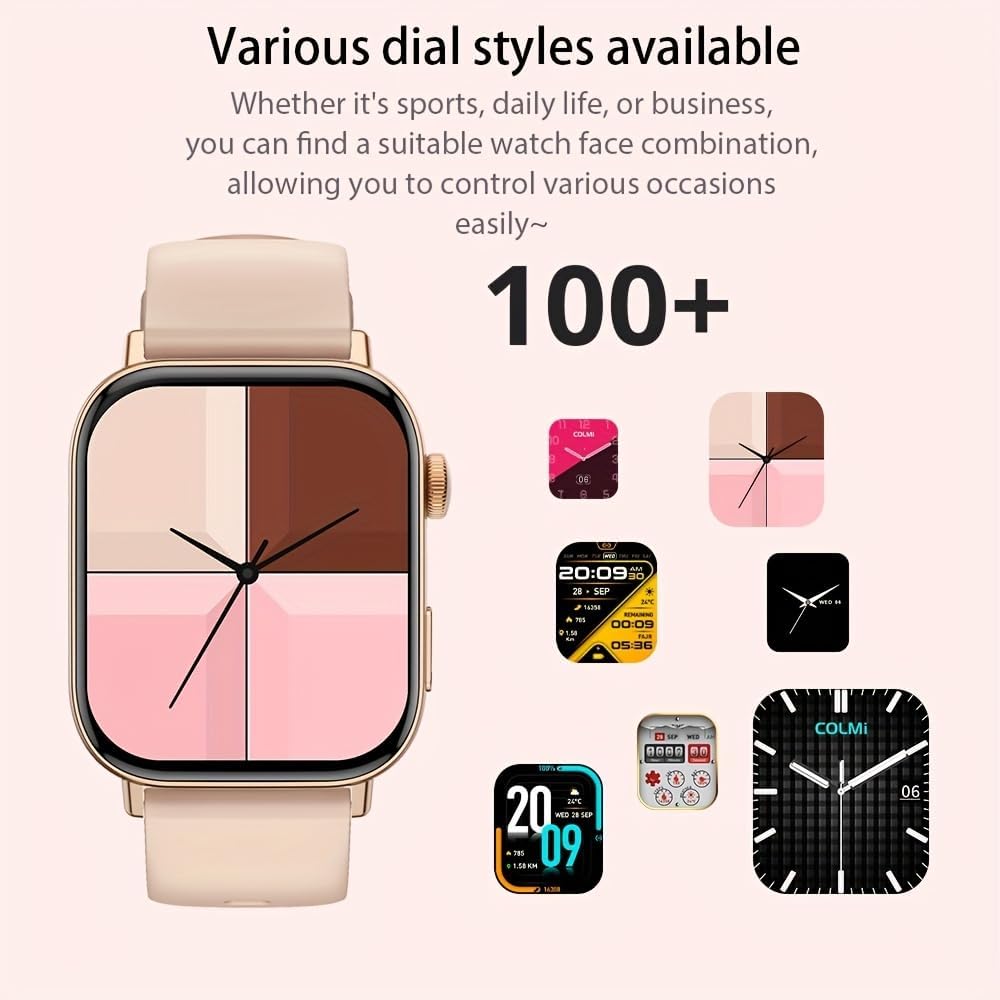
2. irudia: Erloju adimendunen erakustaldiaasing a selection of its over 100 available dial styles, allowing for personalization.
2.2 Core Features and Functions
The COLMI C8 MAX is equipped with a wide range of features to support your daily activities and health monitoring.
- Fitness jarraipena: Monitor steps, distance, calories burned, and active minutes. Includes a pedometer, heart rate monitor, and multi-sport modes (over 100 sports modes available, including walking, running, cycling, football, basketball, table tennis, badminton, mountaineering, rope jumping).

3. irudia: The smartwatch highlighting its extensive range of over 100 sports tracking modes, suitable for various physical activities.
- Loaren jarraipena: Loaren ereduak eta kalitatea kontrolatzen ditu.
- Komunikazioa:
- Wireless Calling: Make and receive calls directly from your wrist. Access recent calls, dial pad, and contacts.
- Mezuen jakinarazpenak: Receive alerts for SMS, WhatsApp, emails, and other social media applications (Facebook, Snapchat, Twitter, Telegram, Instagram, LinkedIn).

4. irudia: The smartwatch demonstrating its wireless calling feature, showing an incoming call notification on the display.

5. irudia: The watch's ability to synchronize information and notifications from a connected smartphone, including messages from WhatsApp and other platforms.
- AI Ahots Laguntzailea: Use voice commands to interact with your watch for tasks like making calls, checking weather, or playing music.

6. irudia: Illustration of the intelligent voice assistant function, showing examples of voice commands and responses on the watch screen.
- Beste ezaugarri batzuk: Calendar, alarm clock, countdown timer, remote camera control, sedentary reminder, menstruation management.
3. Mantentzea
3.1 Urarekiko erresistentzia (IP68)
The COLMI C8 MAX Smartwatch has an IP68 water resistance rating, meaning it is protected against dust ingress and can withstand immersion in water up to 1.5 meters for 30 minutes. It is suitable for daily use, hand washing, and light rain. However, it is not recommended for hot showers, saunas, or diving, as steam and hot water can compromise the seals.
3.2 Zure erloju adimenduna garbitzea
Zure gailuaren itxura eta funtzionaltasuna mantentzeko:
- Garbitu pantaila eta gorputza zapi leun eta lihorik gabeko batekin.
- Zikinkeria egoskorrerako, apur bat lehortuampGarbitu oihalak urarekin. Saihestu produktu kimiko gogorrak edo material urratzaileak erabiltzea.
- Kargatze eraginkorra bermatzeko, garbitu kargatzeko kontaktuak aldizka.
- If the strap gets dirty, clean it according to its material type (e.g., silicone straps can be washed with mild soap and water).
3.3 Bateriaren iraupenaren optimizazioa
The smartwatch offers a battery life of 5-10 days depending on usage, with an average life of 240 hours. To maximize battery life:
- Murriztu pantailaren distira.
- Desgaitu beharrezkoak ez diren jakinarazpenak.
- Limit continuous heart rate monitoring if not required.
- Turn off "Always-On Display" if available.
4. Arazoak
If you encounter issues with your COLMI C8 MAX Smartwatch, refer to the following common problems and solutions:
| Arazoa | Irtenbide posiblea |
|---|---|
| Erlojua ez da pizten. | Ziurtatu erlojua guztiz kargatuta dagoela. Konektatu kargagailura gutxienez 30 minutuz. |
| Ezin da telefonoarekin parekatu. |
|
| Jakinarazpenak ez dira jasotzen. |
|
| Fitness datu zehaztugabeak. |
|
| Pantailak ez du erantzuten. | Restart the watch by pressing and holding the side button until it reboots. |
4.1 Fabrika berrezarri
If problems persist, you may need to perform a factory reset. This will erase all data on the watch and restore it to its original settings. Navigate to 'Settings' > 'System' > 'Reset' or 'Factory Reset' on your smartwatch and confirm.
5. Zehaztapenak
| Ezaugarri | Xehetasuna |
|---|---|
| Ereduaren izena | C8 Max |
| Marka | COLMI |
| Bistaratzea | 1.93-inch IPS Touchscreen, 240 x 288 pixels |
| Bateria Edukiera | 250 mAh litio-polimeroa |
| Bateriaren iraupena | 5-10 days (typical usage), 240 hours average life |
| Uraren Erresistentzia | IP68 |
| Memoria | 128 MB Storage, 640 KB RAM |
| Konektibitatea | Bluetooth 5.3 |
| Bateragarritasuna | Android & iOS Smartphones/Tablets |
| Neurriak | 10 x 9 x 6.5 cm |
| Pisua | 200 g |
| Dakarten osagaiak | Smartwatch, User Manual |
6. Bermea eta Laguntza
The COLMI C8 MAX Smartwatch comes with a manufacturer's warranty. Please refer to the warranty card included in your product packaging for specific terms and conditions, including warranty duration and coverage details.
For technical support, product inquiries, or warranty claims, please contact COLMI customer service through their official website or the contact information provided in your product documentation. Ensure you have your product model number (C8 Max) and purchase details ready when contacting support.


